Terra-core: div does not respect height:100% in IE 11
Bug Report
Hi,
We are seeing a strange issue with IE 11 only.
It looks fine in Chrome and Edge but looks squished in IE 11.
After further investigation, I've tracked down the responsible element that is causing the squished height.
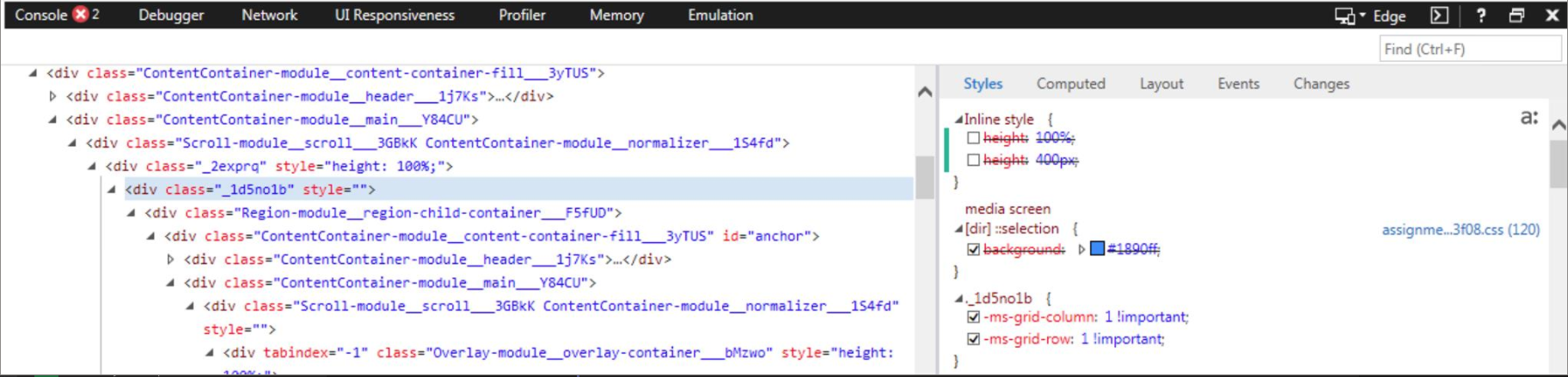
It is the div with the class "_1d5no1b"
I have no idea why this div doesn't seem to respect height: 100% in IE 11 but does respect height: 400px
I think the component in question is DynamicGrid. https://engineering.cerner.com/terra-ui/#/components/terra-dynamic-grid/dynamic-grid/dynamic-grid
Issue Type
- [ ] New Feature
- [ ] Enhancement
- [x] Bug
- [ ] Other
Expected Behavior
Expect this div to have height of 100% in IE 11
Current Behavior
div looks squished
Steps to Recreate
I created an example of this using repl.it here:
https://repl.it/@SpartaSixZero/List-displaying-incorrectly-in-IE-11
Environment
- Component Version:
- Browser Name and Version: IE 11 (Version 11.0.9600.17843)
Update Versions: 11.0.20 (KB3058515) - Operating System and version (desktop or mobile): Windows 7 Enterprise SP1
@ Mentions
@tbiethman
 SpartaSixZero
All 5 comments
Is there a trick to getting your code to run? the link appears to be unable to generate it
 JakeLaCombe
on 15 Feb 2019
JakeLaCombe
on 15 Feb 2019
Looks to be working now. I'll investigate
JakeLaCombe
on 15 Feb 2019
So this is a defect within IE11 itself that won't be resolved when you have auto sizing values. See
https://css-tricks.com/css-grid-in-ie-debunking-common-ie-grid-misconceptions/ and https://stackoverflow.com/questions/28627879/flexbox-not-filling-height-in-ie11 for more details.
In your code, one thing to note is that IE grids require explicit values for all of their columns and rows. Thus, to get what you need working, you need to set grid-column-rows of your grid template.
const template = {
  "grid-template-columns": "350px 1fr",
  "grid-template-rows": "100%",
};
Thanks @JakeLaCombe . Appreciate the help!!! I'll give this a shot today!
SpartaSixZero
on 3 Apr 2019
Verified that the solution works perfectly!
SpartaSixZero
on 3 Apr 2019
Related issues
 noahbenham
·
5Comments
noahbenham
·
5Comments
 StephenEsser
·
5Comments
StephenEsser
·
5Comments
 JS062512
·
6Comments
JS062512
·
6Comments
 bjankord
·
3Comments
noahbenham
·
5Comments
bjankord
·
3Comments
noahbenham
·
5Comments
Most helpful comment
So this is a defect within IE11 itself that won't be resolved when you have auto sizing values. See
https://css-tricks.com/css-grid-in-ie-debunking-common-ie-grid-misconceptions/ and https://stackoverflow.com/questions/28627879/flexbox-not-filling-height-in-ie11 for more details.
In your code, one thing to note is that IE grids require explicit values for all of their columns and rows. Thus, to get what you need working, you need to set
grid-column-rowsof your grid template.