Terra-core: Make labelText a required prop on form fields
Issue Description
We need to make labelText required on all form fields. All form inputs should include a label for accessibility. Though I know UX has designs which do not display a visual label. For this case, we should add a prop, isLabelHidden which defaults for false which can be used to visually hide the label, while maintaining the label for screen readers. This is a change we need to make across the board, but for any new form components, we should be including this prop change by default.
Issue Type
- [ ] New Feature
- [ ] Enhancement
- [x] Bug
- [ ] Other
Expected Behavior
Form fields require labels, labels can be visually hidden to match designs.
Current Behavior
Labels are optional on form fields.
 bjankord
All 3 comments
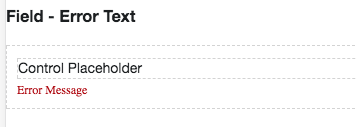
When the label is hidden, would we expect to see the errorIcon whenisInvalid={true}?
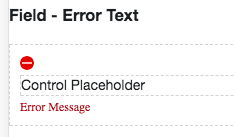
Or would the entire label group be hidden?
 emilyrohrbough
on 30 Oct 2017
emilyrohrbough
on 30 Oct 2017
Got cross-UX feedback on how to handle. If a label is hidden, then the associated elements with it would also be hidden: including the required field indicator (red asterisks) and the errorIcon (red circle).
UX will use future logged issues and design reviews to see this proves to be problematic, but since it will be special cases where the label is hidden, this will be an acceptable way to validate or enhance field usage. Possible reasons for hiding may be creating a new field layout with labels on the left of the inputs (planned enhancement) or usage inside of an element with a header as the label (a special use that may require unique required/error handling).
 neilpfeiffer
on 30 Oct 2017
neilpfeiffer
on 30 Oct 2017
This has been released in terra-form-field 1.0.0
bjankord
on 16 Nov 2017
Related issues
 yuderekyu
·
3Comments
bjankord
·
5Comments
bjankord
·
3Comments
yuderekyu
·
3Comments
bjankord
·
5Comments
bjankord
·
3Comments
 StephenEsser
·
5Comments
StephenEsser
·
5Comments
 noahbenham
·
5Comments
noahbenham
·
5Comments
Most helpful comment
Got cross-UX feedback on how to handle. If a label is hidden, then the associated elements with it would also be hidden: including the required field indicator (red asterisks) and the errorIcon (red circle).
UX will use future logged issues and design reviews to see this proves to be problematic, but since it will be special cases where the label is hidden, this will be an acceptable way to validate or enhance field usage. Possible reasons for hiding may be creating a new field layout with labels on the left of the inputs (planned enhancement) or usage inside of an element with a header as the label (a special use that may require unique required/error handling).