Tdesktop: App launches with a blank dialog window on macOS Mojave (10.14.4) on unsupported macs
Steps to reproduce
- "Clean" install.
/Users/alexander/Library/Containers/org.telegram.desktop/Data/Library/Application Support/Telegram Desktop/is empty. - Start
Telegram Desktop.app
Expected behaviour
A login dialog appears.
Actual behaviour

Configuration
Operating system:
macOS 10.14.4 (18E226)
Version of Telegram Desktop:
1.6.3
Used theme:
Logs:
[2019.03.27 01:14:46] Launched version: 1006003, install beta: [FALSE], alpha: 0, debug mode: [FALSE], test dc: [FALSE]
[2019.03.27 01:14:46] Executable dir: /Applications/, name: Telegram Desktop.app
[2019.03.27 01:14:46] Initial working dir: /Users/alexander/Library/Containers/org.telegram.desktop/Data/
[2019.03.27 01:14:46] Working dir: /Users/alexander/Library/Containers/org.telegram.desktop/Data/Library/Application Support/Telegram Desktop/
[2019.03.27 01:14:46] Command line: /Applications/Telegram Desktop.app/Contents/MacOS/Telegram Desktop
[2019.03.27 01:14:45] Executable path before check: /Applications/Telegram Desktop.app
[2019.03.27 01:14:46] Logs started
[2019.03.27 01:14:49] Connecting local socket to /Users/alexander/Library/Containers/org.telegram.desktop/Data/Documents/f018...
[2019.03.27 01:14:49] This is the only instance of Telegram, starting server and app...
[2019.03.27 01:14:49] Moved logging from '/Users/alexander/Library/Containers/org.telegram.desktop/Data/Library/Application Support/Telegram Desktop/log_start0.txt' to '/Users/alexander/Library/Containers/org.telegram.desktop/Data/Library/Application Support/Telegram Desktop/log.txt'!
[2019.03.27 01:14:49] Primary screen DPI: 72
[2019.03.27 01:14:55] Font Error: could not locate 'Open Sans Semibold' font in ':/gui/fonts/OpenSans-Semibold.ttf'.
[2019.03.27 01:15:04] OpenAL Logging Level: (not set)
[2019.03.27 01:15:04] Audio Playback Devices: OpenAL Soft
[2019.03.27 01:15:04] Audio Playback Default Device: OpenAL Soft
[2019.03.27 01:15:04] Audio Capture Devices: CoreAudio Default
[2019.03.27 01:15:04] Audio Capture Default Device: CoreAudio Default
[2019.03.27 01:15:10] Window Info: Setting layer scale factor to: 1
[2019.03.27 01:15:12] TCP Error: network - Host unreachable
[2019.03.27 01:15:12] TCP Error: network - Host unreachable
[2019.03.27 01:15:12] HTTP Error: network error 99 - Host unreachable
[2019.03.27 01:15:14] TCP Error: network - Host unreachable
[2019.03.27 01:15:14] HTTP Error: network error 99 - Host unreachable
[2019.03.27 01:15:16] TCP Error: network - Host unreachable
[2019.03.27 01:15:16] HTTP Error: network error 99 - Host unreachable
[2019.03.27 01:15:17] TCP Error: network - Host unreachable
[2019.03.27 01:15:17] HTTP Error: network error 99 - Host unreachable
[2019.03.27 01:15:18] Config Error: Bad digest.
[2019.03.27 01:15:18] TCP Error: network - Host unreachable
[2019.03.27 01:15:18] HTTP Error: network error 99 - Host unreachable
[2019.03.27 01:15:19] TCP Error: network - Host unreachable
[2019.03.27 01:15:19] HTTP Error: network error 99 - Host unreachable
[2019.03.27 01:15:19] TCP Error: network - Host unreachable
[2019.03.27 01:15:19] HTTP Error: network error 99 - Host unreachable
 alexander-ii
All 21 comments
Same problem here. @alexander-ii i just want ask model of your mac.
 MrCapone
on 29 Mar 2019
MrCapone
on 29 Mar 2019
also on my Mac mini (Mid 2011)
 danya00
on 29 Mar 2019
danya00
on 29 Mar 2019
@MrCapone MacBookPro 13 (early 2011). Mojave was installed via http://dosdude1.com/mojave/ since it's officially not supported on my laptop.
alexander-ii
on 29 Mar 2019
So all of us using Mojave on not supported macs (mine is MacBookPro 13 late 2011). Maybe thats the problem. Im also have mac mini mid 2012 which officially supported by Mojave. I haven't updated it yet. I'll do this later and then will check this issue.
MrCapone
on 29 Mar 2019
I'v checked this issue on mac mini mid 2012 with Intel HD4000 (metal supported). Unfortunately it is only pre-metal macs problem.
UPD
Also i'v checked older telegram desktop versions. All versions since 1.1.29 have this issue.
UPD2
Latest 32bit mac version works fine.
MrCapone
on 29 Mar 2019
Ok now it's getting really interesting. All my OpenGL applications stop working with same issue. But it happened just after i'v updated my Xcode to 10. All builds built with older xcode versions work just fine. So its not telegram problem, many developers have this issue since apple deprecate opengl in mojave.
MrCapone
on 30 Mar 2019
https://stackoverflow.com/questions/52938516/opengl-not-rendering-on-macos-mojave
Don't know how helpful this link is.
alexander-ii
on 31 Mar 2019
@alexander-ii I'm not sure this is it. Does the app start working fine after you resize the window?
 john-preston
on 31 Mar 2019
john-preston
on 31 Mar 2019
This is only pre metal macs problem + new Xcode. I dont think telegram team will use old Xcode for builds. So Im afraid the only decision for us is dowgrade to high sierra and start looking for new macs :(
MrCapone
on 31 Mar 2019
Does the app start working fine after you resize the window?
Unfortunately not.
alexander-ii
on 1 Apr 2019
Resizing the window, going into full screen, exiting full screen does not change this.
It is however able to show version information when using the Mac menus.

After about a minute it started working. Maybe it was doing some sort of local data migration?
 LeviSchuck
on 1 Apr 2019
LeviSchuck
on 1 Apr 2019
@LeviSchuck Basing on the version number (5.0+) you're using a Telegram for macOS, not a Telegram Desktop (which the last version is 1.6.3). Telegram for macOS works without this issue.
alexander-ii
on 1 Apr 2019
Since it's not telegram issue i think it should be closed. We might contact autor of dosdude1.com/mojave/ and tell him about this issue.
MrCapone
on 1 Apr 2019
Just found that:
- https://github.com/telegramdesktop/tdesktop/releases/download/v1.6.7/tsetup.1.6.7.dmg partly works in my setup.
- https://telegram.org/dl/desktop/mac (https://updates.tdesktop.com/tmac/tsetup.1.6.7.dmg) still shows a blank window.
But GitHub version crashes when you interact with a top menu bar: press command + ., or click on some menu items (all items in the Window menu group and Telegram - Preferences... item), or disabling Show tray icon in Preferences. The same actions work without crashing via hamburger menu.
The only difference in logs is this two strings:
[2019.04.14 12:27:16] Window Info: Setting layer scale factor to: 1
[2019.04.14 12:27:16] Media key monitoring disabled in Mojave.
Logs:
[2019.04.14 12:26:56] Launched version: 1006007, install beta: [FALSE], alpha: 0, debug mode: [FALSE], test dc: [FALSE]
[2019.04.14 12:26:56] Executable dir: /Applications/, name: Telegram Desktop.app
[2019.04.14 12:26:56] Initial working dir: //
[2019.04.14 12:26:56] Working dir: /Users/alexander/Library/Application Support/Telegram Desktop/
[2019.04.14 12:26:56] Command line: /Applications/Telegram Desktop.app/Contents/MacOS/Telegram
[2019.04.14 12:26:56] Executable path before check: /Applications/Telegram Desktop.app
[2019.04.14 12:26:56] Logs started
[2019.04.14 12:26:56] Connecting local socket to /tmp/8bbb1c27f4a685565d1446c4cdc96c44-{87A94AB0-E370-4cde-98D3-ACC110C5967D}...
[2019.04.14 12:26:56] This is the only instance of Telegram, starting server and app...
[2019.04.14 12:26:56] Moved logging from '/Users/alexander/Library/Application Support/Telegram Desktop/log_start0.txt' to '/Users/alexander/Library/Application Support/Telegram Desktop/log.txt'!
[2019.04.14 12:26:56] Primary screen DPI: 72
[2019.04.14 12:26:58] Font Error: could not locate 'Open Sans Semibold' font in ':/gui/fonts/OpenSans-Semibold.ttf'.
[2019.04.14 12:26:58] App Info: reading settings...
[2019.04.14 12:26:58] App Info: reading encrypted settings...
[2019.04.14 12:26:58] Lang Info: Loaded cached, keys: 2256
[2019.04.14 12:26:58] OpenAL Logging Level: (not set)
[2019.04.14 12:26:58] Audio Playback Devices: OpenAL Soft
[2019.04.14 12:26:58] Audio Playback Default Device: OpenAL Soft
[2019.04.14 12:26:58] Audio Capture Devices: CoreAudio Default
[2019.04.14 12:26:58] Audio Capture Default Device: CoreAudio Default
[2019.04.14 12:26:58] App Info: reading map...
[2019.04.14 12:26:58] App Info: reading encrypted map...
[2019.04.14 12:26:58] App Info: reading encrypted user settings...
[2019.04.14 12:26:58] App Info: encrypted user settings read.
[2019.04.14 12:26:58] App Info: reading encrypted mtp data...
[2019.04.14 12:26:58] MTP Info: read keys, current: 1, to destroy: 0
[2019.04.14 12:26:58] Map read time: 22
[2019.04.14 12:26:59] TCP Error: network - Host unreachable
[2019.04.14 12:26:59] HTTP Error: network error 99 - Host unreachable
[2019.04.14 12:27:00] TCP Error: network - Host unreachable
[2019.04.14 12:27:00] HTTP Error: network error 99 - Host unreachable
[2019.04.14 14:04:51] Launched version: 1006007, install beta: [FALSE], alpha: 0, debug mode: [FALSE], test dc: [FALSE]
[2019.04.14 14:04:51] Executable dir: /Applications/, name: Telegram Desktop.app
[2019.04.14 14:04:51] Initial working dir: //
[2019.04.14 14:04:51] Working dir: /Users/alexander/Library/Application Support/Telegram Desktop/
[2019.04.14 14:04:51] Command line: /Applications/Telegram Desktop.app/Contents/MacOS/Telegram
[2019.04.14 14:04:51] Executable path before check: /Applications/Telegram Desktop.app
[2019.04.14 14:04:51] Logs started
[2019.04.14 14:04:51] Connecting local socket to /tmp/8bbb1c27f4a685565d1446c4cdc96c44-{87A94AB0-E370-4cde-98D3-ACC110C5967D}...
[2019.04.14 14:04:51] This is the only instance of Telegram, starting server and app...
[2019.04.14 14:04:51] Moved logging from '/Users/alexander/Library/Application Support/Telegram Desktop/log_start0.txt' to '/Users/alexander/Library/Application Support/Telegram Desktop/log.txt'!
[2019.04.14 14:04:51] Primary screen DPI: 72
[2019.04.14 14:04:53] Font Error: could not locate 'Open Sans Semibold' font in ':/gui/fonts/OpenSans-Semibold.ttf'.
[2019.04.14 14:04:53] App Info: reading settings...
[2019.04.14 14:04:53] App Info: reading encrypted settings...
[2019.04.14 14:04:53] Lang Info: Loaded cached, keys: 2256
[2019.04.14 14:04:53] OpenAL Logging Level: (not set)
[2019.04.14 14:04:53] Audio Playback Devices: OpenAL Soft
[2019.04.14 14:04:53] Audio Playback Default Device: OpenAL Soft
[2019.04.14 14:04:53] Audio Capture Devices: CoreAudio Default
[2019.04.14 14:04:53] Audio Capture Default Device: CoreAudio Default
[2019.04.14 14:04:54] App Info: reading map...
[2019.04.14 14:04:54] App Info: reading encrypted map...
[2019.04.14 14:04:54] App Info: reading encrypted user settings...
[2019.04.14 14:04:54] App Info: encrypted user settings read.
[2019.04.14 14:04:54] App Info: reading encrypted mtp data...
[2019.04.14 14:04:54] MTP Info: read keys, current: 4, to destroy: 0
[2019.04.14 14:04:54] Map read time: 27
[2019.04.14 14:04:54] Export Info: Destroy top bar by controller removal.
[2019.04.14 14:04:55] TCP Error: network - Host unreachable
[2019.04.14 14:04:55] HTTP Error: network error 99 - Host unreachable
[2019.04.14 14:04:55] TCP Error: network - Host unreachable
[2019.04.14 14:04:55] HTTP Error: network error 99 - Host unreachable
[2019.04.14 12:27:14] Launched version: 1006007, install beta: [FALSE], alpha: 0, debug mode: [FALSE], test dc: [FALSE]
[2019.04.14 12:27:14] Executable dir: /Applications/, name: Telegram tme.app
[2019.04.14 12:27:14] Initial working dir: //
[2019.04.14 12:27:14] Working dir: /Users/alexander/Library/Application Support/Telegram Desktop/
[2019.04.14 12:27:14] Command line: /Applications/Telegram tme.app/Contents/MacOS/Telegram
[2019.04.14 12:27:14] Executable path before check: /Applications/Telegram tme.app
[2019.04.14 12:27:14] Logs started
[2019.04.14 12:27:14] Connecting local socket to /tmp/8bbb1c27f4a685565d1446c4cdc96c44-{87A94AB0-E370-4cde-98D3-ACC110C5967D}...
[2019.04.14 12:27:14] This is the only instance of Telegram, starting server and app...
[2019.04.14 12:27:14] Moved logging from '/Users/alexander/Library/Application Support/Telegram Desktop/log_start0.txt' to '/Users/alexander/Library/Application Support/Telegram Desktop/log.txt'!
[2019.04.14 12:27:14] Primary screen DPI: 72
[2019.04.14 12:27:15] Font Error: could not locate 'Open Sans Semibold' font in ':/gui/fonts/OpenSans-Semibold.ttf'.
[2019.04.14 12:27:15] App Info: reading settings...
[2019.04.14 12:27:15] App Info: reading encrypted settings...
[2019.04.14 12:27:15] Lang Info: Loaded cached, keys: 2256
[2019.04.14 12:27:15] OpenAL Logging Level: (not set)
[2019.04.14 12:27:15] Audio Playback Devices: OpenAL Soft
[2019.04.14 12:27:15] Audio Playback Default Device: OpenAL Soft
[2019.04.14 12:27:15] Audio Capture Devices: CoreAudio Default
[2019.04.14 12:27:15] Audio Capture Default Device: CoreAudio Default
[2019.04.14 12:27:16] App Info: reading map...
[2019.04.14 12:27:16] App Info: reading encrypted map...
[2019.04.14 12:27:16] App Info: reading encrypted user settings...
[2019.04.14 12:27:16] App Info: encrypted user settings read.
[2019.04.14 12:27:16] App Info: reading encrypted mtp data...
[2019.04.14 12:27:16] MTP Info: read keys, current: 1, to destroy: 0
[2019.04.14 12:27:16] Map read time: 40
[2019.04.14 12:27:16] Window Info: Setting layer scale factor to: 1
[2019.04.14 12:27:16] Media key monitoring disabled in Mojave.
[2019.04.14 12:27:17] TCP Error: network - Host unreachable
[2019.04.14 12:27:17] HTTP Error: network error 99 - Host unreachable
[2019.04.14 12:27:17] TCP Error: network - Host unreachable
[2019.04.14 12:27:17] HTTP Error: network error 99 - Host unreachable
[2019.04.14 14:46:16] Launched version: 1006007, install beta: [FALSE], alpha: 0, debug mode: [FALSE], test dc: [FALSE]
[2019.04.14 14:46:16] Executable dir: /Applications/, name: Telegram tme.app
[2019.04.14 14:46:16] Initial working dir: //
[2019.04.14 14:46:16] Working dir: /Users/alexander/Library/Application Support/Telegram Desktop/
[2019.04.14 14:46:16] Command line: /Applications/Telegram tme.app/Contents/MacOS/Telegram
[2019.04.14 14:46:16] Executable path before check: /Applications/Telegram tme.app
[2019.04.14 14:46:16] Logs started
[2019.04.14 14:46:17] Connecting local socket to /tmp/8bbb1c27f4a685565d1446c4cdc96c44-{87A94AB0-E370-4cde-98D3-ACC110C5967D}...
[2019.04.14 14:46:17] This is the only instance of Telegram, starting server and app...
[2019.04.14 14:46:17] Moved logging from '/Users/alexander/Library/Application Support/Telegram Desktop/log_start0.txt' to '/Users/alexander/Library/Application Support/Telegram Desktop/log.txt'!
[2019.04.14 14:46:17] Primary screen DPI: 72
[2019.04.14 14:46:18] Font Error: could not locate 'Open Sans Semibold' font in ':/gui/fonts/OpenSans-Semibold.ttf'.
[2019.04.14 14:46:18] App Info: reading settings...
[2019.04.14 14:46:18] App Info: reading encrypted settings...
[2019.04.14 14:46:18] Lang Info: Loaded cached, keys: 2256
[2019.04.14 14:46:18] OpenAL Logging Level: (not set)
[2019.04.14 14:46:18] Audio Playback Devices: OpenAL Soft
[2019.04.14 14:46:18] Audio Playback Default Device: OpenAL Soft
[2019.04.14 14:46:18] Audio Capture Devices: CoreAudio Default
[2019.04.14 14:46:18] Audio Capture Default Device: CoreAudio Default
[2019.04.14 14:46:19] App Info: reading map...
[2019.04.14 14:46:19] App Info: reading encrypted map...
[2019.04.14 14:46:19] App Info: reading encrypted user settings...
[2019.04.14 14:46:19] App Info: encrypted user settings read.
[2019.04.14 14:46:19] App Info: reading encrypted mtp data...
[2019.04.14 14:46:19] MTP Info: read keys, current: 4, to destroy: 0
[2019.04.14 14:46:19] Map read time: 115
[2019.04.14 14:46:19] Export Info: Destroy top bar by controller removal.
[2019.04.14 14:46:19] TCP Error: network - Host unreachable
[2019.04.14 14:46:19] HTTP Error: network error 99 - Host unreachable
[2019.04.14 14:46:20] Window Info: Setting layer scale factor to: 1
[2019.04.14 14:46:20] Media key monitoring disabled in Mojave.
[2019.04.14 14:46:20] TCP Error: network - Host unreachable
[2019.04.14 14:46:20] HTTP Error: network error 99 - Host unreachable
[2019.04.14 14:46:20] TCP Error: network - Host unreachable
[2019.04.14 14:46:20] TCP Error: network - Host unreachable
[2019.04.14 14:46:20] TCP Error: network - Host unreachable
[2019.04.14 14:46:20] HTTP Error: network error 99 - Host unreachable
[2019.04.14 14:46:20] HTTP Error: network error 99 - Host unreachable
[2019.04.14 14:46:20] HTTP Error: network error 99 - Host unreachable
After last macos patcher update issue gone. Might be closed.
MrCapone
on 15 May 2019
I recently updated the patches, still having the same issue.
On Wed, May 15, 2019, 3:28 PM Dmitry Lukianov notifications@github.com
wrote:
After last macos patcher update issue gone. Might be closed.
—
You are receiving this because you are subscribed to this thread.
Reply to this email directly, view it on GitHub
https://github.com/telegramdesktop/tdesktop/issues/5850?email_source=notifications&email_token=AAABBY35FMSUFW5T6WRZTJLPVRP5PA5CNFSM4HBSNM7KYY3PNVWWK3TUL52HS4DFVREXG43VMVBW63LNMVXHJKTDN5WW2ZLOORPWSZGODVPWOJY#issuecomment-492791591,
or mute the thread
https://github.com/notifications/unsubscribe-auth/AAABBY5DYZXLGUGOVF2QLO3PVRP5PANCNFSM4HBSNM7A
.
 Flare183
on 15 May 2019
Flare183
on 15 May 2019
@Flare183 I think you may need to update http://dosdude1.com/mojave/ to 1.3.1 or greater version. And then re-apply post-install fixes.
I intend to close this issue.
alexander-ii
on 16 May 2019
Patcher show me update for "non metal video cards support" and i installed it.
Also i'v updated to macOS 10.14.5. But my mac stuck on this update after reboot. So prepare install usb with mac patcher 1.3.2 before updating.
MrCapone
on 16 May 2019
@alexander-ii any workaround to make it work? I'm also having issues on MBP 2010 with mojave 10.14.4 from dosdude.
 asunyer90
on 25 Jun 2019
asunyer90
on 25 Jun 2019
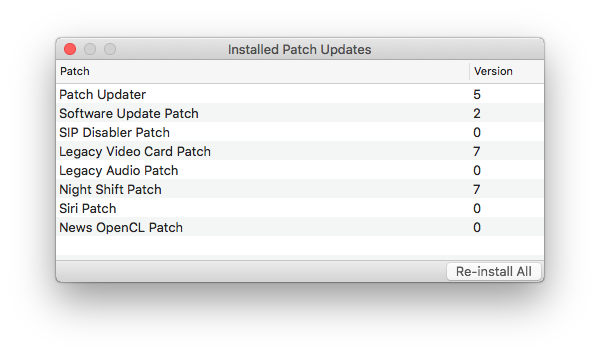
@asunyer90 I reinstalled macOS Mojave 10.14.5 with the latest dosdude patcher (1.3.3 I believe) on top of installed macOS. And applied all suggested patches. And the problem was solved.
alexander-ii
on 25 Jun 2019
@asunyer90 create mojave 10.14.5 bootable usb with latest dosdude patch (1.3.3). Then update your mac to 10.14.5. If boot will stuck you can fix it with usb you created.
MrCapone
on 25 Jun 2019
Related issues
 abhyrz
·
3Comments
abhyrz
·
3Comments
 TotalKrill
·
3Comments
TotalKrill
·
3Comments
 ArmeF97
·
3Comments
ArmeF97
·
3Comments
 FunctionalHacker
·
3Comments
FunctionalHacker
·
3Comments
 LeonTheOriginal
·
3Comments
LeonTheOriginal
·
3Comments