Tabulator: How to get row Id on cellClick
i would like to know the row id on cellClick ,because each cell have different functionalities but their database is related to their row id. So is there any way to do this?
 pavankomarina
All 11 comments
$("#example-table").tabulator({
    columns:[
        {id:1, title:"Name", field:"name", sorter:"string", width:200, editor:true},
 ],


{title:"Name", field:"name", cellClick:function(e, cell){
        //e - the click event object
        //cell - cell component
       var row = cell.getRow()
       var rowIndex = row.getIndex();
    },
}
});
Something like this?
 Rodbjartson
on 18 Jan 2018
Rodbjartson
on 18 Jan 2018
I'd like to re-open the issue since I just done what the guys said and I get undefined
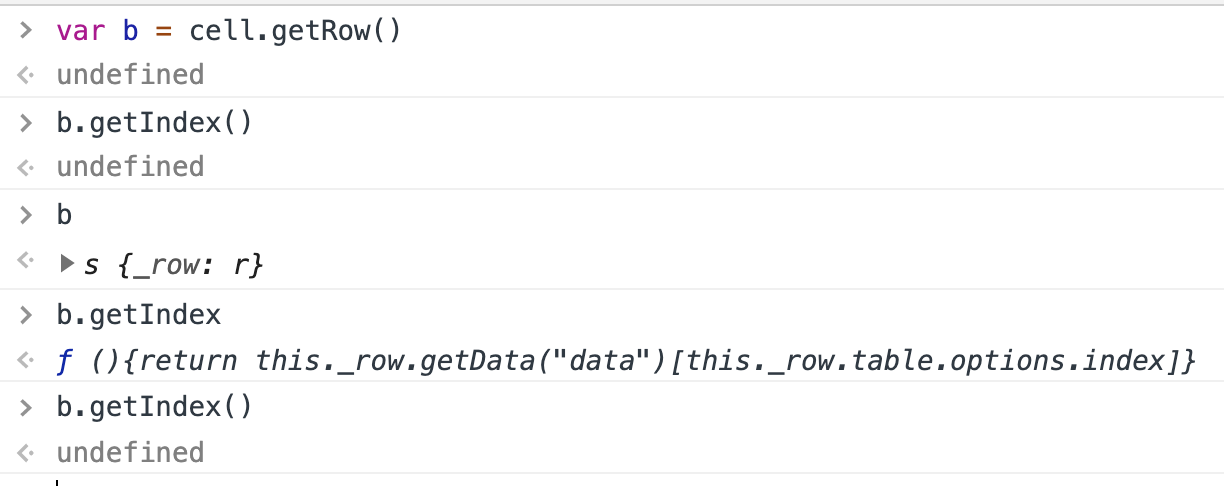
Using cellClick
 ShinobiWPS
on 24 Oct 2019
ShinobiWPS
on 24 Oct 2019

ShinobiWPS
on 24 Oct 2019
@olifolkerd
ShinobiWPS
on 24 Oct 2019
@ShinobiWPS
Without seeing where that function is called from it is impossible to offer you help, it is likely that your setSelectedCell function is being called without the cell component being passed into it.
Oli
 olifolkerd
on 24 Oct 2019
olifolkerd
on 24 Oct 2019
that's all

ShinobiWPS
on 24 Oct 2019
the arguments are from Tabulator, i'm not doing anything else like manipulating or filtering arguments,so if something is missing, is a library bug or something
ShinobiWPS
on 24 Oct 2019
The cell click function is working exactly as expected when I use it. Please confirm which version of Tabulator u are using.
Also please create a JS Fiddle so we can see how your table is configured. As I mentioned it is impossible to diagnose your issue without the context in which it is being used.
Cheers
Oli
olifolkerd
on 24 Oct 2019
ShinobiWPS
on 24 Oct 2019
Thanks that was very helpful,
The reason you are getting undefined is because you have no id property defined on your row data which is what the getIndex function returns, (or whatever field you have specified in the index setup option)
If you want to get the position of the row in the table, ie the number of rows from the top of the table then you need to call the getPosition function on the row component.
If in future you could provide a JS Fiddle or a bit more information about how you are using your table when you first post it will make it easier for us to help you
Cheers
Oli :)
olifolkerd
on 24 Oct 2019
thank you @olifolkerd ,that was enlightning!
Leaving everything here for the the next @me having same issue
ShinobiWPS
on 24 Oct 2019
Related issues
 KES777
·
68Comments
KES777
·
68Comments
 fingers10
·
41Comments
fingers10
·
41Comments
 qlj
·
24Comments
qlj
·
24Comments
 zeropage-io
·
24Comments
olifolkerd
·
23Comments
zeropage-io
·
24Comments
olifolkerd
·
23Comments
Most helpful comment
Something like this?