This section says:
In order for the virtual DOM to function correctly you must ensure that the table element has a height you can either define this in the CSS for the element or set it using the height option in the table constructor, this can be set to any valid CSS value. If no height is set the table will revert to the standard DOM mode and try and render all rows at once, which will have a performance impact on tables with a large number of rows.
But here virtualDOM option does not mention this.
Probably you should put link from here to the paragraph above
You should put a note about the true is falling back to false when table has no height
 KES777
All 68 comments
KES777
on 7 Dec 2018
KES777
on 7 Dec 2018
Links on the page are broken:
The function accepts one argument, the CellComponent for the cell the tooltip is being generated for.
The function accepts one argument, the RowComponent for the row being formatted.
CellComponent/RowComponent
KES777
on 7 Dec 2018
KES777
on 7 Dec 2018
Any function that takes a component as an argument will also attempt to find that component based on the value provided if it is not a component iteslf
itself
KES777
on 7 Dec 2018
To specify a sorter to be used on a column use the param property in the columns definition object
param -> sorter
KES777
on 8 Dec 2018
Would be cool if Tabulator will support ability to change default value of headerSort property
here
    var table = new Tabulator("#example-table", {
        height      : "25rem",
        headerSort  : false, <<< disabled by default
        columns: [
            { title: "",   field: "" },  <<< disabled
            { title: "",   field: "" },  <<< disabled
            { title: "",   field: "" },  <<< disabled
            { title: "",   field: "", headerSort: true },   <<< enable
        ],
    });
this would be much clear than:
    var table = new Tabulator("#example-table", {
        height      : "25rem",
        columns: [
            { title: "",   field: "", headerSort: false },  <<< disabled
            { title: "",   field: "", headerSort: false },  <<< disabled
            { title: "",   field: "", headerSort: false },  <<< disabled
            { title: "",   field: "" },   <<< enable
        ],
    });
Hey @KES777
Thanks for heads up on the typos, they should all be fixed now.
Thanks for your feedback on the headerSort property, but im going to keep it where it is for the time being. There are lots of users who want to disable sort on a per column basis.
Cheers
Oli :)
 olifolkerd
on 8 Dec 2018
olifolkerd
on 8 Dec 2018
but im going to keep it where it is for the time being.
I am not asking to change things. Just extend the behavior by allowing to change default value. Look into example more precisely ;-)
KES777
on 8 Dec 2018
if you are not afraid I will continue to post issues about the DOC here.
your example shows table with data, but source code do not show how data are fetched into table.
Another examples also hide this fact. ;)
UPD this is covered only here.
KES777
on 8 Dec 2018
@KES777
Please feel free to post any other issues you notice here.
Cheers
Oli :)
olifolkerd
on 8 Dec 2018
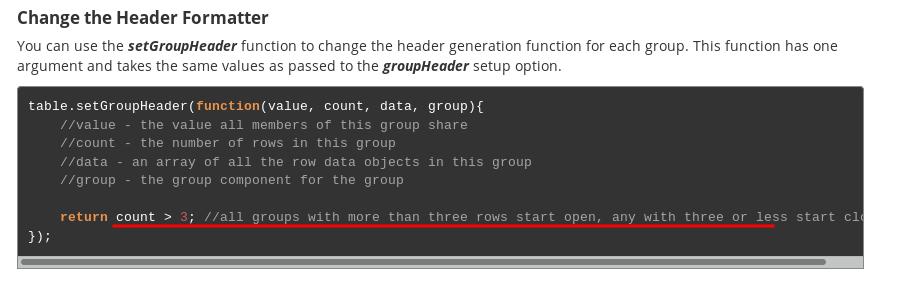
Change the Header Formatter
You can use the setGroupHeader function to change the header generation function for each group. This function has one argument and takes the same values as passed to the groupHeader setup option.
The groupHeader returns string to represent the group value, but here you return bool.
possibly the example should belongs to Change the Start Open States section
KES777
on 8 Dec 2018
The getIndex function returns the index value for the row. (this is the value from the defined index column, NOT the ros position in the table)
ros -> pos? row?
KES777
on 10 Dec 2018
Navigation
You can navigat any direction around the table using the following functions:
navigate
KES777
on 10 Dec 2018
probably you should put a word about that navPrev is an action.
and use this action name when you extend keybindings actions:
Tabulator.prototype.extendModule("keybindings", "bindings", {
    customActionName:"shift + 9",         // <<<< NOTICE HERE
});

The default list of keybinding actions and their functions can be extended:

Tabulator.prototype.extendModule("keybindings", "actions", {
    "customActionName":function(){ //delete selected rows      <<<<  NOTICE HERE
        var rows = this.table.getSelectedRows();

        rows.forEach(function(row){
            row.delete();
        });
    },
});
Also put a word: if you use already existing action name that action will be replaced. Thus you can change behavior of default actions
because http://tabulator.info/docs/4.1/keybindings does not show how to setup custom action's handler.
KES777
on 10 Dec 2018
so that a users preferences can be remembered
a user preferences or users preferences ("a" may not be used with plurals, but I may wrong)
KES777
on 10 Dec 2018
Both options can take either an html string representing the contents of the toggl element
toggle
KES777
on 10 Dec 2018
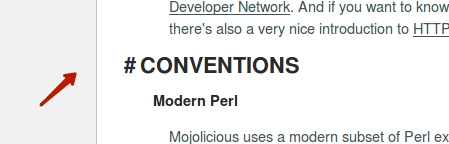
would be cool if you allow to copy links to paragraph like this:
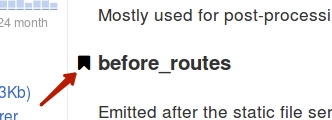
https://metacpan.org/pod/Mojolicious#before_routes
KES777
on 10 Dec 2018
KES777
on 10 Dec 2018
ambiguous at row formatter example:
    rowFormatter:function(row, data){
        var element = row.getElement(),
        data = row.getData(),
        width = element.element.offsetWidth,
if you get data as function argument why you define data again?
KES777
on 11 Dec 2018
buttonTick - displays a tick icon on eac row (for use as a button)
buttonCross - displays a cross icon on eac row (for use as a button)
each
KES777
on 11 Dec 2018
KES777
on 11 Dec 2018
You can also load data at any point by ajxa
ajax
Also here:
If you have already set the URL using the ajaxURL option in the table constructor then you can trigger a reload of the data at any point by calling the setData function without any arguments.
table.setData();
May you please to explicitly name this as: Refresh/Reload section. It would be more handy. thank you.
KES777
on 12 Dec 2018
This is not clear what is top and bottom calculations: http://tabulator.info/docs/4.1/column-calcs#format http://tabulator.info/docs/4.1/format
Please put appropriate links which describe what is topCalcFormatterParams and bottomCalcFormatterParams
KES777
on 12 Dec 2018
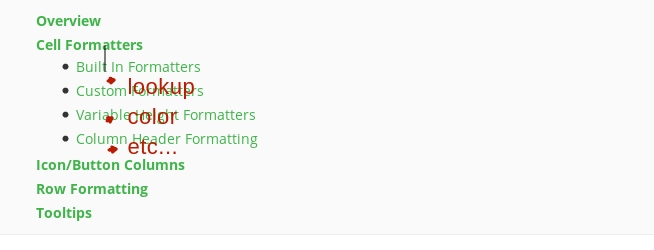
I have found that it is hard to find where formatters are documented: http://tabulator.info/docs/4.1/format#format-builtin
because section name List lookup do not correspond the formatter.
As proposition you may list formatters at the contents as subsection
KES777
on 12 Dec 2018
Hey @KES777
Thanks for info on the typos, i have fixed the ones that where appropriate.
In answer to your other points (im just providing feedback on points, please understand i am not looking to get into a lengthy discussion on these issues i just want to clarify my standing on them) :
- the groupHeader function return this can be any thing you want, it can be a string, a number a boolean it dosn't matter as long as the comparison function can handle it.
- the ability to copy links to paragraphs is already planning and will be coming out on the site next year
- top and botom calc params are defined in that sentence and there is a link to the formatter params docs that clearly outlines how params should be used
- Formatter lists, to keep the page headers clear i am only including 1 level of nesting in the headers lists, if you need to find specific things the search box in the site header can be used to find things.
Thanks for the feedback
Oli :)
olifolkerd
on 12 Dec 2018
Hey @KES777
Can i ask, are you working your way through every page of the site, or are you actually coming across these issues as you use the system.
Please forgive my questioning, im am just curious because over the last few days you have been very active over the issues list (and i really appreciate the engagement) but it feels that you are only going skin deep in terms of skim reading the pages rather than actually using them in a project.
The reason i say this is because i would far rather that you got something out of Tabulator by using it and feeding back your experience to the community, instead of skim reading things and providing feedback based on a cursory look at things rather than practical experience as this can confuse more junior users/developers.
If you are keen to contribute to the Tabulator community i would love to welcome you on board and can offer you some pointers on more specific ways you can contribute to the project that will benefit all the users in a constructive way.
Cheers
Oli :)
olifolkerd
on 12 Dec 2018
@olifolkerd, I come to those issues because I am trying to use Tabulator in my real project. Currently I code this. I am not trying to just skim.
can offer you some pointers on more specific ways you can contribute to the project
Yes, you are welcome to advice me ;-)
PS. I am sorry, if my sentences probably does not sound kindly. That is because I do not know perfect/sharp word to use.
KES777
on 13 Dec 2018
Please create sample data to be used in all tabulators section on example page. This will allow to copy data from page and not looking into example source
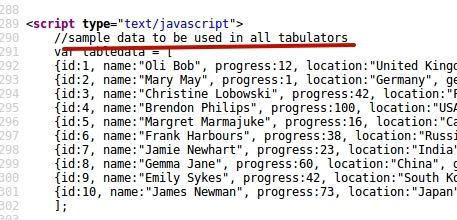
and do not forget to fill data property:
var table = new Tabulator("#example-table", {
    height:"311px",
    data: sampleData,       <<<<<<
    columns:[
        ...
@KES777 The example data is already defined in the Data Documentation
It is the purpose of the examples section to inform users about specific configurations of the table not to show them start to finish exercises in how to build a basic table, there is a Quickstart Guide for this.
Any part of the system that requires that the table have a different format of data entry includes an example of that in the main documentation, which is where it belongs. the example section provides quick access to see features in action with links to the correct documentation to look at things in more detail.
Cheers
Oli :)
olifolkerd
on 13 Dec 2018
@KES777
Thanks for your response
At this point it just feels to me like you are going through the site trying to find the tiniest of hole to point out here, i mean in your last post you were actually looking into the source code for the website which is a bit excessive.
Most of the last few issues you have raised seem to come from a very personal perspective (ie this information wasn't exactly where I wanted it to be) which isn't very helpful to me, no documentation is ever going to be exactly the way you want it im afraid,
There are all sort of searching and linking features built in the website to help people locate the information they are after, if you choose not to use them that is up to you. I simply don't have the time to address every pet niggle of every user of the website, and quite frankly that isn't the point of this issues list.
If there are genuine issues that actually stopped you using the website then i would love to hear about them, and hearing about any typos is great as im crap at spelling, but if it is just a personal usability preference im sorry but you will just have to get used to the site as it is. everyone has their own preferences and i cant cater for them all.
In terms of usefully contributing to the project, my first suggestion would be that go and gain significant experience in using certain function of the table, you can then offer insights from real world experience when answering questions in the issues list. You will see that Tabulator has 4-5 main responders to issues that have been raised, each of them has been using Tabulator for years in specific ways and when they respond the provide sample code and links to the website that are clearly tied back to the question asked.
I understand that you are enthusiastic about Tabulator, and that is great! Im really happy that it is working well for you, but when you go round the issues list trying to redirect users to use your issues, or trying to answer feature requests from other developers that are trying to ask me for new functionality it makes my life much harder because i use this list to manage the development flow of Tabulator and when you start doing that i then have to spend hours going through and correcting it all which makes it all that much more confusing for other users and wastes time that i could actually be spending developing Tabulator.
If there are any areas that you feel you would be suited to when it comes to contributing the Tabulator, such as pull requests, or documentation or anything else, please let me know and i can see if there is a specific way you can contribute more significantly to Tabulator that suits you.
Cheers
Oli :)
olifolkerd
on 13 Dec 2018
It is the purpose of the examples section to inform users about specific configurations of the table
Yes, I agree with you, but from my newbie point of view that is worth to put a word about how tables are initialized and where to get the data. Because I am not just see the different configurations but also try them.
KES777
on 13 Dec 2018
The typo in the example Autocomplete section
        values.forEach(function(item){
            if(item.value === term){
                matches.push();     <<<<<<
            }
        });
this does not work, because it must be matches.push( item ) otherwise empty array returned
KES777
on 13 Dec 2018
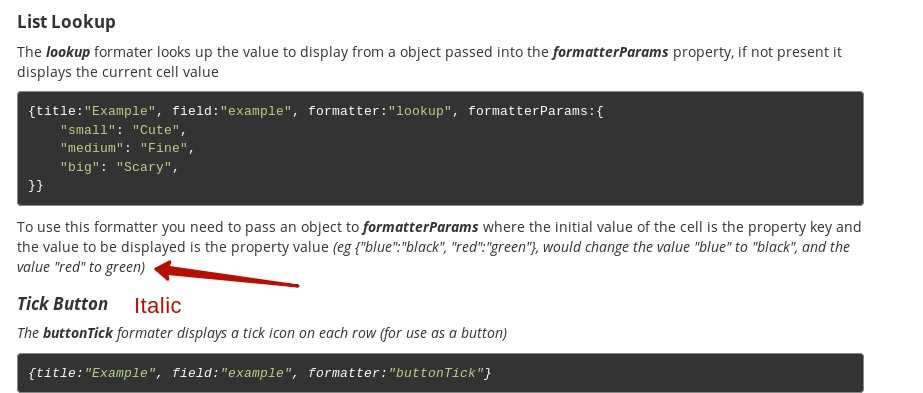
some HTML tags are not closed
KES777
on 13 Dec 2018
Accessor Types example
{title:"Under Age", field:"age", accessor:ageAccessor, accessorParams:{legalAge:16} accessorDownload:ageAccessor, accessorDownloadParams:{legalAge:18} }
missed comma before accessorDownload
KES777
on 15 Dec 2018
It is not clear from Accessor Type example what it does:
return value >= params.legalAge;
- Does it return transformed data?
- Does it just check access right to data? if
false- null data is returned, iftrue- value is returned/displayed for user
KES777
on 15 Dec 2018
documentation (UPD Fixed link) does not cover how to control header formatter:
is it shrinked or ... padded
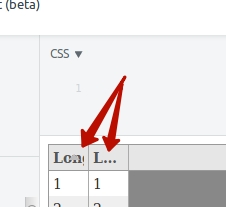
    columns:[
        {title:"Long title",  field:"id",         width:40 },
        {title:"Long title",  field:"country_id", width:40, headerSort: false },
    ],
Currently I just notice different rendering for title when headerSort is enabled or not
KES777
on 15 Dec 2018
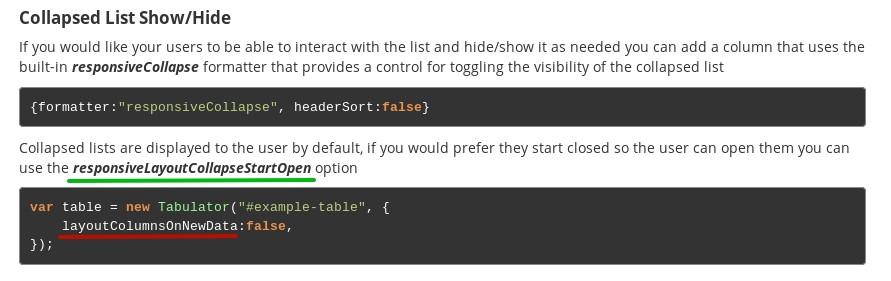
replace: layoutColumnsOnNewData -> responsiveLayoutCollapseStartOpen
KES777
on 15 Dec 2018
@KES777
Thanks for the feedback, i have fixed the areas in the docs.
Cheers
Oli :)
olifolkerd
on 16 Dec 2018
You can retrieve the current AJAX URL of the table with the gtAjaxUrl function.
var url = table.gtAjaxUrl();
gtAjaxUrl -> getAjaxUrl at two places
KES777
on 19 Dec 2018
thanks, i have just fixed that on the site :)
olifolkerd
on 19 Dec 2018
KES777
on 20 Dec 2018
same feature named differently: Remote pagination VS Ajax filtering. I was thought that there is no remote filtering/sorting support. Actually it is.
Would be nice if this will be mentioned on sort/filter pages
KES777
on 20 Dec 2018
sorters - the first current sorters(if any)
Did not run code on this example, but it seems obvious that client should send to server all its state (array of current sorters, not just first one) thus server can return correct sorted data
KES777
on 20 Dec 2018
On this page broken link: http://tabulator.info/docs/4.1/overview-install
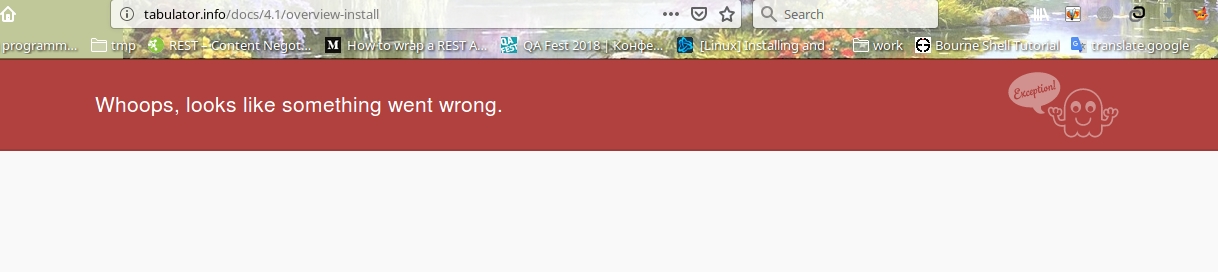
Click on Install section in content
KES777
on 21 Dec 2018
superfluous information
headerFilterPlaceholder:"Max Age",
section Filter Comparison Types
The example contains: headerFilterPlaceholder:"Max Age". In that example this parameter is superfluous.
Next examples in this section even hide required info:
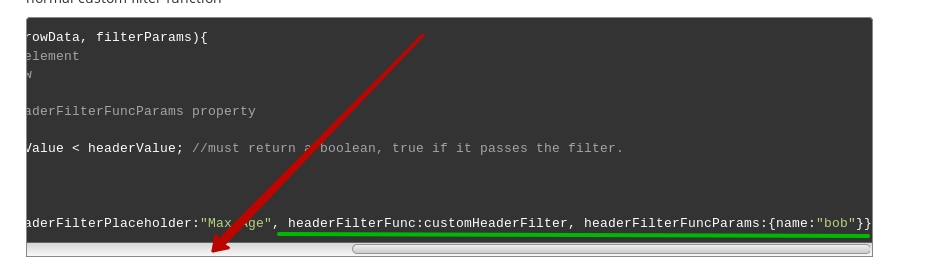
Thus remove headerFilterPlaceholder from examples in this section. Also headerFilterPlaceholder is described in next section Placeholder Text
KES777
on 26 Dec 2018
lack of information.
I read through the DOC and can only found two types of supported filters: input, tick. Looking at the issue tracker I found another one select
Please describe all supported filter types.
Also I have found some API inconsistency. see details at #1681
KES777
on 26 Dec 2018
@KES777
As the documentation states you can use ANY editor as a header filter, there are numerous examples of other header filters in use in the example page.
As the header filter docs state:
you can pass a string to this parameter containing any of the standard editors listed in the Manipulating Data section
Cheers
Oli :)
olifolkerd
on 26 Dec 2018
documentation contain ambiguous info https://github.com/olifolkerd/tabulator/issues/1683#issuecomment-450088342
KES777
on 27 Dec 2018
Also clarify row component documentation for update method.
https://github.com/olifolkerd/tabulator/issues/1682#issuecomment-450091258
Thank you.
KES777
on 27 Dec 2018
Get Cell in Specific Column
The getCell function returns the CellComponent for the specified column from this row.
var cells = row.getCell(column);
cells -> cell, because method return only one cell, not array.
KES777
on 28 Dec 2018
Filter Comparison Types
function customHeaderFilter(headerValue, rowValue, rowData, filterParams){
    //headerValue - the value of the header filter element
    //rowValue - the value of the column in this row
    //rowData - the data for the row being filtered
    //filterParams - params object passed to the headerFilterFuncParams property
rowValue - the value of the column in this row
do you mean:
cellValue - the value of the cell in this row
No documentation about how to supply values. Should it be like editorParams or formatterParams
http://tabulator.info/docs/4.1/filter#header
Relevant question on SO
KES777
on 7 Jan 2019
Framework Compatability
The data reactivity module has been built to be compatable with all other reactive front end frameworks like vue, react and angular. This means that when you include Tabulator in your framework project you only need to pass the data array to it when you instantiate the table. you can then manipulate the array and data objects through the framework and Tabulator will automatically update
You should be capital
KES777
on 5 Mar 2019
Alternativly if you have the ColumnComponent of the column you wish to toggle, you can call the toggle function directly on the component.
Alternatively
KES777
on 22 Mar 2019
code have comment:
//register table for inderdevice communication
this is typo for inderdevice
KES777
on 13 Apr 2019
tabulator.info/docs/4.2/group#setup-toggle
To then set the default open
The example speaks about different things:
https://tabulator.info/docs/4.2/group
HeaderFormatter should return the display string instead of boolean value
KES777
on 10 Jun 2019

Menu link is not clickable http://tabulator.info/docs/4.2/group#multi
KES777
on 11 Jun 2019
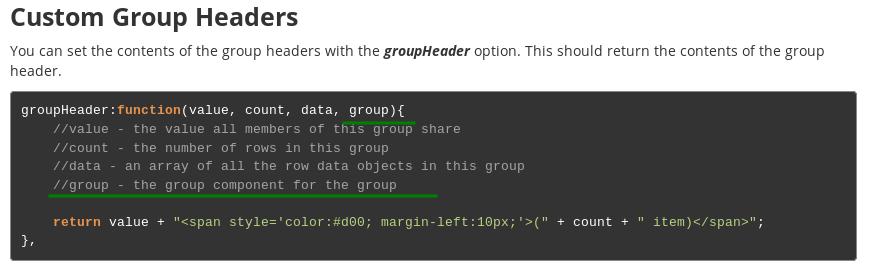
Documentation missed info about forth parameter:

http://tabulator.info/docs/4.2/group#multi
compare description with one level grouping (two paragraph earlier)
KES777
on 11 Jun 2019
http://tabulator.info/docs/4.3/release
allow users to cleare the cells value easily.
should be clear
"undefined" text no longer appears when am undefined value is passed into a textarea editor
am??
KES777
on 24 Jul 2019
KES777
on 28 Jan 2020
On page links to Row component are broken: http://tabulator.info/docs/4.5/update#component-row
KES777
on 28 Jan 2020
 KES777
on 4 Apr 2020
KES777
on 4 Apr 2020
http://tabulator.info/docs/4.6/reactivity#reactive-data
Typo: Replacing Entier Data Array -> Replacing Entir Data Array
On same page too:
tabledata.push(row); -> tableData.push( row )
@olifolkerd Hi, Oli. Does this issue alive? Are my posts here useful?
KES777
on 27 May 2020

 KES777
on 5 Jun 2020
KES777
on 5 Jun 2020
Hey @KES777
Thanks for those, yes it is still helpful when you post the feedback on here.
Cheers
Oli :)
olifolkerd
on 7 Jun 2020
Probably I am not english speaker. But these two description seems similar to me:

Probably this should be reworded to be more explicit
KES777
on 8 Jun 2020
Related issues
 andreivanea
·
3Comments
KES777
·
3Comments
andreivanea
·
3Comments
KES777
·
3Comments
 mindcreations
·
3Comments
mindcreations
·
3Comments
 jiaqianliCn
·
3Comments
jiaqianliCn
·
3Comments
 Honiah
·
3Comments
Honiah
·
3Comments
Most helpful comment
Hey @KES777
Thanks for those, yes it is still helpful when you post the feedback on here.
Cheers
Oli :)