Subtitleedit: All capital letters in all words.
I need to change all letters in words to uppercase.
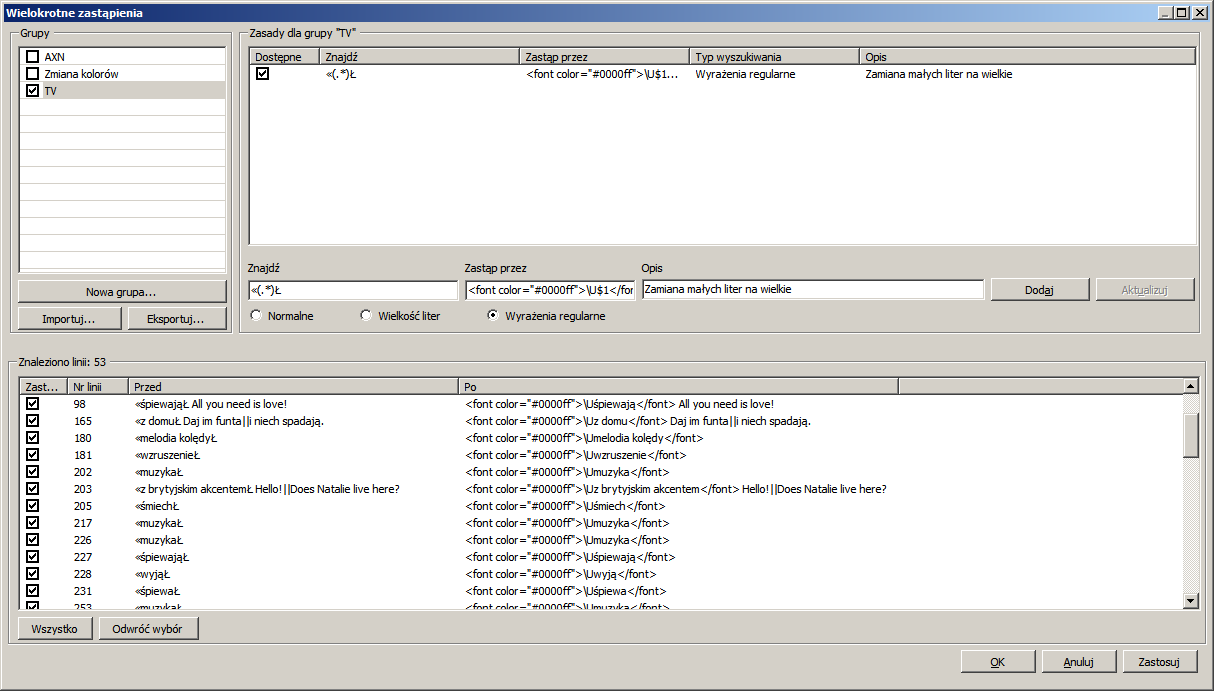
In regex, I use \U or \L and I get the result as in the screenshot. Anyone have an idea what I should enter there?
 borifax
All 24 comments
Regex in .NET doesn't support the \U and \L.
 OmrSi
on 25 Dec 2020
OmrSi
on 25 Dec 2020
Thanks.
borifax
on 25 Dec 2020
Also, there isn't any substitute.
OmrSi
on 25 Dec 2020
You can:
- Select all lines.
- Copy text only to clipboard.
- Paste it in Regex101 and apply your regex.
- Copy the result.
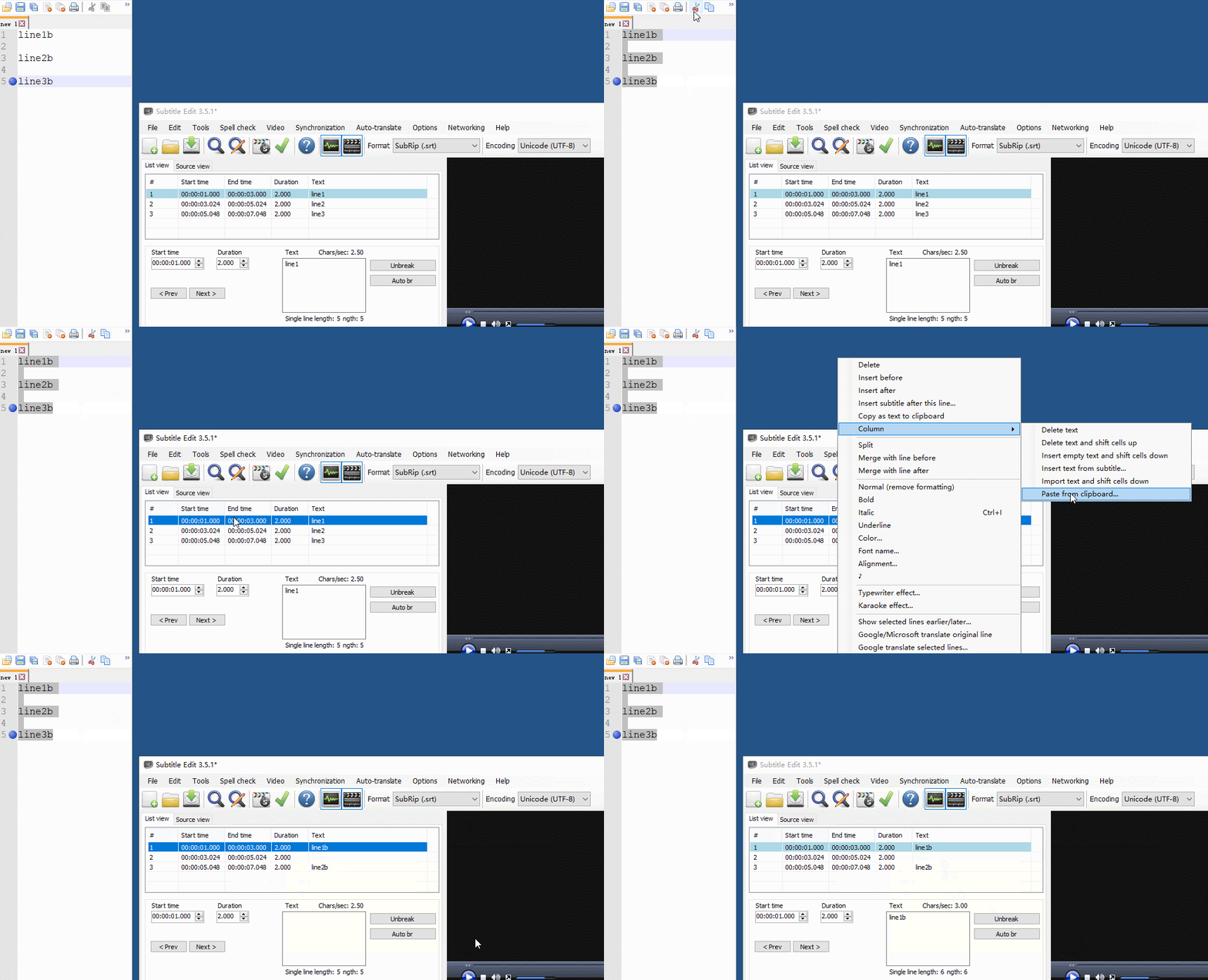
- Go to the first selected line in SE and right-click -> Column -> Paste from clipboard
OmrSi
on 25 Dec 2020
For the more frequent errors I defined separate expressions. The rest I corrected manually.
Thanks again.
borifax
on 25 Dec 2020
@OmrSi However, when pasting back to SE, empty lines will be taken into account, not sure if it's something to fix. :-/
 LeonCheung
on 25 Dec 2020
LeonCheung
on 25 Dec 2020
@LeonCheung How so? Column paste from clipboard allows you to paste only text and takes the empty lines in the text as an indication to new lines.
OmrSi
on 25 Dec 2020
I don't know, it shouldn't be like that but just confirmed in the beta 300 and 353.
LeonCheung
on 25 Dec 2020
For the test I made these corrections again. It was working. I copied and pasted from the source view.
borifax
on 25 Dec 2020
Ah oh, it occurs to me even with 3.5.1. I'm soooooo puzzled....
LeonCheung
on 25 Dec 2020
@LeonCheung Just took a look at the code, it actually just pastes every line in a paragraph even if it's empty.
OmrSi
on 25 Dec 2020
Then how to explain the GIF? 🤣
LeonCheung
on 25 Dec 2020
You missunderstood.
It just takes every line in the copied text and pastes it to a line in the list view.
Meaning if you have:
Line1B
it will paste each line into a list view item, even if the line is a space.
OmrSi
on 25 Dec 2020
Ah I see. It puzzled me because I tried to follow your idea above step by step, but couldn't get the expected result, so...
LeonCheung
on 25 Dec 2020
That's my bad. I thought it worked that way.
Turned out I just copy the time with the text all the time, so I thought that was the default behavior.
I don't know which is better, tbh.
OmrSi
on 25 Dec 2020
It's okay just... it reminded me on a specific workflow in real life. Similar to what's mentioned in #1528. Maybe that's another topic.
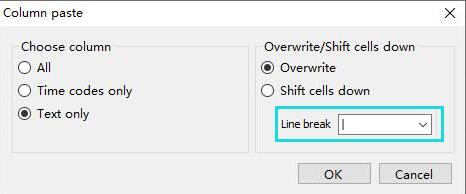
In the case here, a bit brainstorm can be no harm :) like:
LeonCheung
on 25 Dec 2020
I don't know if Line break is exactly right here, it should be something like lines separator.
OmrSi
on 25 Dec 2020
Ah yes, you are right.
LeonCheung
on 26 Dec 2020
I need to change all letters in words to uppercase.
Have you tried Tools - Change casing... ?
 niksedk
on 26 Dec 2020
niksedk
on 26 Dec 2020
@niksedk He seems to have a letter at the end of the regex, so I guess he only wants to change certain words?
OmrSi
on 26 Dec 2020
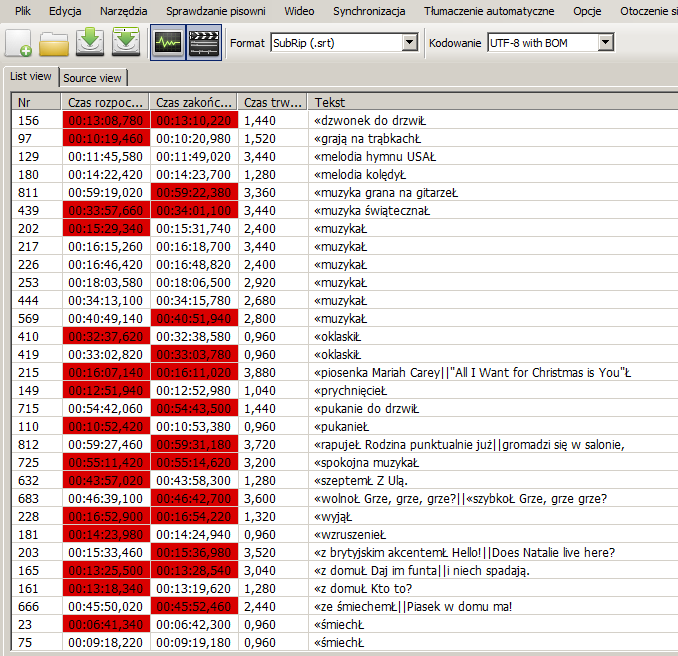
It is just like OmrSi says. I wanted to uppercase the text between "<<" and "Ł". These are descriptions for the hearing impaired, which I wanted to highlight in capital letters and in color. This is how they are presented in alphabetical order.
Edit
I was able to solve my problem only using SE :)
Step 1: I have replaced the characters "<<" and "Ł" with brackets "(((" and ")))".
Step 2: I used the HI2UC plug.
Step 3: I replaced the brackets with the color tags.
Boss :P
borifax
on 26 Dec 2020
@borifax Very nice tip. I didn't know that plug-in, and it's very powerful, not sure @ivandrofly can see this.
LeonCheung
on 27 Dec 2020
Here here... maybe have a option in HI2UC to allow user to define token for start&end of HI? /cc @LeonCheung
 ivandrofly
on 30 Dec 2020
ivandrofly
on 30 Dec 2020
@ivandrofly Oh then it would definitely be even better if technically possible. :)
LeonCheung
on 30 Dec 2020
Related issues
 PannenkoekenNL
·
3Comments
PannenkoekenNL
·
3Comments
 frozenspider
·
5Comments
LeonCheung
·
5Comments
frozenspider
·
5Comments
LeonCheung
·
5Comments
 07416
·
5Comments
07416
·
5Comments
 m0ck69
·
5Comments
m0ck69
·
5Comments