Some nice fixes and features:
- Encoding "UTF-8 without BOM" - see https://github.com/SubtitleEdit/subtitleedit/pull/3979
- Dialog style - see https://github.com/SubtitleEdit/subtitleedit/pull/3993
- Encoding auto-detect improved
- Microsoft Translator API fixes
- mpv fixes
- Reopen fixes/improvements
- New subtitle formats
So please do give latest beta a run and report any bugs here :)
https://github.com/SubtitleEdit/subtitleedit/releases/download/3.5.13/SubtitleEditBeta.zip
TODO:
- [x] Test encoding
- [x] Dialog style
- [x] Test "Batch convert"
- [x] General testing (+ fixing bugs)
 niksedk
All 26 comments
Well, I've had my share of issues for this version. xD
I just hope you can take a look at this https://github.com/SubtitleEdit/support-files/commit/2fe6303f32c273676b0e76aa275be85239038820#commitcomment-36947882
 OmrSi
on 1 Mar 2020
OmrSi
on 1 Mar 2020
@niksedk A bug:
If you have in recent files: "File" and "File + Original" and you delete the "Original" file you get double entries.
OmrSi
on 2 Mar 2020
I have a small request, I noticed that when double-clicking on a word that has a punctuation mark stuck to it, only the work is selected, like double-clicking on Hi. would only select Hi, but if you have an Arabic punctuation mark, that doesn't happen, like مرحبا؟ or مرحبا، would all be selected, not only مرحبا, can you do anything about that?
OmrSi
on 2 Mar 2020
Hello. I have EIA-608 subtitles, but SE didn't see it.
 Cryosim
on 3 Mar 2020
Cryosim
on 3 Mar 2020
@Cryosim Which format? Post it here.
 uckthis
on 4 Mar 2020
uckthis
on 4 Mar 2020
I have extraction issues with new version. I haven't been able to extract any subtitles from any mkv file. Will test for mp4 once a file comes along.
Example:
...
They extract with 3.5.11
uckthis
on 4 Mar 2020
Please take a look at #4019
 AlexandreMT
on 5 Mar 2020
AlexandreMT
on 5 Mar 2020
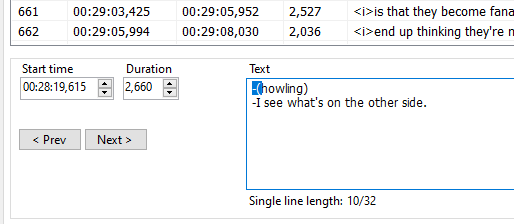
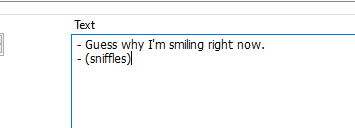
General Testing: w/ BETA 253
In this case bellow where there was HI in the first line, Fix with "Dash both lines with space" setting didn't get it.
Case where HI was on second line, it worked fine.
 btsix
on 7 Mar 2020
btsix
on 7 Mar 2020
@btsix: thx, beta updated: https://github.com/SubtitleEdit/subtitleedit/releases/download/3.5.13/SubtitleEditBeta.zip
niksedk
on 7 Mar 2020
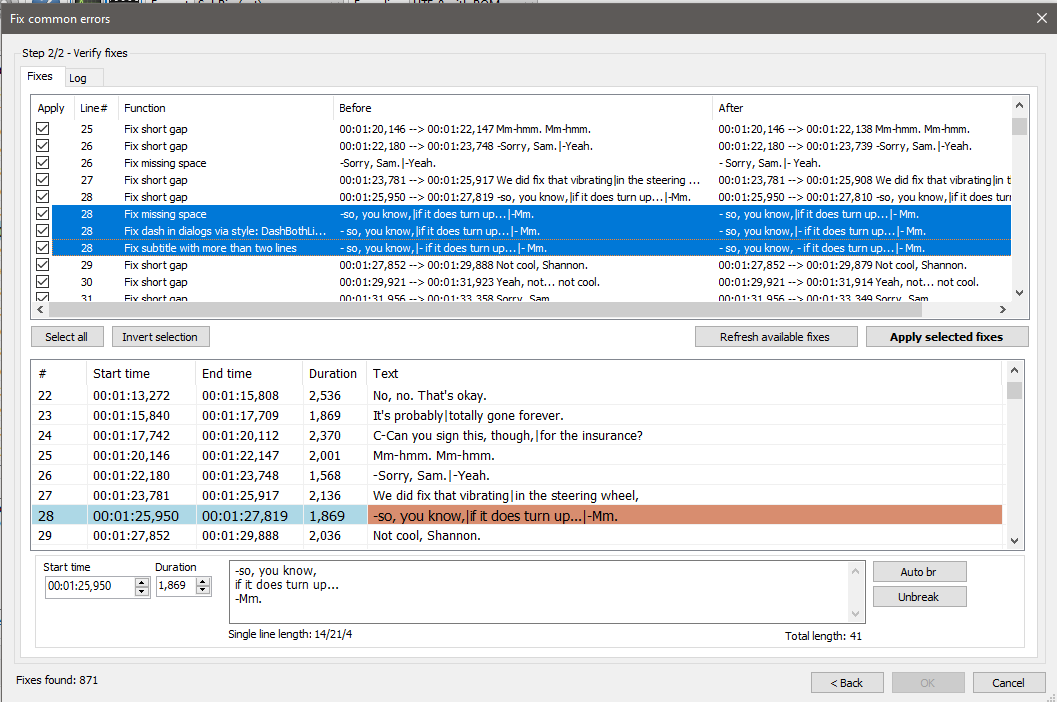
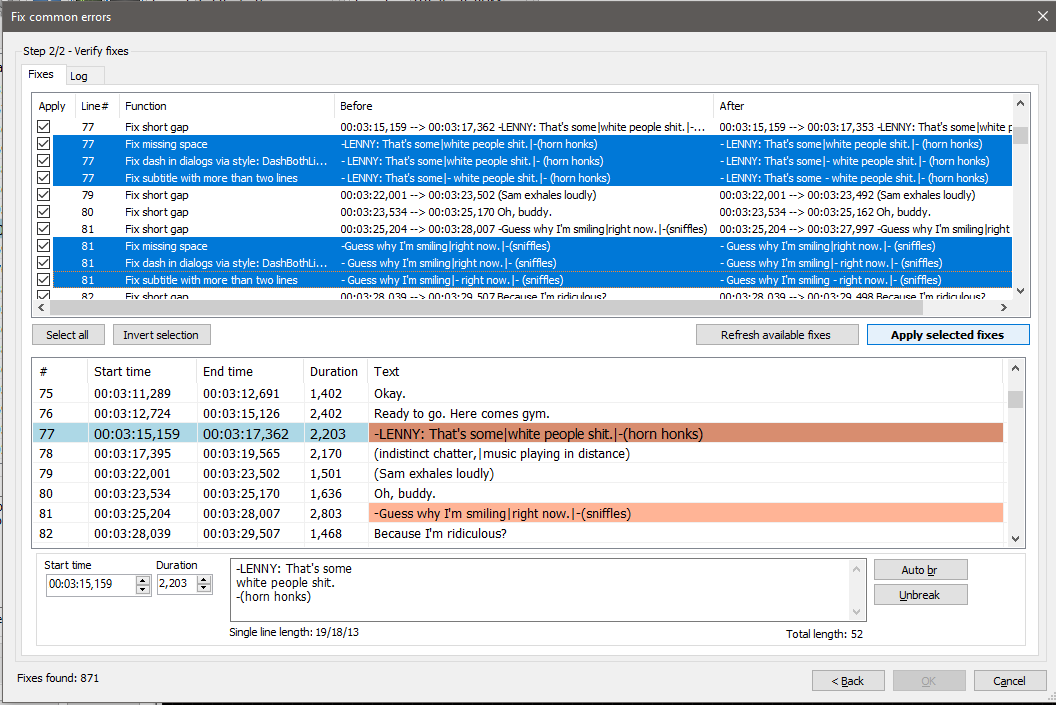
Also about Fix, there's a situation with 3 lines that SE isn't dealing the best way. It is leaving a hyphen when originally was the second line.
-I'm a
once-in-a-generation artist.
-Oh.
It's becoming:
- I'm a - once-in-a-generation artist.
- Oh.
Other examples:
btsix
on 7 Mar 2020
@btsix Why arr selected lines red? Change max number of lines to 3. See if it changes anything.
uckthis
on 7 Mar 2020
@uckthis The mentioned selected lines are red because it depends of the rules you set, the most common everyone follows is 2 lines, also what my settings are.
btsix
on 7 Mar 2020
@btsix You have Fix subtitles with more than two lines selected and that's why you get the
I'm a - once-in-a-generation artist.
Oh.
uckthis
on 7 Mar 2020
@uckthis That's the bug I've exposed above, with another 3 instances of the same pattern. All instances of this cases was treated the same throughout the whole subtitle.
btsix
on 7 Mar 2020
i would just turn the Fix subtitles with more than two lines off in Fix Common Errors. It's not a bug if it does what it's supposed to do.
uckthis
on 7 Mar 2020
Also, I don't know if there's a way to tell if it's either 3 dialogues or two dialogues in 3 lines. You can't automate everything.
uckthis
on 7 Mar 2020
Beta updated with some fixes for three-line-dialogs: https://github.com/SubtitleEdit/subtitleedit/releases/download/3.5.13/SubtitleEditBeta.zip
SE does not have as good support for three-liners as the normal two-liners (some checks/fixes are skipped). Luckily must subtitles/jobs are just using two lines.
niksedk
on 7 Mar 2020
@uckthis: I don't have any problems with extracting subtitles from mkv files... is 3.5.14 still not working for you?
niksedk
on 8 Mar 2020
@niksedk did u try the files i posted?
uckthis
on 8 Mar 2020
@uckthis: It works well here... are you getting a crash or what happens?
What OS?
niksedk
on 8 Mar 2020
@niksedk Nothing happens. In the task bar it'll go all the way to green and then nothing happens. Video will load and you can play it but no subtitles. Anyways, I have older version installed as well, so I'll just extract them there or use CCExtractor.
uckthis
on 8 Mar 2020
@uckthis: Strange as it's working here... what OS are you using?
Are anybody else having problems with extracting subs from mkv files?
niksedk
on 8 Mar 2020
Sub extract from mkv also works on Linux.
niksedk
on 8 Mar 2020
@niksedk OS Windows 10 v 1903
No idea why it's happening. Today I tried a few more mkvs and it extracted from some.But not from the one I posted links of.
It'll solve itself if it's Windows error. I'll install new Windows later this month. I shortcut 3.5.11 on my desktop as well, so I just extract from there. It's no issue.
uckthis
on 9 Mar 2020
@uckthis: 64-bit or 32-bit ? What dot-net framework do you have installed?
niksedk
on 9 Mar 2020
x64 and v4.0.30319
uckthis
on 9 Mar 2020
Related issues
 frozenspider
·
5Comments
frozenspider
·
5Comments
 depeo
·
5Comments
OmrSi
·
6Comments
depeo
·
5Comments
OmrSi
·
6Comments
 m0ck69
·
5Comments
m0ck69
·
5Comments
 darkred
·
4Comments
darkred
·
4Comments
Most helpful comment
Beta updated with some fixes for three-line-dialogs: https://github.com/SubtitleEdit/subtitleedit/releases/download/3.5.13/SubtitleEditBeta.zip
SE does not have as good support for three-liners as the normal two-liners (some checks/fixes are skipped). Luckily must subtitles/jobs are just using two lines.