Stylus: use mousewheel to change a focused input
Details
Origin: Today I see that this extension can use 🎡 to reference.
Alarm Me!
https://chrome.google.com/webstore/detail/knahjdfbilnkfipggnnhojmjpjcgjkmg
https://github.com/frafajec/AlarmMe

a year ago mentioned at https://github.com/openstyles/stylus/issues/760
https://jsfiddle.net/Mottie/cu8opevq/ @Mottie
Now Chrome support the mouse wheel🎡. but Stylus still does not support, So whether to re-study ?
One exception is:
/edit.html <input id="editor.tabSize" type="number" min="0"> is vaild
Expected behavior for Stylus other places:
🎡 can not be used directly, very inconvenient.
- for
/manage.html<input id="manage.newUI.targets" type="number" >
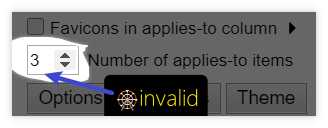
- for
/popup.htmlStylus-UserCss-Popup-Configuration⚙ can use 🎡 to increase or decrease or select.
Details

<select <option value="xx">xxx</option> </select>
<input type="text" class="config-value">
<input type="range" class="config-value">
<input type="number" class="config-value">
 dnknn
dnknn
All 9 comments
Sounds like you want to change it just by hovering the mouse and scrolling the wheel, but it'll lead to the inability to scroll the UI without placing the mouse so that it never hovers anything that can be changed, which is terribly inconvenient.
I can add mousewheel support on the currently focused input though so you'll click it first, then wheel it.
 tophf
on 1 Aug 2020
tophf
on 1 Aug 2020
just by hovering the mouse and scrolling the wheel, but it'll lead to the inability to scroll the UI without placing the mouse so that it never hovers anything that can be changed, which is terribly inconvenient.
You are right, I was wrong.
on the currently focused input though so you'll click it first, then wheel it.
Yes, this is also perfect, more in line with conventional inertial operation techniques.
dnknn
on 1 Aug 2020
@tophf can you add support for input[type=range]?
Example: https://github.com/openstyles/stylus/wiki/Writing-UserCSS#user-content-variable-examples
dnknn
on 9 Nov 2020
@dnknn I've edited your comment to show you an example that I consider sensible and understandable. Most of info you add is unnecessary and only wastes my time. The feature is implemented in 30b9378d.
tophf
on 9 Nov 2020
Hi @tophf, Report a problem: you seem to reverse the adjustment direction of the mouse-wheel.
- Current unconsistency behavior of
input[type=range]:
| Wheel-up : | Decrease |
| Wheel-down : | Increase |
- Expected/fixed behavior:
Just likeinput[type=number]select>option
dnknn
on 4 Dec 2020
No, a range is different, it's horizontal so the current behavior is natural for me. I guess it's based on the native language direction: most world languages are left to right at least in the internet. I can probably switch the direction based on rtl flag.
BTW This is the same way horizontal multi-picture scroll boxes work in the web.
tophf
on 4 Dec 2020
thanks for the reply!
left to right...
The same text direction, however, I personally think that it should be based on the level of increment/decrement as a logical interaction, It should not be based on the horizontal direction.
I have used it seems to be : Wheel-up = Increase .
BTW This is the same way horizontal multi-picture scroll boxes work in the web.
Never used, maybe this is a non-uniform interaction specification...
You think it is normal, so no a big problem, For input[type=range], although I always press the wrong wheel-direction every, but can "use mousewheel to change a focused input" is enough !
dnknn
on 4 Dec 2020
This is how horizontal scrolling works everywhere - wheel up always scrolls to the left - so the current behavior stays intact.
tophf
on 4 Dec 2020
This is how horizontal scrolling works everywhere -
wheel upalways scrolls to the left
OK, I see, It's like overflow-x:auto/scroll; a horizontal scrollbar appears on the webpage, then behavior of Shift+wheel to horizontal-scroll is the same as you described !
dnknn
on 4 Dec 2020
Related issues
 saxamaphone69
·
64Comments
tophf
·
26Comments
saxamaphone69
·
64Comments
tophf
·
26Comments
 catcat520
·
26Comments
catcat520
·
26Comments
 HoLLy-HaCKeR
·
74Comments
HoLLy-HaCKeR
·
74Comments
 tkosamja
·
49Comments
tkosamja
·
49Comments
Most helpful comment
@dnknn I've edited your comment to show you an example that I consider sensible and understandable. Most of info you add is unnecessary and only wastes my time. The feature is implemented in 30b9378d.