Stylus: Chrome forbids extensions on its standard new tab page as of 61.0.3161.0
@schomery, @narcolepticinsomniac, @Mottie, and everybody else.
This is it: https://crrev.com/2978953002/
Extensions wishing to modify the New Tab Page should do so through the
use of the chrome url overrides [1] API, not through content scripts.
Disallow content script injection on the New Tab Page.
We'll have to modify the stylusUnavailableForURLdetails message, and display it for the NTP depending on the browser version.
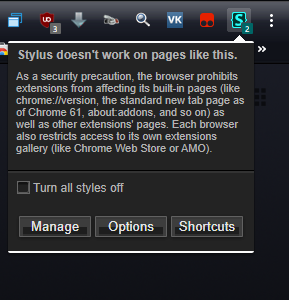
As a security precaution, the browser prohibits extensions from affecting its built-in pages (like chrome://version, the standard new tab page as of Chrome 61, about:addons, and so on) as well as other extensions' pages. Each browser also restricts access to its own extensions gallery (like Chrome Web Store or AMO).
Thoughts?
 tophf
tophf
All 26 comments
No big loss IMO. There are a few styles that target them intentionally, but probably a ton more that do so inadvertently and muck it up even more than it already is. I can't believe people don't change it to anything besides the default. Nothing like a fake input that jumps to the URL bar when you start typing. I'd say adding it to the shit-list depending on the version makes sense. The message LGTM.
 narcolepticinsomniac
on 22 Jul 2017
narcolepticinsomniac
on 22 Jul 2017
Test it please: chrome-no-ntp.zip.
I didn't delete the translated message in other locales as I'm not sure whether we should do it now or wait for Chrome stable to advance to 61.
tophf
on 22 Jul 2017
I'm not sure whether we should do it now or wait
NBD either way, but if the check works fine, might as well be now. There's either a lot less people who use dev/Canary compared to dev/Nightly, or they are just way more realistic in their expectations of an alpha browser. Nightly users always appear to be flabbergasted when anything isn't 100% working _for_ Nightly. If you see any similar reports regarding Canary, they're usually more of a heads-up of what may need to be accounted for soon. Imperfect handling of a page that's essentially being transitioned to internal, would pretty much be expected, but handling it more gracefully in the meantime would be preferable.
I assume you already tested Canary. The Chromium Dev utility/repo I use usually lags behind slightly, so I'll check soon.
narcolepticinsomniac
on 23 Jul 2017
Btw, I hadn't opened Dev in a while, but they finally got rid of that stupid white border in the UI under the bookmarks bar, huh? Something I've been wanting forever, but now that I see a dark UI with a dark styled website, it also looks kinda odd. The white sucked, but it would've been better to leave something more subtle. Preferably, a border/box-shadow which was mostly transparent, but enough for a little definition.
Edit: Actually, I was looking at it with a black themed website. Testing it elsewhere, it seems they switched the border to black, and there is an extremely faint inset box-shadow or something along those lines. It could be a little more well-defined IMO, but a huge improvement nonetheless.
narcolepticinsomniac
on 23 Jul 2017
Done, 3b49d83616c6d9b177f56b66efcb9f834004a3bd.
tophf
on 23 Jul 2017
Got this email after 1.1.2 (not 1.1.2.1) submission
Dear Developer,
We routinely review items in the Chrome Web Store for compliance with our Program
policies https://developer.chrome.com/webstore/program_policies?hl=en to
ensure a safe and trusted experience for our users. Your item "Stylus"
clngdbkpkpeebahjckkjfobafhncgmne is being taken down as it currently does
not comply with the Extensions Quality Guidelines. These guidelines state
that an extension should have a single, narrow purpose limited to (1) a
narrow focus area or subject matter (for example, news headlines",
"weather", "comparison shopping") or (2) a narrow browser function (for
example, "new tab page", "tab management", or "browser history"). A common
violation is to have an extension that injects ads as well as provides a
toolbar all in a single extension.
To have your item reinstated, please ensure:
- The purpose of the extension is clear to users; and
- The extension either limits its functionality to a narrow focus area
of subject matter or to a narrow browser function.
To serve multiple purposes with your extensions, please package each
purpose as a separate extension.
Once your item complies with Chrome Web Store policies, you may request
re-publication in your developer dashboard. Your item will be manually
reviewed for policy compliance which typically takes a few business days,
prior to re-publication. If you have any questions about this item’s
removal, you may reply to this email and the Chrome Web Store developer
support team will follow up with you.
Important Note
Repeated or egregious policy violations in the Chrome Web Store may result
in your developer account being suspended. This may also result in the
suspension of related Google services associated with your Google account.
Thank you for your cooperation,
Google Chrome Web Store team
 schomery
on 25 Jul 2017
schomery
on 25 Jul 2017
One of the reasons I don't want to publish extensions is that the reviewers are robotic or plain stupid. I don't see how that nonsensical take down notice applies to Stylus. I would even go as far as to suspect the "developers" of the new Stylish and USO reporting "abuse". Anyway, I'm not aware of a way to reach a reasonable human responsible for web store. They never explain, they never admit openly their mistakes.
tophf
on 25 Jul 2017
I'll try to contact them and see how it goes.
schomery
on 25 Jul 2017
Seems like an odd coincidence that AMO and the Webstore both rejected us for pretty arbitrary reasons so close together. I'm a sucker for a good conspiracy theory. It'll be interesting to see how this plays out.
At least AMO came up with an actual reason. The Google email says a whole lot of nothing. If I've learned anything about Google, not getting approved usually has something to do with not selecting all the squares with storefronts and street signs correctly.
narcolepticinsomniac
on 25 Jul 2017
Finally got an update to test this in Chromium 62.0.3168.0. The correct message appears, but globals still register on the new tab page so the icon isn't changing correctly.
Also, as you can see in the photo, those thick, stupid white borders Chrome hard-codes around extension popups is funkier than usual. They're on the top and bottom, but not the sides, which looks ridiculous. It has nothing to do with the new tab page, since it's like that everywhere. It also doesn't have anything to do with Stylus in general AFAICT. Seems like they're making a change that's been implemented poorly so far. Hopefully they get rid of it altogether.
narcolepticinsomniac
on 27 Jul 2017
the icon isn't changing correctly
Fixed, test please: no-counter-on-ntp.zip
tophf
on 27 Jul 2017
Seems good now.
narcolepticinsomniac
on 28 Jul 2017
Hey, it would appear that the issue with the Webstore has been resolved. Stylus updated to 1.1.2 today. AMO is still at 1.1.0, but they take forever to approve anything.
narcolepticinsomniac
on 29 Jul 2017
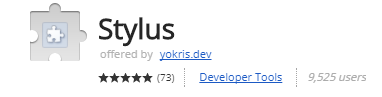
I just noticed though, our icon is missing in the Webstore now. Maybe something to do with certain sizes being replaced recently? I thought that was 1.1.1 though, so maybe not. Not sure if it'll resolve itself, or if we need to fix something.
narcolepticinsomniac
on 29 Jul 2017
AFAIK it has to be uploaded/specified manually in the web store, @schomery?
tophf
on 29 Jul 2017
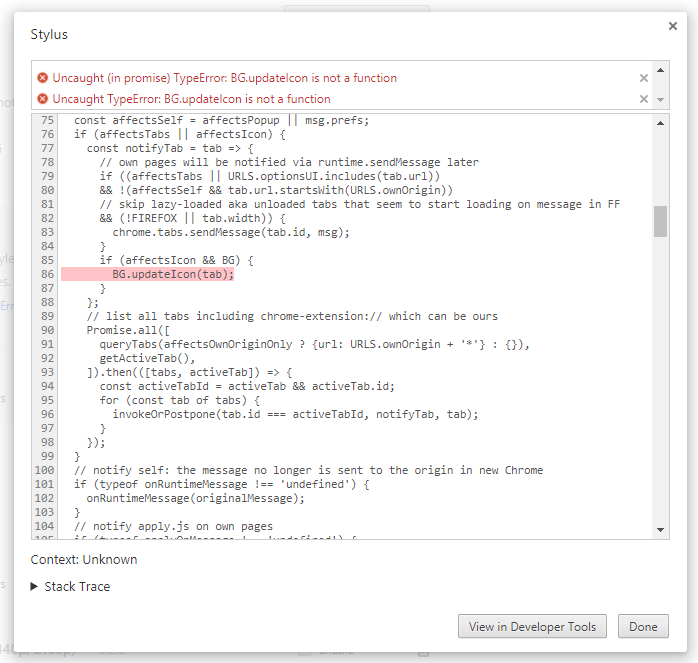
@tophf Btw, I took a screenshot of an error the other day, but forgot to post it. Just saw it before I emptied the recycling bin, so I figured it might be worth mentioning. No real context, nor has it popped up again since.
narcolepticinsomniac
on 29 Jul 2017
@narcolepticinsomniac, thanks, fixed in 860443b9096d3654410953e83f138d4dbc8ff1a6.
tophf
on 29 Jul 2017
A new one from Webstore
Dear Developer,
We routinely review items in the Chrome Web Store for compliance with our Program policies to ensure a safe and trusted experience for our users. We recently found that your item "Stylus", with ID: clngdbkpkpeebahjckkjfobafhncgmne did not comply with our policies.
Your item was found to be suspicious and has requested/fetched one or more external scripts.
To have your item reinstated, please make any necessary changes to avoid requesting or executing remotely hosted code (including by referencing remote javascript files or executing code obtained by XHR requests).
Your item is still published, but is at risk of being removed from the Web Store. Please make the above changes within 15 days in order to avoid removal.
Once you have made these changes you may submit and publish a new draft in the developer dashboard. Your draft will be reviewed for policy compliance which typically takes a few business days. If the outcome of the review is successful, your store listing will remain published. If we find additional issues with your item, we will send you another email with details. If you have any questions about this email, please respond and the Chrome Web Store developer support team will follow up with you.
Important Note:
Your item will still be subject to review and may be removed from the store within the warning period.
Repeated or egregious policy violations in the Chrome Web Store may result in your developer account being suspended or could lead to a ban from using the Chrome Web Store platform. This may also result in the suspension of related Google services associated with your Google account.
schomery
on 30 Jul 2017
Your item was found to be suspicious and has requested/fetched one or more external scripts.
The reviewers are insane?
tophf
on 30 Jul 2017
This seems like a human review. Maybe they have issues with update checks?
schomery
on 30 Jul 2017
They have issues with brains. Stylus doesn't fetch external scripts. Period.
tophf
on 30 Jul 2017
I'll try to contact them one more time! Let's see how it goes.
schomery
on 30 Jul 2017
Maybe they have issues with update checks?
Gotta be, right? That's the only thing it "fetches". Assuming this review is from an actual human being, it's somebody who doesn't understand what the code does. Didn't realize CSS qualifies as a "dangerous external script". Maybe try to explain it preemptively to avoid a prolonged back and forth @schomery .
narcolepticinsomniac
on 30 Jul 2017
Okay I will.
schomery
on 30 Jul 2017
Wow, what a PITA.
 Mottie
on 30 Jul 2017
Mottie
on 30 Jul 2017
Update check fetches a json file with CSS text inside. The CSS text is inserted in a <style> element. Never in an executable thing like <script> or an inline event handler. And the reviewer mistakes that for a js file and an executable script? Another confirmation of how pathetic the web store reviewers are.
tophf
on 30 Jul 2017
Related issues
narcolepticinsomniac
·
27Comments
schomery
·
35Comments
 AmpliDude
·
26Comments
AmpliDude
·
26Comments
 catcat520
·
26Comments
narcolepticinsomniac
·
75Comments
catcat520
·
26Comments
narcolepticinsomniac
·
75Comments