Stylus: Firefox: styles not being applied immediately on some pages.
Hello,
First, thank you very much for this program, I like it very much.
I am writing this to see if you can help to solve a problem present on Stylus for Firefox.
I am using Stylus on Firefox version 57.0.1 (firefox quantum) on Debian Unstable. The problem is that on some pages, like in google search or bing search, the styles are applied after the page is loaded. This cause that if you are using a dark style, it flashes with the default white background color for a second before becoming dark.
You can see the problem following this steps:
- Apply one dark style to Stylus. For example, this one is a very good one: https://userstyles.org/styles/31267/global-dark-style-changes-everything-to-dark
- Search something on www.bing.com
- Click on "next page" on the bottom of bing's search page.
- On the browser's panel, click back to go to the previous page.
- On the browser's panel, click next to go to the following page.
- On the browser's panel, click back and next in succession to see the flashes.
Notice that the problem does not happen every single time.
I am pretty sure that this problem was not present on versions older than firefox quantum.
Also, using Stylus on Chrome web browser the problem does not appear.
Thank you very much sir,
Regards.
 Aqa-Ib
All 85 comments
It was fixed in 2b22494f3f77673cdcebc969bb31b30c0b098abf.
Sorry for the inconvenience.
Can you try the new version by loading it as a temporary extension on about:debugging page? Disable the official Stylus, unpack the zip file, click the load button on that page, point to manifest file in the unpacked directory.
 tophf
on 5 Dec 2017
tophf
on 5 Dec 2017
Hello tophf!
I have tried and it doesn't solve the flashes.
Thank you very much sir.
Regards.
Aqa-Ib
on 5 Dec 2017
Well, I can't reproduce the flashes no matter how I try with the new version... Not sure what the problem is in your case. Try in a new browser profile without any extensions except the new version of Stylus.
tophf
on 5 Dec 2017
I have tried with a brand new profile and the problem is still there.
Also I have tried the new version of Stylus that you gave me on another computer, one with a better CPU. On that one the flashes are so rapid that you can't notice them unless you are very observant.
So I suspect that this problem affects the less powerful CPUs because the flashes are intensely noticeable. I notice them very well on a Intel(R) Pentium(R) CPU G4400 @ 3.30GHz.
Regards.
Aqa-Ib
on 5 Dec 2017
If this is CPU-bound then there's a problem in Firefox, not present in Chrome, which we can't circumvent for the time being. Maybe our insertCSS version will help a bit when it's ready, but maybe not.
tophf
on 5 Dec 2017
It also could be related to the host O.S., because the computer where I notice the flashes is using Debian and the computer where I don't notice them is using Windows 10. So for now I can't tell if it is CPU-bound or SO-bound.
Thank you very much!
Aqa-Ib
on 5 Dec 2017
Oh, maybe FF on Debian doesn't use GPU hardware acceleration?
tophf
on 5 Dec 2017
In fact, I have learnt that FF comes with hardware acceleration disabled by default on Linux because of a security risk. I have enabled it by force and the problem persists.
Also, I have disabled it on the Windows computer and the problem doesn't happen anyways.
Aqa-Ib
on 5 Dec 2017
The thing is that this problem didn't happen pre firefox quantum. May I report this bug to Firefox itself?
Aqa-Ib
on 5 Dec 2017
They won't listen unless you can provide a really simplified test. When you say "an extension has a problem with" they automatically close reports and say that the extension authors should investigate it.
Also, the problem might be something specific to linux desktop/display manager or the way it interacts with Firefox.
tophf
on 5 Dec 2017
I have just tried firefox version 52.5.0 and the problem is not there. The changes to firefox quantum introduced it for sure. It could be related to that changes in conjunction with linux display manager, who knows.
Aqa-Ib
on 5 Dec 2017
Hmm, you can help them by bisecting the regression range: http://mozilla.github.io/mozregression/
tophf
on 5 Dec 2017
Thank you very much tophf, I will see what I can find.
Aqa-Ib
on 5 Dec 2017
Hello @tophf . I have looked into this problem and I have verified that writing a dark CSS style into Stylus causes the flashes, but writing the same exact dark style into Firefox's userContent.css resolves the flashes.
I have reported this issue to Mozilla developers.
https://bugzilla.mozilla.org/show_bug.cgi?id=1462070
One of them said:
If this is the Stylus source code:
https://github.com/openstyles/stylus
then the extension appears to inject a content script into every page that sends a message to the background page asking what styles to apply. This is always going to be racy (in addition to being needlessly expensive).
Using an API like this instead would be more efficient and would make styles available before the content is first displayed:
https://developer.mozilla.org/en-US/Add-ons/WebExtensions/API/contentScripts/register
What do you think about it?
Aqa-Ib
on 16 May 2018
Er, wait, I can reproduce if I repeat back-forward navigation 10 times or more. Gonna look into it.
tophf
on 17 May 2018
Hello @tophf. Thank you very much for your response man.
I told you before that the flashes didn't appear in a computer with windows 10, but yesterday I tried it again and now it is happening in that computer too.
Ok, I read that it happens to you too. You dont need to go back and forward to reproduce it. Just go to www.google.com and press F5.
Thank you a lot sir.
Aqa-Ib
on 17 May 2018
Well, I can see it only once per 10-50 back/forward navigations and never on refresh.
tophf
on 17 May 2018
Now I can't see it even after 100 repetitions...
tophf
on 17 May 2018
Lol, that's weird. I don't know what changed in my computer with windows 10 but before it didn't happen and now it happens everytime. I wish I could tell you how to reproduce it.
Aqa-Ib
on 17 May 2018
@tophf I ran into the same thing a while back in FF. I was pretty confident I narrowed it down to a conflict with TM instant inject mode being enabled. Not sure if that's relevant here, but maybe worth mentioning.
 narcolepticinsomniac
on 17 May 2018
narcolepticinsomniac
on 17 May 2018
Can you try on these two sites?
https://www.reddit.com/
http://www.wordreference.com/es/en/translation.asp?spen=hola
Aqa-Ib
on 17 May 2018
No, I can only see a mini-flash of the style's background picture on bing.com while going back/forward really quickly.
We could have used the suggested contentScripts.register in some cases like the global styles that apply to <all_urls>, and in non-regexp styles, though. It seems to remove the mini-flashes completely. However, contentScripts.register is still a crippled/limited solution for Stylus because we can't control the order of the registered stylesheets unless we re-register all the enabled styles whenever one of them is updated or re-enabled. This problem is nearly the same as with tabs.insertCSS, which is why I'm reluctant to implement it.
It'd be helpful if you test it anyway:
- open the "Global dark style" editor in Stylus
- uncheck "Enabled" and save
- open devtools (F12 key), switch to console and run the following code:
browser.contentScripts.register({matches:['<all_urls>'], allFrames:true, matchAboutBlank:true, runAt: 'document_start', css: [{code: editors[0].getValue()}]}) - reload the site(s) and try to make them flash
tophf
on 17 May 2018
@narcolepticinsomniac, I've been able to see it in a pristine user profile with Stylus only, no other extensions. Looks like our model is indeed "racy" and "expensive" in FF due to its implementation specifics. Let's see if the new trick above solves the problem for the reporter.
tophf
on 17 May 2018
Ok, you are a beast. Now it doesn't flash never.
Aqa-Ib
on 17 May 2018
OK. I'll see if I can overcome the lack of ordering in contentScripts.register and either implement the new mode by default in FF, or it'll be an option.
tophf
on 17 May 2018
Thank you very much sir. I really appreciate it.
Aqa-Ib
on 17 May 2018
I read that contentScripts.register currently has these problems, maybe we have to wait until they are fixed, I don't know. I post it here in case it is useful information for you:
1.)
script.remove()does not remove the CSS from loaded tabs.
Patches are welcome: https://bugzilla.mozilla.org/show_bug.cgi?id=1423323
2.) There is no way to specify the
cssOrigin, so@-moz-documentrules won't work (https://bugzilla.mozilla.org/show_bug.cgi?id=1035091).
I see two possible solutions:
* Request acssOriginproperty either on thecontentScriptOptionsor each entry in its.css.
* Use the content scripts.matchesoption to include it only on the desired domains in the first place.
This should again be faster than injecting it everywhere and then filtering through@documentblocks,
but.matchesonly supports match patterns. They can emulateurl(),domain(), andurl-prefix(),
but notregexp()includes, which again leaves two options:
* Use.register({ matches: [ ..., ], })where possible, and the current implementation forregexp().
* Request RegExps in.matches.
It is actually being discussed at: https://bugzilla.mozilla.org/show_bug.cgi?id=1462070
Aqa-Ib
on 17 May 2018
Well, I wasn't planning to use its direct CSS injection anyway since it doesn't support specifying the order (for example, one of the several styles appplied to a page is disabled, then enabled, or its code gets autoupdated). I'll try to simply set the style data variables which can be used by our main content script so it can maintain the order as it does now.
tophf
on 17 May 2018
So I've used contentScripts.register to get rid of the "racy" asynchronous messaging and provide the style CSS as a variable in our content script synchronously at document_start. The CSS was applied via style DOM elements like previously.
It didn't help. Only direct registration of literal CSS code helps, which means the problem is not the "racy" messaging like that Firefox dev said. The problem is that Firefox sometimes needlessly renders a completely empty page before or somewhere around document_start. Chrome did it in the past until they've fixed it recently.
I'm not sure what to do next, as I don't want to use direct registration of CSS due to its lack of stylesheet ordering, which is needed for our LivePreview of styles in the editor and dynamic toggling of styles. So far the only solution is to re-register all styles that have a higher id on each change of the style code. Yuck.
tophf
on 17 May 2018
"The problem is that Firefox sometimes needlessly renders a completely empty page before or somewhere around document_start." thats true, I noticed it, but I think that it is another problem different to this one.
The code that you gave me before worked like a charm, because it makes the pages not to display before Stylus styles.
Maybe the problem is that you can't reproduce the bug on your computer. I can test anything if you want.
Thank you very much.
Aqa-Ib
on 17 May 2018
but I think that it is another problem different to this one.
No, it's not.
The code that you gave me before worked like a charm
It's the direct registration of CSS I've described above.
Maybe the problem is that you can't reproduce the bug on your computer
Like I said, I see the flashes: "It didn't help. Only direct registration of literal CSS code helps, which means the problem is not the "racy" messaging like that Firefox dev said".
tophf
on 17 May 2018
I see. So in order for me to understand... The direct registration of literal CSS is only possible through contentScripts.register but in a way that breaks Stylus ?
Aqa-Ib
on 17 May 2018
and is not completely implemented as mentioned above
 DanaMW
on 17 May 2018
DanaMW
on 17 May 2018

narcolepticinsomniac
on 17 May 2018
you know that Dana guy will steal that and display it like a prize
DanaMW
on 17 May 2018
contentScripts.register can be used to 1) run JavaScript code with the style CSS that's added to the page as style DOM element 2) insert CSS directly.
Both do it at document_start so theoretically there should be no difference, but as I've tried the first approach it turned out FF paints an empty white page anyway, apparently before our script runs at document_start.
With the second approach FF knows your CSS when it erroneously paints that empty page. Hence there's no apparent flash (it's just dark), or it can avoid the flash altogether since it knows the CSS hasn't changed. However the problem with this approach is that there's no way to dynamically toggle the style and to dynamically update the style's CSS while it's being edited in the editor with LivePreview enabled - instead we'll have to re-register all the styles that come after that. It'll be bad in cases there are many big styles applied on a given site.
tophf
on 17 May 2018
I see thank you for the explanation. I want to make clear that the problem that I am having with Stylus, is that it shows an unstyled version of the site, then it get styled quickly, giving the bright flash. The problem that I am having is not that I see a blank white page, it is that I see the page unstyled before it get styled right after.
Aqa-Ib
on 17 May 2018
Well, I guess the particular details of how the flash is manifested depend on CPU, mine is 4GHz i7.
tophf
on 17 May 2018
Pentium G4400 @ 3.30GHz here.
So, after I told you that I can see the unstyled site before it gets styled, do you still think that the problem is that firefox renders a completely empty page ?
Aqa-Ib
on 17 May 2018
Now I have doubts indeed, but I can't do anything about it anyway...
tophf
on 17 May 2018
OK man, lets see if in the future the API gets better or something, I guess.
Anyways, thank you very much, I really appreciate your help.
Aqa-Ib
on 17 May 2018
I still think that the flashes that you are seeing on your system are not the same that the ones that I see on mine. If you send me your changes of Stylus with contentScripts.register I can tell you if I still see the unstyled pages with it or not.
Aqa-Ib
on 17 May 2018
Sure: stylus.zip
It's just a draft though so only a straightforward use case is supported.
tophf
on 17 May 2018
Any advice on how to compile or install the source code? I'm noob sorry.
Aqa-Ib
on 17 May 2018
tophf
on 17 May 2018
Ok, I have loaded the extension, then I went to write a new style, I wrote the style and saved it straight. Then I went to http://www.wordreference.com/es/en/translation.asp?spen=cabeza and pressed F5 to watch the unstyled page before it gets styled indeed. I don't know if I should have made anything else for it to work?
Aqa-Ib
on 17 May 2018
Er, I didn't elaborate, but the straightforward use case means the styles are only registered on extension [re]start. Now that you have a style, simply click reload on about:debugging page, then also reload the web page just in case.
tophf
on 17 May 2018
I have added that step to the process and I still see the unstyled page on reload just before it gets styled, giving the damned bright flash still.
Thank you very much @tophf, you are great man.
Aqa-Ib
on 17 May 2018
Just to make sure the new code actually ran, open the web page devtools console and see if it has registered and same code entries.
tophf
on 17 May 2018
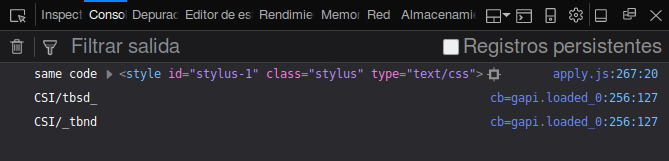
Not registered it seems.
Aqa-Ib
on 17 May 2018
There's no registered. Try a style with a simple global section, that is which "Applies to everything" as shown in the editor.
tophf
on 17 May 2018
I have tried with this simple style:
* {background-color: #000000 !important}
Now it is registered. Still the damned flashes appears.
Aqa-Ib
on 17 May 2018
Thanks for confirming.
tophf
on 17 May 2018
I think that you are refering to different flashes than mine because I can see two of them:
- When I normally realod the page, the unstyled page appears becoming styled right after. This ones are the ones that I reported, and that the code you gave me fixed.
- When I spam the reload button, I can see a blank white page, which seems to be a different type from the preivous one, not related with Stylus at all in my opinion. This ones I think are the ones that you see in your system.
Aqa-Ib
on 17 May 2018
Well, it's still within my assumptions in https://github.com/openstyles/stylus/issues/287#issuecomment-389792233 and https://github.com/openstyles/stylus/issues/287#issuecomment-389799808 - Firefox apparently postpones calculation of styles added in our content script even though it occurs at precisely the same moment technically (document_start) as the direct registration of CSS code (https://github.com/openstyles/stylus/issues/287#issuecomment-389687261).
tophf
on 17 May 2018
The fact is that Firefox version 52 or older didn't have this problem.
If you want, I encourage you to write something in the BugZilla thread to Mozilla developers:
https://bugzilla.mozilla.org/show_bug.cgi?id=1462070
Aqa-Ib
on 17 May 2018
Old Firefox had a completely different architecture (it was a single process) so of course it didn't have the problem. I also don't think the problem is that simple to fix since it took Chrome developers years to even acknowledge it and then come up with a rather complex fix.
tophf
on 17 May 2018
Well, at least I have hope because the code that you gave me before fixed the problem. Let's hope that contentScripts.register API improve in the future, or that a new API appears that Stylus can use without breaking functionalities. (Wishful thinking ^_^).
For now I am moving to Chrome.
I let you in peace @tophf. Thank you very very much for your attention.
Aqa-Ib
on 17 May 2018
For now I am moving to Chrome
Moving to the standard Chrome might be hard. See if you'll like CentBrowser (latest beta is based on Chrome 66), which is more customizable. The downside is that it takes a few weeks for them to catch up with each official release.
tophf
on 17 May 2018
CentBrowser hasn't a build for linux, thank you anyways.
The fact is that I couldn't stay in Chrome for too long. That browser has a lot more white flashes than firefox.
Actually the "workaround" that I have to this problem is adding this code into userContent.css for those sites that I visit a lot and emit white flashes:
@-moz-document domain("wordreference.com"), domain("google.com"), domain("google.es") { * {background-color: #222 !important} }
Aqa-Ib
on 22 May 2018
Unless there's some regression in Linux, Chromium solved the white flash issue a while back. The method is different in that it shows the current bg color till the next page loads, but navigating from dark to dark shouldn't flash white. Only time I see it fail is if the dark bg isn't on html or body, which is uncommon.
If you have issues with white flashes in new tabs opening, that can be due to which theme you use. When a new tab is opened, the bg that flashes briefly before the page loads uses the bg color of the new tab, which is specified in some themes, but not others.
narcolepticinsomniac
on 22 May 2018
Hey narcolepticinsomniac!
I know that Chrome fixed that big white flash issue that you are refering to, that was a great improvement. Although it still has some other flashes going. For example: when you load many pages on new tabs, but you don't click on them, let them load in the background. Then, close the actual tab to automatically go to the next tab that was previously loaded, giving sometimes a white flash in the process.
Also there is the bleach-white Chrome interface that can't be modified. Extensions interfaces can't be darkened easily as in Firefox userContent.css.
P.S. God bless the day when human beings deprecate the white color from computer backgrounds.
Edit: Actually my real workaround for this problem is falling back to putting the dark style directly into userContent.css without extensions. I wish that one day we have a good API for extensions to apply styles.
Aqa-Ib
on 22 May 2018
...when you load many pages on new tabs, but you don't click on them, let them load in the background. Then, close the actual tab to automatically go to the next tab that was previously loaded, giving sometimes a white flash in the process.
Oh yeah, huh? If I ever saw it before, it didn't register enough to notice, but I doubt I've ever seen it in recent history, tbh. I use "Tabs to the Front" extension, and it doesn't seem to happen unless tabs are opened in the background. The scenario you explained with bg tabs does cause a random, yet frequent white flash. Wonder if there's a bug filed for this.
Btw, idk what distro you use, but Mint 18+ has a setting to force the system theme. Been like that for a while, I'd guess other distros have the same. The Chromium interface gets a pretty nice dark theme (URL bar and all) if you've got a good dark system theme.
Edit: White flash is more accurate than FOUC. I'd guess you get a quick flash of Chrome's chrome, which I believe would also be dark in Mint.
narcolepticinsomniac
on 22 May 2018
Yes, on any distribution out there, Chromium and Firefox both take the GTK3 color scheme and apply it. It is a really nice option for a unified system look. Unfortunately, as far as I know, we can't actually change the color from Chrome protected pages, like extensions pages, history page, settings page and chrome:// pages.
Aqa-Ib
on 22 May 2018
Unfortunately, as far as I know, we can't actually change the color from Chrome protected pages, like extensions pages, history page, settings page and chrome:// pages.
It'd be nice, I guess, but I've never thought of it as essential. Idk how much I could accomplish with custom.css in Cent because it doesn't bother me enough to experiment.
IIRC, Slimjet has an inversion switch which affects internal pages. They have a Linux version too. Not even necessarily recommending it, because it's not like I ever really used it. I'm unsure if/how you could uninvert regular webpages, plus inversion is a far cry from user CSS. Maybe worth checking out though, it has a bunch of the same bells and whistles as Cent.
narcolepticinsomniac
on 22 May 2018
Thank you, I will try it.
Aqa-Ib
on 22 May 2018
I reported that one in case they can fix it:
https://bugs.chromium.org/p/chromium/issues/detail?id=845621
Aqa-Ib
on 22 May 2018
@narcolepticinsomniac thank you very much for posting the video in the chromium bug report. I am pretty sure that it was you.
Aqa-Ib
on 24 May 2018
@tophf these are the flashes that I was talking about. I should have uploaded this video at the beginning, I am sorry, but better late than never: https://www.youtube.com/watch?v=mSKXT_uBmJE
These flashes are different from the flashes that you can see when you spam the reload button. Anyway, I never spam the reload button, so those are not a real problem.
Aqa-Ib
on 24 May 2018
Well, it still fits my previous guesses.
tophf
on 24 May 2018
This happens on Chrome too. I have Chrome 59, and with my userstyle for mediafire when I open any download page the layout is the non-modified one for a second or so until the page finishes.
The weirdest part is that if I stop the loading of the page my style is not applied at all. But a quick view in the inspector shows the style added after the body element.
 q1k
on 25 May 2018
q1k
on 25 May 2018
@q1k The delay is due to your code. You're using body.download as a parent selector throughout, but as with a lot of sites, the class is added by js and the js is slow.
You might use @-moz-document regexp("https?://www\\.mediafire\\.com/file/.*") to limit it to download pages without using the .download class, which causes the delay.
narcolepticinsomniac
on 25 May 2018
Also, why Chrome 59? Kinda old and random.
narcolepticinsomniac
on 25 May 2018
@narcolepticinsomniac But why does it not happen in firefox with stylish 2.1.1 or waterfox as well? The regexp doesn't work. And Chrome 59 because the newer versions have some problem with canvas elements that makes mouse movement while locked too slow.
q1k
on 25 May 2018
The regexp doesn't work.
I only knew of one test link off the top of my head:
http://www.mediafire.com/file/vbd2dwas2rckdj5/firadisk-src-0.0.1.30.7z
The regex works for that, but idk if they use others. The idea was to limit it to download pages via URLs instead of the slow .download selector.
But why does it not happen in firefox with stylish 2.1.1 or waterfox as well?
Weird, and irrelevant. Sometimes sites change their code based on UA strings, particularly outdated ones. It doesn't really matter, because the cause of the delay is simple to figure out.
The weirdest part is that if I stop the loading of the page my style is not applied at all
Not weird at all. Check again, if you stop loading before it's applied, body will have no .download class. The style isn't applied because the parent selector you use in every selector doesn't exist yet.
narcolepticinsomniac
on 25 May 2018
@narcolepticinsomniac I was trying to make the regexp work, and it turns out the correct one https?://www\\.mediafire\\.com/file/.* is not accepted by userstyles.org.
It shows error
1 error prohibited this style from being saved
There were problems with the following fields:
Example url must be provided; could not determine what site this affects.
But the regexp works.
EDIT:
I found a workaround by adding an empty section with domain..
q1k
on 25 May 2018
Regexp in @-moz-doc rules require surrounding quotes and double-backslashes to escape, like the original above. Without seeing exactly what you're submitting, that's my best guess. Btw, forward slashes don't need escaping in those rules.
narcolepticinsomniac
on 25 May 2018
I'm closing the issue since it's 90% off-topic and there's nothing we can do until FF at least implements its new registration API completely.
tophf
on 25 May 2018
It is fine. Thank you very much for your attention!
Aqa-Ib
on 25 May 2018
I recently wrote a Chrome polyfill for browser.contentScripts.register, so if that API works well in Firefox now it can also be used in Chrome.
 fregante
on 1 Jul 2019
fregante
on 1 Jul 2019
How did you implement unregister for CSS? IIRC there is no way to remove a content style injected by tabs.insertCSS.
 eight04
on 1 Jul 2019
eight04
on 1 Jul 2019
Good point, I didn't implement that part since my main use was with scripts and scripts can't be "undone"
But I just tried the regular browser.contentScripts.register in Firefox and that doesn't seem to happen natively either: the changes are always applied on the next reload, both on register and unregister
fregante
on 1 Jul 2019
So #248 is still an issue.
However, It sounds like we can use the register API to "prefetch" the CSS code. Things need to be measured:
- Does it improve the load speed? How do we compare the performance of registered content script v.s. script transferred through
runtime.sendMessage? - If a style uses regexp to match URLs, should we prefetch that style for all pages (since
registeronly supports match pattern + glob)? - How do we know if a style is prefetched? It is possible that the style code is not loaded when
apply.jsis loaded. If we still have to query the background for the status of the style code, then we should measure the performance of messages with the style code v.s. messages without the style code. - Is the performance still a problem in 2019?
eight04
on 1 Jul 2019
If you have those constraints you probably can't use contentScripts.register:
- no regex support
- even if you just use it to prefetch the CSS, the registered code still needs to wait for an activation message, so at that point I don't it's much different than running
insertCSSdirectly
fregante
on 1 Jul 2019
https://github.com/openstyles/stylus/issues/287#issuecomment-389792233
So I've used contentScripts.register to get rid of the "racy" asynchronous messaging and provide the style CSS as a variable in our content script synchronously at document_start. The CSS was applied via
styleDOM elements like previously.It didn't help. Only direct registration of literal CSS code helps, which means the problem is not the "racy" messaging like that Firefox dev said. The problem is that Firefox sometimes needlessly renders a completely empty page before or somewhere around document_start. Chrome did it in the past until they've fixed it recently.
I'm not sure what to do next, as I don't want to use direct registration of CSS due to its lack of stylesheet ordering, which is needed for our LivePreview of styles in the editor and dynamic toggling of styles. So far the only solution is to re-register all styles that have a higher id on each change of the style code. Yuck.
According to this comment, prefetch the code doesn't help with this issue. Although I'm not sure if it can improve the load time.
eight04
on 1 Jul 2019
Related issues
tophf
·
26Comments
narcolepticinsomniac
·
74Comments
 schomery
·
35Comments
schomery
·
35Comments
 tkosamja
·
49Comments
narcolepticinsomniac
·
75Comments
tkosamja
·
49Comments
narcolepticinsomniac
·
75Comments