Sparkle: App cleaner damaged Sparkle causing ambiguous popup message
My apologies if this is the wrong place...
Preface: although I am a developer, I am not a MacOS developer. I develop hybrid mobile apps for iOS and Android. So, I do not use Sparkle in my projects.
I was cleaning-up my MacOS installation (with App Cleaner) and came across Sparkle. When to the website to see what it was. Said to myself "I don't use this, what is it doing on my system?" And deleted it.
I gather it's a tool used by MacOS app developers for updating their apps.
Oops!
So, this morning, I found this popup on my desktop:
Insecure update error!
For security reasions, you need to code sign your application or sign your updates with a DSA key. See https://sparkle-project/documentation/ for more information.
Huh?
WHAT application? How would I possibly know?
MY application? MY updates? Wha?
I GUESS this occurred because I deleted Sparkle (or some Sparkle data) and now some app is trying to do an update. Which one, I know not.
So, the issue here is - could this please be made a more user-friendly message?
The linked URL and text is not useful to end-users. It's barely useful to me as a developer. (Only insofar as it gave me the information I needed to come here and write an Issue...)
The only way this makes sense if if the developer were to have the gift of remote vision... It is speaking to the wrong person. "Helloer, sorry, the developer is not here! Sorry, this is the end-user!"
I do not know if this popup is from Sparkle itself, or from some app. If the latter, you might bold-text an admonishment in your documentation to developers to please provide specific information.
Aside from the above suggestion, can somebody please point me to some documentation on how to fix this now? Will Sparkle (and whatever data it needs) come back the next time I newly-install some app that uses it? If so, can somebody suggest some trivial app I can install (and then immediately uninstall)to get it back. Again, the Sparkle website is non-helpful to end users.
 jtara
jtara
All 26 comments
Sparkle is not an application, but a framework (library) used internally by other apps. It's not supposed to be user-visible and you generally can't remove it from apps without damaging them.
It looks like you've deleted some internal files from app bundle and broke app's code signing. To Sparkle this looks like it hasn't been installed properly yet, which is why you get developer-oriented installation instructions.
Trash the damaged app bundle. Download the app again from its website, don't mess with its internal files, and it will work again.
 kornelski
on 3 Nov 2017
kornelski
on 3 Nov 2017
I have no idea what app. The popup doesn't tell me. That's the point of the Issue. The popup is not useful to end-users.
Does that popup come from the Sparkle framework? Or from some app? The way it is worded, I have to assume it's something built-in to Sparkle.
Actually, the message says nothing about missing framework or data. I am just speculating, as I recall removing something related to Sparkle. It says that some application (which?) needs to be signed and isn't. But the message is probably erroneous, and some code has misinterpreted an error return.
It is a "note to the author". But I am not the author. Maybe it was something meant to be caught by the author during development, and assumed never to be seen by end-users.
jtara
on 3 Nov 2017
It comes from Sparkle. If you don't see which app it is from, it's most likely from a menu bar app that hides itself from the dock.
I get that you're trying to say users should never see it. And indeed normal users never see it. You're an exceptional case, because you've modified apps and broken them. I don't know App Cleaner, but it's probably not a good idea to use it if it breaks code signing and exposes Sparkle to end users.
kornelski
on 3 Nov 2017
Thanks, I will check each menu bar app and try to update each.
It's a shame you closed this, though. Apparently, you do not think that it is a problem that the message give no indication which app it is talking about.
If Sparkle has the name of the app, IMO it should include it in the popup message. I can't think of any good reason for NOT identifying the app. Nor for not making the message meaningful for end-users.
I didn't modify any apps.
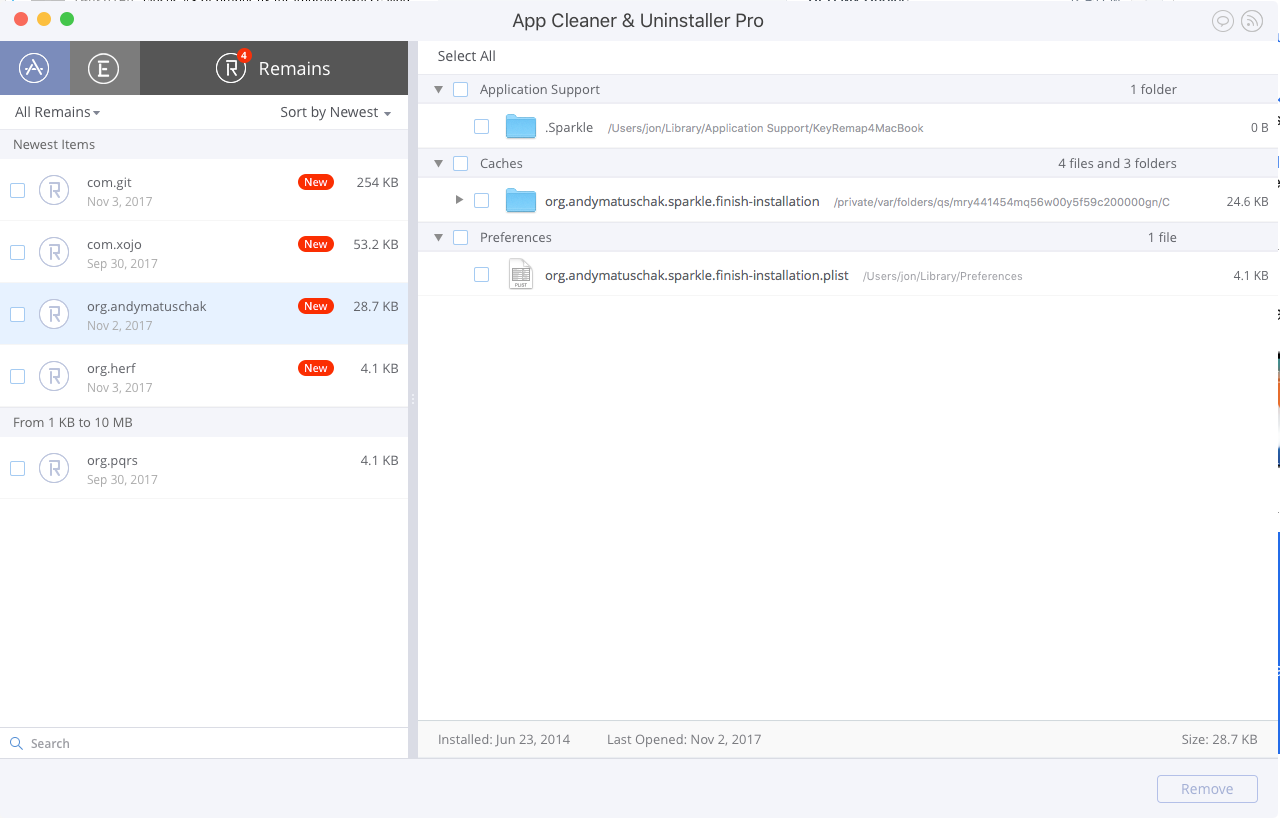
App Cleaner has a few functions, the main one being that it will remove an app and all of it's associated data. But it also finds (or at least tries to find) orphaned data that has no currently-installed app. (It calls these "remains"
FWIW, it's this:
https://itunes.apple.com/us/app/app-cleaner-uninstaller/id1013897218?mt=12
(There are other apps with a similar name.)
So, I just opened it to see if there is some log of past actions, but did not find anything in the app itself. However, it did find a new "remain". I will attach a screenshot.
Looks like the app is Karabiner. Which I uninstalled, or thought I did. But it seems it hangs around like a zombie.
jtara
on 3 Nov 2017
jtara
on 3 Nov 2017
OK, these folders are safe to delete. Perhaps then just one of your apps actually has Sparkle incorrectly installed, or has been damaged in some other way.
kornelski
on 3 Nov 2017
Usually alert windows are obviously associated with an app. For regular apps the menu in top left shows the app name, so the alerts don't need to repeat it.
Menubar apps don't have that. So I guess for these we could try to do something.
kornelski
on 3 Nov 2017
I got the same issue, it just pops up out of nowhere while watching youtube.
This non-informative popup freaks people out. What security reason??? What app is broken? The link leads to a 404 page.
 Mrtn79
on 12 Apr 2018
Mrtn79
on 12 Apr 2018
Any suggestions how this message should be worded?
- it's intended for the application developer who is working on the application.
- users are never supposed to see it, as they can't fix it.
Unfortunately, we don't know who's the user and who is the developer, so the message must be clear for both.
kornelski
on 12 Apr 2018
This is a PR (as in public relations, not pull request!) problem for Sparkle. If an app developer uses Sparkle incorrectly it isn't Sparkle's fault, but Sparkle gets the blame.
So I think it would be a good idea to include the name of the app in the message. Something like
"Insecure update error!
For security reasons, THE_APP_NAME needs to be code signed or have its updates signed with a DSA key. Please tell the application's developers to see https://sparkle-project.org/documentation for more information."
This also corrects the misspelling of "reasions" to be "reasons" and the bad URL (missing ".org"), but I'm not sure if these errors are in the Sparkle code or come from an error in the quote in the original post.
Although the app name isn't needed in a non-menubar app, I don't think hurts to specify the app name, so I don't think it's worth the trouble to make including the app name conditional on whether it's a menubar app, although that could be done by examining the app's Info.plist for NSUIElement and LSUIElement.
 jkbullard
on 12 Apr 2018
jkbullard
on 12 Apr 2018
I'm not a developer of open source apps, just a user. I just found out that the Mac.OS (El Capitan 10.11.3) has some issues with some open source apps from Github. To find a list of the used Sparkle apps on your mac, open terminal and type:
find /Applications -name Sparkle.framework
I just deleted all of them, problem was solved.
Mrtn79
on 19 Apr 2018
@Mrtn79 If you just delete the framework, the apps may not start. At best you will be left with apps that don't receive updates, including potential security fixes.
Usually if you have problem with Sparkle as an end user:
- Download a fresh copy of the app manually. It's possible that your version is too old to update itself (authors move servers, lose keys, etc.), or the app bundle got damaged somehow.
- If even the latest version fails to update, report the bug to the app developer.
- If all Sparkle-based apps fail to update, report the bug to us with messages from Console.app.
kornelski
on 19 Apr 2018
@kornelski the whole point of this issue is that it's unacceptable to give the user such a message without identifying what app it is referring to. This is why your advice
Download a fresh copy of the app manually...
Is 100% meaningless - the whole problem is to figure out what app to upgrade/fix/remove.
What you should do is altering this popup message and include the app name, and/or its complete path - like others suggested in this thread.
P.S. In our days, DSA keys are out of favor. Try something newer.
P.P.S.
$ find /Applications -name Sparkle.framework -print
/Applications/VLC.app/Contents/Frameworks/Sparkle.framework
/Applications/TeX/SimpleTeX4ht.app/Contents/Frameworks/Sparkle.framework
/Applications/TeX/LaTeXiT.app/Contents/Frameworks/Sparkle.framework
/Applications/TeX/TeXShop.app/Contents/Frameworks/Sparkle.framework
/Applications/TeX/BibDesk.app/Contents/Frameworks/Sparkle.framework
/Applications/TeX/TeX Live Utility.app/Contents/Frameworks/Sparkle.framework
/Applications/filesync.app/Contents/Frameworks/Sparkle.framework
/Applications/FotoMagico 5.app/Contents/Frameworks/Sparkle.framework
/Applications/Docker.app/Contents/Frameworks/Sparkle.framework
/Applications/Painter Essentials 5.app/Contents/Frameworks/Sparkle.framework
/Applications/Utilities/XQuartz.app/Contents/Frameworks/Sparkle.framework
/Applications/Utilities/cocoaDialog.app/Contents/Frameworks/Sparkle.framework
/Applications/Transmit.app/Contents/Frameworks/Sparkle.framework
/Applications/MacVim.app/Contents/Frameworks/Sparkle.framework
/Applications/Toast 16 Titanium/Toast Titanium.app/Contents/Frameworks/Sparkle.framework
/Applications/HipChat.app/Contents/Frameworks/Sparkle.framework
Which of these should I "download a fresh copy of"?
 mouse07410
on 6 Jan 2019
mouse07410
on 6 Jan 2019
@mouse07410
kornelski
on 6 Jan 2019
I don't think https://github.com/sparkle-project/Sparkle/issues/1149#issuecomment-341804172 applies, because, unlike the original reporter, I did not modify any apps, so it is highly unlikely that I broke any of them. And I'm getting this same message with annoying regularity and frequency.
Great, thanks.
IMHO it is fine to get that message - but it must contain the name-of/reference-to the app that this message is about.
mouse07410
on 7 Jan 2019
PLEASE CHANGE THIS POP UP MESSAGE. It continually pops up every 30 seconds for me.
Just include the app name or even the file location or the process id... (actually all three please)
I might have to reformat my hard drive because of this.
EDIT: Turns out it was Screenhero.app, there was some process that was stuck continually updating and i deleted the app, but it was still trying to update it and it got confused.
 patrickriordan
on 16 Jan 2019
patrickriordan
on 16 Jan 2019
More importantly: even assuming you would eventually fix that crazy popup message - how to identify the offending app now, with the current broken Sparkle version?
mouse07410
on 19 Jan 2019
@mouse07410 Perhaps this would work: open Activity Monitor. While the alert is visible, locate the Updater process and double-click on it. In the process info window that appears, choose the open files tab. One of the first paths there will point to the Updater app, which should be inside of the Sparkle framework, which itself should be inside of the offending app.
 michelf
on 19 Jan 2019
michelf
on 19 Jan 2019
@michelf thank you - great idea. I'll file it for future use.
Unfortunately, in this case it did not work. First, "Open Files" tab only shows for the apps that run with user privileges, not those run under root. Second, there were no "Updater" processes or apps. I searched for anything containing "update" in their name, got six or so apps, a couple owned by me, and the rest - by root or "_softwareupdate". Going into "Open Files" (or "Sample" for those that don't offer the "Open Files" tab) showed me a bunch of files and frameworks - but I didn't see sparkle anywhere...
Searching through the /Applications directory gave me this:
$ find /Applications -name '*Sparkle.framework' -print
/Applications/TeX/LaTeXiT.app/Contents/Frameworks/Sparkle.framework
/Applications/TeX/TeXShop.app/Contents/Frameworks/Sparkle.framework
/Applications/TeX/BibDesk.app/Contents/Frameworks/Sparkle.framework
/Applications/TeX/TeX Live Utility.app/Contents/Frameworks/Sparkle.framework
/Applications/filesync.app/Contents/Frameworks/Sparkle.framework
All of the above are current...
mouse07410
on 31 Jan 2019
I'm not a developer of open source apps, just a user. I just found out that the Mac.OS (El Capitan 10.11.3) has some issues with some open source apps from Github. To find a list of the used Sparkle apps on your mac, open terminal and type:
find /Applications -name Sparkle.framework
I just deleted all of them, problem was solved.
Thanks for bringing this up. I'm also just a user who found this message confusing. I could find the list following your instructions about terminal (this is a list of the Apps using Sparkle, right?). I saw the list of apps, but I'm nervous to delete all of them just to fix this error. Agreed that a more informative error message would be helpful. Thanks!
 vkozloff
on 22 Feb 2019
vkozloff
on 22 Feb 2019
This pop up is so disturbing. It shouldn't be disturbing the users. I used CleanMyMac X.
 ahmadawais
on 2 Mar 2019
ahmadawais
on 2 Mar 2019
Please beware that a third party "cleaner" that modifies app bundles can be the cause of this error, and will certainly not be able to fix it.
kornelski
on 2 Mar 2019
I agree with @kornelski's points, but also agree that the error message should be made less ambiguous.
(Also, it looks like the relevant strings have no localized versions in the .strings files.)
 Wevah
on 2 Mar 2019
Wevah
on 2 Mar 2019
Just got this pop-up and of course google led me to others with the same issue. I can't believe after two years, the OP's suggestion still hasn't been implemented. The message is absolutely useless without identifying what app it originates from. Such a simple yet extremely important fix.
In my case, I was able to track down what I hope to be the culprit by sorting through the running processes. There was an app I uninstalled but it left a zombie "helper" app in the application support library.
 fruitofgeorge
on 24 Jun 2019
fruitofgeorge
on 24 Jun 2019
I have an app causing this right now. I have gone in and updated every app using Sparkle using the find /Applications -name Sparkle.framework -print command. So, this is an auto-updater that must have been broken when I went to uninstall something.
Would be great if I knew what it was. This is still a defect. Closing it doesn't make it any less so.
 Merovex
on 15 Jul 2019
Merovex
on 15 Jul 2019
This has been fixed, but you can't see the fix, because you can't update to the fixed version.
I'm locking this, because even if million people add +1 to this thread, I still can't time travel to change it in the old version you have.
kornelski
on 16 Jul 2019
Related issues
 ianbytchek
·
8Comments
ianbytchek
·
14Comments
ianbytchek
·
8Comments
ianbytchek
·
14Comments
 balthisar
·
12Comments
balthisar
·
12Comments
 frankrei
·
8Comments
frankrei
·
8Comments
 mbacchi
·
3Comments
mbacchi
·
3Comments
Most helpful comment
I'm not a developer of open source apps, just a user. I just found out that the Mac.OS (El Capitan 10.11.3) has some issues with some open source apps from Github. To find a list of the used Sparkle apps on your mac, open terminal and type:
find /Applications -name Sparkle.framework
I just deleted all of them, problem was solved.