Sparkle not discovering the latest update and shows wrong newest version
Description of the problem
The app not seeing updates, though it's present. What's especially odd, I've been using automated deployment script since integrating Sparkle and nothing relevant has changed recently that could affect this. What's also odd, since a month or two ago I started seeing this weird message when checking for update in the latest version, that's the one I'm seeing in 2.1.2 while 2.1.3 is available:
Gifox 2.0.0 is currently the newest version available, though I'm running 2.1.2.

All recent items in the appcast.xml appear exactly the same. Also double checked that this is the same one Sparkle gets with mitmproxy. Console app nor app logs contain no output from Sparkle.
I did update Sparkle to 1.23.0 in the previous release (2.1.2), so I'm guessing the problem is there. Reverting back to the earlier version (2.1.1) works as expected:

Do you use Sandboxing in your app?
No.
Version of Sparkle.framework in the latest version of your app
1.23.0
Version of Sparkle.framework in the old version of app that your users have (or N/A)
1.23.0
Sparkle's output from Console.app
None…
Steps to reproduce the behavior
Get Gifox 2.1.2 and try to update? 🤷♂️
 ianbytchek
All 14 comments
You have unusual version numbers with leading zeros. I hope we're not accidentally parsing them as octal or such :)
In recent versions we've modified version comparator to support git-like versioning scheme. Maybe that broke it? #1504
Can you add your versions to our unit test and see if they're compared correctly?
 kornelski
on 6 Apr 2020
kornelski
on 6 Apr 2020
Frankly, they are the way they are just to even out the string length and make sure comparing them isn't an issue for anyone. So, this is especially ironic.
Can you add your versions to our unit test and see if they're compared correctly?
Yes, good call! Will do that.
In the meantime, do you think changing version numbers in appcast can solve the problem for outdated users? Would appreciate any advice.
ianbytchek
on 7 Apr 2020
Try removing all non-latest items from the appcast. If the issue is with picking wrong one, it may help if there's no wrong one to pick.
kornelski
on 7 Apr 2020
Kickass! That solved the current issue.
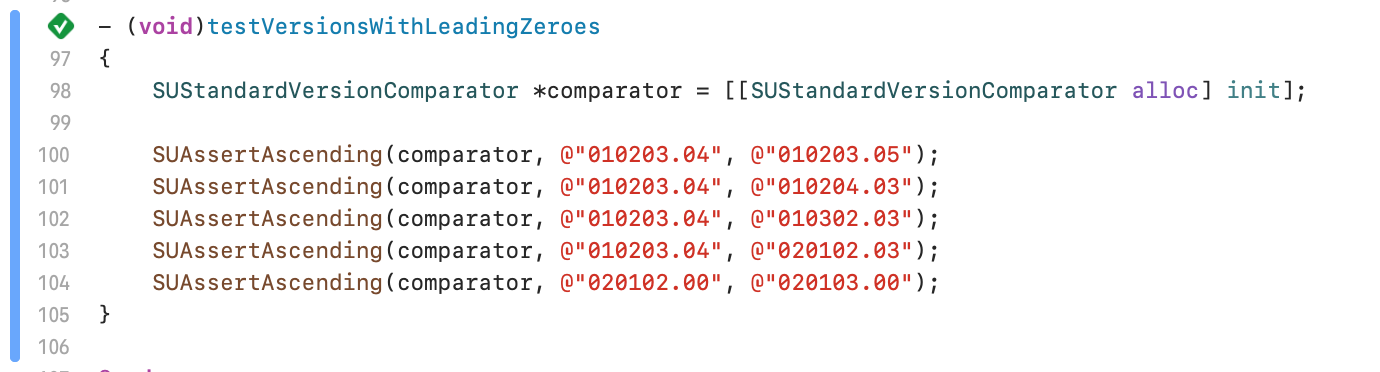
Regarding the tests, everything looks smooth. I'm guessing they're pretty much the same as reverse date ones. I'll send a PR if you feel they add any value:
Am I correct to assume the Sparkle uses sparkle:version attributes from the appcast? Is there anything else that might be causing this?
ianbytchek
on 7 Apr 2020
It uses sparkle:version, yes. So if version comparison is correct, then there may be logic bug around it:
kornelski
on 7 Apr 2020
Tried picking around the code and my gut tells me that this might be caused by comparing the date:
I'm not using the date attribute in my appcast file, so, the condition would always fail after finding the first item. Sparkle starts seeing the update after moving the latest release to the top of the list in appcast file, which goes in line with this theory.
I could't run the Sparkle Test App from master branch due to signature problems (most likely Catalina-related) and switched to 2.x branch. There it looks like bestItemFromAppcastItems moved from SUBasicUpdateDriver.m to SUAppcastDriver.m where it no longer compares the date, only the version:
That seems the right approach and I wanted to check with you and @zorgiepoo (looks like you're the last one who updated that part in 2.x branch) if the date comparison should be removed from the equation? Alternatively, the date should be compared only if it's set, but I think it might cause problems with older versions published after newer ones, e.g., 1.2.3 hotfix was published today and latest 2.3.4 was published yesterday.
Happy to PR if you are?
ianbytchek
on 15 May 2020
Oh, interesting.
The intention is to first pick latest version, and then if versions are the same, use date as an extra disambiguator. This is for apps that release betas with versions that are the same except git hash, and git hashes aren't comparable.
So maybe the fix could be as simple as [item.date compare:candidate.date] != NSOrderedDescending?
PR welcome.
kornelski
on 15 May 2020
Got it now. I see it's the 2.x branch that is behind and this was added in master a few months ago, which would relate to the time when this started happening. Do you want a separate PR for 2.x branch as well or do you guys have some process for keeping them in sync?
ianbytchek
on 15 May 2020
tbh, I don't think comparisons should be done on anything other than x.y.z CFBundleVersion but I wasn't involved in date comparisons (In fact I thought I tried to remove date comparisons a long time ago in 1.x).
 zorgiepoo
on 15 May 2020
zorgiepoo
on 15 May 2020
Btw, apps can always have the same short version string but different bundle versions. If two app bundles have the same bundle version, the system (launch services) doesn't know which one is later, so it's just wrong.
zorgiepoo
on 15 May 2020
Agree, it's a super-weird way of doing things. Though, my judgement is based mostly on the fact that I handle versions differently, apparently commit hashes in pre-releases is a real thing and people really love complicating things. The only question I have for them is why not use hashes instead of SemVer all together and say goodbye to the common sense… 🤷♂️
ianbytchek
on 15 May 2020
@kornelski Please let know re 2.x branch PR.
So maybe the fix could be as simple as
[item.date compare:candidate.date] != NSOrderedDescending?
I didn't find a relevant unit test to play with but tried putting together a quick playground and as suspected everything was getting mixed up. From what you're saying, the only situation we need to look at the date is when two versions are the same. But I just realized, will two versions compare as NSOrderedSame if their hashes are different? If not, this will need extra handling, but the way it was is near illegal.
ianbytchek
on 15 May 2020
IIRC a version like x.y.z-hash, only x.y.z is compared, so they would be equal if they differ only by hash.
kornelski
on 15 May 2020
I think it's unfortunate falling back on optionally provided date for something that's not reasonably valid / comparable. Would not desire keeping that IMO.
zorgiepoo
on 15 May 2020
Related issues
 k06a
·
18Comments
k06a
·
18Comments
 glyph
·
5Comments
glyph
·
5Comments
 mbacchi
·
3Comments
mbacchi
·
3Comments
 vadi2
·
10Comments
vadi2
·
10Comments
 frankrei
·
8Comments
frankrei
·
8Comments
Most helpful comment
Try removing all non-latest items from the appcast. If the issue is with picking wrong one, it may help if there's no wrong one to pick.