Sparkle: Catalina / Notarization / Hardened Runtime problems on master
Hi,
I'm trying to submit some of my apps for notarization, but as soon as Sparkle is included the executable is rejected with a
"Autoupdate.app" and "fileop" must be rebuilt with support for the Hardened Runtime. Enable the Hardened Runtime capability in the project editor, then test your app, rebuild your archive, and upload again.
I have built the sources (today) with Xcode 10.3 via:
git clone --recursive https://github.com/sparkle-project/Sparkle
make release
and then again by opening the project and building the "Distribution" and I have checked that the new framework is copied; not an older version that might be somewhere on the disk.. to no avail.
The hardened runtime capability is definitely switched on for the Autoupdate.app target, but I don't know how to verify this for the fileop target. I suspect that the --runtime flag should be used, but I'm still deeply confused about Notarization & Hardened Runtime stuff.
Help!
 frankrei
All 8 comments
I'm unfortunately as confused as you are. The hardened runtime option is enabled globally for the whole project :/
 kornelski
on 24 Jul 2019
kornelski
on 24 Jul 2019
Hi,
Thanks for your fast reply. I think I might have figured out what's going on. I've spent the entire work day trying to get rid of the problem.
My usual workflow is:
- get the (unsigned) binary distribution
- copy the Sparkle.framework in /Library/Frameworks/ and ~/Library/Frameworks
- link to it in the Build Phase tab
- add it to the Copy Files To Frameworks build phase
- and tick "Code Sign on Copy"
I did complicated script phases for codesigning the framework in the past, but the above approach has worked fine for years now.
Since (if I understand correctly) the hardened runtime is not switched on in the current binary distribution, I:
- did a
git clone --recursive https://github.com/sparkle-project/Sparkle - and
make release
but that did not work (notarization fails with not hardened runtime)
I tried building in Xcode but that did not change anything.
Then I:
- added my Developer ID into the Sparkle, autoupdate.app and fileop targets
- build
and now it works perfectly.
My working assumption is that (at least in Xcode 10.2 and 10.3 ) if you don't codesign the build, the hardened runtime setting is ignored. I was under the impression that if the hardened runtime is in fact active that the built version should have an entitlement file; there is, however, none to be found.
Thanks for your time; it is very much appreciated.
frankrei
on 24 Jul 2019
Hardened Runtime is actually enabled at sign-time (as opposed to code generation or linking). A flag is passed to the codesign executable internally: --options runtime.
 ivanmoskalev
on 26 Jul 2019
ivanmoskalev
on 26 Jul 2019
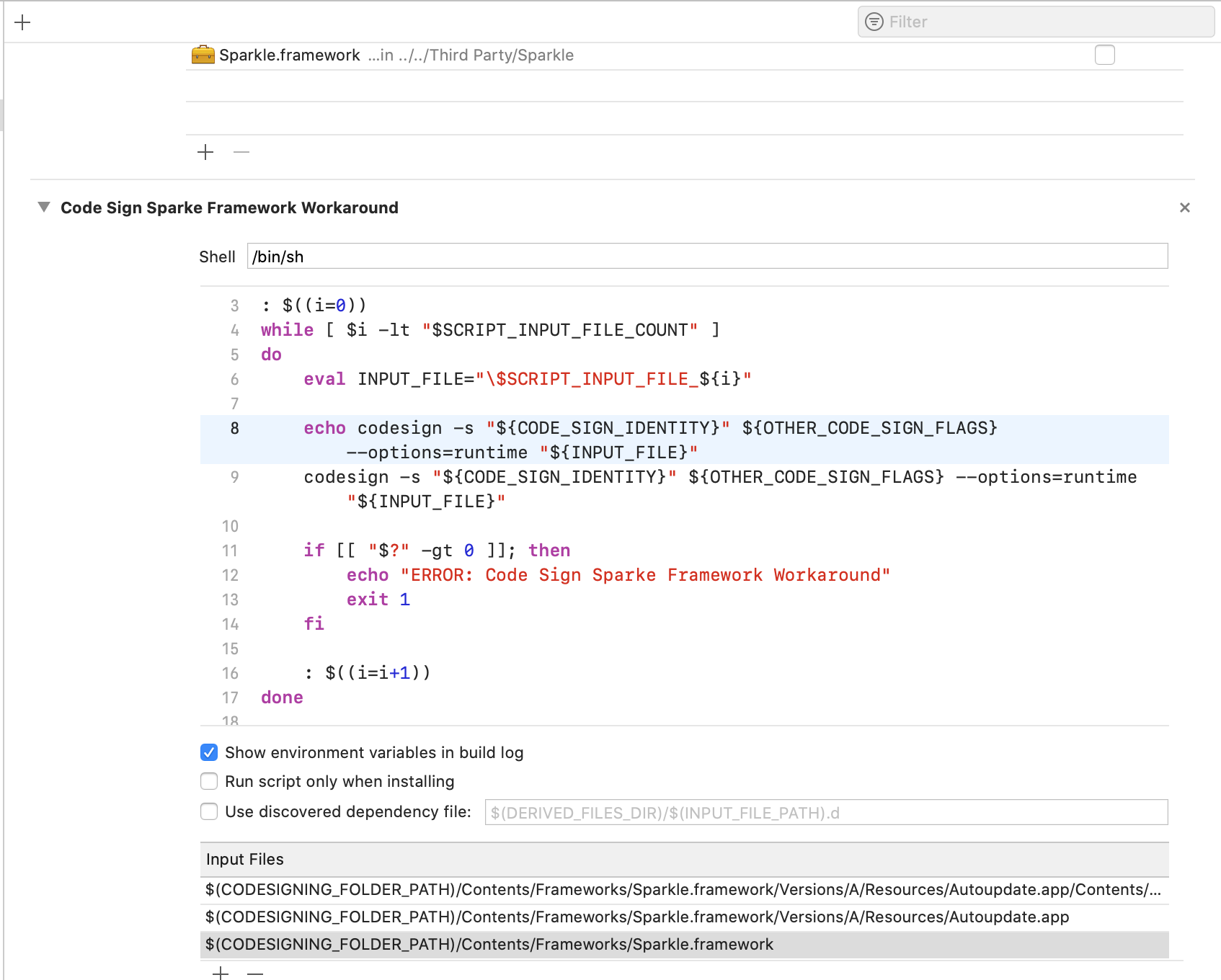
I got it working by disabling "Code Sign On Copy" and using this script:
: $((i=0))
while [ $i -lt "$SCRIPT_INPUT_FILE_COUNT" ]
do
    eval INPUT_FILE="\$SCRIPT_INPUT_FILE_${i}"

    echo codesign -s "${CODE_SIGN_IDENTITY}" ${OTHER_CODE_SIGN_FLAGS} --options=runtime "${INPUT_FILE}"
    codesign -s "${CODE_SIGN_IDENTITY}" ${OTHER_CODE_SIGN_FLAGS} --options=runtime "${INPUT_FILE}"

    if [[ "$?" -gt 0 ]]; then
        echo "ERROR: Code Sign Sparke Framework Workaround"
        exit 1
    fi

    : $((i=i+1))
done
With Input Files:
$(CODESIGNING_FOLDER_PATH)/Contents/Frameworks/Sparkle.framework/Versions/A/Resources/Autoupdate.app/Contents/MacOS/fileop
$(CODESIGNING_FOLDER_PATH)/Contents/Frameworks/Sparkle.framework/Versions/A/Resources/Autoupdate.app
$(CODESIGNING_FOLDER_PATH)/Contents/Frameworks/Sparkle.framework
Note: I pass the --timestamp over the OTHER_CODE_SIGN_FLAGS.
 catlan
on 26 Aug 2019
catlan
on 26 Aug 2019
@frankrei have you changed the bundle id for the Autoupdate.app?
 marcobambini
on 10 Sep 2019
marcobambini
on 10 Sep 2019
It's been a while, but I don't think I changed anything to the bundle id.
frankrei
on 10 Sep 2019
In case it helps anyone, I had this issue. Turned out I had a build phase with some custom code signing, including using codesign_xpc. When I removed the custom signing script, and just checked the "Code Sign on Copy" for the Sparkle framework, it all worked as advertised.
 drewmccormack
on 10 Oct 2019
drewmccormack
on 10 Oct 2019
Running into the same issue while integrating Sparkle through Carthage with carthage copy-frameworks. @catlan's script worked for me, but excluding Sparkle.framework which was already signed properly. This is still an ongoing issue that ought to be adressed.
 OskarGroth
on 22 Nov 2019
OskarGroth
on 22 Nov 2019
Related issues
 mbacchi
·
3Comments
mbacchi
·
3Comments
 NathanYu1124
·
3Comments
NathanYu1124
·
3Comments
 balthisar
·
12Comments
balthisar
·
12Comments
 ianbytchek
·
14Comments
ianbytchek
·
14Comments
 freman
·
5Comments
freman
·
5Comments
Most helpful comment
Hardened Runtime is actually enabled at sign-time (as opposed to code generation or linking). A flag is passed to the
codesignexecutable internally:--options runtime.