Simulator: How to use the cyber bridge between Apollo 5.5 and LGSVL
Hi everyone!
I am trying to connect Apollo 5.5 to LGSVL simulator but I encountered some issues with the cyber_bridge module.
Do you have any idea on how to setup or adapt the bridge to Apollo 5.5?
Porting this module from Apollo 5.0 (simulation branch) to Apollo 5.5 seems to not work properly, the module establishes the connection with the simulator but it is not possible to run the simulation.
Setup info:
Apollo 5.5
OS: Ubuntu 18.04.3 LTS
x86
Thank you in advance.
 mm-joseph
All 14 comments
@mm-joseph We don't yet support Apollo 5.5 but we have it on our road map. Hopefully soon.
 EricBoiseLGSVL
on 8 Feb 2020
EricBoiseLGSVL
on 8 Feb 2020
Can I adapt the code by myself? Which are the basic files to change?
mm-joseph
on 8 Feb 2020
@mm-joseph you could check out the files changes for the Apollo 5.0 fork, from the latest commits back to the moment it's first forked.
 ntutangyun
on 9 Feb 2020
ntutangyun
on 9 Feb 2020
Can I adapt the code by myself? Which are the basic files to change?
@mm-joseph Several PRs have been submitted to the ApolloAuto project to add support for LGSVL simulator, several of which have already been accepted. If anyone is eager to test this, you can check out Apollo master and and then manually add in the changes in the unmerged PRs.
We will provide updated documentation for using LGSVL Simulator with Apollo (master) soon.
 lemketron
on 12 May 2020
lemketron
on 12 May 2020
We have all five PRs merged into Apollo now. The latest Apollo master should works with our simulator.
@mm-joseph @ntutangyun You can clone latest Apollo and test it. You can follow most of instructions to Apollo 5.0 with two changes:
- Call "bootstrap_lgsvl.sh" instead of "bootstrap.sh" to launch Dreamview; and
- Select the
Mkz Lgsvlmode, in addition to selectLincoln2017MKZ LGSVLvehicle andBorregasAvemap.
Please let us know if you found any problems when using latest Apollo with LGSVL Simulator.
 rongguodong
on 18 May 2020
rongguodong
on 18 May 2020
We have all five PRs merged into Apollo now. The latest Apollo master should works with our simulator.
@mm-joseph @ntutangyun You can clone latest Apollo and test it. You can follow most of instructions to Apollo 5.0 with two changes:* Call "bootstrap_lgsvl.sh" instead of "bootstrap.sh" to launch Dreamview; and * Select the `Mkz Lgsvl` mode, in addition to select `Lincoln2017MKZ LGSVL` vehicle and `BorregasAve` map. Please let us know if you found any problems when using latest Apollo with LGSVL Simulator.
@rongguodong:
Hi Guodong,
I checked LGSVL Simulator 2020.03 with Apollo 5.5. I observed the timestamps between Simulator and Apollo and found out they are not synchronized:
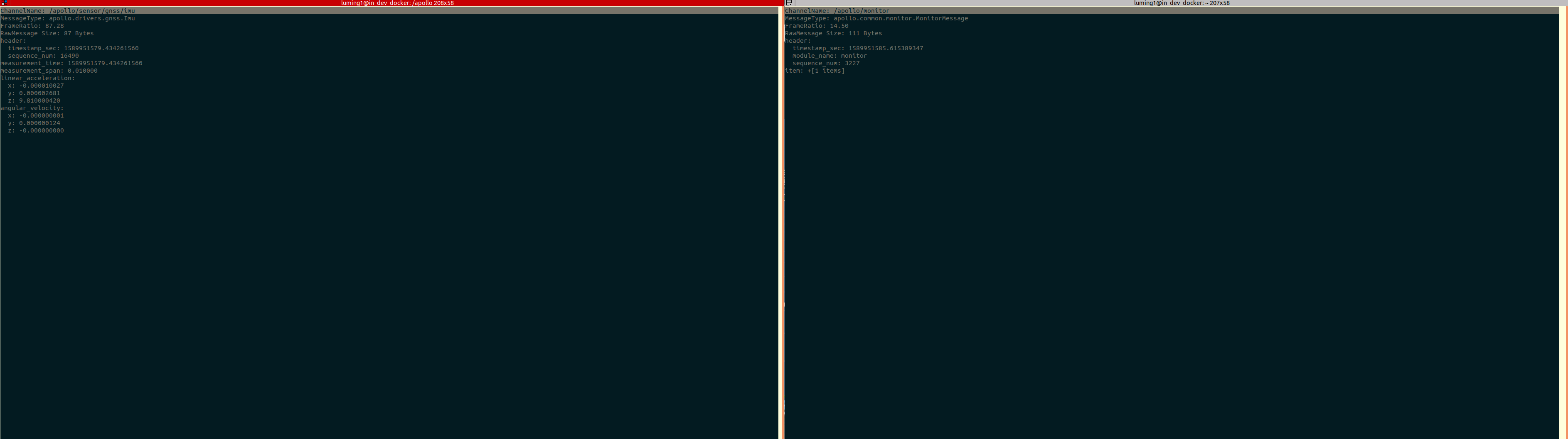
Left: apollo.drivers.gnss.Imu topic sent from Simulator
Right: apollo.common.monitor.MonitorMessage Apollo internal cyber time
The delta increases during whole time.
I investigate a little bit in source code:
Simulator takes a fix step time and increase the timestamp each loop with this delta, am I right?
Cyber takes time from system clock.
Issue:
This inconsistent timestampes causes a unexpected result of perception module of Apollo. The detected objects are not stable: position of object not updated, object cannot be detected, etc.
My quick and dirty workround:
To avoid this issue I adapted the source code on Apollo side:
in file modules/perception/onboard/transform_wrapper/transform_wrapper.cc:
line 219: cyber::Time query_time = cyber::Time(0);
in file /home/luming1/workspace/apollo/modules/perception/onboard/component/trafficlights_perception_component.cc
line 676: apollo::cyber::Time query_time(0);
After that I get "stable" perception output.
Anyway from my point of view, the timestample needs to be synchronized between simulator and cyber. Otherwise simulation cannot provide any plausible result.
Thanks!
 miluit01
on 20 May 2020
miluit01
on 20 May 2020
Yes, we know the time difference between simulation time and real time. But I did not see any obvious issue caused by it. Can you describe more details of what are "unexpected result" of perception module? How can I reproduce this locally? And when you made those changes, how do you tell the results are more stable?
As for the timestamp, we are investigating several solutions, including using real time in simulator and using MOCK mode in Apollo.
rongguodong
on 20 May 2020
Per offline sync with @miluit01, the problem of "unstable perception" is because of wrong mode. You need to select "Mkz Lgsvl" mode (from the drop down menu left to the vehicle selection menu). With this mode in use, the perception module should work well.
rongguodong
on 25 May 2020
@rongguodong Thanks for your classification! As we offline discussed, the core issue is the timestamp diff between simulator and cyber time. I hope that you will have a solution with Baidu developer soon. Many thanks!
miluit01
on 26 May 2020
@rongguodong Hi, I'm using the LGSVL-linux64-2020.03, I can't find the "Mkz Lgsvl" mode menu in LGSVL interface, is this menu in browser interface or the lgsvl app interface?
What the default mode and if I didn't change this option, is it right or not?
 zhanghming
on 26 May 2020
zhanghming
on 26 May 2020
Hi, I'm using the LGSVL-linux64-2020.03, I can't find the "Mkz Lgsvl" mode menu in LGSVL interface, is this menu in browser interface or the lgsvl app interface?
What the default mode and if I didn't change this option, is it right or not?
@zhanghming The "setup mode" menu is found in Dreamview (in the browser), not in the LGSVL Simulator. It is to the left of the "vehicle" menu and should be set to "Mkz Lgsvl".

lemketron
on 26 May 2020
@lemketron Thanks for your reply.
What the Apollo repository are you use? I can not find the "Mkz Lgsvl" option in the Dreamview, there are only "Mkz Close Loop" and "Mkz Standard Debug". And I used the lgsvl/apollo-5.0 repository. Are you use the latest apollo master branch?
zhanghming
on 26 May 2020
What the Apollo repository are you use? I can not find the "Mkz Lgsvl" option in the Dreamview, there are only "Mkz Close Loop" and "Mkz Standard Debug". And I used the lgsvl/apollo-5.0 repository.
@zhanghming Sorry, it seems that @rongguodong and I were referring to the latest apollo (in the apollo master branch).
For lgsvl/apollo-5.0 it should be "Mkz Standard Debug" as shown in the LGSVL Simulator docs for Apollo 5.0 and screen shot.
lemketron
on 26 May 2020
@lemketron Thanks a lot, I ran all things successfully.
zhanghming
on 28 May 2020
Related issues
 frontw
·
14Comments
frontw
·
14Comments
 RamoramaInteractive
·
13Comments
RamoramaInteractive
·
13Comments
 yanbec
·
18Comments
yanbec
·
18Comments
 dr563105
·
15Comments
dr563105
·
15Comments
 MccAlfh
·
14Comments
MccAlfh
·
14Comments
Most helpful comment
We have all five PRs merged into Apollo now. The latest Apollo master should works with our simulator.
@mm-joseph @ntutangyun You can clone latest Apollo and test it. You can follow most of instructions to Apollo 5.0 with two changes:
Mkz Lgsvlmode, in addition to selectLincoln2017MKZ LGSVLvehicle andBorregasAvemap.Please let us know if you found any problems when using latest Apollo with LGSVL Simulator.