The simulator aborted when i try to run it from browser(car and map are not loaded), i've followed the documents, added the _Graphics Drivers PPA_ , installed the _libvulkan1_ as the following picture show:

My desktop's spec is:
RAM: 8G
Graphics: GTX 1050
I can run all the functions of the simulator in Windows 7 at this same desktop successfully (Although it performs laggy)
and i've also started the simulator at my laptop from browser(car and map are loaded)
Laptop spec: Ubuntu 16.04, Thinkpad E470, RAM:16G, Graphics: GTX 920M),
but the simulator aborted when i click the start icon in the simulator
Where is the problem? Can you help me to figure out? Thank you very much!
 MccAlfh
All 14 comments
Are you able to run nvidia-smi? If so can you provide a screen shot of the results?
 lemketron
on 20 Jul 2020
lemketron
on 20 Jul 2020
Can you check it out with "nvidia-smi" how much gpu its consuming. I guess its because of lack of gpu vram
 arslansarp
on 20 Jul 2020
arslansarp
on 20 Jul 2020
You could also try installing "vulkan-tools" and then run "vulkan-info" and "vkcube" to ensure that Vulkan is installed and working properly.
However, the 920M is a 2GB Kepler-based GPU which could explain why the simulator is not running.
You should also look at (or post) the Player.log file from ~/.config/unity3d/LG Silicon Valley Lab/LGSVL Simulator/Player.log as there may be some clues in that log file.
lemketron
on 20 Jul 2020
Also note the 920M (older Kepler architecture as opposed to the Maxwell-based 920MX) is not listed on Nvidia's Vulkan support page. I don't know why the 920M isn't listed, but it would appear that it is not supported by Vulkan -- something you can probably confirm by running vulkan-info and checking the Player.log file.
lemketron
on 20 Jul 2020
Are you able to run nvidia-smi? If so can you provide a screen shot of the results?
Can you check it out with "nvidia-smi" how much gpu its consuming. I guess its because of lack of gpu vram
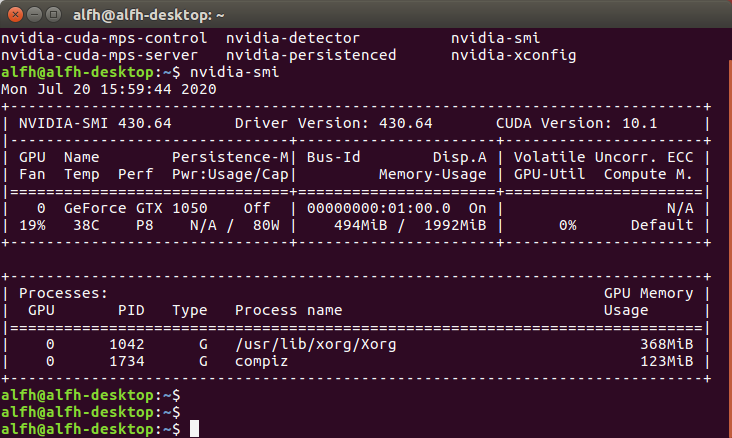
Thanks for your replys, here is my Desktop nvidia-smi result:
vulkaninfo:
vulkaninfo.txt
MccAlfh
on 20 Jul 2020
I parse the vulkaninfo.txt by these instructions:
- sudo apt-get install vulkan-utils
- vulkaninfo >> vulkaninfo.txt
MccAlfh
on 20 Jul 2020
The GTX 1050 is a new enough (Pascal) architecture, but it only has 2GB of GPU memory which may not be enough to let the simulator start. Can you check the Player.log file and see what it says?
lemketron
on 20 Jul 2020
The GTX 1050 is a new enough (Pascal) architecture, but it only has 2GB of GPU memory which may not be enough to let the simulator start. Can you check the Player.log file and see what it says?
here is my Player.log file
Player.log
MccAlfh
on 20 Jul 2020
I can't tell for sure if the GPU is running out of memory but 2GB is below our recommended 4GB minimum...
You could check out nvtop if you're curious about the memory utilization as the simulato is launching, but you'll have to build it from source since you're on 16.04 (it's only installable on 19.04+).
I recommend upgrading to a 4GB or 8GB GPU if possible.
lemketron
on 20 Jul 2020
I can't tell for sure if the GPU is running out of memory but 2GB is below our recommended 4GB minimum...
You could check out nvtop if you're curious about the memory utilization as the simulato is launching, but you'll have to build it from source since you're on 16.04 (it's only installable on 19.04+).
I recommend upgrading to a 4GB or 8GB GPU if possible.
I've check Player.log and it says:
Got a SIGSEGV while executing native code. This usually indicates
a fatal error in the mono runtime or one of the native libraries
used by your application.
It's this the problem?Anyway I'll try to build it from source.
I'm also curious about the reason why i can run the simulator in windows 7 at the same desktop but dumped in Ubuntu 16.04.
MccAlfh
on 20 Jul 2020
SIGSEGV is kinda a catch all for many issues. Also, Linux usually uses more memory and Unity doesn't support this platform as well as Windows. From the log it looks like an issue with the socket. Do you have any other application using the port you used for the cyber bridge?
 EricBoiseLGSVL
on 23 Jul 2020
EricBoiseLGSVL
on 23 Jul 2020
SIGSEGV is kinda a catch all for many issues. Also, Linux usually uses more memory and Unity doesn't support this platform as well as Windows. From the log it looks like an issue with the socket. Do you have any other application using the port you used for the cyber bridge?
Thanks for your reply !
I've check the port using state by 'sudo netstat -tunpl |grep 127'
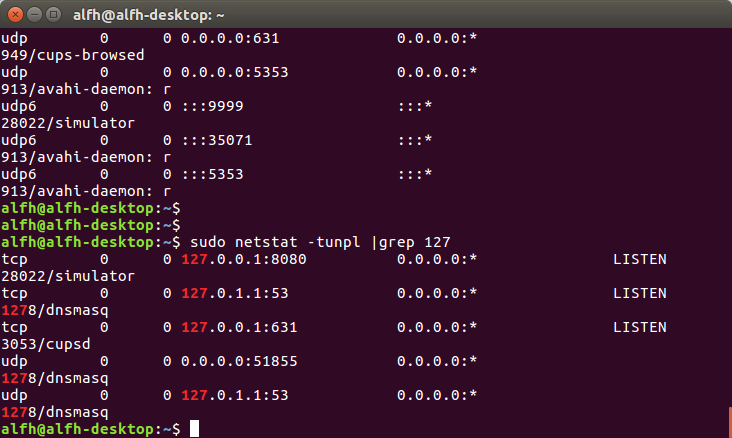
as i can see my config port 9090 is not being occupied.
Then I captured some net pcaps by wireshark when i running the simulator, it seems like some TCP RST error occured(tcp.flags.reset eq 1)
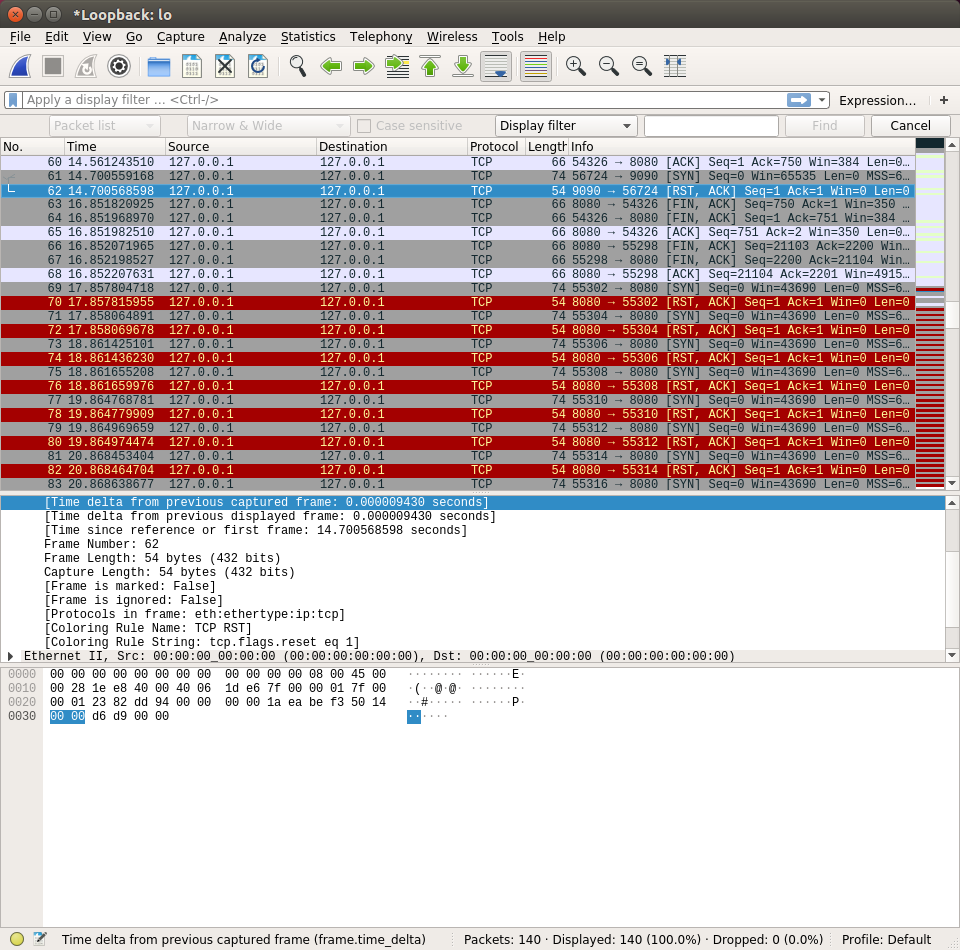
(by the way, i haven't build the lgsvl from source till now :P, may be next week)
MccAlfh
on 23 Jul 2020
Sockets are not a problem. Simulator is running out of memory. You can see that in call stack at end of log file:
Obtained 9 stack frames.
#0  0x007f14d565b371 in vk::DataBuffer::CreateResource()
#1  0x007f14d565b037 in vk::DataBuffer::Initialize(void const*, vk::CommandBuffer*, vk::ScratchBuffer*, unsigned long)
#2  0x007f14d5612d8d in GfxDeviceVK::InitializeBufferInternal(GfxBuffer*, void const*, GfxUpdateBufferFlags)
It tries to create some kind of data buffer for Vulkan (GPU API). When Unity runs out of GPU memory it simply exits with SIGSEGV.
 martins-mozeiko
on 27 Jul 2020
martins-mozeiko
on 27 Jul 2020
Sockets are not a problem. Simulator is running out of memory. You can see that in call stack at end of log file:
Obtained 9 stack frames.
#0  0x007f14d565b371 in vk::DataBuffer::CreateResource()
#1  0x007f14d565b037 in vk::DataBuffer::Initialize(void const*, vk::CommandBuffer*, vk::ScratchBuffer*, unsigned long)
#2  0x007f14d5612d8d in GfxDeviceVK::InitializeBufferInternal(GfxBuffer*, void const*, GfxUpdateBufferFlags)
It tries to create some kind of data buffer for Vulkan (GPU API). When Unity runs out of GPU memory it simply exits with SIGSEGV.
Thanks for your replys, i'm totally clear with this problem now and i'll upgrade my Graphics later :)
MccAlfh
on 28 Jul 2020
Related issues
 frontw
·
14Comments
frontw
·
14Comments
 manonechu
·
30Comments
manonechu
·
30Comments
 vatna
·
20Comments
vatna
·
20Comments
 asifsid-32
·
18Comments
asifsid-32
·
18Comments
 RamoramaInteractive
·
13Comments
RamoramaInteractive
·
13Comments
Most helpful comment
Sockets are not a problem. Simulator is running out of memory. You can see that in call stack at end of log file:
It tries to create some kind of data buffer for Vulkan (GPU API). When Unity runs out of GPU memory it simply exits with SIGSEGV.