Simulator: Apollo driving straight into other vehicles
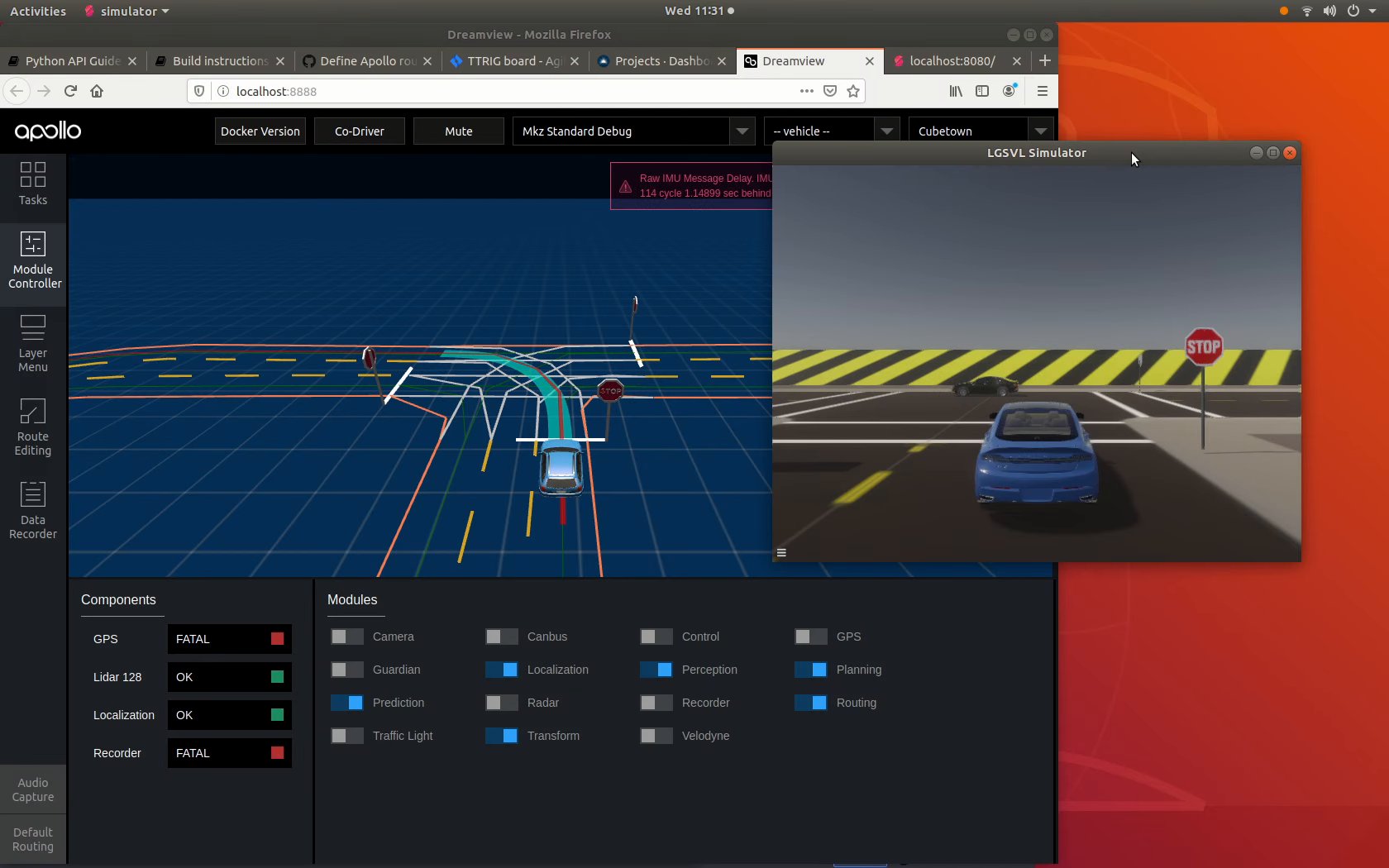
I'm running Apollo 5.0 to control the (Lincoln2017MKZ (Apollo 5.0)) vehicle on the Cubetown map and have noticed that even when it's driving at relatively low speed, it sometimes drives straight into stationary vehicles. Looking at the Dreamview screen, it looks like it hasn't detected the stationary vehicle at all.
Attached is a screenshot where I put the ego vehicle at a junction and have another vehicle drive across the junction, where you can see that it isn't detecting the passing vehicle that's right in front of it. I would estimate that the ego vehicle / Apollo only detects the other vehicle driving past about 10% of the time. I don't know if it is a lidar sensor issue or an Apollo perception issue? Any suggestions as to why this is and how I could improve it?
 vatna
vatna
All 20 comments
several things that you could try to check:
- check the
perceptoin/obstaclemessage fromcyber_monitor, and see if the perception module indeed does not output any obstacle - see if you could plot out the lidar sensor data, and see if the other vehicle is affecting the lidar sensor output.
- check the frequencies of the messages in the
cyber_monitorand see the message frequency of sensor data. I'm just guessing that if the sensor mesasge frequency are too low, then there might be perception issue.
 ntutangyun
on 18 Mar 2020
ntutangyun
on 18 Mar 2020
@vatna Besides @ntutangyun's solutions, I think you need to select a vehicle at the top right of dreamview, apollo will copy calibration files for the car to corresponding locations. Also, you need to check your simulator's fps, is it running very slow? For detecting static objects, you can check perception configuration files, it might be the obs_enable_hdmap_input is true in modules/perception/production/conf/perception/perception_common.flag so Apollo uses HDMap ROI filter to only detect obstacles within roads.
 luqiang21
on 18 Mar 2020
luqiang21
on 18 Mar 2020
@ntutangyun, looking at the sensor frequencies in the simulator's "Bridge" panel, the frequency for the lidar jumps about a lot. Sometimes it's at 10Hz, which is where it's supposed to be I think, but most of the time it is at 1 or 2 Hz, and I've seen it as low as 0.5Hz. Is this low value due to the CPU or GPU? I already have the sim at it's lowest resolution and graphics quality. Is there anything else I can cut down on?
vatna
on 18 Mar 2020
@luqiang21 I didn't realise selecting the vehicle was important so I'll do that. How do i check the fps of the simulator? I looked in the various panels of data within the sim & couldn't see it.
vatna
on 18 Mar 2020
@vatna Selecting the vehicle is important for the vehicle to have correct calibration files. But you may already have a default one which is very close to the one you want, so it might not have very large effect on the performance. For the fps, I am sorry we don't have it inside the simulator right now, you can use other tools to check it.
From @shalinmehtalgsvl:
On Windows use the Nvidia GeForce FPS counter, Alt+Z -> Gear icon -> HUD -> FPS -> pick a corner
On Ubuntu, look for Nvidia X Server settings -> OpenGL Settings -> Enable Graphics API Visual Indicator
luqiang21
on 18 Mar 2020
@luqiang21, under Nvidia X Server settings -> OpenGL Settings, I don't see 'Enable Graphics API Visual Indicator'. I've got V435.21 of nvidia driver and V11.0 of X Server.
But maybe I don't need fps. I've been monitoring the frequency of the lidar sensor and set up a simple scenario using PythonAPI. If I use the Borregas map, I get decent frequencies but if I use the Cubetown map, it drops significantly. Everything else is the same, I only change the map that is loaded. Would you know why that is, and is there anything I can do about it (as I prefer using the cubetown map)?
vatna
on 19 Mar 2020
Do you think the lidar frequency achieved is limited by the CPU or the GPU, or something else?
vatna
on 19 Mar 2020
@vatna not just lidar frequency, the camera sensor I think also sends quite large amount of data per second. Could you try to remove the lidar and camera sensors and test out the CPU and momory usage with htop and also test out the other sensor frequencies in the cyber_monitor
ntutangyun
on 19 Mar 2020
@vatna I reported this problem to our team, we are looking into this.
luqiang21
on 19 Mar 2020
I tested both Borregas and Cubetown, and did not see any difference in Lidar publishing rate. Both are around 10Hz.
@vatna Can you provide more details on how to reproduce this issue (Lidar publishing rate drop to below 1Hz in Cubetown)?
 rongguodong
on 20 Mar 2020
rongguodong
on 20 Mar 2020
@rongguodong, the code I'm using to test this is below. When I monitor the lidar frequency in the Bridge panel of the simulator, it stays around 10Hz for Borregas and is much lower, often 1-3Hz, sometimes dropping to <1Hz.
The frequency of the cameras is fine for both maps. I have Apollo 5.0 running also. Even if I only have one module activated (localization), I see the issue. I have a GTX 1060 6GB GPU which is running at 80-100% utilization. Let me know if you need any more details & if you can reproduce the issue.
#!/usr/bin/env python3
import time
import lgsvl

sim = lgsvl.Simulator(address = "localhost", port = 8181)
# sim.load(scene = "CubeTown", seed = 1111)
sim.load(scene = "BorregasAve", seed = 1111)

spawns = sim.get_spawn()
state = lgsvl.AgentState()
state.transform = spawns[0]
ego = sim.add_agent("Lincoln2017MKZ (Apollo 5.0)", lgsvl.AgentType.EGO, state)

ego.connect_bridge("localhost", 9090)
while not ego.bridge_connected:
  time.sleep(1)
print("Bridge connected:", ego.bridge_connected)

sim.run(time_scale=1)
@vatna I can see the rate drop on Linux. Previously, I tested on Windows, and never see the rate drop. I will continue to investigate on Linux.
Are you using Windows or Linux?
rongguodong
on 24 Mar 2020
@rongguodong I'm running Linux, Ubuntu 18.04.
vatna
on 24 Mar 2020
@vatna I think you may use the default setup for vehicles, i.e. the MKZ is equipped with one 128 line Lidar and two color cameras (main camera and teleport camera). Can you try to remove one camera (or both), to see if the Lidar publishing rate become normal?
In my case, when I removed the teleport camera from the JSON file, the Lidar publishing rate keeps at around 10Hz.
rongguodong
on 24 Mar 2020
@rongguodong I get the same result as you when I remove the telephoto camera on the short code above. I then used that new vehicle in more complex code, which has NPCs driving around following waypoints, it does improve the lidar frequency but it is still low.
I then tried removing both cameras. The lidar frequency improves again: 10Hz most of the time with the occasional drop, e.g. to 3Hz. So thanks, I can use this as a workaround for the moment but of course without cameras, Apollo won't detect traffic lights so won't go through any traffic light junctions.
Am I able to remove the radar as well? Does Apollo 5.0 use that? We don't enable the radar module within Apollo so does that mean it doesn't use it?
vatna
on 24 Mar 2020
@vatna Thanks for your updates.
You can delete any sensors you are not using. But according to our experience, only camera and lidar sensors consumes a lot of bandwidth of the bridge.
We are working on a better solution. It is under beta test now and will be available soon.
rongguodong
on 24 Mar 2020
Thanks @rongguodong. I'll use the workaround for now, and look forward to the update!
vatna
on 25 Mar 2020
@vatna Thanks for your updates.
You can delete any sensors you are not using. But according to our experience, only camera and lidar sensors consumes a lot of bandwidth of the bridge.
We are working on a better solution. It is under beta test now and will be available soon.
Hello @rongguodong, @luqiang21,
According to the new 2020.03 Release annoncement, the Velodyne Lidar Sensor plugin "bypasses the normal bridge communication interface and instead use a direct UDP connection to communicate with the target System Under Test (AD stack)".
What are LG plans for the future of the "old" LIDAR sensor ? Are you going to deprecate it then remove it from the simulator ?
 fabriquant
on 21 Apr 2020
fabriquant
on 21 Apr 2020
"old" Lidar sensor is a general lidar model so that you can model it according to your own Lidar model, particularly if you are not using Velodyne Lidar.
The current Velodyne Lidar Sensor plugin only supports VLP-16 and VLP-32C (VLS-128 will be added soon). If you use other models of Velodyne Lidar, or non-Velodyne Lidar, and still want to bypass bridge, you may create your own Lidar sensor plugin for that.
rongguodong
on 21 Apr 2020
@fabriquant You can refer to our updated documents on Lidar Sensor Plugin:
https://www.lgsvlsimulator.com/docs/lidar-plugin/
rongguodong
on 22 Apr 2020
Related issues
 ImCabbage
·
17Comments
ImCabbage
·
17Comments
 dr563105
·
15Comments
dr563105
·
15Comments
 yanbec
·
17Comments
yanbec
·
18Comments
yanbec
·
17Comments
yanbec
·
18Comments
 Kailiangdong
·
15Comments
Kailiangdong
·
15Comments