Simulator: Lidar beams not bouncing on Unity native terrain
Hi everyone. I am designing custom environment which includes Unity3D native gameObjects such as cubes, trees, custom objects and terrain. When I activate lidar visuals on UI there is no bouncing Lidar beams on Unity terrain. All other objects bounce lidar beams back. Is it possible to enable Lidar bouncing on Unity terrain ?
Below are the snapshots of the issue
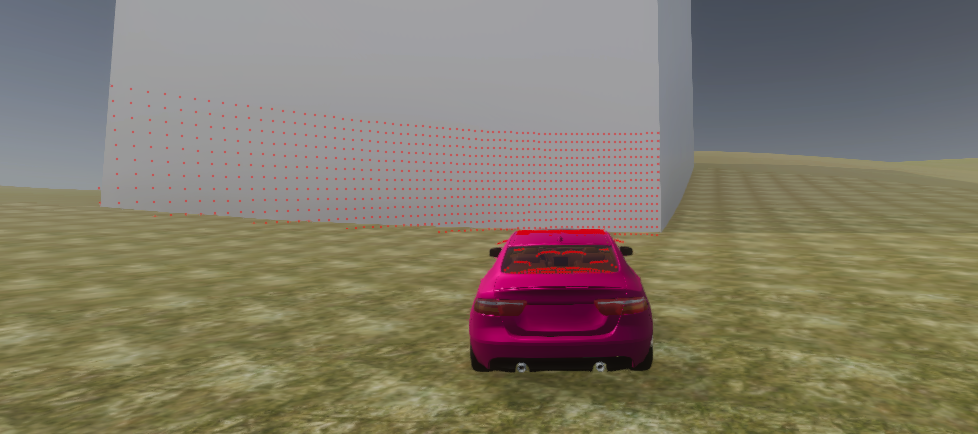
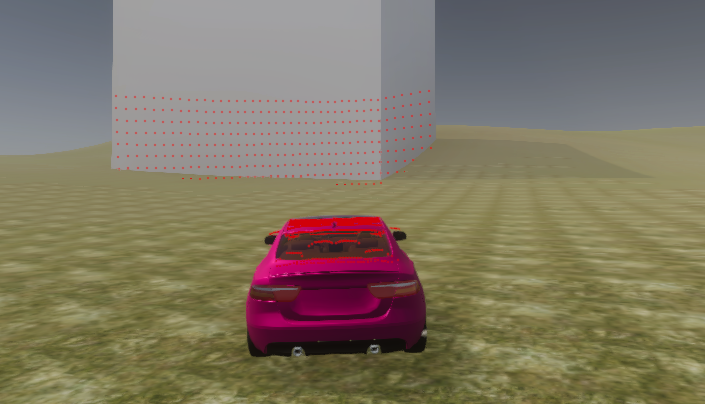
 SeymurSm
All 13 comments
@SeymurSm
Currently lidar bounce on terrains is not supported. Lidar needs to have a mesh to work. I recommend a terrain to mesh exporter like this.
Also, be sure your JSON lidar settings position the lidar sensor high enough on the vehicle or angle to prevent beams hitting the car.
 EricBoiseLGSVL
on 27 Nov 2019
EricBoiseLGSVL
on 27 Nov 2019
@SeymurSm
Lidar (and other sensors) seeing things requires modification to rendering shaders as we use GPU to have more efficient lidar simulation. We have modified HDRP shaders to support lidar, depth camera and semantic camera. We did not look what shaders are used to render terrain. But I don't think it takes much to support terrain. You should check git history on Packages/com.unity.render-pipelines.high-definition folder to see our changes to HDRP rendering. And then apply similar modifications what we did to Lit shader to the terrain shaders. After that lidar and other camera sensors should "see" the terrain.
 martins-mozeiko
on 27 Nov 2019
martins-mozeiko
on 27 Nov 2019
@EricBoiseLGSVL @martins-mozeiko thanks for the prompt answers. I have tested Eric's answer and it is working as I want. The only point I want to mention about is that when we export terrain it loses collider on it. When we import use it as an .obj object on new scene it is possible add Mesh collider and select terrain itself as a mesh.
SeymurSm
on 28 Nov 2019
Wanted to re-open this discussion and see if anyone has made progress on the HDRP Terrain shaders solution. I'm starting to go through them now, however it seems not to be as smooth as the HDRP Lit shaders process. It's missing a SubShader.cs file as the HDLitSubShader.cs is setup. Not sure if it leverages this one as well, or what, not the best on shaders, but wanted to reach out and see if progress has been made.
 osholsonel20
on 23 Jul 2020
osholsonel20
on 23 Jul 2020
@osholsonel20 We are currently working removing our changes to HDRP packages but this will probably be in one of the next few releases.
EricBoiseLGSVL
on 23 Jul 2020
Are you reverting back from HDRP? Or trying to create a solution that's not apart of the HDRP packages, yet still leveraging HDRP? I guess for the time being, is there a quick fix or existing solution out there? @martins-mozeiko
I did see your lidar shader uses SurfaceData and was going to test out if TerrainSurfaceData should be used for a terrain specific solution. surfacedata.baseColor vs. terrainSurfaceData.albedo is called for that. I'm not sure, but any and all help would be great while we wait on the changes to HDRP packages.
osholsonel20
on 24 Jul 2020
Not reverting HDRP but removing dependency on HDRP changes. You can search // lgsvl in the HDRP packages folder and see our changes to make segmantic/depth and lidar effects work on terrain shaders. Terrains have not been a top priority for Unity in many years and we do not suggest relying on them. Why do you require them to be in a simulation? You can create meshes to achieve the exact same results.
EricBoiseLGSVL
on 24 Jul 2020
I'm utilizing a plugin that leverages open street map data, and the solution they use is generating on top of a terrain.
https://forum.unity.com/threads/released-citygen3d-procedural-city-generation-from-map-data.514677/
I have started the process of looking into the shader changes you did vs. terrain shaders, and terrain shaders do not seem to be the same way hdrp/Lit shaders are setup. I'm getting a lot of shader errors from redefining variables or unidentified variables due to missing library inclusions, it's a chain of shader errors. I'll keep plugging away at that, and maybe investigate some alternative solutions to the problem
osholsonel20
on 27 Jul 2020
@osholsonel20 I see, this looks like a great tool. Let me discuss internally on how to support terrain shaders in simulation. I'll mark this as a new feature request. I would keep looking for a work around in the meantime because it might be a few releases before it's done.
EricBoiseLGSVL
on 27 Jul 2020
Awesome, thank you! Yeah I figured you guys might be interested in this. This honestly is a really great tool and it doesn't come with issues of mesh z-fighting etc. that some road generators do. The only issue is it's not open source, and it does not support HDRP. However, i'm in the process of trying to fix some of the HDRP issues, and getting it to at least run in lgsvl sim.
osholsonel20
on 28 Jul 2020
Please re-open this discussion. On previous version of LGSVL I have solved this issue by exporting terrain mesh and adding exported mesh under terrain (Approximately 0.5-1mm) with lit shader which was workaround to get lidar point clouds from terrain surface. At same same time I was using terrain's trees and other functionalities to change environment easily. On the current version of the LGSVL the both built scene and editor crashes after random amount of time (appx 10- 20sec). I have checked and it is not problem about Unity 2019.3.3. I could not find main reason of problem but I think it would be nice to solve this problem. It is almost impossible to generate off-road scenes without using Terrain. @osholsonel20 we are trying to do exactly the same thing. Have you find any workaround on the current version?
SeymurSm
on 24 Aug 2020
I have not, I was going to leave it up to LGSVL or an outside source to figure it out, as I've got my hands full on other efforts. If you would like to go down the rabbit hole of HDRP shader scripting, it's a fun one for sure... I've tried using the same logical structure as their custom shaders for lidar, but no luck.
osholsonel20
on 24 Aug 2020
@SeymurSm @osholsonel20 Thank you for your patience. We are still trying to move all HDRP LGSVL Sim changes out of the package and support more shaders. We hope to finish this soon
EricBoiseLGSVL
on 24 Aug 2020
Related issues
 Martin20
·
19Comments
Martin20
·
19Comments
 ImCabbage
·
17Comments
ImCabbage
·
17Comments
 vatna
·
20Comments
vatna
·
20Comments
 dr563105
·
15Comments
dr563105
·
15Comments
 MccAlfh
·
14Comments
MccAlfh
·
14Comments
Most helpful comment
I have not, I was going to leave it up to LGSVL or an outside source to figure it out, as I've got my hands full on other efforts. If you would like to go down the rabbit hole of HDRP shader scripting, it's a fun one for sure... I've tried using the same logical structure as their custom shaders for lidar, but no luck.