Silent-hill-2-enhancements: Fixing the game to run on multiple cores and not always use 100% of core
@Gemini-Loboto3 @MeganGrass
Thank you both for taking an interest in this.
To give context to the notes below: Elisha and I were discussing via email the ability to restore the game save/game load SFX when selecting it through the pause menu. Being an audio-related thing, Elisha got to digging around with how the game handles/processes audio calls.
His notes may be helpful in trying to fix the audio issues to allow the game to run stable on multiple cores. Note that some of his talking points relate to the ticket I linked above, to give context to those parts of the discussion. (Specifically, when he talks about dialogue/voice files, it's in relation to that ticket.)
Also note that any addresses discussed are from the North American 1.0 executable for the game. And a side effect of the game not being able to run on a single core is that it always uses 100% of the core it has access to, which Elisha discusses more about below.
Elisha's Audio Notes
There is a lot of code responsible for playing voice files because of the way they are packaged in an asf file (
I did some debugging to see how the game handles SFX vs. BGM vs. Voice samples. I found out some interesting things. First of all it, I was able to create code to detect (with pretty good accuracy) when the game is running each type of sample. The game seems to keep 10 DirectSound buffers cached in memory at all times and rotates through the buffers as needed. This means that the game can likely only play up to 10 sound samples at once.
I was also able to find a way to detect when the game was using a voice sample via address 0x00B15140 (4-byte). This address will equal the value 0x46464952 when it is playing a voice sample.
Pretty much all the game code between address 0x0055BE8E and 0x0056F009 is responsible for playing voice files. It looks like this code is used to open and read the asf file data.
A function at address 0x0056EFF0 seems to be called once and only once each time a voice sample is played. This small function is responsible for checking the header of the audio file in the voice.asf package to ensure that it is a supported audio file.
I did try to force the game to keep the Game Load sound playing after loading a new save while in-game. However, when I did that it just caused the sound to stutter and repeat itself exactly like it does when you have SingleCoreAffinity disabled. I don’t think we will be able to fix this in DirectX, but will need to use the game’s code to fix this.
I think the reason the Load Game sound is played fully when loading from the main menu is because the there is no other sounds playing except that sound so there is nothing else to stop. However, when loading a save from in-game there could be all kinds of sounds playing (including continuous sounds like the BGM). Since the game has 10 cached buffers and does not know which buffer is playing what it just tells Windows to stop all buffers that are currently playing.
BTW: I think the issue with the SingleCoreAffinity looping has something to do with the 10 cached buffers. These buffers are accessed by different threads and I think the different threads get out of sync accessing these buffers and cause the sound issues we see.
I found out why the audio loops when SingleCoreAffinity is disabled. The game tell DirectSound to play a sound and loop (DSBPLAY_LOOPING) giving it around 200ms of buffer. Then right before the buffer is exhausted the game will update/append to the buffer new cache data for the next 200ms of audio. It continues this process until the audio is done playing. Then the game stops the audio. However, the looping sound issue happens when the game, for some reason, either no longer updates the cache for this buffer or fails to stop the audio for this buffer. In this case it just keeps looping the same 200ms of cache the game previously gave it.
This is also why I cannot fix the load game sound because even if I prevent the game from stopping the sound it will just cause it to repeat the same 200ms of audio, rather than all the audio. To fix the load game sound we need to find out what part of the code the game uses to stop all the buffers and bypass it so that the game continues to feed all of the buffers sound. Then I can manually stop all sound buffers except the load game sound, similar to what I did with the game ending. Or else we need to trick the game into feeding all the data into the buffer rather than just 200ms of data. More about that below…
This code that continuously feeds DirectSound 200ms of data to the buffer is also what is causing one of the threads to use 100% CPU time (there are two threads using 100% CPU each). The game’s thread continuously loops and on each loop checks to see if any of the buffers need more cached data. It needs to give the buffer data at just the correct time otherwise the sound will either skip (like what is happening in the issue on GitHub) or repeat itself (like what happens when SingleCoreAffinity is disabled).
Another idea I had here is that it is likely that the game likely only feeds around 200ms because when this game was created memory was small and there was not enough memory to feed more data into the buffer. Today we have lots of memory and if we can find out where the game injects data into the buffer maybe we can get the game to inject larger chunks of data into the buffer so that it does not need to loop so quickly. In fact, if the data is small we could just have the game feed all the data into the buffer and then not have it loop at all. This would eliminate a bunch of audio issues and free up a lot of CPU time for the code that handles graphics.
 Polymega
All 85 comments
I'm not 100% sure what the issue is, but from what I could analyze the game is heavily abstracting most of the DirectSound access via CRI SDK: here's a huge list of what I could identify by using the XBox SDK libraries.
The thing matches for the most and I suspect all issues are stemming from the fact that CRI pretty much ported to PC what was used on XBox, so probably not the most multi-core friendly code. I wanted to do some tests with their more recent SDK to see if patching that up can fix the issue in any way. It might be tricky, but at least with library reference it's a lot easier to isolate threaded functions.
So far the only huge difference is that the PC version of SH2 seems to initialize DirectSound in its own function, which doesn't match any function in the library (so far, could be an oversight), nor the CRI SDK examples.
EDIT: update to the huge list.
Turns out the code works a little differently than the XBox version, just like the Dreamcast SDK has a different way to initialize the sound. So the part that calls DirectSoundCreate8 is definitively part of the engine, and so are a few helper functions with buffers. Still, considering how the whole ADX library is using a lot of threading internally, I do suspect the only way to fix looping issues would be to rewrite whatever does the update.
 Gemini-Loboto3
on 16 Apr 2021
Gemini-Loboto3
on 16 Apr 2021
Seems like a good solution to fix the problem is to override CreateThread in the exe, either as single call to isolate which routine is faulty, or by overriding the external pointer altogether. Here's the trick that I'm using currently for global override:
HANDLE WINAPI _CreateThread(_In_opt_ LPSECURITY_ATTRIBUTES lpThreadAttributes,
    _In_ SIZE_T dwStackSize,
    _In_ LPTHREAD_START_ROUTINE lpStartAddress,
    _In_opt_ __drv_aliasesMem LPVOID lpParameter,
    _In_ DWORD dwCreationFlags,
    _Out_opt_ LPDWORD lpThreadId
)
{
    HANDLE th = CreateThread(lpThreadAttributes, dwStackSize, lpStartAddress, lpParameter, dwCreationFlags, lpThreadId);
    if (th)
    {
        DWORD ret = SetThreadAffinityMask(th, 1);
        // we need to do shit, damn
        if (ret == 0)
        {
            CloseHandle(th);
        }
    }

    return th;
}

void Inject_tests()
{
    INJECT_EXT(0x24A6838, _CreateThread);
}
This example should be safe enough since nothing in the game calls CreateThread besides the ADX lib.
So the idea is to force just the faulty ADX code (or all of it) to run on a single core via SetThreadAffinityMask sitting hidden in our rerouted call. No idea how to detect the most suitable core to run the ADX lib, but I'm sure anything besides the game process should be good.
Gemini-Loboto3
on 17 Apr 2021
I'm not 100% sure what the issue is, but from what I could analyze the game is heavily abstracting most of the DirectSound access via CRI SDK: here's a huge list of what I could identify by using the XBox SDK libraries.
All of the items on that list are related to the "voice" and background music (BGM). There are also sound effects (SFX), which simply use a wave file. I think we even get stuttering from these.
Still, considering how the whole ADX library is using a lot of threading internally, I do suspect the only way to fix looping issues would be to rewrite whatever does the update.
Yeah, I believe that the game includes a beta version of this library because the released version was not available when this game was created.
Seems like a good solution to fix the problem is to override CreateThread in the exe, either as single call to isolate which routine is faulty, or by overriding the external pointer altogether.
Thanks for your comments. I tried setting threads to the same processor affinity before and was unable to isolate the offending thread. However, your idea of hooking the CreateThread() function allowed me to collect more information about the threads.
Using this method I was able to detect that there is a threading issue in the threads that run in "binkw32.dll" and at least one of the threads that run in "sh2pc.exe". There are only 5 threads (including the starting thread) that run in "sh2pc.exe" and only two in "binkw32.dll". The two that run in "binkw32.dll" are started dynamically and only run when a video is playing and exit after the video closes. BTW: @Polymega, this could be the cause of the delay when starting a video.
I created a quick build that sets the affinity of all the threads running in "binkw32.dll" and "sh2pc.exe" to the same processor. This build also logs details about each thread that starts up, to help with any debugging. A quick test shows that this seems to work well. This allows the game to use more than double the amount of CPU then it did before without any issues (at least none that I could detect).
Here is the testing build: d3d8.zip
BTW, below is a list of all the normal threads that are started by the game. I excluded the threads created by the d3d8.dll module itself. The "Start:" parameter shows where the thread begins to execute code once it starts up.
18948 01:58:12.511 DelayedStart Thread 18948 handle 0xFFFFFFFE                                                                                    <-- sh2pc10.exe (100% CPU usage)
18948 01:58:12.511 CreateThreadHandler Thread started:  3492 handle 0x00000484 Size:     0 Start: 0x5D00F838 Parameter: 0x04747DC0 Flags0x4       <-- MSVCR70.DLL
18948 01:58:12.521 CreateThreadHandler Thread started: 18768 handle 0x000004C8 Size: 20480 Start: 0x756D79D0 Parameter: 0x026BF100 Flags0x0       <-- CRYPT32.dll (temporary)
18948 01:58:12.551 CreateThreadHandler Thread started:  1036 handle 0x000004DC Size:     0 Start: 0x780FF190 Parameter: 0x00000000 Flags0x0       <-- nvd3dum.dll (temporary)
18948 01:58:12.975 CreateThreadHandler Thread started: 15356 handle 0x00000540 Size: 65536 Start: 0x78C8835C Parameter: 0x02758DF0 Flags0x10000   <-- nvd3dum.dll
18948 01:58:12.975 CreateThreadHandler Thread started: 11424 handle 0x00000544 Size: 65536 Start: 0x78C8835C Parameter: 0x02759090 Flags0x10000   <-- nvd3dum.dll
18948 01:58:12.975 CreateThreadHandler Thread started: 18012 handle 0x00000548 Size: 65536 Start: 0x78C8835C Parameter: 0x02759150 Flags0x10000   <-- nvd3dum.dll
18948 01:58:12.975 CreateThreadHandler Thread started:  8552 handle 0x0000054C Size: 65536 Start: 0x78C8835C Parameter: 0x02759170 Flags0x10000   <-- nvd3dum.dll
18948 01:58:13.043 CreateThreadHandler Thread started:  5488 handle 0x00000730 Size: 65536 Start: 0x78C8835C Parameter: 0x169904F0 Flags0x10004   <-- nvd3dum.dll
5488  01:58:13.060 CreateThreadHandler Thread started: 17620 handle 0x0000075C Size: 65536 Start: 0x78C8835C Parameter: 0x16990450 Flags0x10004   <-- nvd3dum.dll
18948 01:58:13.147 CreateThreadHandler Thread started:  2268 handle 0x00000768 Size:     0 Start: 0x67470F00 Parameter: 0x1F252940 Flags0x0       <-- dinput.dll
18948 01:58:13.472 CreateThreadHandler Thread started:  8472 handle 0x000007D0 Size:     0 Start: 0x75A86D60 Parameter: 0x044EFB00 Flags0x4       <-- msvcrt.dll
8472  01:58:13.505 CreateThreadHandler Thread started:  6120 handle 0x0000086C Size:     0 Start: 0x75A86D60 Parameter: 0x044F9520 Flags0x4       <-- msvcrt.dll
18948 01:58:13.506 CreateThreadHandler Thread started: 11788 handle 0x00000870 Size:     0 Start: 0x75A86D60 Parameter: 0x04526788 Flags0x4       <-- msvcrt.dll
18948 01:58:13.507 CreateThreadHandler Thread started: 18972 handle 0x00000878 Size:     0 Start: 0x6D5CE870 Parameter: 0x1F2F3328 Flags0x0       <-- dsound.dll
18948 01:58:13.514 CreateThreadHandler Thread started: 19052 handle 0x00000948 Size:   300 Start: 0x6D183610 Parameter: 0x00000000 Flags0x20      <-- winmm.dll (timers)
18948 01:58:13.514 CreateThreadHandler Thread started:  7784 handle 0x00000950 Size:     0 Start: 0x0055FAA0 Parameter: 0x00000000 Flags0x4       <-- sh2pc10.exe
18948 01:58:13.514 CreateThreadHandler Thread started:  3884 handle 0x00000954 Size:     0 Start: 0x0055FAE0 Parameter: 0x00000000 Flags0x4       <-- sh2pc10.exe
18948 01:58:13.514 CreateThreadHandler Thread started: 19288 handle 0x00000958 Size:     0 Start: 0x0055FB50 Parameter: 0x00000000 Flags0x4       <-- sh2pc10.exe
18948 01:58:13.563 CreateThreadHandler Thread started:  6268 handle 0x00000964 Size: 12288 Start: 0x00560190 Parameter: 0x00000000 Flags0x4       <-- sh2pc10.exe
18948 01:58:13.690 CreateThreadHandler Thread started: 14760 handle 0x00000968 Size:     0 Start: 0x5D00F838 Parameter: 0x04749180 Flags0x4       <-- MSVCR70.DLL (100% CPU usage)
5488  01:58:15.250 CreateThreadHandler Thread started:  4044 handle 0x00000978 Size: 65536 Start: 0x78C8835C Parameter: 0x169CCA88 Flags0x10000   <-- nvd3dum.dll
5488  01:58:15.250 CreateThreadHandler Thread started: 18844 handle 0x0000097C Size: 65536 Start: 0x78C8835C Parameter: 0x169CC868 Flags0x10000   <-- nvd3dum.dll
5488  01:58:15.250 CreateThreadHandler Thread started:  5248 handle 0x00000980 Size: 65536 Start: 0x78C8835C Parameter: 0x169CC3A8 Flags0x10000   <-- nvd3dum.dll
5488  01:58:15.250 CreateThreadHandler Thread started:  1708 handle 0x00000984 Size: 65536 Start: 0x78C8835C Parameter: 0x169CC488 Flags0x10000   <-- nvd3dum.dll
5488  01:58:18.612 CreateThreadHandler Thread started:  2600 handle 0x0000099C Size: 65536 Start: 0x78C8835C Parameter: 0x169B38E8 Flags0x10000   <-- nvd3dum.dll
18948 01:58:37.310 CreateThreadHandler Thread started: 19280 handle 0x000009CC Size: 65536 Start: 0x78C8835C Parameter: 0x02758EB0 Flags0x10000   <-- nvd3dum.dll
18948 01:58:37.311 CreateThreadHandler Thread started: 13052 handle 0x000009D0 Size: 65536 Start: 0x78C8835C Parameter: 0x169CC888 Flags0x10000   <-- nvd3dum.dll
18948 01:58:37.311 CreateThreadHandler Thread started: 18228 handle 0x000009D4 Size: 65536 Start: 0x78C8835C Parameter: 0x169CC808 Flags0x10000   <-- nvd3dum.dll
18948 01:58:37.311 CreateThreadHandler Thread started: 11268 handle 0x000009D8 Size: 65536 Start: 0x78C8835C Parameter: 0x169CC9C8 Flags0x10000   <-- nvd3dum.dll
18948 01:58:37.345 CreateThreadHandler Thread started:   720 handle 0x000009E4 Size: 65536 Start: 0x78C8835C Parameter: 0x16990090 Flags0x10004   <-- nvd3dum.dll
720   01:58:37.413 CreateThreadHandler Thread started:  6344 handle 0x00000554 Size: 65536 Start: 0x78C8835C Parameter: 0x16990350 Flags0x10004   <-- nvd3dum.dll
720   01:58:37.615 CreateThreadHandler Thread started: 19284 handle 0x00000560 Size: 65536 Start: 0x78C8835C Parameter: 0x169CC5C8 Flags0x10000   <-- nvd3dum.dll
18948 01:59:21.000 CreateThreadHandler Thread started:  8248 handle 0x00000A00 Size: 12288 Start: 0x3000DA50 Parameter: 0x04779440 Flags0x4       <-- binkw32.dll
18948 01:59:21.000 CreateThreadHandler Thread started: 15176 handle 0x000009F0 Size: 12288 Start: 0x3000DA50 Parameter: 0x047794C0 Flags0x4       <-- binkw32.dll
 elishacloud
on 17 Apr 2021
elishacloud
on 17 Apr 2021
Using this method I was able to detect that there is a threading issue in the threads that run in "binkw32.dll"
Looks like I was wrong about this one. I think the issues I saw in "binkw32.dll" were related to my handling of threads in the AudioClipDetection feature. I created a new build that fixed my thread handling issues and only sets the affinity of threads that start in "sh2pc.exe". This seems to fix the audio issues in my testing.
There are only 5 threads that start in "sh2pc.exe". Each of these threads start when sh2pc.exe starts and runs until sh2pc.exe exits. I think that most (or all) of these threads have issues.
Here are the starting addresses of each of these threads: 0x00401000, 0x0055FAA0, 0x0055FAE0, 0x0055FB50, 0x00560190
Here is an updated testing build (without the extra logging): d3d8.zip
elishacloud
on 17 Apr 2021
Hi Elisha,
Does this test build have a solution for the sound looping issue in it? What Gemini suggested doing? If so, I'll play it this weekend and try to break it.
To test, I would disable the SingleCoreAffinity feature? Anything else I'd need to change/prep for testing?
Polymega
on 17 Apr 2021
There's indeed 5 threads for the ADX code. I couldn't find anything in the calls related to 0x401000, as the main ADXT thread would be located at 0x560390 (adxwin_server_proc). All the other procedures seem to be correct. Glad that simple trick worked!
Gemini-Loboto3
on 17 Apr 2021
Does this test build have a solution for the sound looping issue in it? What Gemini suggested doing?
Yes, this is using the suggestions from Gemini. I sent you an email with more details on how to test it.
I couldn't find anything in the calls related to 0x401000
That is the initial place that the game starts running code after loading all the static dlls. My initial tests showed that this thread needs to be set to single processor affinity, but now I am not sure. I asked John to do some more testing on this.
Glad that simple trick worked!
Yeah, all of the 4 ADXT threads use a very tiny amount of the CPU. So setting them all to the same CPU core should have very little, if any, impact on the performance of the game. So this build gets us about 99% of the way to full multi-core support.
I would still like to solve the root issue, if possible, so we don't need to set the affinity at all. But it may not be very urgent if this completely solves the issue.
elishacloud
on 17 Apr 2021
The problem might stem from the fact that two of those threads don't use any synchrony barriers with something like WaitForSingleObject or Sleep to synchronize, for whatever reason. The faulty ones are: adxm_safe_proc (0x55FAA0) and adxm_mwidle_proc (0x55FB50). Here's the code for them:
void __stdcall adxm_safe_proc(LPVOID lpThreadParameter)
{
  for ( ; !adxm_safe_loop; ++adxm_safe_cnt );  // adding the sync code here could do the trick
  adxm_safe_exit = 1;
  ExitThread(999);
}

void __stdcall adxm_mwidle_proc(LPVOID lpThreadParameter)
{
  while ( !adxm_mwidle_loop )
  {
    ++adxm_mwidle_cnt;
    if ( !SVM_ExecSvrMwIdle() || adxm_goto_border_flag == 1 )
    {
      if ( adxm_goto_border_flag == 1 )
      {
        adxm_goto_border_flag = 0;
        SetThreadPriority(adxm_mwidle_thrdhn, nPriority);
      }
      // sleep callback, this is where the synchrony code can be added
      // the parameter should be a delay in milliseconds
      if ( adxm_mwidle_sleep_cb )
        adxm_mwidle_sleep_cb(dword_1D81CFC);
      SuspendThread(adxm_mwidle_thrdhn);
    }
  }
  adxm_mwidle_exit = 1;
  ExitThread(999);
}
Sorry to say that I have sound issues on both test builds.
d3d8_b1.7.1907_WithoutStartThread
I got the sound loop bug almost instantly (upon leaving the bathroom).
d3d8_b1.7.1907_WithStartThread
The "select" SFX (when selecting choices on the main menu) stopped working after quitting the game and returning to main menu. This build also uses 100% of a CPU core at all times.
For both, Mary's beginning dialogue ("In my restless dreams...") doesn't play some of the time. I found if I hang out in the beginning bathroom for a while before leaving is when her dialogue will not play. If I then quit the game and start a new game, James' beginning dialogue in the bathroom ("Mary, are you really in this town?") won't play.
Polymega
on 17 Apr 2021
Could the dialogue issue I described relate to your recent changes to AudioClipDetection, Elisha? I disabled that and the dialogue has been playing every time in my handful (~6-7 game launches) of tests afterwards.
I also haven't gotten the sound loop bug again on d3d8_b1.7.1907_WithoutStartThread with these new tests while AudioClipDetection is disabled. However, I've only been testing the first 3-5 minutes of the game on each launch as of now, so I'm not sure if the sound loop bug is still present or not. Right now, I've been testing to see if AudioClipDetection is responsible for the dialogue mysteriously being silent.
Edit: With these tests, the past two times I went to quit to the main menu the game instantly crashed and closed itself, though.
Polymega
on 18 Apr 2021
Could the dialogue issue I described relate to your recent changes to
AudioClipDetection, Elisha?
Yes, that is very possible. In most of my tests I had this feature disabled to reduce the number of threads used and help isolate the problem ones.
This build also uses 100% of a CPU core at all times.
That is correct. This build sets one of the threads (the starting thread) to a single processor which will make it take all the CPU on that processor.
The faulty ones are: adxm_safe_proc (0x55FAA0) and adxm_mwidle_proc (0x55FB50). Here's the code for them:
Nice! I will need to look at this in more details to understand it.
elishacloud
on 18 Apr 2021
If you're overriding CreateThread where it's called (instead of actually overriding it globally) the CPU core loop bug should be fixed in a similar way and the thread affinity is limited only to the ADX library. I tested this a bit earlier and couldn't trigger the bug with my dirty solution.
If I understand correctly how you're doing it now, detecting the current thread is probably way more intensive and not a definitive solution. Haven't checked if overriding the thread loops fixes the issue, but I guess that's even a better solution and keeps the multicore structure intact without forcing it on a single core.
Gemini-Loboto3
on 18 Apr 2021
Yes, that is very possible. In most of my tests I had this feature disabled to reduce the number of threads used and help isolate the problem ones.
I see. Okay, until further notice, I'll test with it disabled. Do you want me to go ahead and do a full playtest with d3d8_b1.7.1907_WithoutStartThread? Otherwise I'll wait in case of upcoming, additional adjustments.
Polymega
on 18 Apr 2021
Do you want me to go ahead and do a full playtest with d3d8_b1.7.1907_WithoutStartThread? Otherwise I'll wait in case of upcoming, additional adjustments.
Let's hold off for the time being. I want to see if we can override or patch the existing thread loops to fix the issue. Then we could completely remove the code to set single core affinity.
elishacloud
on 18 Apr 2021
I tried reworking the threads to have sleep timers or the vsync wait in them, but neither seems to be working at all. At this point I suspect it's neither adxm_mwidle_proc or adxm_safe_proc that are faulty.
#define SYNC_TRICK  ADXM_WaitVsync()        // calls internally WaitForSingleObject(hEvent, 0xFFFFFFFF)
#define SYNC_TRICK  Sleep(10)

void __stdcall adxm_safe_proc(LPVOID lpThreadParameter)
{
    for (; !adxm_safe_loop; ++adxm_safe_cnt)
        SYNC_TRICK;
    adxm_safe_exit = 1;
    ExitThread(999);
}

void __stdcall adxm_mwidle_proc(LPVOID lpThreadParameter)
{
    while (!adxm_mwidle_loop)
    {
        ++adxm_mwidle_cnt;
        if (!SVM_ExecSvrMwIdle() || adxm_goto_border_flag == 1)
        {
            if (adxm_goto_border_flag == 1)
            {
                adxm_goto_border_flag = 0;
                SetThreadPriority(adxm_mwidle_thrdhn, nPriority);
            }
            //
            //if (adxm_mwidle_sleep_cb)
            //    adxm_mwidle_sleep_cb(dword_1D81CFC);
            SuspendThread(adxm_mwidle_thrdhn);
        }
        SYNC_TRICK;
    }
    adxm_mwidle_exit = 1;
    ExitThread(999);
}
Neither SYNC_TRICK definition seems to make them multicore-safe at all, but it does 100% work when CreateThread overrides with the affinity mask, and according to my tests so far. I haven't checked if the wrapped CreateThread is called in the bink dll, but I think that one probably builds its own internal import at boot.
Gemini-Loboto3
on 18 Apr 2021
I believe there is an issue with this thread also: 0x0055FAE0 It seems that this thread handles the voice audio.
elishacloud
on 18 Apr 2021
I have found the exact issue: it's ADXM_WaitVsync(), the function located at 0x55FFC0 that would supposedly wait for vertical sync in order to synchronize two audio threads (0x55FAE0 adxm_vsync_proc and 0x560190 ADXWIN_EnableFsThrd). These threads work fine if executed on the same core, while the other threads are pretty much irrelevant and produce no change whatsoever, so can be left as they currently are.
This is the function on the XBox SDK:
void ADXM_WaitVsync(void)
{
  D3DDevice_BlockUntilVerticalBlank();  // does not exist on C
}
Same function on PC:
void __cdecl ADXM_WaitVsync()
{
  WaitForSingleObject(hvsync, 0xFFFFFFFF);
}
The thread associated to the PC code uses these snippets of code:
// code found at 0x55FC50
void __stdcall vsync(UINT uTimerID, UINT uMsg, DWORD_PTR dwUser, DWORD_PTR dw1, DWORD_PTR dw2)
{
  LONG v5; // ebp
  unsigned int v6; // edi
  unsigned int v7; // ebx
  __int64 v8; // rax
  unsigned __int64 v9; // rax
  __int64 v10; // rax
  unsigned __int64 v11; // rax
  int v12; // esi
  LARGE_INTEGER PerformanceCount; // [esp+10h] [ebp-8h] BYREF

  QueryPerformanceCounter(&PerformanceCount);
  v5 = PerformanceCount.HighPart;
  v6 = HIDWORD(qword_24A4C70);
  v7 = qword_24A4C70;
  do
  {
    ++qword_1D81D28;
    v8 = sub_5703F0(qword_1D81D28, HIDWORD(qword_1D81D28), v7, v6);
    v9 = sub_5703F0(v8, HIDWORD(v8), 100, 0);
    LODWORD(v10) = sub_570310(v9, (unsigned int)dword_8BF948);
    qword_1D81D20 = qword_24A4C50 + v10;
    v11 = sub_5703F0(
            qword_24A4C50 + v10 - PerformanceCount.LowPart,
            (qword_24A4C50 + v10 - __PAIR64__(v5, PerformanceCount.LowPart)) >> 32,
            1000,
            0);
    v12 = sub_570310(v11, __SPAIR64__(v6, v7));
  }
  while ( v12 <= 0 );
  timeKillEvent(::uTimerID);
  timeEndPeriod(1u);
  if ( dword_1D81D18 )
  {
    dword_1D81D18 = 0;
  }
  else
  {
    timeBeginPeriod(1u);
    ::uTimerID = timeSetEvent(v12, 0, vsync, 0, 0);
  }
  PulseEvent(hvsync);
}

// how the event is created in ADXM_SetupThrd at 0x55FDB7
    qword_1D81D28 = 0i64;
    qword_24A4C50 = PerformanceCount.QuadPart;
    hvsync = CreateEventA(0, 1, 0, 0);
    if ( !dword_1D81D30 )
    {
      timeBeginPeriod(1u);
      uTimerID = timeSetEvent(1u, 0, vsync, 0, 0);
    }
So they effectively tried to simulate vsync by using the performance timers, but something went bonkers. Strangely enough, making ADXM_WaitVsync() completely blank seems to cause no harm at all to the game and actually fixes the loops, but I suspect it runs uncapped, so potentially polling like crazy. A good trick here would be to rewrite vsync() in a more precise way to simulate its intended behavior, which is really nothing more than a limiter capped at 60 fps.
Gemini-Loboto3
on 18 Apr 2021
Nice! wait on vsync is still supported on PCs, see D3DKMTWaitForVerticalBlankEvent. I will rewrite this and we should be good. Thanks!
elishacloud
on 18 Apr 2021
That could be an easy way out if it works on all systems and with the game in true fullscreen. I would suggest to nop the calls that set the timer and the unitializer. On this matter, I tried to cap the code with my own frame limiter but it was still behaving incorrectly for whatever reason.
Hopefully that gdi function proves useful!
Gemini-Loboto3
on 18 Apr 2021
Ok, I created a test build. This build replaces ADXM_WaitVsync() with my own function. The function checks if vertical sync is available and used it. Otherwise it just returns. It also sets the two audio threads (0x55FAE0 adxm_vsync_proc and 0x560190 ADXWIN_EnableFsThrd) to run on the same CPU core to avoid sync issues.
I may rewrite this later in case vsync is not available. However, it should be available on any modern computer.
To test this you need to have SingleCoreAffinity enabled. Test with and without AudioClipDetection.
Test build: d3d8.zip
elishacloud
on 18 Apr 2021
That test build still has the looping issue. I may have found a more generic solution that supposedly works all the time and doesn't require any extra dependencies.
Here's a little class of mine used to limit frame rate in Classic REbirth:
#define FRAMES_PER_SECOND   (60)
#define TICKS_PER_FRAME     (1)
#define TICKS_PER_SECOND    (TICKS_PER_FRAME * FRAMES_PER_SECOND)

class FrameLimiter
{
public:
    FrameLimiter() :
        TIME_Frequency(0.),
        TIME_Ticks(0.)
    { }

    void Init()
    DWORD Sync();

private:
    double TIME_Frequency,
        TIME_Ticks;

    void Ticks();
};

void FrameLimiter::Init()
{
    LARGE_INTEGER frequency;

    QueryPerformanceFrequency(&frequency);
    TIME_Frequency = (double)frequency.QuadPart / (double)TICKS_PER_SECOND;
    Ticks();
}

void FrameLimiter::Ticks()
{
    LARGE_INTEGER counter;

    QueryPerformanceCounter(&counter);
    TIME_Ticks = (double)counter.QuadPart / TIME_Frequency;
}

DWORD FrameLimiter::Sync()
{
    DWORD lastTicks, currentTicks;
    LARGE_INTEGER counter;

    QueryPerformanceCounter(&counter);
    lastTicks = (DWORD)TIME_Ticks;
    TIME_Ticks = (double)counter.QuadPart / TIME_Frequency;
    currentTicks = (DWORD)TIME_Ticks;

    return (currentTicks > lastTicks) ? currentTicks - lastTicks : 0;
}
Throw that class somewhere in the dll solution, then change the old synchrony code with this:
void ADXM_WaitVsync()
{
    while (!timer.Sync());
}
Also make sure to null all the code from 0x55FDB0 to 0x55FE32 and from 0x56008C to 0x56008F in order to remove the old synchrony timer altogether. Call Init() somewhere in your code or move it to the constructor and you're pretty much done.
Edit: nevermind. Even with the new procedure the thing gets out of sync sooner or later. I guess either another solution is found or affinity is pretty much the only easy way out.
Gemini-Loboto3
on 18 Apr 2021
Even with the new procedure the thing gets out of sync sooner or later. I guess either another solution is found or affinity is pretty much the only easy way out.
Did you try disabling AudioClipDetection. This may be causing a timing issue.
elishacloud
on 19 Apr 2021
Ok, I created a test build. This build replaces ADXM_WaitVsync() with my own function. The function checks if vertical sync is available and used it.
Elisha, I just tested it (without AudioClipDetection) and the SFX when starting a new game instantly started looping for me. Quickest test I've done so far for this, heh. This happened three times in a row for me. On the fourth test, the "start game" SFX played, but then the BGM music that happens right at the start of a new game wasn't playing.
Polymega
on 19 Apr 2021
Also make sure to null all the code from 0x55FDB0 to 0x55FE32 and from 0x56008C to 0x56008F in order to remove the old synchrony timer altogether.
If I nop from 0x55FDB0 to 0x55FE32 then the game will hang on exit, even if all I did was go to the main menu and then exit.
void ADXM_WaitVsync()
{
  while (!timer.Sync());
}
Using this sync methods cause the two threads to be 2ms our of sync. But when I use the actual vsync method the two threads are exactly on sync.
I believe the threading issues are all happening with this thread: 0x00560190. If anything happens on this thread the game will hang on exit even if I disable the other three threads.
elishacloud
on 19 Apr 2021
One more testing build. This build overrides CreateThread in the game itself rather than hooking the CreateThread API. It should be more reliable and only effect the calls we want. It sets all five ADXM audio threads to the same processor core, though one of these threads never seems to be called by the game.
The build also nops the code from 0x56008C to 0x56008F in order to remove the old synchrony timer.
And this build updates void ADXM_WaitVsync() to use the GDI vsync and if that is not available it uses the synchrony code above.
And finally, I put a fix in for AudioClipDetection. This should fix the issue where certain audio events were not playing. I also switched to using a Windows event rather than a high fidelity counter, which simplifies the code.
Here is the testing build: d3d8.zip
elishacloud
on 19 Apr 2021
New DLL seems to be working perfectly, tested the lake section for about 10 minutes and no looping issues occurred. On the issue related to the old timer hanging the game on shutdown, I totally forgot to pinpoint a sync loop (had the same issues while testing on my self contained DLL). These are the spots in the ADX functions to eradicate the old timer code completely:
    // ADXM_SetupThrd
    memset((void*)0x55FDB0, 0x90, 0x55FE32 - 0x55FDB0);  // nop creation of vsync timer event and performance queries
    // this one might need a reset of adxm_vsync_cnt (int variable located 0x1D81CEC)
    // this variable is only used in adxm_vsync_proc() as an incremental thread counter
    // but it doesn't seem to do anything at all, it's probably safe even with the base BSS segment value

    // adxm_destroy_thrd
    memset((void*)0x55FFFC, 0x90, 0x56000B - 0x55FFFC);  // nop infinite while waiting for vsync timer
    memset((void*)0x56008C, 0x90, 0x56008F - 0x56008C);  // nop SetEvent on vsync timer
Nice! It looks like that might solve the issue altogether. We may not even need to hook CreateThread(). I created an updated build, one that sets thread affinity on these threads and one that does not.
Test build that sets thread affinity: d3d8-WithAffinity.zip
Test build without affinity set: d3d8-WithoutAffinity.zip
elishacloud
on 19 Apr 2021
The build that sets affinity works fine and doesn't have the loop bug for the time that I tested, the one without affinity deadlocks whenever I try to boot the game via saves (does the load sound, no red fade effect, completely stuck).
Wrapped CreateThread with affinity shouldn't really be a problem as long as you add a condition to detect when lpStartAddress is either 0x55FAE0 or 0x560190. Should keep anything else away from polluting the ADX threads; game seems to juggle a lot across cores according to my tests, while audio is stable on the core Windows decides to pick according to mask set as 1.
Gemini-Loboto3
on 19 Apr 2021
The build that sets affinity works fine and doesn't have the loop bug for the time that I tested
No problem. I will keep the thread affinity code in there.
Wrapped CreateThread with affinity shouldn't really be a problem as long as you add a condition to detect when lpStartAddress is either 0x55FAE0 or 0x560190.
It is easy enough to just override CreateThread in the game itself. I would rather just keep it as is so I don't need to find and check these addresses, as the addresses are different on different binaries. However, I am making all 4 threads run on the same core. The way the code is done makes it hard to hook only the two threads, and hooking all four should not be an issue.
while audio is stable on the core Windows decides to pick according to mask set as 1.
I would rather not hard code this to 1 as that core may not always be available to us. Windows assigns processor groups (on systems with more than 64 cores) and if we are running on a different processor group there may not be a core 1 for us to use. Thus I would rather just use the code I already created to detect the available cores and assign the threads to one of those.
_Edit: Apparently even if we are assigned to a different processor group we can still use a mask of 1 and it will put us on the first core that that group. Anyways, I am going to keep this as is because I don't see any reason to change it._
I updated the build again. I am hoping that this will be the final test build. It works on all three binaries (v1.0, v1.1 and vDC). However, some of the functions are rearranged in v1.1 and vDC so I had to put some custom code for the different binaries. Unfortunately, this means that full testing will need to be done on each binary for this feature. It is not good enough to fully test one binary and then smoke test the others. All three binaries will need to be tested.
One final note: I kept the old SetSingleCoreAffinity option in here but I renamed it to SingleCoreAffinityLegacy, disabled it by default and removed it from the ini file. I just kept it in here in case we need to use it for troubleshooting in the future.
Here is the updated testing build: d3d8.zip
elishacloud
on 19 Apr 2021
I updated the build again. I am hoping that this will be the final test build.
I'm sorry to say that I'm still getting issues. Here is a video example: https://youtu.be/1KLQTD3rkSM
The "game start" SFX wigs out. I wasn't able to capture it, but one time this SFX was looping indefinitely.
Also, immediately upon starting a new game, the BGM should instantly start playing (as in, it should start when the FMV starts). In some of those examples in the video, it doesn't start playing until after the "game start" SFX has finished.
This happened both with and without AudioClipDetection enabled.
Here's another example. It seems the game is waiting for a SFX to end (such as a "door close" SFX) before it'll start playing the BGM in a new room. Also, the BGM will start looping... or "pulsating"... along with crackling/popping. You'll need your headphones to best hear it: https://youtu.be/qU45FbfoZZ4
Polymega
on 19 Apr 2021
The "game start" SFX wigs out. I wasn't able to capture it, but one time this SFX was looping indefinitely.
As far as I can tell, none of the threads we have discussed so far have any thing to do with SFX files. What if there is more than one issue with threads?
The addresses that relate to SFX files seem to be in this part of the code: from 0x0044F189 to 0x0044F1CC and from 0x005181B2 to 0x00518A05.
Can you try with SingleCoreAffinityLegacy enabled and see if it fixes this issue?
Also, immediately upon starting a new game, the BGM should instantly start playing [...] it doesn't start playing until after the "game start" SFX has finished.
It sounds like something in the SFX files code is causing the the other audio to wait. It could be that there is another event timer.
This happened both with and without
AudioClipDetectionenabled.
Yeah, I am pretty sure I fixed the AudioClipDetection issues. I am using proper thread syncing techniques now.
Did the game ever hang on exit?
elishacloud
on 19 Apr 2021
What if there is more than one issue with threads?
That may be. I've played the game so long using a single core my memory on the sound looping bug in general is fuzzy. I know for a fact it affects the BGM channels. I'm not sure if it also affects the SFX and dialogue channels, but it might.
It sounds like something in the SFX files code is causing the the other audio to wait. It could be that there is another event timer.
Were you able to replicate the "game start" SFX issue I showcased in the video, Elisha? I just want to make sure it's not just me...
Can you try with SingleCoreAffinityLegacy enabled and see if it fixes this issue?
Yes, I'll try this later on today and report back.
Did the game ever hang on exit?
I don't believe so, no.
Polymega
on 19 Apr 2021
I'm not sure if it also affects the SFX and dialogue channels, but it might.
Actually, I am not completely sure if it happens in the SFX files. The issue only happens when the game sends a DSBPLAY_LOOPING flag and it may not do that for any of the SFX files.
Were you able to replicate the "game start" SFX issue I showcased in the video, Elisha?
Not with that build, but I did not test in all the places you tested in. Anyways, we either fixed the issue or not. Making it work on some computers and not others is not a fix. Especially when the two computers are not testing the same thing.
However, since there is never more than 2 threads waiting in the ADXM_WaitVsync() function, I had an epiphany. What if we do something super simple for this thread sync function like this:
Sleep(0);
ResetEvent(hTriggerEvent);

// Add slight delay
WaitForSingleObject(hTriggerEvent, 10);

// Trigger thread
SetEvent(hTriggerEvent);
This should make both threads start at the same time and it keeps the short pause so they don't cycle the CPU. This is much better than the complex syncing method or the vsync method.
Here is the new test build: d3d8.zip
elishacloud
on 19 Apr 2021
I've been playing for an hour straight and I'm happy to say I've experienced no sound loop issues so far. I'm going to take my time and keep testing, but early results look promising. I noticed that one of my CPU cores stayed at a constant, near-100% usage, but that's about it. I think that's due to setting two of the faulty audio threads to their own affinity?
Polymega
on 19 Apr 2021
I noticed that one of my CPU cores stayed at a constant, near-100% usage, but that's about it. I think that's due to setting two of the faulty audio threads to their own affinity?
Interesting. I assume that is happening because it is not switching over to the other thread before executing the ResetEvent(). I saw that before and is why I added the Sleep(). This is not a great way, but I hoped it would work. I can probably add a slightly better way that is still simple.
elishacloud
on 19 Apr 2021
For my processor, SH2 PC was averaging 34% CPU usage. Unrelated, but PCSX2 was averaging 17% with SH2.
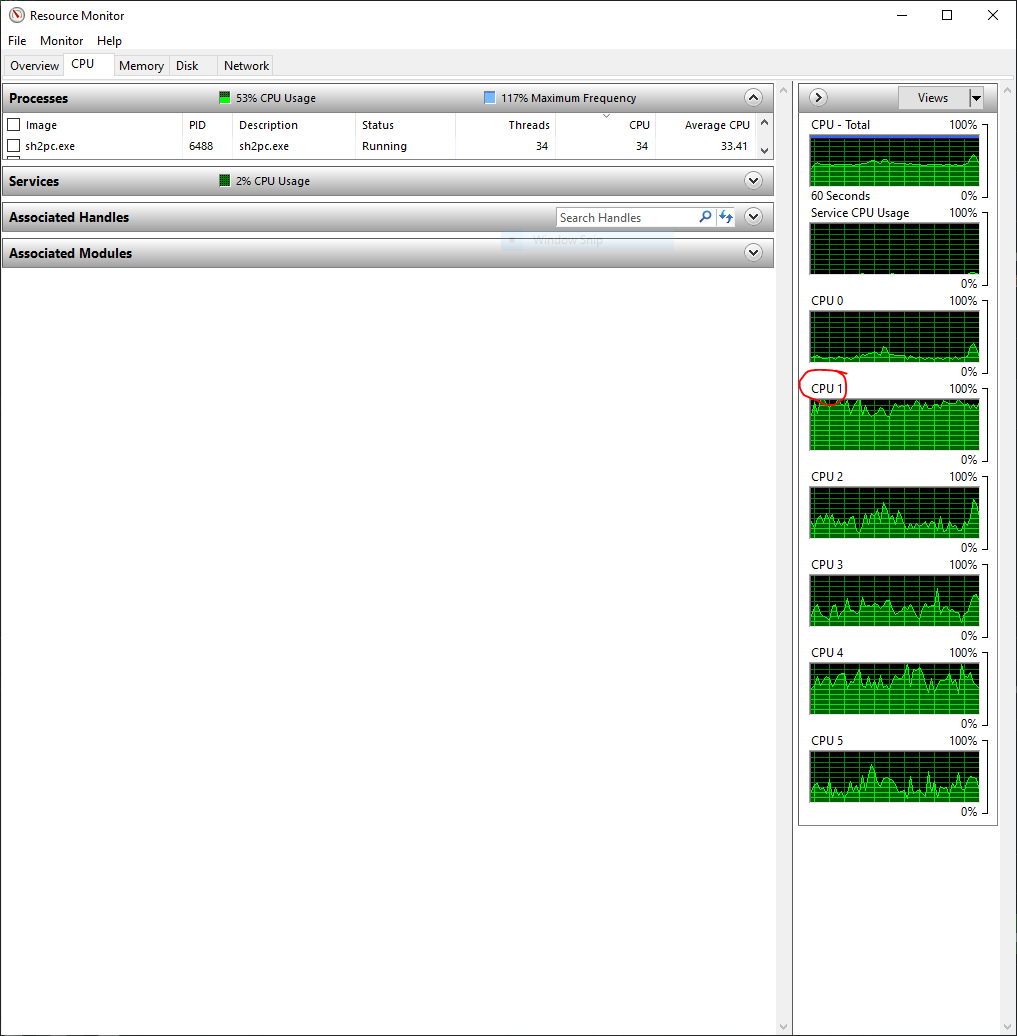
Polymega
on 20 Apr 2021
I saw that before and is why I added the Sleep(). This is not a great way, but I hoped it would work. I can probably add a slightly better way that is still simple.
Okay, I'll pause playtesting in the meantime to see what you find. The sound bug would happen within _minutes_ of starting the game, so being able to play for an hour straight so far without issue tells me you're on to something here.
Polymega
on 20 Apr 2021
There are still two threads that cycle the CPU continuously. That is not going to change. However, the work that those threads do should be spread across multiple cores so that no single core should be pegged. What we are doing here (with this code change) is allowing the game to run on multiple cores to take advantage of the extra CPU time.
The total CPU usage for the game should be around this amount:
- With hyper-threading: (100% / NumberOfCores) * 2.5
- Without hyper-threading: (100% / NumberOfCores) * 2
In my case I have 8 cores with hyper-threading so it runs around 31.25% CPU usage.
It should look something like this:
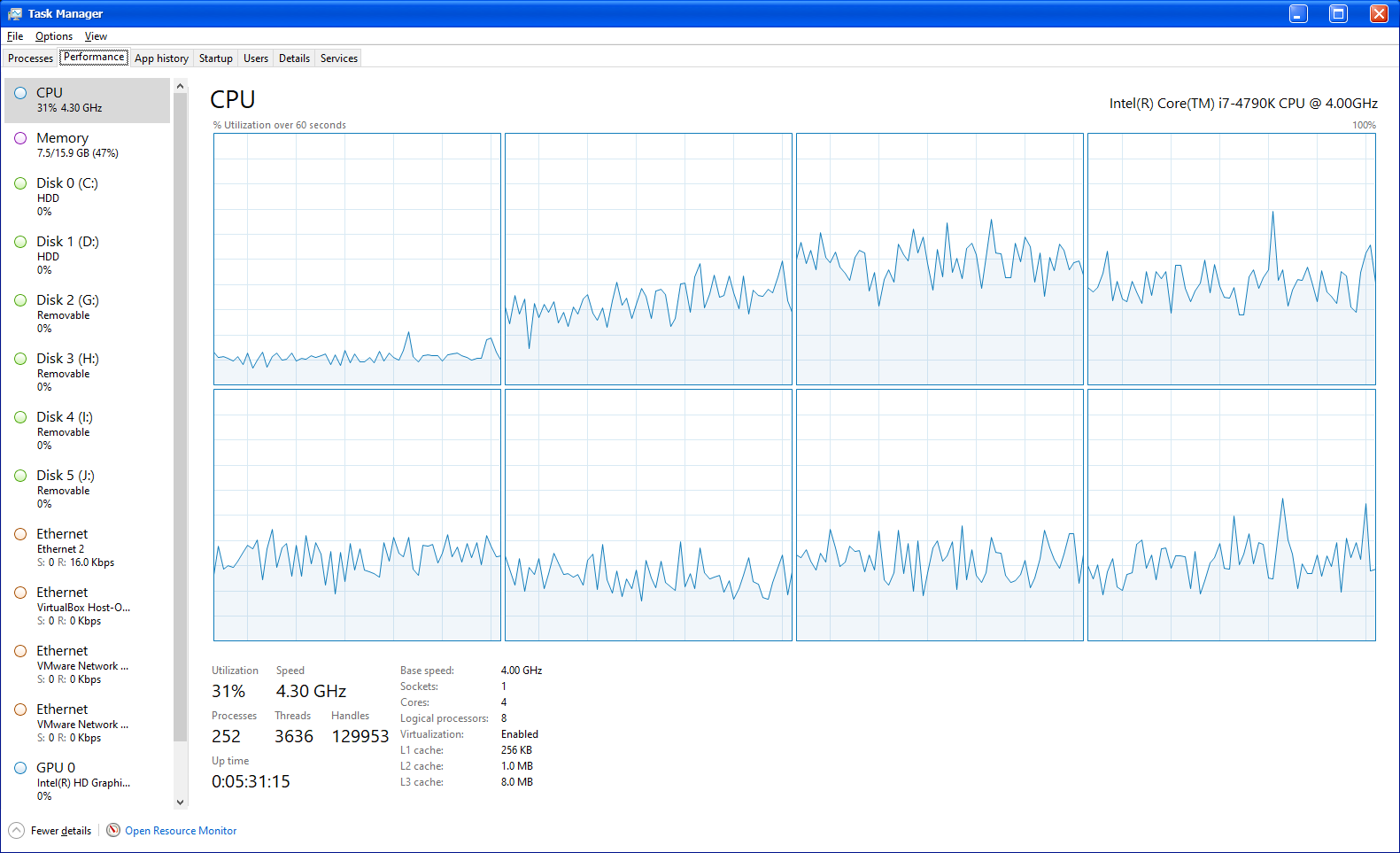
I did also make some minor changes to the code and added logging. If you are seeing something in the CPU that looks out of order than zip the logs and send them to me. The logs could be large so you may need to send it over the FTP.
Here is the update d3d8.zip
elishacloud
on 20 Apr 2021
For my processor, SH2 PC was averaging 34% CPU usage. Unrelated, but PCSX2 was averaging 17% with SH2.
34% CPU usage seems normal. What you are seeing is not a pegged CPU. A pegged CPU is flat lined at the top of the bar with no idle time. Below is an example of a pegged CPU:
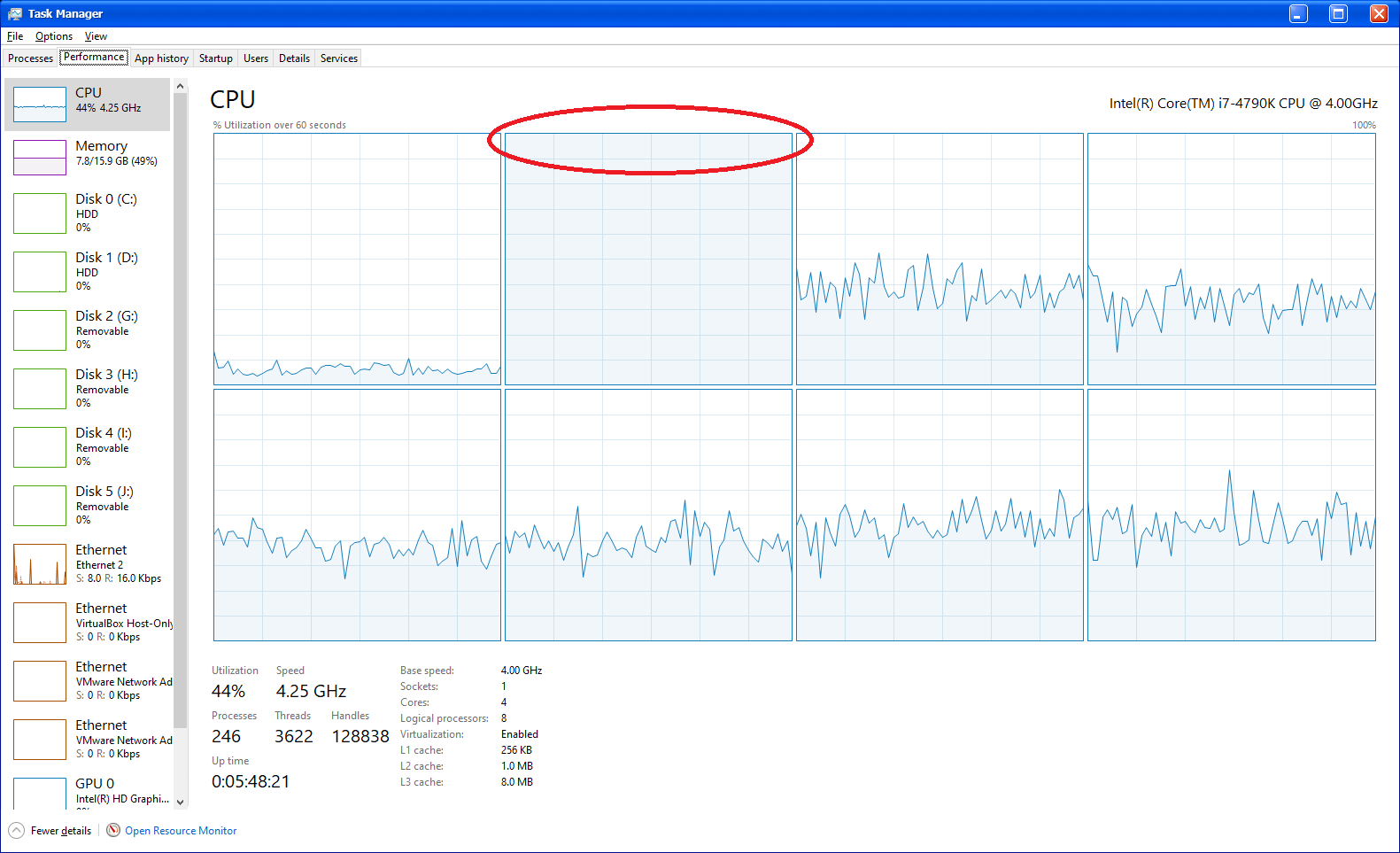
elishacloud
on 20 Apr 2021
Thanks Elisha. None of my cores were "pegged" then, but the game seems to favor one core (CPU 1) over the others, even with this new build. I just wasn't sure if that's normal or not. If that's normal, then no worries, but otherwise I wanted to let you know. Nothing looked unusual in the log, but here it is: d3d8.log
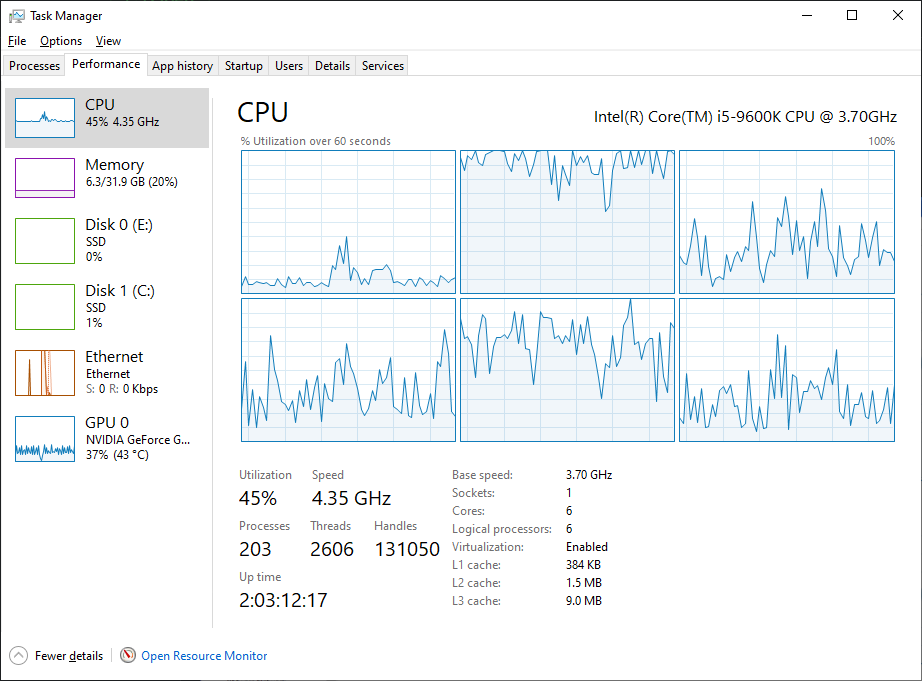
Polymega
on 20 Apr 2021
I noticed that one of my CPU cores stayed at a constant, near-100% usage, but that's about it. I think that's due to setting two of the faulty audio threads to their own affinity?
I checked the 4 audio threads that we set to a single core and all of them combined use less than 1% of the CPU. So that is not the reason you are seeing one of your CPU cores so high.
I suspect that the reason it is so high is related to the two threads that are continuously cycling the CPU. These threads are not related to the audio (as far as I can tell) and Windows could just be allowing these threads to do more work on a single core rather than continually switching them to another core.
I suspect that it is because you do not have hyper-threading. Hyper-threading will make the cores look more even (like my screenshot) even if a single thread is doing all the work.
Nothing looked unusual in the log, but here it is: d3d8.log
Your logs looks good. I can see that the threads are both pausing for ~10ms and then starting at the same time (well, technically one immediately after the other since they are on the same core) just like they should.
So, if this build works correctly on all three of the binary files then we are good. No more multi-core issues...
elishacloud
on 20 Apr 2021
I suspect that it is because you do not have hyper-threading. Hyper-threading will make the cores look more even (like my screenshot) even if a single thread is doing all the work.
Works for me! Just wanted to be sure on that.
So, if this build works correctly on all three of the binary files then we are good. No more multi-CPU issues...
I still want to test 1.0 some more, then I'll do the same for the other two binaries, but things are looking promising with this. 😊 I'll report back in the next few days.
If it's not too much trouble, may I get this same build without the additional logging?
Polymega
on 20 Apr 2021
If it's not too much trouble, may I get this same build without the additional logging?
I was going to do that but I did not want to keep bombarding you with new builds. However, since you asked so nicely...
Here is the updated build with the additional logging disabled: d3d8.zip
_BTW: we do have a feature to completely disable logging. It is DisableLogging. Just add this to the ini and set it to 1._
elishacloud
on 20 Apr 2021
BTW: we do have a feature to completely disable logging. It is DisableLogging. Just add this to the ini and set it to 1.
You're always two steps ahead. :) Thank you.
Polymega
on 20 Apr 2021
@elishacloud
Here's some quick testing information that might help you. It seems like you guys have only been testing this with 6 - 8 thread Intel processors, so I figured I'd add a little more diversity in the test results.
Build 1900 (Affinity)
The current release build with SingleCoreAffinity enabled. CPU1 is pegged the entire time, as expected.

Build 1900 (No Affinity)
The current release build with SingleCoreAffinity disabled. CPU4 - CPU7 are occasionally pegged, horrible audio glitches occur. CPU usage goes no higher than 15 - 16%.

Build 1909 (Multi-Core Fix)
The latest test build with AudioClipDetection enabled. CPU4 - CPU7 are occasionally pegged, but _no audio glitches occur_. CPU usage goes no higher than 15 - 16%.

So as you can see, my cores still occasionally get pegged with the latest test build, but this behavior is more or less identical to running the game with no affinity at all. It's possible that the core usage will vary based on the CPU, and something like my results are normal behavior for 12 - 16 thread Ryzen processors.
 AeroWidescreen
on 20 Apr 2021
AeroWidescreen
on 20 Apr 2021
@AeroWidescreen, thanks for the tests here!
One core occasionally getting pegged may be normal, based on how Windows handles multi-tasking with your CPU. As long as it behaves the same as it would with SingleCoreAffinity disabled (without the audio glitches) then we should be good.
It is great to no longer require running on a single CPU. It should make the game run smoother. There is no way I could have done this without @Gemini-Loboto3's help.
elishacloud
on 20 Apr 2021

I, uh... I got the sound loop bug. I was sitting in one of the Hospital hallways with a background ambiance track playing while typing an email and, after about 10 minutes, it happened. The sound loop sounded like it always does; on a 200ms loop.
I forgot to switch over to the test build that doesn't have additional logging, so I have the log with extra info. Problem is, nothing looks to be wrong in the log: d3d8.log
Polymega
on 20 Apr 2021
Okay, let's see if we can find a more definitive solution: @elishacloud, how much are you versed in using mutexes and semaphores? Because all we need at this point is a definitive way to make the game halt those two threads at the same time and the only way that I can think of is to effectively do some random crap in a looping thread that stops every tot ms and then reports to the ADX procedures that they need to proceed doing their stuff. I'm not that much of a big expert in multithreading or I would have tried to write some sort of synchrony solution. :/
Alternative solution, which requires probably more labour but it's garanteed to always work: use the timer that I posted above and when that it done processing unlock the ADX server threads from the loop itself.
Gemini-Loboto3
on 20 Apr 2021
Not that you need a video on it, but I just now had it happen a second time: https://youtu.be/Sd1Sjzca1EE
This time it took about 30+ minutes to happen.
Polymega
on 20 Apr 2021
Ok, I somehow stumbled upon a change and I _think_ may completely solve this issue. If this works than the issue has to do with the flags that the game sends to DirectSound. I will send more details later.
Testing build: d3d8.zip
elishacloud
on 20 Apr 2021
Okay, let's see if we can find a more definitive solution: @elishacloud, how much are you versed in using mutexes and semaphores?
I know a little bit about mutexes, and almost nothing about semaphores. However, based on my last change the issue may not be related to threading at all. Even without making any changes to audio threads I was able to eliminate the sound loop. I would like to hold off a bit on this until @Polymega runs some tests first. I will write up a better explanation when I have time.
elishacloud
on 20 Apr 2021
Ok, scratch that. It looks like that change only works on one of my computers. However, I am believe that the threading issue are solved with that build and the looping is a byproduct of how the game uses DirectSound.
elishacloud
on 20 Apr 2021
@Polymega
Ok, scratch that. It looks like that change only works on one of my computers. However, I am believe that the threading issue are solved with that build and the looping is a byproduct of how the game uses DirectSound.
Right. This might be related to the audio issue I had many months ago when we were testing the enhanced images, remember?
https://www.youtube.com/watch?v=Luvd87_7FHE
It wouldn't surprise me if this had nothing to do with the threading issue, like Elisha believes, and instead was caused by another issue entirely.
AeroWidescreen
on 20 Apr 2021
Right. This might be related to the audio issue I had many months ago when we were testing the enhanced images, remember?
https://www.youtube.com/watch?v=Luvd87_7FHE
Could be. I didn't think it was worth mentioning to Elisha because of how circumstantial it is, but when he implemented the Game Result load fix* I noticed the TV static was a noise that didn't stop, despite Elisha telling DirectSound to stop all audio: https://youtu.be/b76QVMiYer8
It may then also relate to this? https://github.com/elishacloud/Silent-Hill-2-Enhancements/issues/424
*Oh, Aero_, we've continued off your research and fixed the Game Result bug. :)
Polymega
on 20 Apr 2021
I noticed the TV static was a noise that didn't stop, despite Elisha telling DirectSound to stop all audio
This is because I don't actually "tell" DirectSound to stop all the threads. I wait until the game sends more data to the buffer and then stop audio stream. In this case, I would guess that the game sends all data to the buffer when the TV static starts up and so this stream never triggers my code to stop its audio.
To fix this I probably just need to add a line of code into the correct DirectSound function. I would just need some testing to figure out which is the right function to add this code to. It should be a very easy fix, if I can reproduce it.
It may then also relate to this? #424
It could be related to this one, but we would need to look into this later.
For the issue at hand, somehow either the game gets out of sync with DirectSound or the game stops sending additional data to the sound buffer. I haven't yet figured out which one.
For both BMG and Voice the game sends a small amount of data to the buffer and then plays the buffer with a DSBPLAY_LOOPING flag telling DirectSound to loop the data. SFX does not do this so should not have any issues.
Then every so often (~20ms) the game will query the position of the playback. Sometimes the game queries once and sometime it query 7 or 8 times in a row. After the query the game will then lock the buffer and add more data to a specific location in the buffer.
The issue is either that the game starts putting the data in the wrong place in the buffer or that the game stops putting data in the buffer at all. It is hard for me to figure out which it is because the game creates 10 buffers and is feeding data to multiple buffers at the same time even if only one sound is playing.
Also, I noticed that there are some threads that are loaded by dsound.dll. This means that the game could be running into syncing issues with the threads in dsound.dll.
Let me give you an example. The game does this:
9592 19:16:32.858 m_IDirectSoundBuffer8::Play (17D3D0C8)
9592 19:16:32.858 m_IDirectSoundBuffer8::GetStatus (17D3D0C8)
9592 19:16:32.873 m_IDirectSoundBuffer8::GetCurrentPosition (17D3D0C8) 0 3844
9592 19:16:32.873 m_IDirectSoundBuffer8::Lock (17D3D0C8) 32768 9728 0x00000980 0x1fb8930 0x008C16C0 0x2000 0x0
9592 19:16:32.873 m_IDirectSoundBuffer8::Unlock (17D3D0C8)
9592 19:16:32.873 m_IDirectSoundBuffer8::Lock (17D3D0C8) 32768 9728 0x00000980 0x1fb8930 0x008C16C0 0x2000 0x0
9592 19:16:32.873 m_IDirectSoundBuffer8::Unlock (17D3D0C8)
9592 19:16:32.891 m_IDirectSoundBuffer8::GetCurrentPosition (17D3D0C8) 2392 7684
9592 19:16:32.891 m_IDirectSoundBuffer8::Lock (17D3D0C8) 42496 9728 0x00000980 0x1fb8930 0x008C16C0 0x2980 0x0
9592 19:16:32.891 m_IDirectSoundBuffer8::Unlock (17D3D0C8)
9592 19:16:32.891 m_IDirectSoundBuffer8::Lock (17D3D0C8) 42496 9728 0x00000980 0x1fb8930 0x008C16C0 0x2980 0x0
9592 19:16:32.891 m_IDirectSoundBuffer8::Unlock (17D3D0C8)
9592 19:16:32.908 m_IDirectSoundBuffer8::GetCurrentPosition (17D3D0C8) 4312 9604
9592 19:16:32.908 m_IDirectSoundBuffer8::Lock (17D3D0C8) 52224 9728 0x00000980 0x1fb8930 0x008C16C0 0x3300 0x0
9592 19:16:32.908 m_IDirectSoundBuffer8::Unlock (17D3D0C8)
9592 19:16:32.908 m_IDirectSoundBuffer8::Lock (17D3D0C8) 52224 9728 0x00000980 0x1fb8930 0x008C16C0 0x3300 0x0
9592 19:16:32.908 m_IDirectSoundBuffer8::Unlock (17D3D0C8)
9592 19:16:32.923 m_IDirectSoundBuffer8::GetCurrentPosition (17D3D0C8) 8152 13444
9592 19:16:32.923 m_IDirectSoundBuffer8::Lock (17D3D0C8) 61952 3584 0x00000380 0x1fb8930 0x008C16C0 0x3c80 0x0
9592 19:16:32.923 m_IDirectSoundBuffer8::Unlock (17D3D0C8)
9592 19:16:32.923 m_IDirectSoundBuffer8::Lock (17D3D0C8) 61952 3584 0x00000380 0x1fb8930 0x008C16C0 0x3c80 0x0
9592 19:16:32.923 m_IDirectSoundBuffer8::Unlock (17D3D0C8)
The issue here is that the game queries the position of the playback and then locks the buffer to modify the playback. However with Windows, DirectSound is running on a different thread so in between the time the game queries for the position and the time the games locks the buffer Windows could have changed the buffer position.
I am not sure if this is the issue or if this could cause an issue. However, it seems like the code to remove the game's synchrony timer and overwrite the ADXM_WaitVsync() function actually makes things worse. I believe the only thing that helps here is setting the audio threads to the same CPU core.
I think the reason @Polymega saw another sound loop with the last testing build may be because I only set the game's audio threads to the same core and not the DirectSound's threads. I created a new build that undoes the ADXM_WaitVsync() function updates and just sets all audio threads (including DirectSound's) to the same core. I ran the game for one hour and did not hear any audio glitches.
All of these threads combined take less than 1% CPU time so it should be fine to set these to the same core.
We may need someone who understands more about DirectSound to fix this. @Gemini-Loboto3, do you know much about DirectSound?
In the meantime, I created a testing build that just sets all the audio threads to the same core. If this solves the issue maybe we should just live with this?
Here is the testing build: d3d8.zip
elishacloud
on 21 Apr 2021
I do kind of understand how DirectSound works more or less, but I'm not an expert due to how weird some of the COM interfaces are structured (example: locking and unlock have way too many meaningless parameters). I'm more of an XAudio2 programmer, since I almost always replace DSound. It works a whole lot better and allows nifty things like arbitrary loop points with no extra code since it runs everything in its own lightweight thread. For example, you could setup a buffer large enough to hold a whole BGM track and set beforehand the loop points in samples, then you fill the buffer as the decompression procedes in another thread; the advantage over DirectSound or OpenAL is that the lib already comes with that kind of support, it's super intuitive and doesn't require any extra complex thread barriers.
At some point I wanted to attempt and rewrite ADX with XAudio2 and ffmpeg, but it's probably overkill on SH2; the game has a really weird audio wrapper with calls everywhere and ADX requires way too many extra classes just to manage how it reads from AFS and all its containers.
As for the issue that you're having here, my guess is that the ADX server gets so much out of sync that it can't detect at the right moment the IDirectSoundBuffers are looping or supposed to. IIRC to check loop points you would usually have an event and an IDirectSoundListener, which work more or less like a callback on events that commence as soon as the position gets in a specific range. SH2 does have the listener for ADX but I couldn't find anything related to the actual callback events. So maybe it polls the buffer position manually? From those calls you posted it does indeed use GetCurrentPosition(), which isn't even that much precise since the buffer can wrap itself during a loop before you detect the actual position required for looping via a ring buffer with new data flowing in.
Gemini-Loboto3
on 21 Apr 2021
Thank you Elisha. I'm starting the playtest for this tonight and will continue throughout the next few days, if all goes well tonight.
To [stop sounds like the TV static from playing on Game Result file load] I probably just need to add a line of code into the correct DirectSound function. I would just need some testing to figure out which is the right function to add this code to. It should be a very easy fix, if I can reproduce it.
In your save file list, near the top, load Apartments 2F Room then follow this path to return to Wood Side Room 208. Once you're in Room 208, no matter where you're at in the room, you'll be able to hear the TV static. Then, load a Game Result file while in this room.
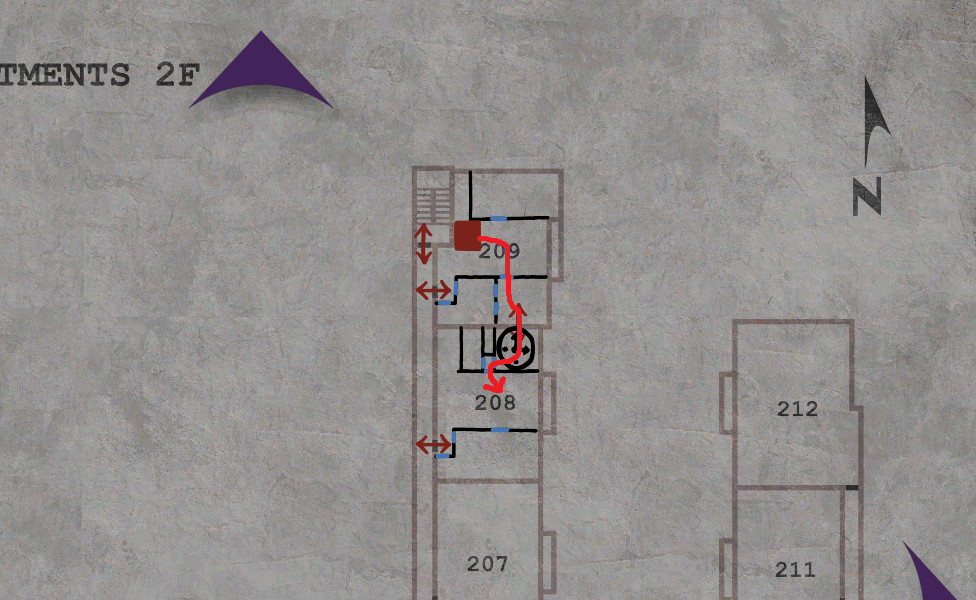
You can make a Quick Save (F5) once in Room 208 to quickly load back in here.
Polymega
on 22 Apr 2021
I've went through the entire game, taking my time, spending a total of around 6 hours with it. First night was 2.5 hours straight, second night was two stints at an hour each, and the last day being 1.5 hours straight.
I'm happy to say I experienced no audio loop issues! I've only tested this is on 1.0 as of writing. I planned to test 1.1 and DC as well. For these ones, I won't do a slow, full playthrough as I've done with 1.0, but I planned to play at least an hour straight for each version.
A few added benefits of running the game on multiple cores:
- There is no pause/lag when taking a screenshot anymore, as the screenshot can now use a less busy core to process and save the image. This should help ensure the visuals and audio don't become desynced when taking screenshots. Nice!
- I'm not totally sure on this, but I _think_ the game stutters less. It might be a placebo effect or I may be psyching myself out, but the stutters feel less frequent.
Polymega
on 23 Apr 2021
That's fantastic news! Did you guys want to do a full test as well or will Polymega's testing suffice? I could at least playthrough v1.0 if neccesary.
I'm not totally sure on this, but I think the game stutters less. It might be a placebo effect or I may be psyching myself out, but the stutters feel less frequent.
Time to implement support for 60 fps? It's going to be a headache, but it should go together nicely with what Elisha has done here.
AeroWidescreen
on 23 Apr 2021
Did you guys want to do a full test as well or will Polymega's testing suffice? I could at least playthrough v1.0 if neccesary.
If you'd want to test 1.1 or DC for like an hour that'd be helpful either way. You just want to do the test all in one go; give the game enough time to "break" with its audio looping.
When I did my full playthrough, there were times where I'd go to a spot that has looping BGM and walk away from my PC for 10-20 minutes. Y'know... trying to give the game as many opportunities as I could to self-implode with its audio.
Time to implement support for 60 fps? It's going to be a headache, but it should go together nicely with what Elisha has done here.
This would be epic, but it's going to be a true challenge (specifically for you, who would be doing a lot of the heavy lifting). If you're game, I'm game. Just to warn you: I've added a lot more issues with 60 fps over the months since you probably last looked at it.
Polymega
on 23 Apr 2021
Once you're in Room 208, no matter where you're at in the room, you'll be able to hear the TV static. Then, load a Game Result file while in this room.
Ok, I fixed this issue with the latest build.
I'm happy to say I experienced no audio loop issues!
Great! This change only sets thread priority, nothing else. So, it is not a "true" fix, but it is much better than what we had.
I planned to test 1.1 and DC as well.
Can you use the new build for the future tests on 1.1 and DC?
I also noticed that there is a difference with and without DSOAL. So you may want to test 1.1 with DSOAL and DC without DSOAL, or vice versa. Or maybe you can test with DSOAL and @AeroWidescreen can test without?
There is no pause/lag when taking a screenshot anymore
Yes, I previously added a bit of extra code to prepare for this. I moved all work possible off to a separate thread.
- I'm not totally sure on this, but I _think_ the game stutters less. It might be a placebo effect
I don't think it is a placebo effect. There is less shuddering because there is more processor time available to the game and the different parts of the game cannot stomp on each other's CPU time. To prove my point see the screenshot example above. Screenshots can no longer stomp on other parts of the game.
Here is the updated test build: d3d8.zip
elishacloud
on 24 Apr 2021
I also noticed that there is a difference with and without DSOAL. So you may want to test 1.1 with DSOAL and DC without DSOAL, or vice versa. Or maybe you can test with DSOAL and @AeroWidescreen can test without?
Sure thing. I have some computer maintenance to do and then I'll get started with the new build, if Polymega agrees.
AeroWidescreen
on 24 Apr 2021
Ok, I fixed this issue with the latest build.
Great! Thank you, I'll test this out.
Can you use the new build for the future tests on 1.1 and DC?
No problem. Aero_, I'll do some testing on DC _without_ DSOAL if you want to test 1.1 _with_ DSOAL?
Note again that I'm not planning on doing a long, full playthrough like I did with 1.0, unless you feel I need to Elisha?
Polymega
on 24 Apr 2021
Note again that I'm not planning on doing a long, full playthrough like I did with 1.0, unless you feel I need to Elisha?
No problem. The current code is the same on all binaries so should not need full retesting.
elishacloud
on 24 Apr 2021
1.5 hours with DC using no DSOAL and no audio issues to report. The game crashed on me once, but I chalk that up to the no-CD DC executable being naturally unstable.
Polymega
on 24 Apr 2021
Unfortunately, I ran into a strange sound loop during the first "boss fight" with Pyramid Head in the apartments. I wasn't able to capture it, but you know that strange moaning sound he makes during the intro cutscene? That rapidly looped until the cutscene ended and then the sound returned to normal. This was with the newest build Elisha posted today.
SH2PC v1.1
DSOAL
d3d8.log
I also ran into a sound loop in the apartments when I was using an older build from 3 days ago. This may have been the same build that Polymega had success with. I'm not sure. Either way, I ran into problems with the new build and old build.
SH2PC v1.1
DSOAL
https://youtu.be/2a39ZP4mqtw
AeroWidescreen
on 24 Apr 2021
heya,
just wanted to ask if I could be of any use? due to illness I'm at home 24/7 at the moment with not much to do, so I'd be practicaly free to help testing all day if that'd do anything for you
cheers
 TommvinHuwaltzky
on 24 Apr 2021
TommvinHuwaltzky
on 24 Apr 2021
just wanted to ask if I could be of any use?
Hi @TommvinHuwaltzky,
Sure, that'd be good. Grab these executables: http://www.igotaletter.com/temp/sh2pc/_Original_No_CD_Executables.zip
To test:
- Use the version 1.1 executable (found in that download link above).
- Use Elisha's latest test build for our project.
- Make sure you are also using DSOAL.
- Play the game normally.
For this test:
Take your time. Let cutscenes play out. Stay in areas for a while that have background music. The only thing we're playtesting/worrying about here is audio looping.
Important:
A lot of SH2's ambient background music intentionally loops in weird ways. It is recommended that you're very familiar with SH2's background music when testing this. I've watched first-time players think correctly playing tracks were incorrectly looping because they aren't familiar with Akira's unique-sounding work for this game.
Polymega
on 24 Apr 2021
can't say I know the game "by heart", but since I've been playing it at least once a year since I've had it back in '01 or '02 on the og PS2, I'd say I have _some_ expertise :P
and maybe I can also comment on some AMD-specific issues since I'm running an all-AMD PC (talked to you and elisha before about anti-aliasing-issues on my 5700 XT, in case you remember)?
so I'm running the DC-version, and you want me to use the 1.1-exe, right? is that the one with the official patch? because it was to supposedly fix some looping-issues? or are you through testing the NA v1.0-exe? just curious.
anyway, I'll get to it.
...shit after all these years this game just isn't getting old, is it? (:
TommvinHuwaltzky
on 24 Apr 2021
so I'm running the DC-version, and you want me to use the 1.1-exe, right? is that the one with the official patch? because it was to supposedly fix some looping-issues?
Yes, please use 1.1.
1.0 turns into 1.1 when using Konami's officially released patch that was supposed to fix the sound looping issues. However, it didn't fix that issue (but curiously did remove the game's DRM).
I'm requesting you to test 1.1 because Aero_ also had issues with 1.1 the other day. I tested 1.0 and DC and had no problems with it (besides the no-CD DC executable being naturally unstable*). If you test 1.1 and have no issues, try out 1.0 or DC next if you'd like. See if you have sound loop issues I didn't have.
...shit after all these years this game just isn't getting old, is it? (:
I love the game (duh 😛), but it'll be nice when we can wrap up the project. We're to a point where we need to let a lot of the smaller things slide and worry about the big stuff left.
*Oh, and we recommend _not_ using the DC executable for regular play.
Polymega
on 24 Apr 2021
I'm requesting you to test 1.1 because Aero_ also had issues with 1.1 the other day. I tested 1.0 and DC and had no problems with it (besides the no-CD DC executable being naturally unstable*). If you test 1.1 and have no issues, try out 1.0 or DC next if you'd like. See if you have sound loop issues I didn't have.
gotcha.
installed... aaaaaaand I'm off. gonna let you know what I can find. hopefully not too much, eh? (:
it'll be nice when we can wrap up the project
hehe yeah, Silent Hill 3 and 4 are a-waitin'... :-3
TommvinHuwaltzky
on 24 Apr 2021
SH2PC v1.1
DSOAL
Build 1909 (4/23/21)
So I started over from the very beginning and went through the entire apartment level with no audio glitches. I continued forward and made it to the otherworld hospital, again no gitches. No cutscenes were skipped and I allowed some of the BGMs to play for a few minutes before moving forward.
Perhaps the issue I experienced with Pyramid Head was an unrelated glitch? I don't know. I'll continue to play and let you guys know if anything changes. I'm looking forward to hearing from @TommvinHuwaltzky as well.
AeroWidescreen
on 24 Apr 2021
so, can finaly report back after the first complete playthrough.
first off, hey @AeroWidescreen - thanks btw for all your other fixes/mods for old(er) games. and your work here ofc. very much appreciated! (:
- I had RTSS running to monitor the game's hardware-utilization (the overlay is visible in the snapshot that's in the inventory-screen btw, just as a curious side-note).
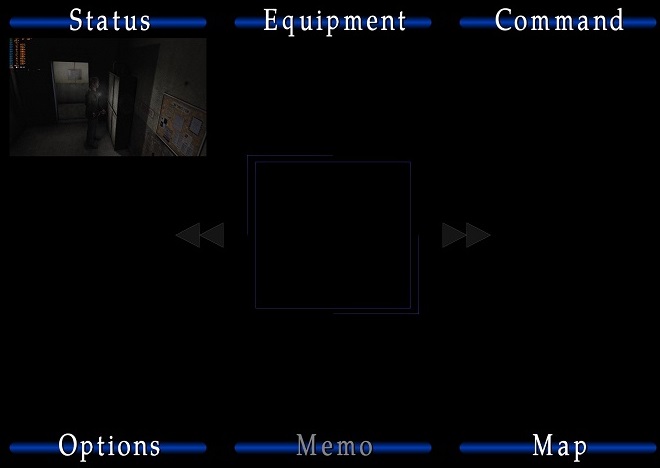
- game alternates between hammering one core/thread and distributing load across 3-4 c/t (normal behavior of the game without EE-module?). would be interesting to know if that'd help any with performance should the game ever be made to run at 60+ fps without bugs.
- frame-pacing seems to be ok though, for the most part.
- skimmed through the post a bit, and had none of the glitches @Polymega, @elishacloud, or @Aero_ mentioned. tested inventory-sounds a while as well. nothing so far. also no popping or crackling.
- had a looping-bug in "Prison North" (the hallway after picking up the "Gluttonous Pig"-tablet). couldn't reproduce; no looping after restarting the game and loading the save that I made immediately when the bug started.
- still funny how after james drops done the hole after the prison, his mouth is open in a silent scream
- just noticed for the first time that all of the 6 hanging prisoners seem to have james's hairpiece :D
- damn, why does the mist in the meat-locker-area (and later the flames in the hotel-stairway) have such harsh texture-seams all of a sudden? Ôo
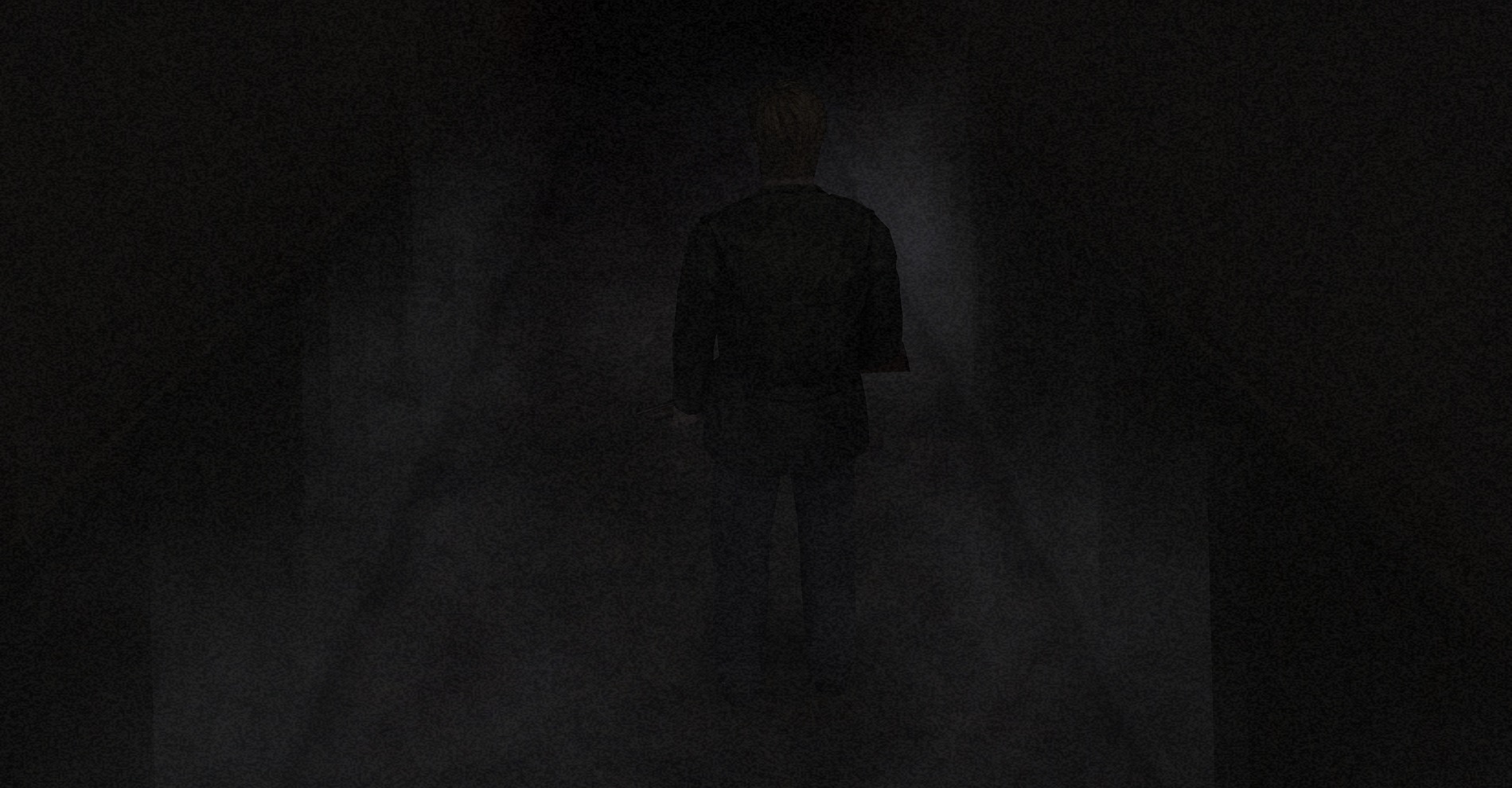
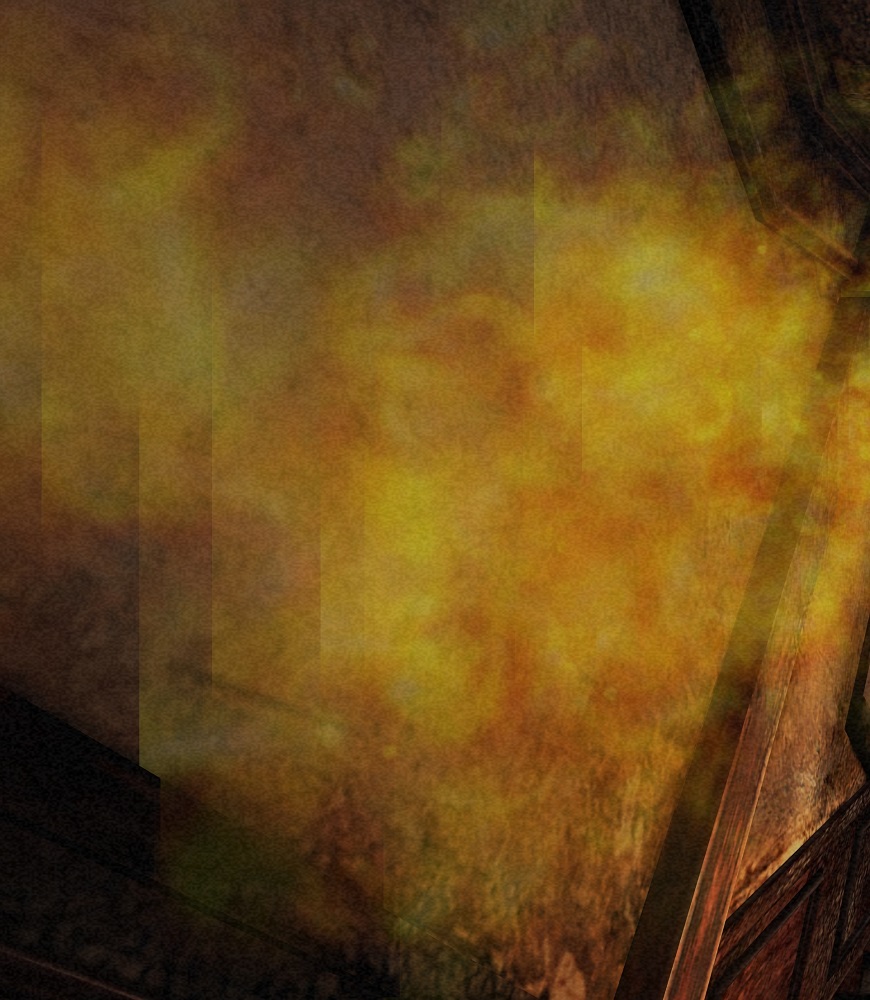
- btw couldn't test every ending since I don't have savegames for each one. got the "Leave"-ending this time. again. (every. single. time. even if I try to get sth else...) so if I should test all of them, gonna need saves :P
- and just how beautiful is this game still? even with the relatively low-res textures. almost photoreal in some places. especialy at 2880p with (your) SMAA and some subtle MXAO.
- oops, got a bit side-tracked there (but I guess it's pretty awesome that there's almost nothing negative to report, right?). gonna start a playthrough with the 1.0 NA-exe now and see what'll happen.
TommvinHuwaltzky
on 25 Apr 2021
had a looping-bug in "Prison North" (the hallway after picking up the "Gluttonous Pig"-tablet). couldn't reproduce; no looping after restarting the game and loading the save that I made immediately when the bug started.
I just finished my v1.1 test and didn't experience any problems after that whole Pyramid Head thing. Based on what we've both experienced so far, an audio loop bug may still exist but it's apparently very rare and seemingly random? Interesting.
AeroWidescreen
on 25 Apr 2021
small update:
tested _Born from a Wish_ on both 1.0 and 1.1. encountered no looping, BUT some other minor bug.
when you try to enter the door again after first talking to Ernest, the sound of Maria knocking on the door is off sync, with both executables.
tried it with both either the EE-module disabled and/or the sh2e\sound-folder renamed. then it's synced again.
seems to be an issues with the audio-enhancement-pack.
update:
played through the game again (NA v1.0) and nothing. seems perfectly fine.
gonna do another playthrough with v1.1, since that's where @AeroWidescreen and I still encountered (random?) looping.
TommvinHuwaltzky
on 25 Apr 2021
Had a buddy playtest this as well.
- SH2E test build 1.8.1909.0
- Executable 1.1
- Used DSOAL
- Played 2+ hours straight, up to the bowling alley
- No audio issues to report
Polymega
on 30 Apr 2021
@elishacloud I just realized he probably still had the SingleCoreAffinity = 2 line in his d3d8.ini file. That shouldn't matter with your test build 1.8.1909.0, correct? This test build doesn't read/worry about the SingleCoreAffinity line in the ini?
Nevermind, I just realized your test build removes the SingleCoreAffinity line from the ini and I confirmed with him he extracted all files from the test build (including the ini) so we're good here.
Polymega
on 30 Apr 2021
Thanks for all your testing here!
The SingleCoreAffinity option no longer works on this testing build. In order to enable processor affinity on this testing build you need to add SingleCoreAffinityLegacy option. This new options works the same as the old option, but it is renamed so that users won't accidentally enable the processor affinity and overwrite our new multi-core support features.
@Polymega, if you are comfortable with this feature as it is I can check it in.
elishacloud
on 3 May 2021
@TommvinHuwaltzky your re-playthrough using 1.1: Did you run into any audio trouble your second go-around?
Polymega
on 3 May 2021
hey, sorry @Polymega
had an emergency in the family.
I got halfway through before though, and nothing so far. gonna continue this evening.
TommvinHuwaltzky
on 5 May 2021
FWIW if you need to pin threads not created by the game code (or by ADX) to specific cores, I recommend CPU Sets when they're supported. If you set the policies right, you'll be able to pin "foreign" threads (such as the DSound ones) to a single core reliably, and then override game's CreateThread to set the threading policy for game threads to be free threaded.
 CookiePLMonster
on 8 May 2021
CookiePLMonster
on 8 May 2021
Thanks @CookiePLMonster for the suggestion! I briefly looked into the CPU Sets and, correct me if I am wrong, it appears that they require Windows 10. They don't appear to be available for Windows 7. I am trying to make this project work on at least Windows 7 and so far it still works all the way back to Windows XP. I don't really want to do a different solution for Windows 7 vs. Windows 10.
elishacloud
on 9 May 2021
I don't really want to do a different solution for Windows 7 vs. Windows 10.
Fair enough, it's just that this solution fits the use case perfectly and you wouldn't need to resort to weird trickery of checking if the thread starts inside dsound.dll.
Also what's the consensus on the vsync loops? I've seen some struggle on should those be implemented properly, and I believe if they are needed then they'd be best implemented with a mutex + counter (to count vblanks) + condition variable. However, seeing how the conversation shifted to internal dsound threads later I'm assuming it was a red herring.
CookiePLMonster
on 9 May 2021
Also what's the consensus on the vsync loops?
I can use D3DKMTWaitForVerticalBlankEvent to exactly time the vsync loops. However, even that does not work and we still hear stuttering in the audio.
I _think_ what may be happening is what Gemini said "that the ADX server gets so much out of sync that it can't detect at the right moment the IDirectSoundBuffers are looping or supposed to". For a more detailed explanation see this comment.
Note: setting all the audio threads (including dsound.dll threads) to the same CPU core seems to work. But it is not really a proper fix.
elishacloud
on 9 May 2021
I've played through game twice again (v1.1), and still no issues.
do you have a new build for testing, @elishacloud?
TommvinHuwaltzky
on 10 May 2021
Related issues
 Badore90
·
9Comments
Polymega
·
18Comments
Polymega
·
8Comments
Polymega
·
15Comments
Badore90
·
9Comments
Polymega
·
18Comments
Polymega
·
8Comments
Polymega
·
15Comments
 yukinsaknos
·
14Comments
yukinsaknos
·
14Comments
Most helpful comment
@AeroWidescreen, thanks for the tests here!
One core occasionally getting pegged may be normal, based on how Windows handles multi-tasking with your CPU. As long as it behaves the same as it would with
SingleCoreAffinitydisabled (without the audio glitches) then we should be good.It is great to no longer require running on a single CPU. It should make the game run smoother. There is no way I could have done this without @Gemini-Loboto3's help.