Silent-hill-2-enhancements: FIX FOUND: Loading a Quick Save inside the Cemetery creates odd environmental effects for that area
@Bigmanjapan , I'm hoping with your deduction skills in determining the address line(s) that caused issues for the rowboat animation bug that maybe you can determine what the cause is here as well?
If you load a Quick Save file that's inside the cemetery the environment looks weird for the cemetery. If you leave the area and come back it fixes itself. This only happens if you load the game from within the cemetery:
Edit: Forgot to mention this also occurs with the vanilla PC version (no mods/fixes being used).
 Polymega
All 18 comments
Actually, this seems a lot more specific/circumstantial than what I first realized. It seems to depend on _where within_ the cemetery you Quick Saved that determines if this issue happens or not:
If you Quick Save between the cemetery building and exit gate the bug seems to occur. If you save close to the water line or further back (towards the gravestones and entrance to the cemetery) it doesn't happen.
I'm going to close this ticket due to how specific this bug is. If you're feeling frisky though, @Bigmanjapan , please take a look still and if you find something about this I'll re-open the ticket.
Polymega
on 27 May 2018
Saving / loading process assigns wrong values to loading zone, cover-up fog and location's textures colour palettes. If you freeze the values while being outside of the cemetery or prior to the loading process while being in the cemetery, the issue will not occur. The addresses should be unfrozen of course once a players's past the cemetery.
@AeroWidescreen
 Bigmanjapan
on 27 May 2018
Bigmanjapan
on 27 May 2018
Excellent work once again, Bigmanjapan! Many thanks
Polymega
on 27 May 2018
@Bigmanjapan @Polymega Had some extra time tonight, so I took a quick look. I thought this was going to be more of a hassle but maybe not. Download the cheat table and tell me if it works.
It can be enabled / disabled at any time, just reload your saved data for the changes to take effect.
 AeroWidescreen
on 1 Jun 2018
AeroWidescreen
on 1 Jun 2018
Is it supposed to be active only at the cemetery / near cemetery or all the time?
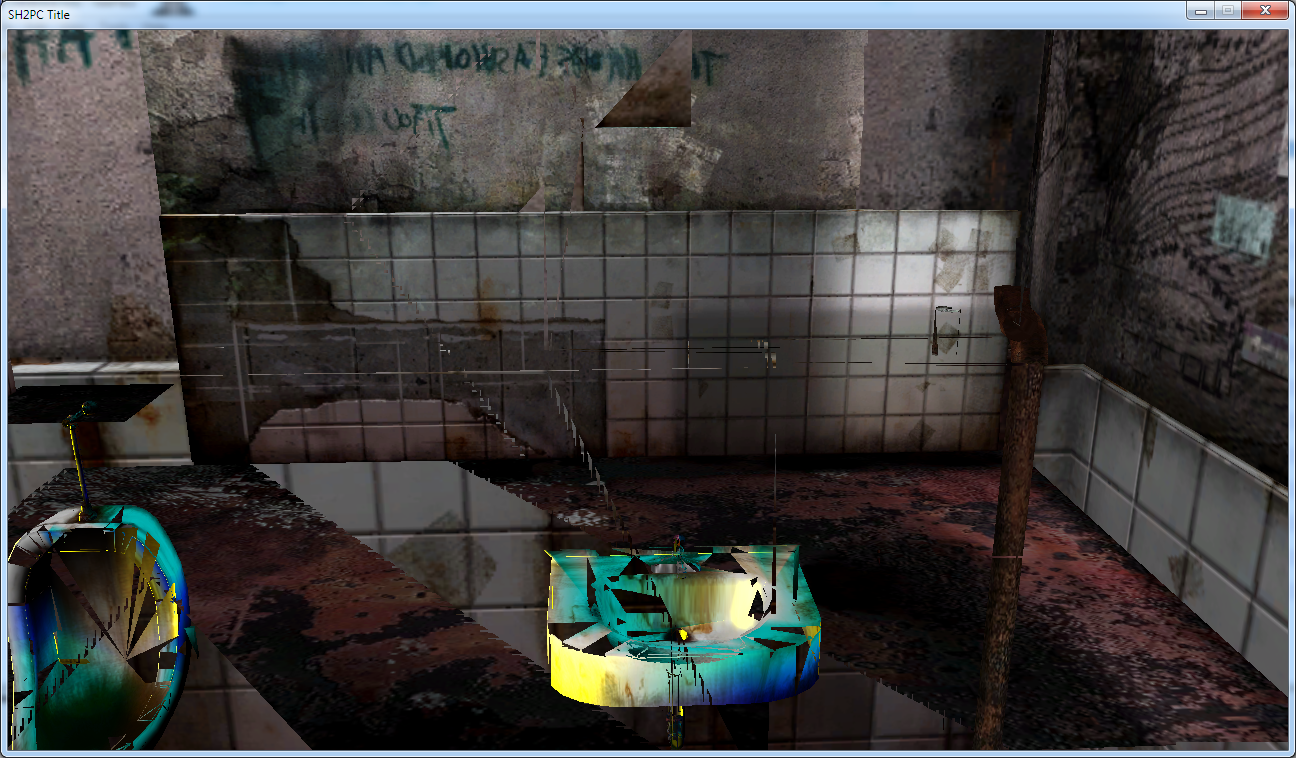
Works fine for the cemetery, breaks stuff in other locations:
Bigmanjapan
on 1 Jun 2018
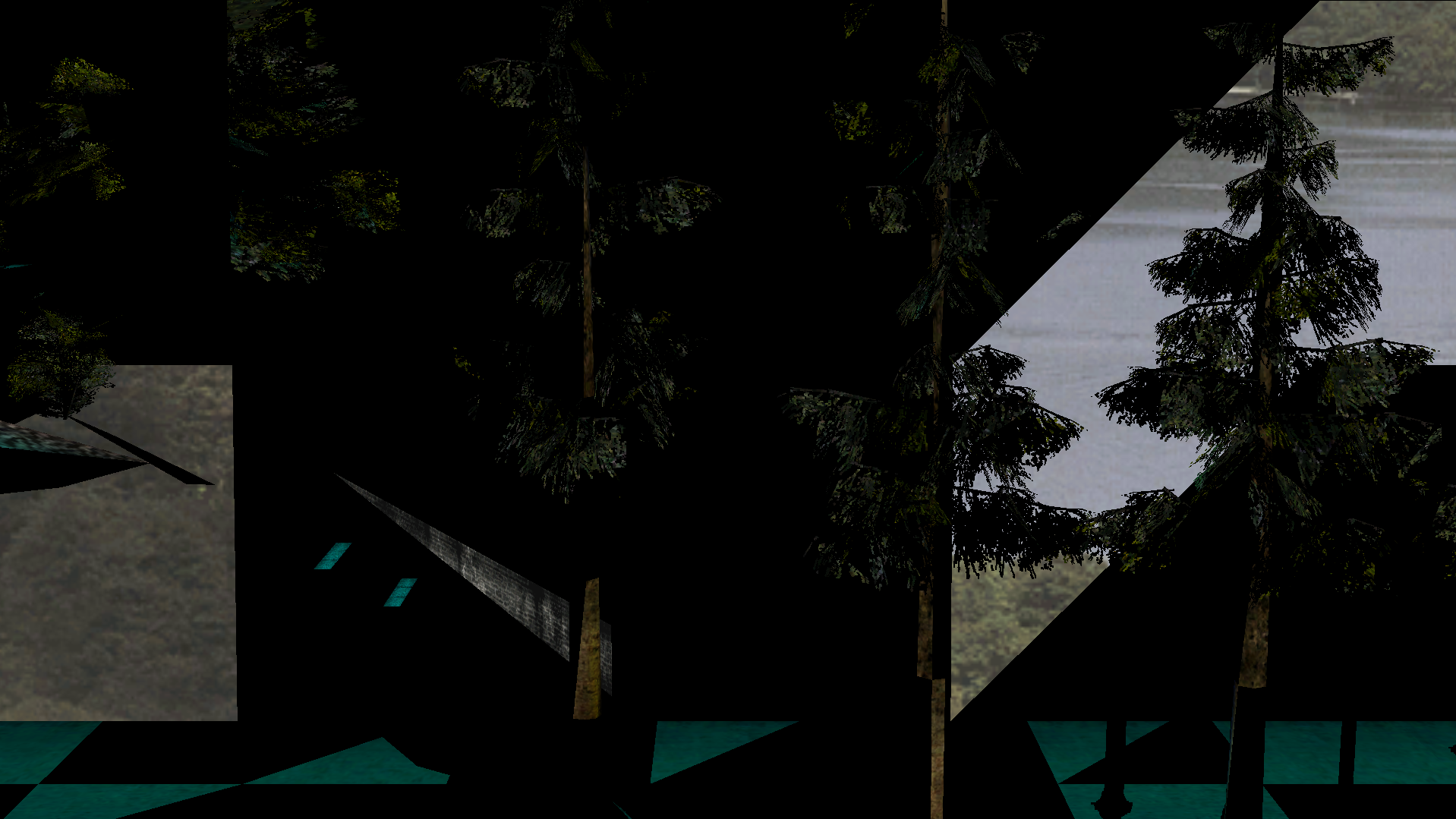
Echoing Bigmanjapan's statement: Fixed the Quick Load bug in the cemetery but glitches up the beginning bathroom and observation deck area. I have not done a full play test with the fix in effect.
Polymega
on 1 Jun 2018
Well that's embarrassing. I checked different save points and locations, but never bothered to check the intro of the game.
Is it supposed to be active only at the cemetery / near cemetery or all the time?
It's suppose to activate under certain lighting conditions. I'll try again later.
AeroWidescreen
on 1 Jun 2018
Edit: Bigmanjapan may have already determined that this was the case in his initial post. Apologies if so.
I'm not too confident that the quick save is the real problem here. That seems to be working as intended; it works exactly the same as a normal save. I'm guessing the problem comes from the value used at this address:
00942ED0
There's part of the cemetery where the game switches over to a hex value of 0001000E (bugged), while the rest of the cemetery seems to go anywhere from 0001000A to 0001000D. You don't notice anything wrong in real-time likely because the function that changes the color palette and writes to 00942ED0 is only used once you enter a new location or load a new save. I don't know what this value is actually for, so I just called it "Palette Variable" in the cheat table.
Try this and tell me if you still run into the same issues. I couldn't reproduce what you guys were experiencing in the screenshots. Weird.
AeroWidescreen
on 10 Jun 2018
Cheat Table
Link is broken?
That's an interesting take on what's happening with that bug. I also think it somehow tied towards that white fade-in that happens before cutscene with Angela since it's a single instance of such white fade-in in the whole game?
Bigmanjapan
on 10 Jun 2018
Link is broken?
Fixed. I had to re-upload the cheat table last night and forgot to update the link before I went to sleep.
I also think it somehow tied towards that white fade-in that happens before cutscene with Angela since it's a single instance of such white fade-in in the whole game?
I don't think there's any correlation, but I never gave it much thought. Good point. I'm almost certain the fade-in is a regular transition overlay recolored to white/gray. You can usually change the color of those type of things. The speed is affected by FastTransitions as well.
AeroWidescreen
on 10 Jun 2018
This looks to be the ticket so far, Aero! The beginning area looks a-okay now. I'll do a full play test and randomly quick save/quick load spots throughout the game to be sure. Really great work here, thank you.
Edit: This is really neat. So I have CE opened beside me and I'm bouncing my eyes back-and-forth between that and the game trying to see if any other zones call 0001000E.
Anyway, while playing, and thanks to CE value stats, I just realized that when you first enter West Silent Hill (after meeting Maria) it's "day time." Then, after exiting the bowling alley, it becomes "dawn time." That's a nice touch by the devs!
Polymega
on 10 Jun 2018
New script seems to work with no issues.
I don't know what this value is actually for
More speculation here. Maybe 0001000A, 0001000B, 0001000C, 0001000D, 0001000E etc values are indicators of a texture skinning zone of the loaded location on which James stands?
Because this looks oddly like a texture zoning of some sorts (brightness go wrong if you load inside this zone with unloaded textures (0001000E zone)): https://youtu.be/8QUQWyuHhFQ
Either way, if your script tricks game engine into thinking that James stands on the other zones which have right brightness values assigned to them, then it's all good.
Then, after exiting the bowling alley, it becomes "dawn time."
Have you noticed that there are multiple James / Maria models' texture sets for each of the daytime state? I always wondered why devs had to make multiple texture sets instead of adjusting models' colors via game engine means. Maybe they run into some limitation we ran into in the flashlight thread.
Bigmanjapan
on 10 Jun 2018
Just ran through the game and saw no oddities, Aero. Excellent work once again!
Although I had a theory as I was play testing: The "Leave" ending's camera spawns right around the area that we were trying to fix. I wondered if that's why this particular loading area is so different? Because the Leave ending shows the graveyard at a different time of day? But I got the leave ending and the address shown on CE to me was 0001000A instead. However, the address right before that one--where James and Mary are in their supposed bedroom--_was_ 0001000E. So maybe it was pulling that value beforehand? (Scratch that, I got a different value this time when I re-did the ending.)
But the good news remains: It seems to work without a hitch and, yes, the Leave ending still looks correct as well!
But @AeroWidescreen , I did find another camera "pop" when ReduceCutsceneFOV is enabled. This happens at the end of Mary's letter in the "Leave" ending. I believe you already found out about this from here with the "Maria" ending? If so, do note that fix may need to apply to all endings and not just the "Maria" ending. I haven't tested the other endings out yet:
Have you noticed that there are multiple James / Maria models' texture sets for each of the daytime state?
No, I didn't! Yeah... I wonder why, too? I mean, why couldn't they just change the RGB values of a light hitting them as opposed to making all-new models for each daytime state? Huh...
Polymega
on 10 Jun 2018
@Bigmanjapan
More speculation here. Maybe 0001000A, 0001000B, 0001000C, 0001000D, 0001000E etc values are indicators of a texture skinning zone of the loaded location on which James stands?
Probably. I did try to experiment with it before and noticed that the textures disappeared when I moved on to other areas. Don't know why that's linked to the fog / palette colors though.
@Polymega
But @AeroWidescreen , I did find another camera "pop" when ReduceCutsceneFOV is enabled. This happens at the end of Mary's letter in the "Leave" ending. I believe you already found out about this from here with the "Maria" ending? If so, do note that fix may need to apply to all endings and not just the "Maria" ending. I haven't tested the other endings out yet:
Yeah, I fixed that already. Rebirth and the Dog ending would need to be tested. UFO and Rebirth don't really have an ending cutscene.
AeroWidescreen
on 10 Jun 2018
@elishacloud
Cemetery Lighting Fix
If the value in ecx = 0001000E, then write 0001000D to ecx. This will prevent the game saving the wrong lighting values in this area, which would normally corrupt the fog.
XXXXXXXX = code cave
0047C31C jmp XXXXXXXX
XXXXXXXX cmp ecx,0001000E
XXXXXXXX je // jumps to mov ecx,0001000D
XXXXXXXX mov [00942ED0],ecx
XXXXXXXX cmp ebp,02
XXXXXXXX jmp 0047C322

XXXXXXXX mov ecx,0001000D // jump goes here
XXXXXXXX mov [00942ED0],ecx
XXXXXXXX cmp ebp,02
XXXXXXXX jmp 0047C322
Thanks @AeroWidescreen!
 elishacloud
on 11 Jul 2018
elishacloud
on 11 Jul 2018
Implemented the Cemetery Lighting Fix in b7700f7 check in.
elishacloud
on 14 Jul 2018
Fixed. Closing issue.
elishacloud
on 14 Jul 2018
Related issues
 lebouffon88
·
17Comments
Polymega
·
10Comments
lebouffon88
·
17Comments
Polymega
·
10Comments
 Badore90
·
9Comments
Polymega
·
8Comments
Polymega
·
14Comments
Badore90
·
9Comments
Polymega
·
8Comments
Polymega
·
14Comments
Most helpful comment
Edit: Bigmanjapan may have already determined that this was the case in his initial post. Apologies if so.
I'm not too confident that the quick save is the real problem here. That seems to be working as intended; it works exactly the same as a normal save. I'm guessing the problem comes from the value used at this address:
00942ED0
There's part of the cemetery where the game switches over to a hex value of 0001000E (bugged), while the rest of the cemetery seems to go anywhere from 0001000A to 0001000D. You don't notice anything wrong in real-time likely because the function that changes the color palette and writes to 00942ED0 is only used once you enter a new location or load a new save. I don't know what this value is actually for, so I just called it "Palette Variable" in the cheat table.
Try this and tell me if you still run into the same issues. I couldn't reproduce what you guys were experiencing in the screenshots. Weird.
Cheat Table