Silent-hill-2-enhancements: Laura's drawing description
This isn't a issue related to the EE, but to the original game (every version). I'm talking about the description you can get pressing the action button on the wall where you meet Laura, here:
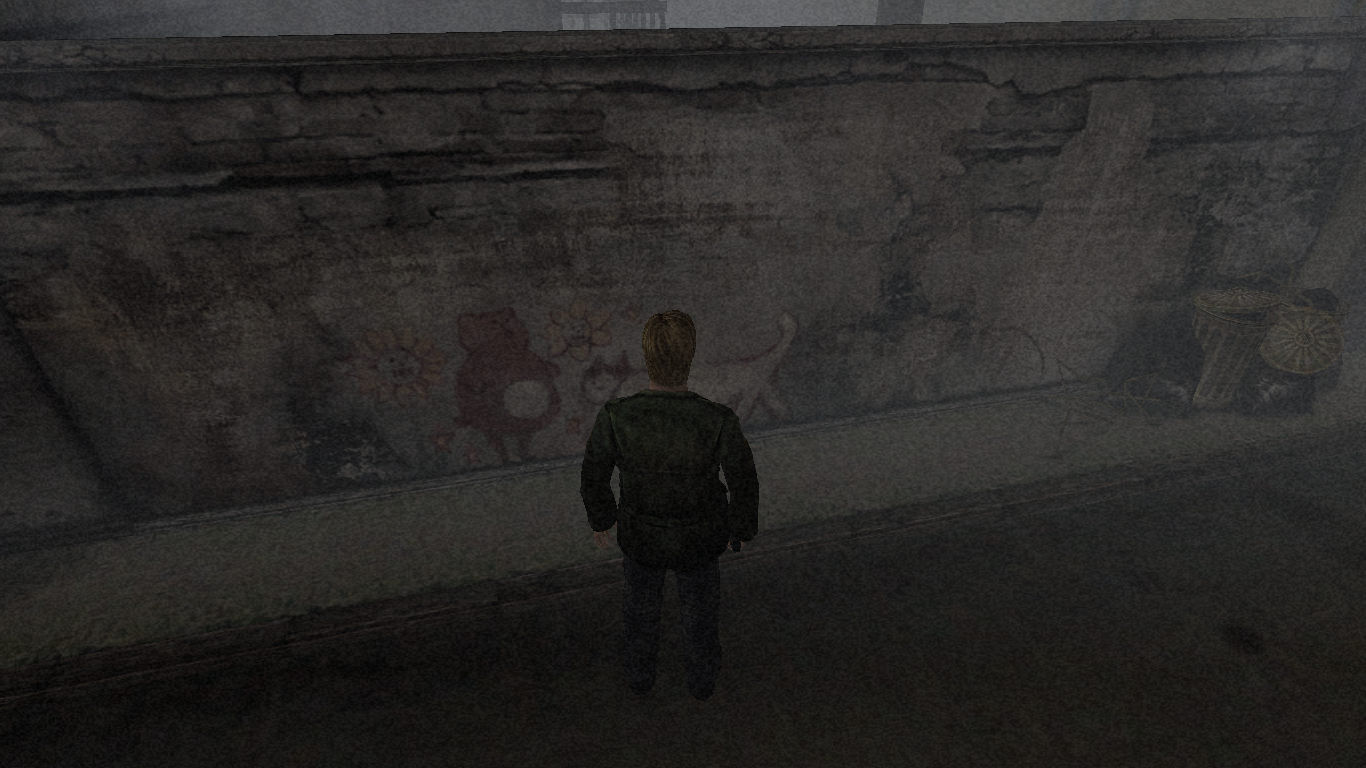
I saw that you even fixed the text, but for sure not many people will notice it '^^
It may take dozens of tries, moving a little after each try, to get that description, so you must know about it before, otherwise, if you're new to the game (or just to this particular write) you'll think that there's not description and just go past it.
I don't know if there are other descriptions so difficult to get like this one (I hope not).
...This particular one isn't really a problem, nothing fundamental, but if it's just a simple fix (to extend the width of the description trigger or so) it wouldn't be a bad thing to fix it.
But I repeat, this little bug is there since the first Ps2 release, so if it's difficult to fix it, just leave it as it is.
 Badore90
All 9 comments
Hi @Badore90 ,
It may take dozens of tries, moving a little after each try, to get that description, so you must know about it before
I completely feel your pain with this. It was a nightmare to play test this spot after I adjusted the text!
I don't know if there are other descriptions so difficult to get like this one (I hope not).
Thankfully I think this is the only spot that has hit detection issues.
But I repeat, this little bug is there since the first Ps2 release, so if it's difficult to fix it, just leave it as it is.
Maybe @Bigmanjapan has some knowledge about the hit box zones for things that can be interacted with?
Previously he adjusted collision boundaries which is pretty awesome. (The collision change will be introduced in the next update to our project.)
 Polymega
on 6 Sep 2019
Polymega
on 6 Sep 2019
I completely feel your pain with this. It was a nightmare to play test this spot after I adjusted the text!
Indeed, now that the text is adjusted there's no reason for that write to be so difficult to spot! :D
Thankfully I think this is the only spot that has hit detection issues.
Better this way
Maybe @Bigmanjapan has some knowledge about the hit box zones for things that can be interacted with?
Previously he adjusted collision boundaries which is pretty awesome. (The collision change will be introduced in the next update to our project.)
That's a great fix 👍
Btw this may be a different one… Note that once you manage to get the description, as far as you stay still you'll always get it (you can press the action button to read the description, then press it again to cancel and repeat forever).
But now, if you just make a little movement, like a step back then a step forward (returning exaclty where you were) the description won't work. You'll have to move around again.
Badore90
on 7 Sep 2019
It's a collision boundary thing. I'm chatting with Nekorun in his stream and we figured out that if the collision boundary for that wall was pushed back like a centimeter or two the hit box for the text would work fine: https://youtu.be/S-ayUQvvCic
Polymega
on 13 Sep 2019
cc04.cld
Polymega
on 13 Sep 2019
It's a collision boundary thing. I'm chatting with Nekorun in his stream and we figured out that if the collision boundary for that wall was pushed back like a centimeter or two the hit box for the text would work fine: https://youtu.be/S-ayUQvvCic
Cool, thanks for shedding some light on this, now it's clear what was causing the bug :D
cc04.cld
What it mean, I have to modify something??
Badore90
on 14 Sep 2019
What it mean, I have to modify something??
Sorry, I posted that as a general thing. That's the collision data file for that part of the game. Just in case someone like Bigmanjapan would want to take a look at it in the future sometime.
Polymega
on 14 Sep 2019
Point pair X (or Y, doesn't matter) coordinate that form the collision line in question is in cc04.cld file at the following offsets:
0x9B0 — Default value is 0x005CA846 (21550 in float)
0x9C0 — Default value is 0x005CA846 (21550 in float)
I made four variants of the file shifting the collision line a little bit further each time, choose yourself.
 Bigmanjapan
on 22 Sep 2019
Bigmanjapan
on 22 Sep 2019
Great! Thanks, Bigmanjapan.
Variant 4 (float 21500) seems to be good. It pushes the collision back the furthest without having James "phase" into the wall any.
@Badore90
Bigmanjapan adjusted the collision file for this part to make it easier to inspect the wall. We'll include this file in the next update for our project. If you'd like to use it now, you can download Bigmanjapan's ZIP package, extract cc04_variant_4.cld, rename it to cc04.cld, and place it under SILENT HILL 2\sh2e\bg\cc\
Polymega
on 22 Sep 2019
Perfect, another game issue solved. This EE is going to be a remake more than a remaster :D
Badore90
on 22 Sep 2019
Related issues
 Storm3000
·
10Comments
Polymega
·
17Comments
Storm3000
·
3Comments
Storm3000
·
10Comments
Polymega
·
17Comments
Storm3000
·
3Comments
 silentdream21
·
8Comments
silentdream21
·
8Comments
 lebouffon88
·
17Comments
lebouffon88
·
17Comments
Most helpful comment
Point pair X (or Y, doesn't matter) coordinate that form the collision line in question is in cc04.cld file at the following offsets:
0x9B0 — Default value is 0x005CA846 (21550 in float)
0x9C0 — Default value is 0x005CA846 (21550 in float)
I made four variants of the file shifting the collision line a little bit further each time, choose yourself.
new_cc04cld.zip