Silent-hill-2-enhancements: RPT Closet Cutscene Fixes (Woodside Apt Rm 307)
@AeroWidescreen
There's a possibility of four fixes that can be done during this cutscene. I have solutions for the first three:
- Restore missing lens flare during one camera cut.
- Darken the closet bars and blur more during first person perspective.
- Adjust room/dynamic objects for one shot (expiremental).
Adjust the boundaries of the blur effect.FIXED VIA WSF MODULE
DURING cutscene ID: 01F7A7C4 (4 bytes): 0000000E
1. Restore missing lens flare

One of two options available for this:
When cutscene camera position X 0094E064 (float) is set to -20902.57031:
Disable ReduceCutsceneFOV for this particular shot, or:
Description | Address | Original Value | New Value
-- | -- | -- | --
Cutscene camera position X | 0094E064 (float) | -20902.57031 | -20850.57031
The camera stays stationary during this part so this should be fine. The reason James' lens flare goes missing here is due to ReduceCutsceneFOV. If you'd like to keep ReduceCutsceneFOV active for this particular camera shot, adjust camera position X to the value mentioned above (also showcased in the .gif above) and it should restore the lens flare. However, I believe I recall Bigmanjapan saying it isn't easy to adjust camera positionings for cutscenes. So it may be easier to disable the FOV fix for this one shot.
2. Darken & blur more closet bars

When cutscene camera position X 0094E064 (float) is set to -21376.56445:
Description | Address | Original Value | New Value
-- | -- | -- | --
"Time of Day" | 009428E2 (byte) | 11 | 15
Closet bar blur intensity | 005999CA (byte) | 3 | 7
IMPORTANT: Once this particular camera angle is changed/gone it must be set back to 11. (It doesn't reset on its own.) To play it safe (in case the address is ever used again elsewhere) it would be advised to change blur intensity back to 3 after this shot as well.
3. Adjust room/dynamic objects for one shot (expiremental values)

When cutscene camera position X 0094E064 (float) is set to -20133.99805:
Description | Address | Original Value | New Value
-- | -- | -- | --
PC location textures + models colour R (set 1) | 00942A50 (float) | 0.150000006 | -0.2
PC location textures + models colour G (set 1) | 00942A54 (float) | 0.150000006 | -0.2
PC location textures + models colour B (set 1) | 00942A58 (float) | 0.150000006 | -0.2
PC location textures + models colour R (set 2) | 00942A70 (float) | 0.04500000179 | 1
PC location textures + models colour G (set 2) | 00942A74 (float) | 0.04500000179 | 1
PC location textures + models colour B (set 2) | 00942A78 (float) | 0.04500000179 | 1
IMPORTANT: Once this particular camera angle is changed/gone those values must be set back to their prior values. They won't reset on camera changes _during_ the remainder of the cutscene. If they're not changed back after this camera shot, the remainder of the cutscene looks very wrong.
While the PS2 version is the bar we're aiming for we must also improve on and better the PS2 version when possible. As of right now, the closet door and characters are practically glowing neon during this one particular shot and it doesn't look right. So we can even out the dynamic objects' and room's levels for a more natural look. Once this particular camera angle is done, it goes back to defaults.
I also spliced this adjustment with the rest of the cutscene (this video doesn't implement the other aformentioned fixes) to better illustrate: https://youtu.be/H-Vv0gmRia8
4. Adjust the boundaries of the blur effect FIXED VIA WSF MODULE
@Aerowidescreen there are portions outside of the closet bars that are blurred which shouldn't happen. About 2/3 over from the left there's a boundary line where the blur starts. It seems to be locked to the camera's position and enabling/disabling ReduceCutsceneFOV doesn't fix it. Can the boundaries of this effect be adjusted any? Video example: https://youtu.be/pQILkFTz6FY~~
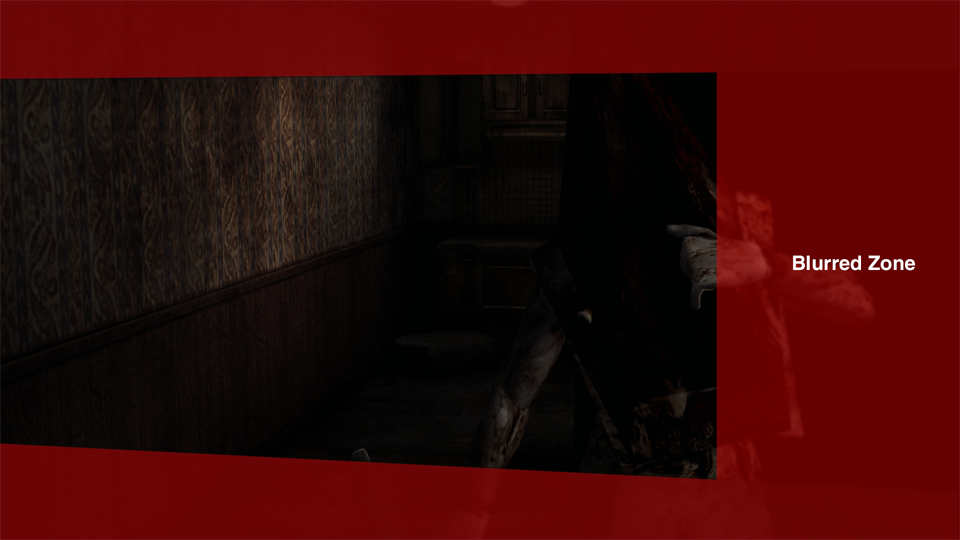
 Polymega
All 15 comments
@Polymega
Closet bars and blur effect are parts of the advanced filters, they can be enabled/disabled on the fly via sh2pc.exe+633408 (00A33408) byte address.
From what I can tell, it's actually like this:
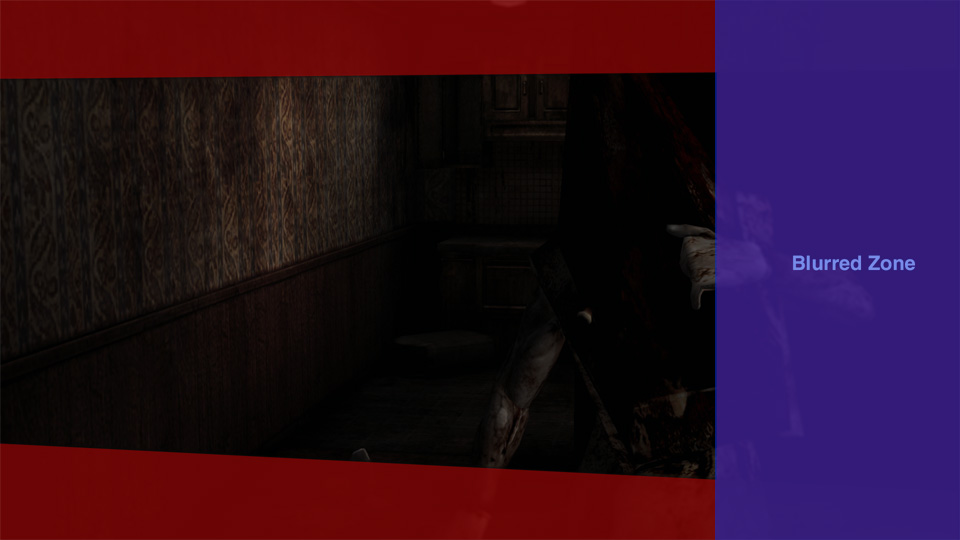
Red area blur is applied to the closet bars while purple blur is not rendered as a part of the game's world but as a screen overlay. No matter how you change the camera angle during this part of the cutscene (when the closet bars and blur effect are invoked) the purple area blur will stay on the same place like an overlay:
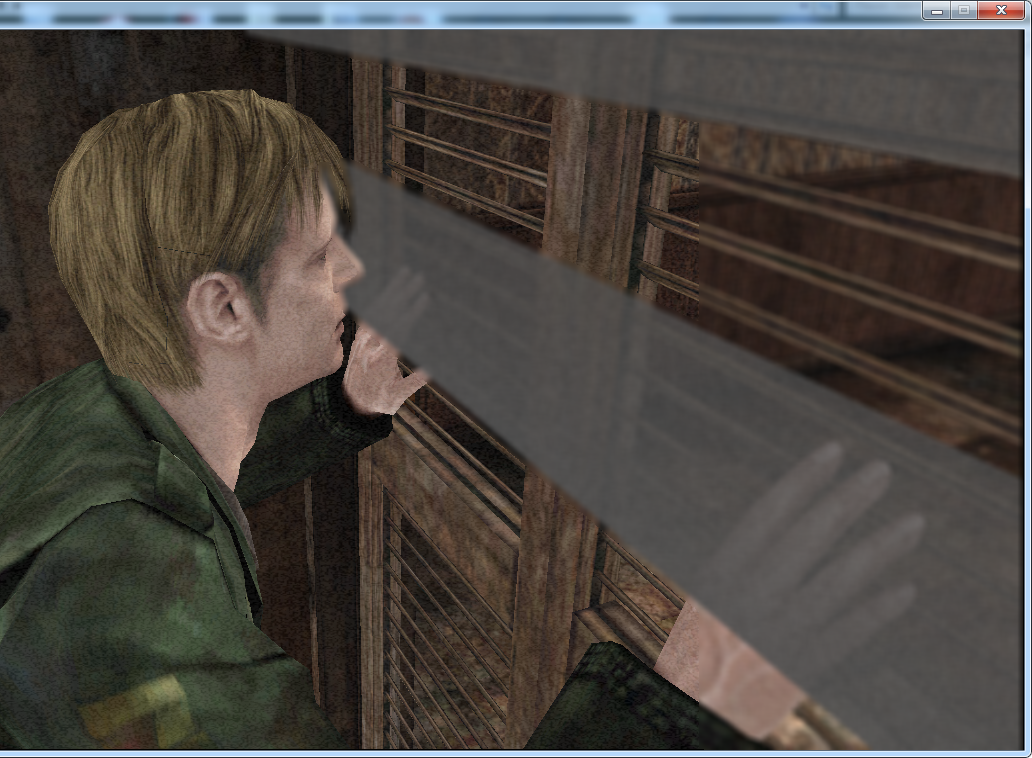
Both of those blurs are powered by the same function, so if I corrupt it, purple area blur will disappear along with closet bars blur:
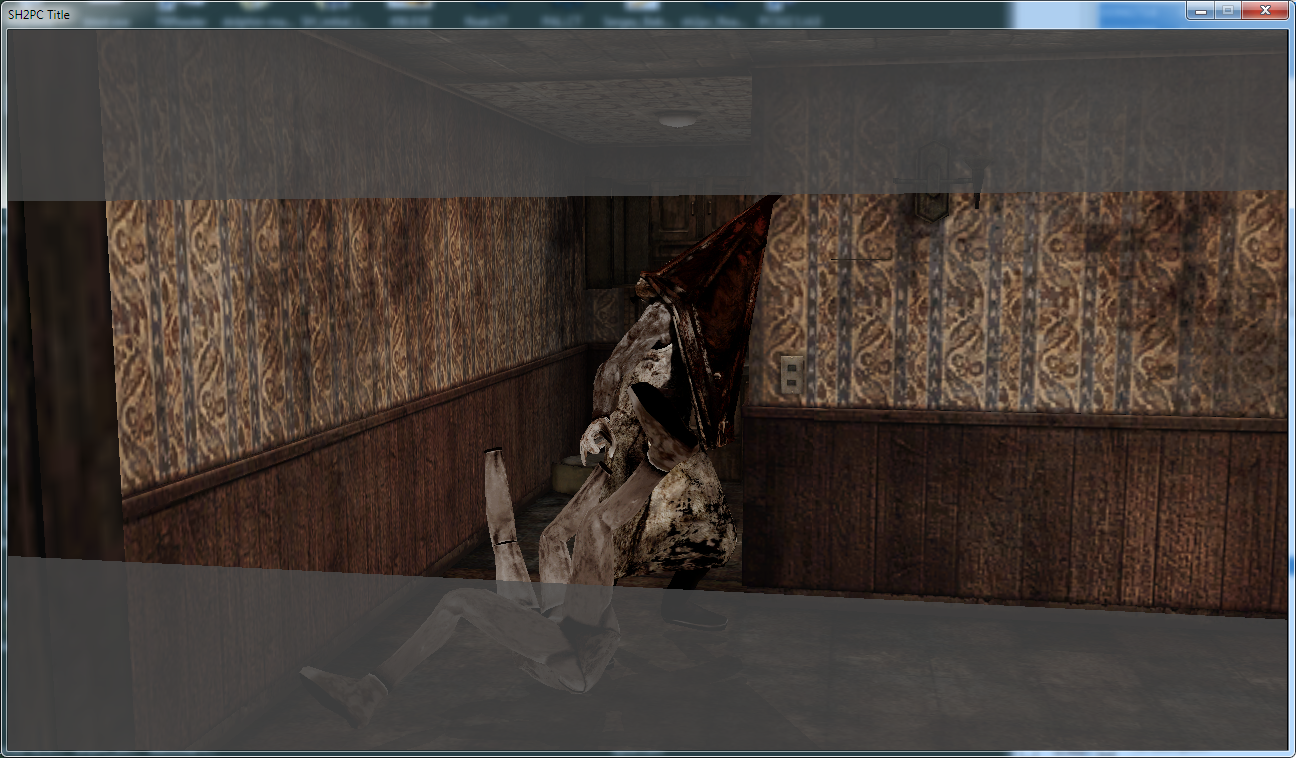
You can try corrupting blur youself by changing a value on sh2pc.exe+199981 (00599981) byte address.
This one will also make the bars black along with disabling blur: sh2pc.exe+1999AB (005999AB) byte (set to 0).
I found addresses that control geometry of the closet bars (you can fully disable them by nulling all the values) but I doubt it will help much. Finding that overlay blur controls will take some time.
 Bigmanjapan
on 28 Nov 2018
Bigmanjapan
on 28 Nov 2018
So, I guess it happens because that blur overlay has a predefined size that is calculated for 4:3 resolutions and when 16:9 hack is activated that blur overlay is shifted to the left side of the screen dragging cutout section with it. I might be completely wrong about this.
sh2pc.exe+633480 (00A33480) 4 byte - blur overlay width
sh2pc.exe+633484 (00A33484) 4 byte - blur overlay height
Unfortunately, if you manually stretch the width of the blur area, then it stretches the visuals that we see through the blur.
Random addresses:
sh2pc.exe+1999CA (005999CA) byte — blur intensity
sh2pc.exe+6333D8 (00A333D8) byte (change from 1 to 0) — make blur less blurry (preset?)
sh2pc.exe+199754 (00599754) byte (change from 7 to something less) — disables closet bars outside of the blur wall
sh2pc.exe+1997E7 (005997E7) byte (change to 0) — Hotline Miami closet bars
sh2pc.exe+4E0FEC (008E0FEC) — memory region where addresses that control closet bars geometry are located
sh2pc.exe+1B7A7B8 (01F7A7B8) float — timer that enables closet bars and blur once the value hits certain amount
sh2pc.exe+2D0DBC (006D0DBC) float — value that controls when the above mentioned timer will enable bars and blur
sh2pc.exe+1B7A7B8 (01F7A7B8) float — timer that disables closet bars and blur once the value hits certain amount
sh2pc.exe+343CF0 (00743CF0) float — value that controls when the above mentioned timer will disable bars and blur
Bigmanjapan
on 29 Nov 2018
Unfortunately, if you manually stretch the width of the blur area, then it stretches the visuals that we see through the blur.
I'll take a look at this later today.
 AeroWidescreen
on 29 Nov 2018
AeroWidescreen
on 29 Nov 2018
Also may help, provided by Bigmanjapan:
sh2pc.exe+63334A (00A3334A) byte
This one controls internal game speed. Set it to, let's say, 150-200 to slow down the process (useful if you want to have more time to change something during a cutscene), 10-20 to speed up the game.
While Cheat Engine's speehack function does similar thing, it operates on framerame and makes gameplay choppy while it's being slowed down. The game's internal speed control maintains smoothness of gameplay when slowed down.
Also, @Bigmanjapan , this is pretty exciting to see:
sh2pc.exe+1999CA (005999CA) byte — blur intensity
Because I'd imagine other effects throughout the game (such as depth of field and the fake bloom in the Hotel room) would also have such values present to change their intensities after all? It's just nice to see, for the closet effect anyway, that this can be adjusted through value changes like that.
Polymega
on 29 Nov 2018
Thanks guys, that gamespeed address made this much easier to test. So I think the blurry bar is fixed... ?
00599518 fild dword ptr []

AeroWidescreen
on 29 Nov 2018
Wow. That was quick and impressive. Bigmanjapan + AeroWidescreen = The A Team.
Polymega
on 29 Nov 2018
@AeroWidescreen with the advent of Bigmanjapan's closet blur intensity discovery I've revised my initial post to alter that as well as darken the bars. This brings it much closer to the PS2 version as seen in this image (near the bottom).
Polymega
on 30 Nov 2018
This brings it much closer to the PS2 version as seen in this image (near the bottom).
While I was corrupting stuff, I once managed to make RPT pyramide to reflect lightning. What is interesting that, in addition a shadow of Great Knife appeared next to his right hand, I'm not sure but it looked like it started using some assets or settings of the Blue Creek cutscene.
Maybe his ability to reflect lightning isn't present in the assets in the mannqeuin scene? Like the eyes issue discussed in the other thread.
Also a useful one:
sh2pc.exe+633353 (00A33353) byte — suspends the game process
Bigmanjapan
on 30 Nov 2018
What is interesting that, in addition a shadow of Great Knife appeared next to his right hand
Oh wow, that's a remnant of a pre-release build of the game:
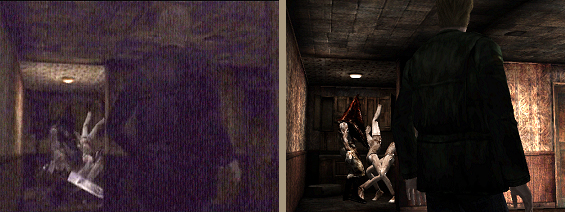
Maybe his ability to reflect lightning isn't present in the assets in the mannqeuin scene? Like the eyes issue discussed in the other thread.
I'm hoping, if this is the case for many areas, that the specular effect and cube map can be called in before being written as FrozenFish24 suggested.
Polymega
on 30 Nov 2018
@Bigmanjapan I just realized I posted the wrong memory address for the blur fix, sorry. I edited my original post above. I've also opened an issue about this problem here since the widescreen fix is what needs to be updated.
AeroWidescreen
on 17 Dec 2018
@AeroWidescreen Thanks! That nine digit address puzzled me for a bit initially.
Bigmanjapan
on 24 Dec 2018
(Removed this post from the other thread)
@elishacloud , the SH2 WSF has received an update which you can now grab here: https://github.com/ThirteenAG/WidescreenFixesPack/releases/tag/sh2
This fixes # 4 found in the initial post of this thread.
^ Because that specific fix is related to playing in widescreen Aero passed it to ThirteenAG and the WSF project.
Polymega
on 10 Jan 2019
Thanks @Polymega. I will add the updated WSF to the build.
 elishacloud
on 15 Jan 2019
elishacloud
on 15 Jan 2019
Wonderful work everybody! This cutscene is looking better than ever now!
An update has been released with this fix in it. See v1.3.1340.0
Polymega
on 18 Apr 2019
Hi Elisha,
A change for the ClosetCutsceneFix:
For this part of the code we set Closet bar blur intensity - 005999CA (byte) to 7 during this camera cut then restore it back to 3 upon either a new camera angle change or cutscene end.
A YouTube comment pointed out an issue with this solution:
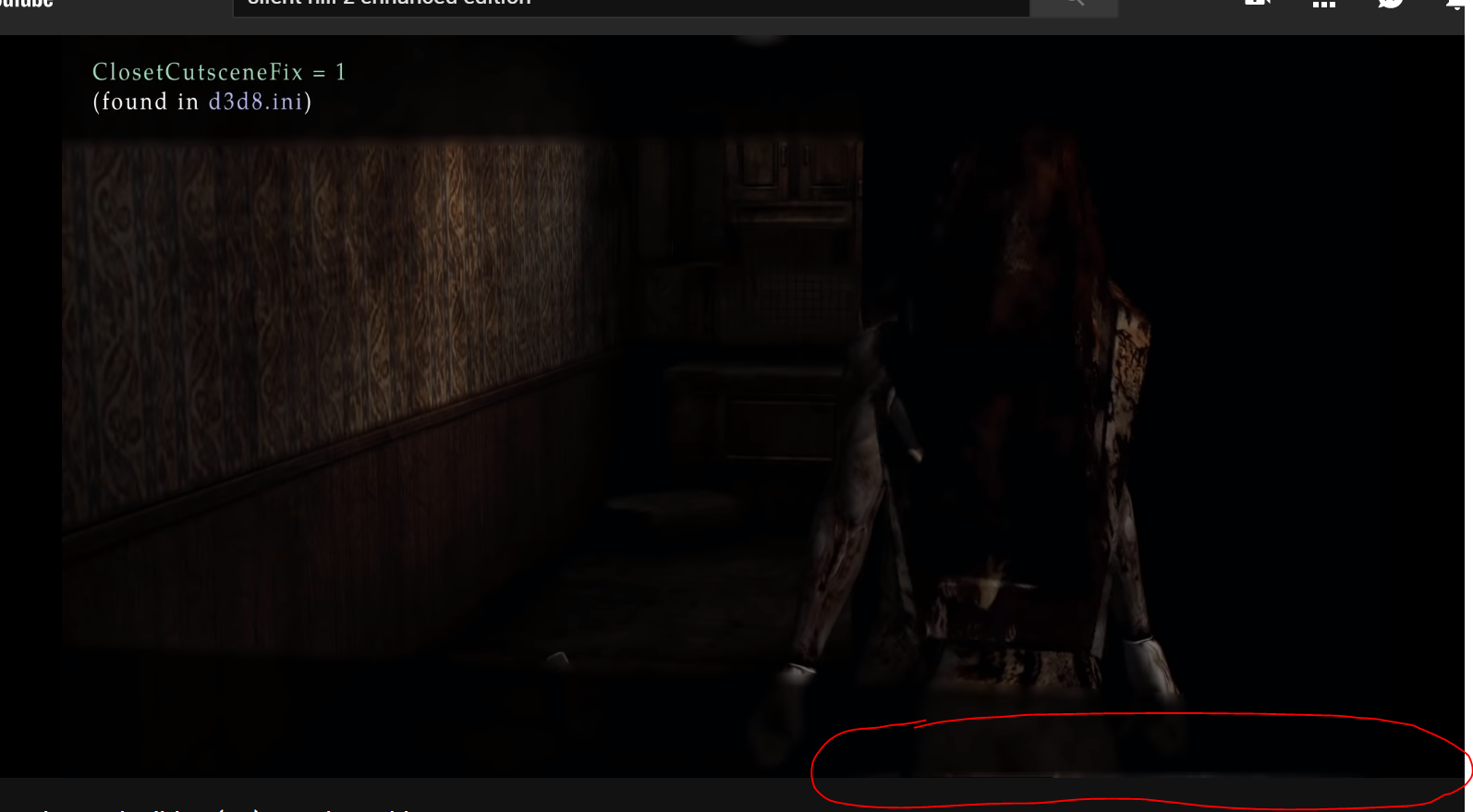
It seems the game only renders the blur pass within the camera boundaries and not past it any, so the blur "bends in" on itself near the camera projection edges.
To fix this:
REMOVED. Aero_ will provide a more solid solution to my suggested address changes that involves pointers. This will be provided at a later time once we square away all other post-processing effects.
Polymega
on 8 Jul 2019
Related issues
 gregitol
·
5Comments
gregitol
·
5Comments
 Psycho-A
·
16Comments
Polymega
·
17Comments
Psycho-A
·
16Comments
Polymega
·
17Comments
 Storm3000
·
10Comments
Storm3000
·
10Comments
 Ihavedepressionimsad
·
4Comments
Ihavedepressionimsad
·
4Comments
Most helpful comment
Thanks guys, that gamespeed address made this much easier to test. So I think the blurry bar is fixed... ?
00599518 fild dword ptr []