Silent-hill-2-enhancements: Compatibility with 4:3 or 5:4 monitors
Not an issue, just a question:
Are cutscenes' camera clipping fixes and decreased FOV compatible with classic 4:3 / 5:4 aspect ratios and won't the cutscenes zoomed twice on them? Some people still uses that kind of monitors as they are good in some aspects of work, especially if they're enough big and high-quality. That would be nice to have some universal game patch that would see which aspect ratio is used and dynamically apply all optimized adjustments depended on this. Sadly I have no 4:3 monitor in my regular place, so can't check these things myself...
 Psycho-A
All 16 comments
The cutscene FOV is adjusted depending on your aspect ratio. This means that the wider the aspect ratio, the more it gets zoomed in. You shouldn't notice any changes if you're playing in 4:3, but you'd probably want to enable the cutscene borders again.
camera clipping fixes
I believe these fixes move the camera to a slightly different stationary position to avoid clipping in 16:9. This shouldn't have any negative effects in 4:3 or any other aspect ratio.
 AeroWidescreen
on 31 Dec 2019
AeroWidescreen
on 31 Dec 2019
To add on to Aero_'s info for anyone else who might read this: The cutscene FOV fix zooms in to match the _horizontal_ composition of the 4:3 versions. So if you use an ultra-wide aspect ratio, the cutscenes will be tremendously zoomed in, if you use that fix.
The camera clipping adjustments fix it for 16:9, and should have little visual difference for 4:3 users, as Aero_ mentioned. But once more: If you use an ultra-wide aspect ratio you'll still experience camera clipping because of how wide the FOV becomes.
Long story short to ultra-wide display users: Play the game in 16:9 (recommended) or 4:3 when using our project. The original game was designed for 4:3 only, and our project is made with 16:9 in mind.
 Polymega
on 31 Dec 2019
Polymega
on 31 Dec 2019
Thanks for answers to everyone, I'm glad to hear that!
Psycho-A
on 7 Jan 2020
The cutscene FOV is adjusted depending on your aspect ratio. This means that the wider the aspect ratio, the more it gets zoomed in. You shouldn't notice any changes if you're playing in 4:3, but you'd probably want to enable the cutscene borders again.
camera clipping fixes
I believe these fixes move the camera to a slightly different stationary position to avoid clipping in 16:9. This shouldn't have any negative effects in 4:3 or any other aspect ratio.
Supposing I'd want to play on a 4:3 monitor, what should I do precisely.
Leaving the Res options to 0, I guess all I'd have to do is to uncheck the enhancements about the FMVs. Then, I'm done?
 Badore90
on 24 Feb 2020
Badore90
on 24 Feb 2020
@Badore90
The most important part is changing the resolution. It has to be 4:3. If you're not running the game in windowed mode, then you can only use resolutions listed in the Windows display settings unless you add a custom resolution. You'll have to look into that yourself, since both AMD and NVIDIA have their own ways of doing this.
Examples of 4:3 resolutions:
2880x2160 (4K)
1440x1080 (1080p)
1024x768
960x720 (720p)
800x600
640x480 (480p)
ResX = 1024
ResY = 768
Then disable these based on preference.
FullscreenImages = 0
DisableCutsceneBorders = 0
I think right now the issue is that the enhanced FMVs will get cropped in 4:3. We're currently working on a better solution for this.
AeroWidescreen
on 24 Feb 2020
To add on to Aero_'s notes:
You can leave FMVWidescreenMode = 1 and FMVWidescreenEnhancementPackCompatibility = 1 and the FMVs will crop if your aspect ratio is under 16:9.
And as Aero_ mentioned, play in windowed mode if your display is not 4:3 (and you want to play in 4:3), then set ResX and ResY accordingly. Or you can set FullscreenWndMode if your display correctly supports 4:3.
And for the time being:
I think right now the issue is that the enhanced FMVs will get cropped in 4:3. We're currently working on a better solution for this.
Polymega
on 24 Feb 2020
I tried it with a 4:3 monitor at 1024x768 and 1280x1024. I didn't changed the resolution in the ini file just leaved it = 0
I changed:
FullscreenImages = 0
DisableCutsceneBorders = 0
ReduceCutsceneFOV = 0
Fix2D = 0
I'm not sure about the last one, I disabled it 'cause I thought it would have stretched the 2d image horizzontally.
However all was perfect but FMVs:
https://www.youtube.com/watch?v=H6oODrUFyRQ
I lost part of the image at both sizes if setting the monitor to full screen.
(note: obviously it's impossible to correctly record it, but the picture quality is astonishing on a monitor like this. I have a couple of very good IPS LCDs, but it's like seeing real life after being watching a cartoon! ...As a side effect it is more easy to notice the blockiness of the fog. On Ps2 and Xbox it is perfectly defined. Maybe it is due to it not scaling with the resolution? I'll check on the CRT monitor if it's better at a low/console like resolution).
Badore90
on 25 Feb 2020
However all was perfect but FMVs:
Here's what we're going to be doing with the FMVs. Remember: The project is intended for standard 16:9 usage. I'm re-rendering the videos to have pillarboxes again. So the raw video will look like this:
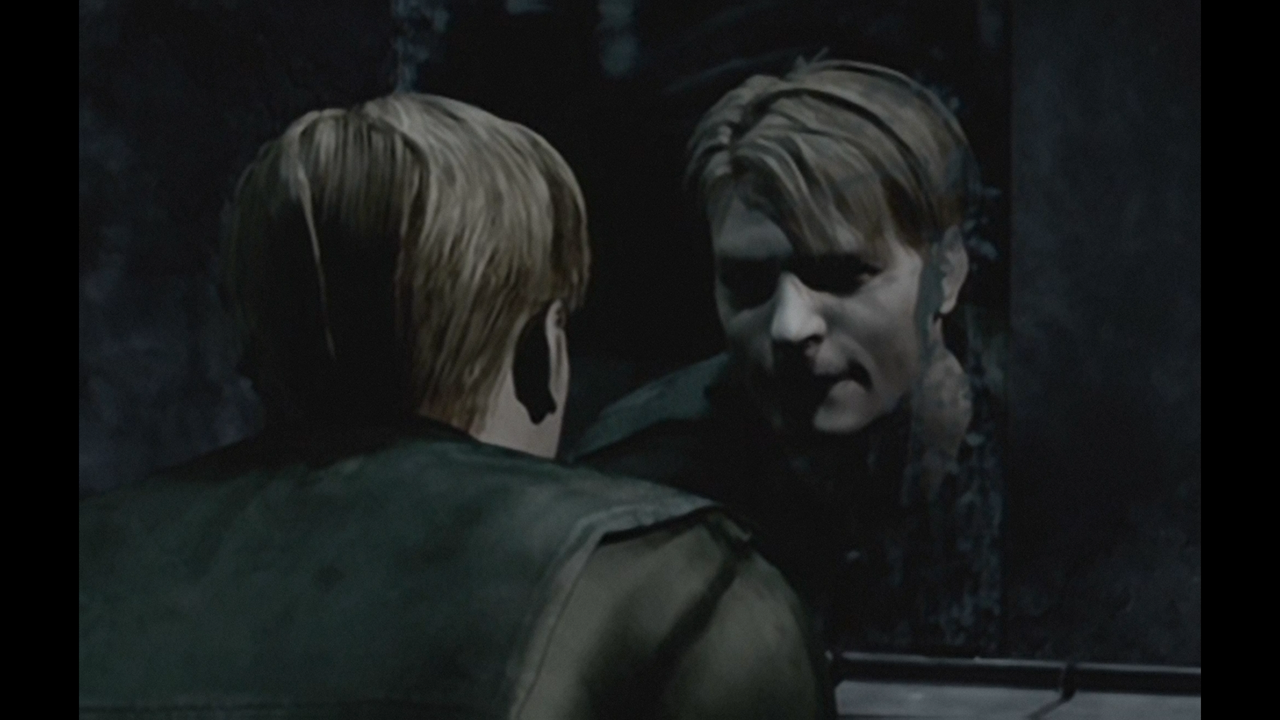
We will then update FMVWidescreenEnhancementPackCompatibility to have two options:
FMVWidescreenEnhancementPackCompatibility = 1
Displays FMVs in full in 16:9, but will have pillarboxes.
FMVWidescreenEnhancementPackCompatibility = 2
Scales FMVs to remove pillarboxes in 16:9, which will crop the videos some vertically.
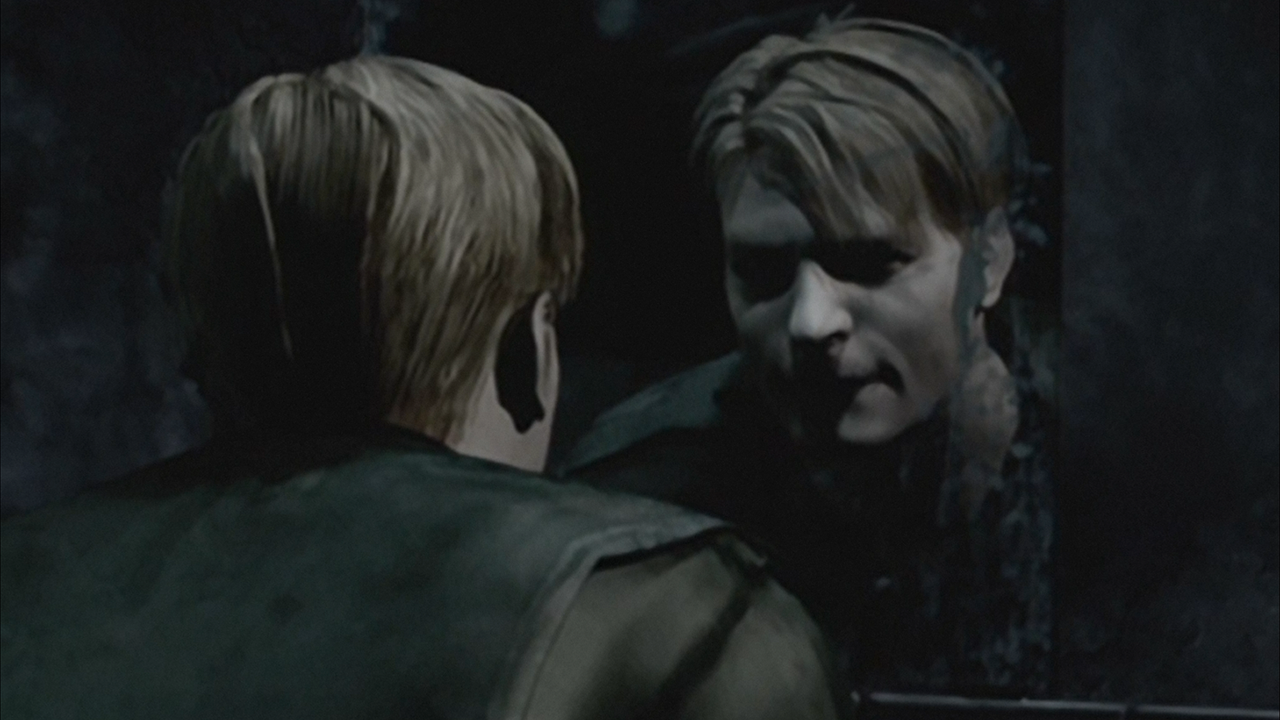
We're planning on having it set to 2 by default, but you can change it back to 1 to show the full FMVs (with pillarboxes).
With this update, you will only have one FMV pack to download and use (good thing), and the scaling will be done through code within the project.
No matter what, you will have cropped FMVs in 4:3 if you use any of the FMV packs, because, again, the project is aimed for 16:9 usage. So even if you set FMVWidescreenEnhancementPackCompatibility = 1 the FMVs will be cropped like this:
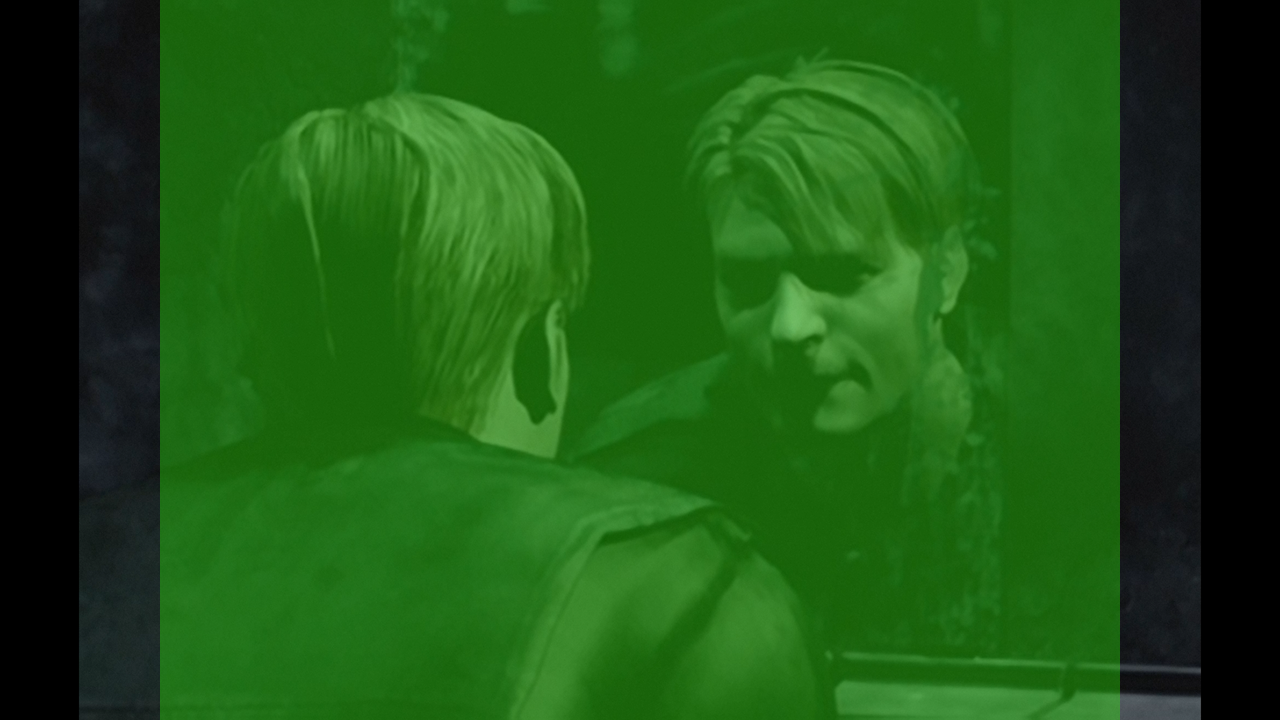
(The light green area is 4:3 boundary)
Polymega
on 27 Feb 2020
Here's what we're going to be doing with the FMVs. Remember: The project is intended for standard 16:9 usage. I'm re-rendering the videos to have pillarboxes again. So the raw video will look like this:
We will then update FMVWidescreenEnhancementPackCompatibility to have two options:
FMVWidescreenEnhancementPackCompatibility = 1
Displays FMVs in full in 16:9, but will have pillarboxes.FMVWidescreenEnhancementPackCompatibility = 2
Scales FMVs to remove pillarboxes in 16:9, which will crop the videos some vertically.We're planning on having it set to 2 by default, but you can change it back to 1 to show the full FMVs (with pillarboxes).
With this update, you will only have one FMV pack to download and use (good thing), and the scaling will be done through code within the project.
This is great. Everyone will be happy this way 👍
No matter what, you will have cropped FMVs in 4:3 if you use any of the FMV packs, because, again, the project is aimed for 16:9 usage. So even if you set FMVWidescreenEnhancementPackCompatibility = 1 the FMVs will be cropped like this:
(The light green area is 4:3 boundary)
I just tested the EE on a 4:3 monitor for curiosity. It worked perfectly and even on this aspect ratio it's much better than the vanilla SH2 with all the bug fixes, fog, shadows, color improvements, etc...
In the case I'd play the game on that screen I could simply use the original FMVs. Or even keep using the sh2 ones, setting the new option so: FMVWidescreenEnhancementPackCompatibility = 1
It doesn't crop the picture so much after all.
For me it'd be perfect.
But, just for talking, it'd be possible to add a FMVWidescreenEnhancementPackCompatibility = 3 that will zoom out a little more than the last picture you posted, so to fit the entire image on a 4:3 monitor (with little horizontal black bars as in original)??
This way even a 4:3 unshakable player would have to just change a couple option on the ini to enjoy the improved EE FMVs pack.
Badore90
on 27 Feb 2020
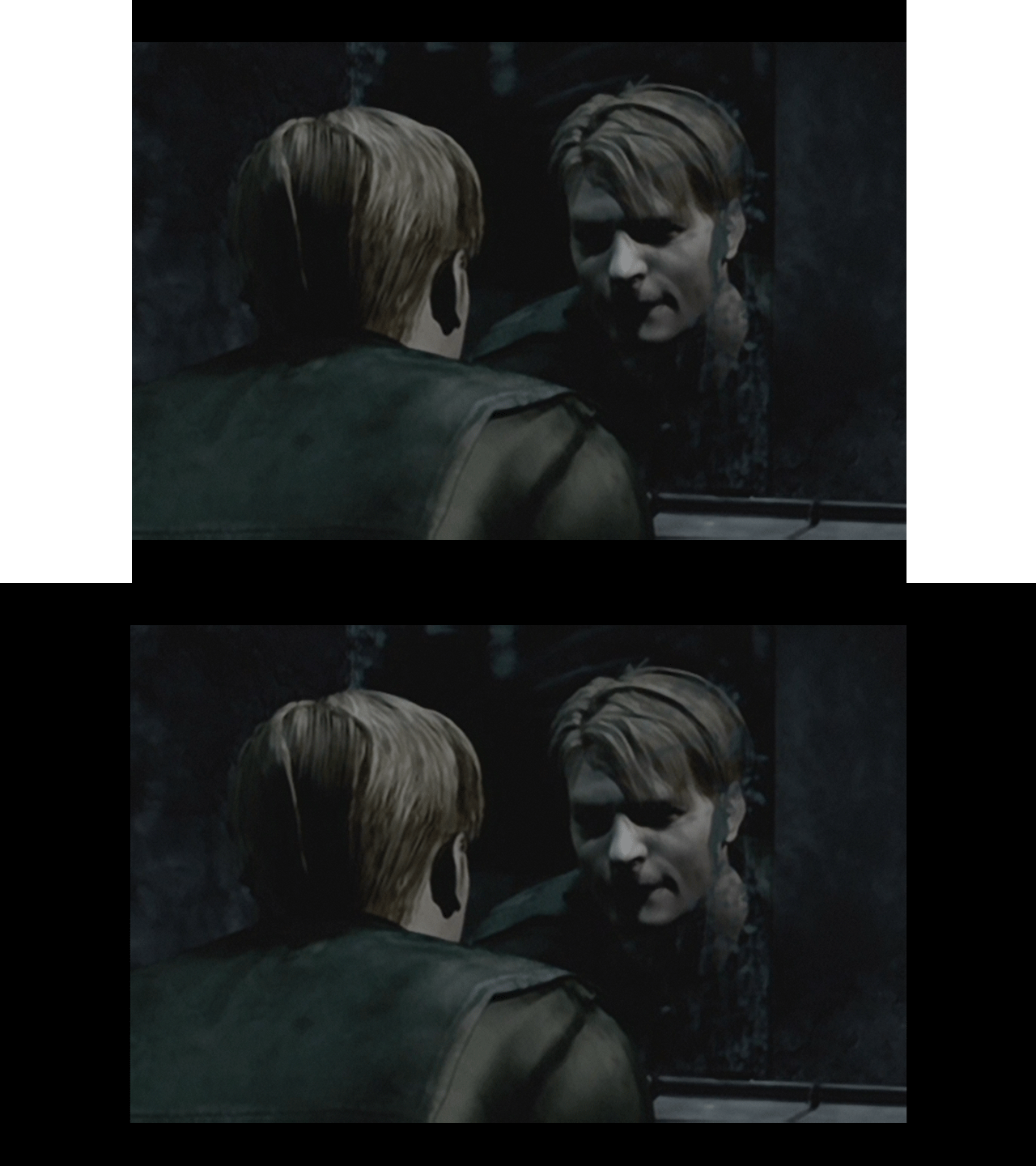
Aero_ is the one who is in the process of updating FMVWidescreenEnhancementPackCompatibility and has now added a third option:
FMVWidescreenEnhancementPackCompatibility = 3
Displays FMVs in full in 4:3, but will have letterboxes.
Polymega
on 1 Mar 2020
Aero_ is the one who is in the process of updating FMVWidescreenEnhancementPackCompatibility and has now added a third option:
FMVWidescreenEnhancementPackCompatibility = 3
Displays FMVs in full in 4:3, but will have letterboxes.
This is awesome! Looking ahead without forgetting the origins :D
Thanks to you and @AeroWidescreen!!
Badore90
on 1 Mar 2020
(note: obviously it's impossible to correctly record it, but the picture quality is astonishing on a monitor like this. I have a couple of very good IPS LCDs, but it's like seeing real life after being watching a cartoon! ...As a side effect it is more easy to notice the blockiness of the fog. On Ps2 and Xbox it is perfectly defined. Maybe it is due to it not scaling with the resolution? I'll check on the CRT monitor if it's better at a low/console like resolution).
It's actually the new PC the cause. The fog blockiness indeed is noticeable even on his monitor.
On the old PC, either on his monitor or connected to the CRT, the fog is pratically perfect, there's no color banding at all, shades are smooth.
Game settings are the same on both PCs.
Maybe it's a GPU driver issue, or some video option that should be changed.
Badore90
on 9 Mar 2020
Badore90 are you now using an Nvidia GPU instead of perhaps Intel or AMD before? Nvidia no longer does dithering in hardware or software on standard 8 bit PC monitors. This means you can get some really bad color banding in gradients, especially in older games with simpler shading.
 DaRkL3AD3R
on 7 Apr 2020
DaRkL3AD3R
on 7 Apr 2020
Badore90 are you now using an Nvidia GPU instead of perhaps Intel or AMD before? Nvidia no longer does dithering in hardware or software on standard 8 bit PC monitors. This means you can get some really bad color banding in gradients, especially in older games with simpler shading.
Thank you for the info. I seems to remember the issue was noticeable even using the integrated card, but I have to check it.
Badore90
on 17 Apr 2020
This will be fixed in the next update to where there will be three choices. Copied from the upcoming INI changes for this feature:
; Display settings for the FMV Enhancement Pack. 1 = Displays FMVs in full for 16:9, but will have pillarboxes. 2 = Scales FMVs to remove pillarboxes for 16:9, which will crop the videos some vertically. 3 = Shrinks FMVs to display them in full for 4:3, but will have letterboxes. (0|1|2|3)
FMVWidescreenEnhancementPackCompatibility = 2
Closing this out. Will be fixed in the next update.
 elishacloud
on 29 Apr 2020
elishacloud
on 29 Apr 2020
Related issues
 Supernaturallll
·
13Comments
Polymega
·
18Comments
Polymega
·
15Comments
Supernaturallll
·
13Comments
Polymega
·
18Comments
Polymega
·
15Comments
 Vare3465
·
7Comments
Vare3465
·
7Comments
 snigelpasta
·
13Comments
snigelpasta
·
13Comments
Most helpful comment
Aero_ is the one who is in the process of updating
FMVWidescreenEnhancementPackCompatibilityand has now added a third option:FMVWidescreenEnhancementPackCompatibility = 3
Displays FMVs in full in 4:3, but will have letterboxes.