Silent-hill-2-enhancements: List of fixes/adjustments before next update release
Hi @elishacloud ,
We're on the verge of being ready to release the next update! Here are the remaining adjustments in preparation of the next release:
:ballot_box_with_check: Improved full screen, 2D images
For the main menu and save screens. Email discussion for more info.
:ballot_box_with_check: Prevent skipping bowling cutscene once fade starts
ISSUE:
If you remember a few months back, we had an issue where Team Silent added an artificial fade to end the Eddie & Laura bowling cutscene early (an overlaid black texture to simulate the fade). But when using Fix2D, the fade wouldn't fill a wide screen space.
ThirteenAG was able to fix this (his code for it can be found here), but I found an issue where, if you cancel the cutscene while this artificial fade is happening, the fade disappears and the in-game image re-brightens until the true fade out happens at the end: https://youtu.be/Ea0GKBGpaw4
REQUEST:
Once the artificial fade is triggered/starts for cutscene 0x19, prevent the user from pressing Esc to end the cutscene from this point up until the end of the cutscene. This can be added to the FixHangOnEsc fix.
:ballot_box_with_check: Fix fog parameters for final boss area
ISSUE:
This is a quirky bug that only affects the PC version. For whatever silly reason, at the top of the final area of the game, if James is unequipped, the fog parameters become messed up: https://www.youtube.com/watch?v=5gzZN18IufI
SOLUTION (thanks to Bigmanjapan and Aero_ for research/fix):
00942C20 = NewEnvFogRGB
Address Location: 004798F6, 00479E64, 0047ADB0, 0047AE13, 0047AEE3, 0047BEF9, 0047BFCB, 0047C083, 0047C112, 0047C260
01F7D634 = OriginalEnvFogRGB
Address Location: 004FE857, 0050E6E1, 0050EA94, 0050EAA4
01F81240 = InGameCameraYOrientation
Address Location: 00515604, 00515764, 00519AEF, 00519B46, 00519B6E, 0051D42F, 0051FA1A, 005A402B
If Room ID = 0xBB
and
if InGameCameraYOrientation < -15750.0 float
00502227 mov eax, [NewEnvFogRGB]
005038B8 push 00
else
00502227 mov eax, [OriginalEnvFogRGB]
005038B8 push 01
... this can be added to the FogParameterFix
:ballot_box_with_check: Fix tree lighting conditions for Maria & Leave endings
ISSUE:
A PC-only bug where the 3D trees will instantly change lighting values as soon as Mary finished reading her letter for the "Leave" or "Maria" ending: https://www.youtube.com/watch?v=K9zGsAglG7U
SOLUTION:
- If cutscene ID is
0x5A(Leave Ending) or0x5D(Maria ending) change the following instruction:
- Change
sh2pc.exe+A13CB (004A13CB) push 01topush 02
- Change
This instruction change will need to revert back to push 01 when not on either of these cutscenes, as it will negatively affect other parts of the game.
Additionally:
- If cutscene ID is
0x5D(Maria ending) change the following:
- PC horizon cover-up for colour R -
00942C20 (byte)=125 - PC horizon cover-up for colour G -
00942C21 (byte)=135 - PC horizon cover-up for colour B -
00942C22 (byte)=150
- PC horizon cover-up for colour R -
As you've done in the past, you may want to have your value changes for the RGB addresses above constantly scan and overwrite any values the game tries to plug in while this cutscene plays (because I don't know if it sets its own values a few moments after the cutscene starts or not).
; Fixes lighting conditions for two of the ending cutscenes.
LightingFix2 = 1
:ballot_box_with_check: Fix rotating Mannequin glitch
ISSUE:
If a player does specific steps in a specific order this silly bug can happen. Most people will likely never accidentally do all the steps required to initiate this bug, but just in case here's a solution:
SOLUTION:
- If Room ID
0x15and01F7A7E0 (flashlight acquired?) 4 bytesis0x340000
- If
01F7AF90 (Mannequin state) 4 bytesis0x206
- Set
01F7AF90 (Mannequin state) 4 bytesto0x207
- Set
- If
Note: Run this script just once, immediately on Room ID load, each time the Room ID is loaded. When you first enter the room, 01F7AF90 (Mannequin state) 4 bytes will momentarily be 0x00 before switching to another value, so ignore the 0x00 value and only read/check the first non-0x00 value on Room ID load to determine when to change this address value to 0x207.
; Fixes spawning placements for objects in Woodside Apartments Room 205.
WoodsideRoom205Fix = 1
:ballot_box_with_check: Varying controller rumble/vibration intensities
In the console releases, you can change vibration intensity from: Off - Soft - Normal - Hard. When Silent made his XinputVibration fix, he found SH2 PC submits vibration at 100% intensity, regardless of the selection made. Could we maybe restore this feature?
sh2pc.exe+19BBFF9 (01DBBFF9) byte is what's used to monitor the vibration selection changes. (0 = Off, 1 = Soft, 2 = Normal, 3 = Hard)
Could we use this address to change vibration intensity within the XinputVibration fix?
Looking at XInput documentation, 65535 is 100% vibration intensity. So could we do increments of 33%? (0 = 0, 1 = 21626, 2 = 43253, 3 = 65535)
The only thing is I don't know how this would work/translate to people who use a DirectInput controller instead, as the range for 0-100% vibration with DirectInput is 0-10,000 there.
 Polymega
All 43 comments
I think ps85.map (maria's prison cell) needs to be added to the shadow fading exclusion list.
 FrozenFish24
on 8 Nov 2019
FrozenFish24
on 8 Nov 2019
I think ps85.map (maria's prison cell) needs to be added to the shadow fading exclusion list.
Brilliant catch.
Elisha, please add room
0x89to the list of rooms that are excluded to the shadow fading script.Please move room
0x0Bfrom the128shadow opacity list to the110list (to accompany room0x21)
Polymega
on 8 Nov 2019
Elisha, please add room
0x89to the list of rooms that are excluded to the shadow fading script.Please move room
0x0Bfrom the128shadow opacity list to the110list (to accompany room0x21)
Room numbers updated in build 1440.
 elishacloud
on 20 Jan 2020
elishacloud
on 20 Jan 2020
I put a fix in for the rotating Mannequin glitch.
Here is the test build: d3d8.zip
elishacloud
on 20 Jan 2020
Thanks Elisha. This bug still persists and I may not be the best one to help with troubleshooting it, as the inner-workings for this are a bit above my skillset.
The original solution was co-developed by Bigmanjapan.
@Bigmanjapan
Can you help us with fixing the rotating Mannequin glitch? Elisha made a test build above using our fix approach, but it's not working.
As a refresher, here's how you provoke the bug:
- Obtain the flashlight in Woodside Apt Rm 205 but do not kill the Mannequin after it comes to life.
- Save anywhere outside of Room 205. (You can just leave Room 205 and Quick Save right there in the hallway).
- Load the save you just made.
- Enter Room 205 and leave the room.
- Re-enter the room. The rotating glitch will now happen.
Here is your original email notes on the matter:
The flashlight room mannequin has these two addresses that flag it's behavior:
sh2pc.exe+1B7AF8C (01F7AF8C) 4 byte
sh2pc.exe+1B7AF90 (01F7AF90) 4 byteSet their values display to hexadecimal and you will see individual bytes act as flags.
01F7AF8C address values act like this:
0x01010102 Dormant state
0x01040102 Idle walk
0x01050102 Target searching
0x01080102 Dormant state with active targeting (the issue that you've shown in your video) / Attacking animation
0x02010102 Waking up animation01F7AF90 address' values range from 0x00000204 to 0x00000207 depending on the mannequin's state.
At first I was trying to fix the dormant state with active targeting issue and you can make it lie still by altering some flags on the first address but it still is rather unnatural — a player leaves the room with the mannequin being alive, goes back and the mannequin is visually dead for some reason (it's not actually dead since there's no blood underneath it, it's just a glitched dormant state). Then I thought that it would be more effective to fix the inbetween bug of the mannequin lying down still without the targeting being active (when you first enter the room after a quicksave) as fixing it would allow the dormant state with active targeting code simply not happen later on.
Change the value of 01F7AF90 address to 0x00000207 when you first enter the room after the quicksave outside of the room, it will wake the mannequin up. I think it's possible that a program will do it fast enough that even if the mannequin is left alive near the door, then it will get up fast enough during fade-in that a player won't see it's getting up animation.
It is possible to wake it up by messing with flags on the 01F7AF8C address but it usually wakes up with inactive collisions.
On that note, I'm not sure if any of these addresses are the right ones to check to see if the flashlight is currently acquired: 01DBA14B / 01DBA14F / 01DBA373 / 01DBA377 (byte)
How about this address: sh2pc.exe+1B7A7E0 (01F7A7E0) 4 bytes
Set to hexadecimal. The value is 0x00300000 when the flashlight is still on the mannequin, 0x00340000 — when the flashlight is on James. You can change it manually to change the flashlight's state without crashing the game.
Polymega
on 20 Jan 2020
I think this might be the problem:
01F7A7E0 (flashlight acquired?) 4 bytes is not 0x340000 for me anymore after I obtain the flashlight from Room 205. The hex value I have for it now is 003D2006 after getting the flashlight.
That's probably why it isn't working as the value the script is looking for (0x340000) isn't being flagged anymore in the game.
But this leads me to a question: Does this value... change? Or did I accidentally paste the wrong value for that address? @Bigmanjapan ?
Polymega
on 20 Jan 2020
I implemented the fix for the "tree lighting conditions for Maria & Leave endings".
Here is the test build: d3d8.zip
_Note: this update also uses the new value for the (flashlight acquired) in the rotating Mannequin glitch fix. This will check for either 0x00340000 or 0x003D2006 values._
elishacloud
on 20 Jan 2020
Thanks Elisha!
I'm still testing LightingFix2 and WoodsideRoom205Fix out.
LightingFix2 crashes the game for me when I enter Woodside Room 307.
Update: It looks like LightingFix2 causes the game to crash whenever any in-game cutscene starts.
Update 2: Looking at Cheat Engine, all room IDs immediately get changed to 0x00 when using WoodsideRoom205Fix
Update 3: ThirteenAG's fix to fill the artificial black fade for the Eddie & Laura bowling cutscene no longer fills the widescreen space. This is related to one of the fixes mentioned on the first post here.
Polymega
on 20 Jan 2020
Ok, two dumb mistakes. Try this one. It should fix the LightingFix2 and WoodsideRoom205Fix items.
Try this test build: d3d8.zip
I'm not sure about the Eddie & Laura bowling cutscene issue. Does that happen on the older builds before 1440?
elishacloud
on 20 Jan 2020
Thanks, I'll get to testing them in a moment.
I'm not sure about the Eddie & Laura bowling cutscene issue. Does that happen on the older builds before 1440?
It does... as in it doesn't work on builds before 1440 as well. I just didn't think to check. If I were to guess, it probably broke after integrating the WSF Pack, maybe when you changed certain code from using ResX/ResY to Width/Height? No clue on this one. :-/
If you load the save point labeled "Bowling Alley" and enter the small door right beside you, you'll initiate this cutscene.
Polymega
on 20 Jan 2020
My eyelids are winning the battle against me so I have to stop for the night, but early tests all look positive for the fixed-up LightingFix2 and WoodsideRoom205Fix. I'll try and break it on all binaries tomorrow. :+1:
Polymega
on 20 Jan 2020
Update 3: ThirteenAG's fix to fill the artificial black fade for the Eddie & Laura bowling cutscene no longer fills the widescreen space. This is related to one of the fixes mentioned on the first post here.
Looks like this is caused by the EnableTexAddrHack option. If you disable that option the Eddie & Laura bowling cutscene works fine. It should have happened even on older builds before I integrating the WSF Pack if you enable EnableTexAddrHack.
elishacloud
on 20 Jan 2020
@elishacloud
LightingFix2 and WoodsideRoom205Fix work great across all binaries. Everything was solid this go-around.
Looks like this is caused by the EnableTexAddrHack option.
Ah, it never crossed my mind to check that. Good catch!
Polymega
on 21 Jan 2020
Everything was solid this go-around.
Great! I am wondering if we should merge LightingFix and LightingFix2 into one option? Both of them effect lighting conditions at different end scenes.
As far as the Eddie & Laura bowling cutscene, the issue is that the EnableTexAddrHack changes the address where textures are stored (to avoid a buffer overlow). WSF picks up the new address correctly, however, Eddie & Laura bowling cutscene is still using the old address so WSF can no longer detect when the fading for this cutscene is happening.
There are several options for fixing this, but I narrowed it down to two that I am considering:
- Re-implement this fading fix and stop using WSF for it. Note: this is part of the
FullscreenImagesfix so we will eventually need to do this anyways. - Update the memory address that Eddie & Laura bowling cutscene uses so that WSF will start working again.
elishacloud
on 21 Jan 2020
Great! I am wondering if we should merge LightingFix and LightingFix2 into one option? Both of them effect lighting conditions at different end scenes.
... oh yeah! WSF is integrated now. :) That was the only reason I suggested making it LightingFix2; because we couldn't add-to the original LightingFix. Sounds like a great idea to me.
Re-implement this fading fix and stop using WSF for it. Note: this is part of the FullscreenImages fix so we will eventually need to do this anyways.
Long term speaking, this one seems the most future-proof--making it its own "thing." Honestly, unless you'd see a reason not to, I'd make this a feature that's simply part of the module, without an ini feature for it. Edit: Having it always fill a display size, that is, not the "prevent users from pressing Esc on it" part.
Polymega
on 21 Jan 2020
Sounds like a great idea to me.
Ok, I have three options for this:
- Make the new Lighting Fix work whenever
LightingFixis enabled regardless of whether WSF is enabled or not. This means if WSF is disabled only part of theLightingFixwill work. - Make the new Lighting Fix work only if both
LightingFixand WSF are enabled. This way all of theLightingFixgets enabled or disabled together. - Move (er copy) the old
LightingFixcode out of WSF and add it to the new Lighting Fix so that both of these fixes can be enabled regardless of whether WSF is enabled or not.
Long term speaking, this one seems the most future-proof--making it its own "thing."
Yes, I was thinking about that also. This option will take a bit more time. I need to look into it to see the best way to fix it. I think it may be better (more reliable) to fix it in DirectX rather than hacking the addresses like WSF did.
I'd make this a feature that's simply part of the module, without an ini feature for it.
I'd still recommend enabling this only when WSF is enabled. It's only needed then and it allows us to disable this for troubleshooting.
elishacloud
on 21 Jan 2020
Ok, I have three options for this:
I vote option 2 or 3; whichever is easier for you. I honestly doubt anyone would ever want to disable the WSF, so keeping it contained there isn't a worry. But moving it out is also fine, if that's just as easy for you.
I'd still recommend enabling this only when WSF is enabled. It's only needed then and it allows us to disable this for troubleshooting.
Good call on that--makes perfect sense. :+1:
Polymega
on 21 Jan 2020
I vote option 2 or 3; whichever is easier for you.
Good! Option 2 is a one line change. Definitely the easiest!
elishacloud
on 21 Jan 2020
I was able to implement a fix for the Eddie & Laura bowling cutscene fade out fairly easy. However, I've had some issues to prevent the user from skipping the bowling cutscene once fade starts.
The existing HangOnEsc code will not work for this cutscene. It seems like some other code is modifying it back right after I change it.
Update: The old test build only worked with my monitor's native resolution. This build should work with any resolution.
New testing build: d3d8.zip
elishacloud
on 21 Jan 2020
Implemented fog parameters for final boss area fix. It took a bit longer than expected because of all the addresses I had to get.
Testing build: d3d8.zip
elishacloud
on 22 Jan 2020
Thanks Elisha!
The addition to the FogParameterFix looks to be working good across all binaries. Nice work finding all the addresses!
However, the HotelWaterFix is now making the water purple, lol
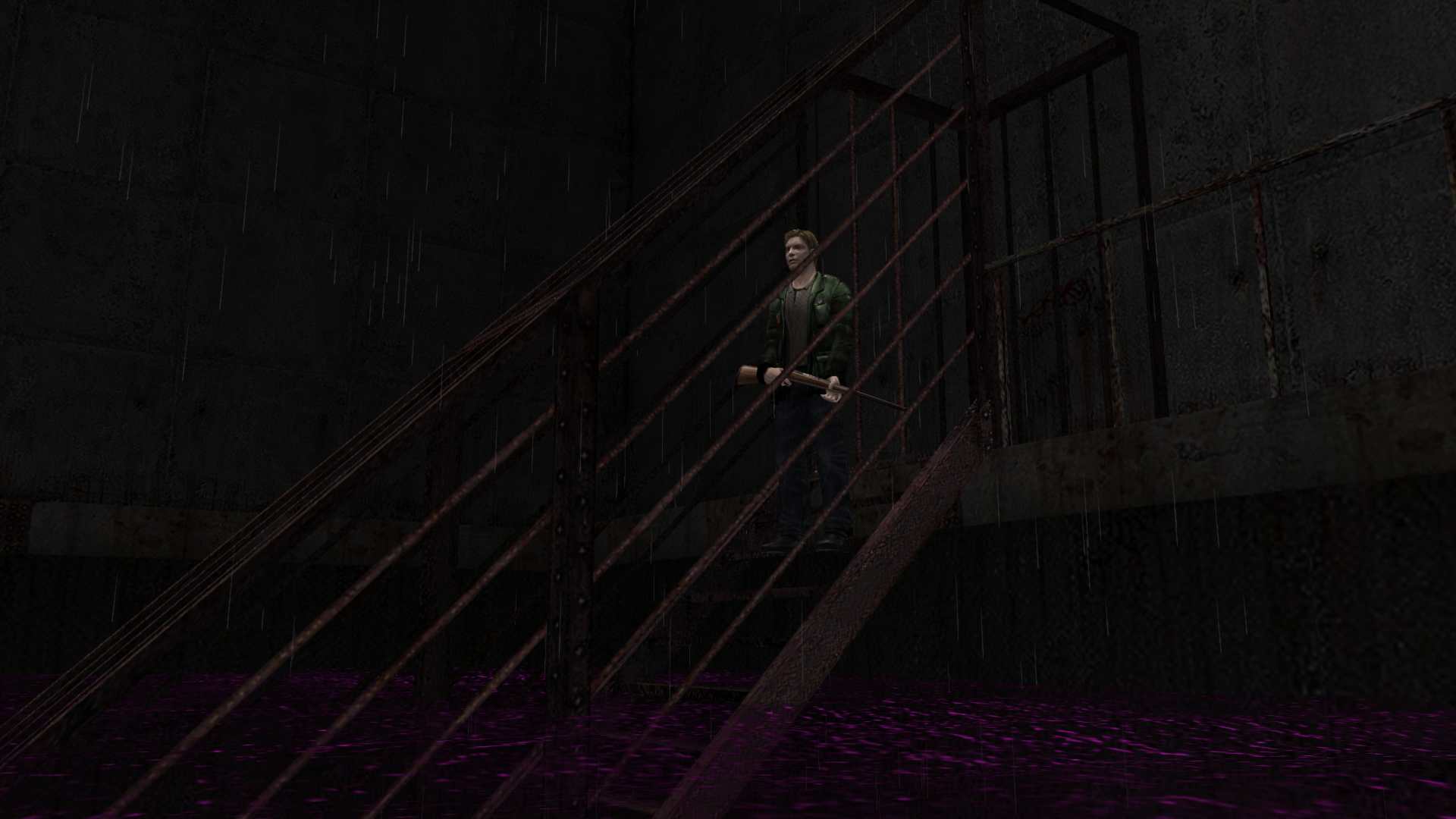
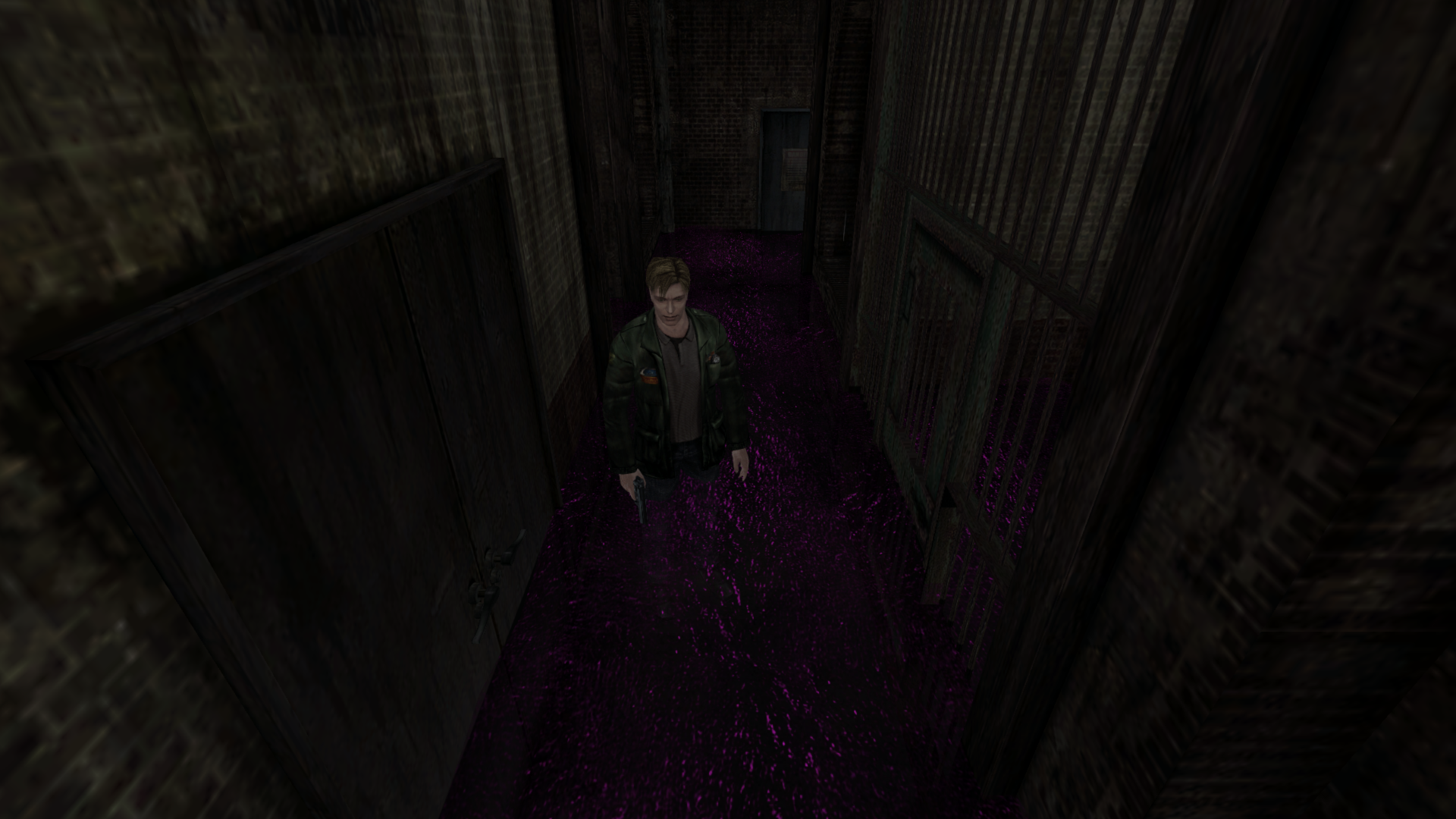
Polymega
on 22 Jan 2020
For possible programming brownie points: I'm thinking this should be 0x04 and not 0x08?
https://github.com/elishacloud/Silent-Hill-2-Enhancements/commit/7a0199a5850a270ddb4ffc9e325dd3bcd1502f31#diff-dd5e9d2bd51e72e661fe47e5e56fbeb6R99
Polymega
on 22 Jan 2020
Oops, looking over your recent commit, FixHangOnEsc is no longer working for me. IncreaseBlood (BloodSize) is still working correctly, I believe.
Polymega
on 22 Jan 2020
These functions are called every frame and I was trying to reduce the number of APIs we use in these functions. I thought it was going to be a safe update...
For possible programming brownie points: I'm thinking this should be
0x04and not0x08?
Yep, that's the issue. Only the red and blue values got changed so the water turned purple.
Oops, looking over your recent commit,
FixHangOnEscis no longer working for me.IncreaseBlood (BloodSize)is still working correctly, I believe.
This issue is really weird. Try this update: d3d8.zip
elishacloud
on 23 Jan 2020
HotelWaterFix is fixed but HangOnEsc unfortunately still isn't working. To test this: Go through any door in the game, on the fade in (of the new room) start spamming the Esc key. You shouldn't be able to pull up the PC pause menu while the fade in is happening. If you can, you'll see a screenshot of the previous room before you interacted with the door as the PC pause menu background.
Polymega
on 23 Jan 2020
Ok, this one should fix the HangOnEsc issue: d3d8.zip
elishacloud
on 23 Jan 2020
That's probably why it isn't working as the value the script is looking for (
0x340000) isn't being flagged anymore in the game.But this leads me to a question: Does this value... change? Or did I accidentally paste the wrong value for that address? @Bigmanjapan ?
@Polymega @elishacloud
The sh2pc.exe+1B7A7E0 (01F7A7E0) address' (used to indicate the flashlight acquirement) value is used bitwise to spawn a portion of items in the inventory.
Your value (0x3D2006) differs from mine (0x340000) because you had different items in the inventory when you picked up the flashlight.
Instead of checking a 4 byte value, check a single bit responsible for flashlight only.
If am correct it's the 3rd bit of the 1 byte value stored at 01F7A7E2.
 Bigmanjapan
on 23 Jan 2020
Bigmanjapan
on 23 Jan 2020
value is used bitwise to spawn a portion of items in the inventory.
Thanks @Bigmanjapan! Yeah, I was wondering if that was not the case. It is easy enough for me to check only a single bit.
If am correct it's the 3rd bit of the 1 byte value stored at 01F7A7E2.
If sh2pc.exe+1B7A7E0 (01F7A7E0) address (4 byte) equals 0x40000 when only the flashlight is in the inventory than we can validate that this is right bit to check.
Another way to check this would be to see what the value of sh2pc.exe+1B7A7E0 (01F7A7E0) address (4 byte) equals before getting the flashlight and then acquire the flashlight and see if the number increases by 0x40000 after getting the flashlight.
@Polymega, let me know if you want me to use this bit or a different address.
elishacloud
on 23 Jan 2020
If sh2pc.exe+1B7A7E0 (01F7A7E0) address (4 byte) equals 0x40000 when only the flashlight is in the inventory than we can validate that this is right bit to check.
Another way to check this would be to see what the value of sh2pc.exe+1B7A7E0 (01F7A7E0) address (4 byte) equals before getting the flashlight and then acquire the flashlight and see if the number increases by 0x40000 after getting the flashlight.
The process is above my head but, if you know how to deduce what bit/value to validate for the fix, I'm happy to playtest it. :)
Polymega
on 23 Jan 2020
If sh2pc.exe+1B7A7E0 (01F7A7E0) address (4 byte) equals 0x40000 when only the flashlight is in the inventory than we can validate that this is right bit to check.
Yes, it outputs a 0x40000 value when the flashlight is picked up with an empty inventory.
Bigmanjapan
on 23 Jan 2020
Yes, it outputs a 0x40000 value when the flashlight is picked up with an empty inventory.
Perfect! Thanks!
The process is above my head but, if you know how to deduce what bit/value to validate for the fix, I'm happy to playtest it. :)
@Polymega, no problem. I will give you an updated build with this fix later tonight.
@Bigmanjapan, since we have you here, there is one other thing we could use your help with. It appears that the address we use to prevent the user from pressing escape does not work when a cutscene is being played.
Currently we modify a specific address and set it to 3. This tells the game to ignore the escape key, but does not work during a cutscene.
I am wondering if you can help us find a way to tell the game to ignore the escape key when in a cutscene?
This would be for the Prevent skipping bowling cutscene once fade starts fix above.
elishacloud
on 23 Jan 2020
I am wondering if you can help us find a way to tell the game to ignore the escape key when in a cutscene?
I've been play testing your pillarbox fix and haven't gotten around to sharing this, but I've spoke with Bigmanjapan elsewhere and he has info/fixes for this:
If you nop the following functions when the bowling fade is active, this should work:
00457B60 - A1 58119400 - mov eax,[00941158]     // disables Esc key during in-game cutscenes only
00446176 - 66 89 04 5E - mov [esi+ebx*2],ax     // disables ALL inputs besides Esc key
One more update. This one fixes the bowling cutscene and uses the new bit that Bigmanjapan mentioned above for the rotating mannequin.
Testing build: d3d8.zip
elishacloud
on 24 Jan 2020
Thanks Elisha!
For the bowling fade, I am still able to press the pause key ("P" key, by default) to skip the cutscene. However, I can no longer press the Esc key to skip the fade part which is good.
I'm not sure if you nop'ed both of the functions mentioned above, or just the first one (that does the Esc key during in-game cutscenes only), but the second function in that list should take care of the P key.
I tested the revised WoodsideRoom205Fix and it's working great across all binaries still. :+1:
(Happy we got a solid, safe address/value for that now!)
I'll start another complete playthrough tonight and finish it tomorrow (Fri) to test your new pillarbox fix adjustments, then report back.
Thank you!
Polymega
on 24 Jan 2020
I'm not sure if you nop'ed both of the functions mentioned above, or just the first one (that does the Esc key during in-game cutscenes only), but the second function in that list should take care of the P key.
I only nop'ed the first on based on the request above that says prevent the user from pressing Esc to end the cutscene from this point up until the end of the cutscene. So that is what I did. Somehow I did not realize I needed to prevent other keys besides Esc. Oops.
Anyways, no problem. I will nop the second function as well.
elishacloud
on 24 Jan 2020
That was my bad, sorry. The pause input is what's used across all versions of the game, to skip cutscenes, pause the game, etc.
The Esc key's function was added in just for the PC version and doubles as the pause key, but they don't use the same addresses for their inputs.
I'm so used to only using the Esc key I forget to mention the pause key too. :-p Once we also disable the pause key, it'll prevent users from skipping the bowling fade on controllers, too.
Polymega
on 24 Jan 2020
This build should disable the pause key.
Test build: d3d8.zip
elishacloud
on 25 Jan 2020
Yes sir; works perfect across all binaries.
Polymega
on 25 Jan 2020
Update... I can smell it.
 umbrellacorp53
on 26 Jan 2020
umbrellacorp53
on 26 Jan 2020
I ought to add a checkmark for this on the original post here. ;)
Edit: I think Elisha already did it for me, haha!
Polymega
on 26 Jan 2020
Edit: I think Elisha already did it for me, haha!
You caught me red-handed.
elishacloud
on 26 Jan 2020
I'm not sure if I'm more excited to play you guys' next update whenever it's out, or to see the extremely satisfying release video on YouTube and watch the public's reaction to it. I've been reading emails on this update ever since you guys were still speculating how (or if it was even possible) to implement soft shadows. It's really exciting to see all of those checkmarks tick off one by one. You guys are awesome. I mean that. Thanks for all the hard work and genius you've poured into this project.
umbrellacorp53
on 26 Jan 2020
These guys are so good at what they do my work is cut out for me scripting/recording/editing this upcoming video! Phew...
But thank you. :heart: Every person on this team is just wonderful. Just when I think I can't be more proud and honored to work alongside all these great folks, they find new ways to impress me.
Restored shadows, restored special effects, upscaled image implementation, and so, so many smaller things and behind-the-scene things. To quote Douglas from Silent Hill 3: "It feels like I'm dreaming."
I seriously love all the people who are part of this--from the team members, to folks like you, umbrellacorp53, who support and encourage us.
Polymega
on 26 Jan 2020
Related issues
Polymega
·
14Comments
 Psycho-A
·
16Comments
Polymega
·
17Comments
Polymega
·
15Comments
Psycho-A
·
16Comments
Polymega
·
17Comments
Polymega
·
15Comments
 Storm3000
·
10Comments
Storm3000
·
10Comments
Most helpful comment
Yes sir; works perfect across all binaries.