Silent-hill-2-enhancements: Can't save the game if installed on 2+ TB hard drive

This issue just came to my attention as I don't personally own/use a 2+ TB hard drive for my own PC. There seems to be a limit on how high the game will read a hard drive for and if the hard drive exceeds that limit the game says there's 0 KB of free disk space left and will prevent you from saving, saying there's no memory to save.
Issues noted here: https://www.reddit.com/r/silenthill/comments/3l87k2/sh2_unable_to_save/
And here: https://www.reddit.com/r/silenthill/comments/a34n1s/sh2_pc_cant_save/
I don't have a 2+ TB HDD/SSD to test for any possible fix to this, unfortunately.
 Polymega
All 61 comments
I don't have a 2TB HDD either. I imagine it's possible to bypass it so you can save regardless of the reported storage space, but a proper solution would probably be better.
 AeroWidescreen
on 10 Dec 2018
AeroWidescreen
on 10 Dec 2018
It can be bypassed with this:
0044B893 nop
0044B894 nop
Maybe add this as an option (disabled by default) and warn people of possible data loss if they don't have enough space? Assuming someone can't find a better solution of course.
AeroWidescreen
on 22 Jan 2019
Thanks for looking into this, Aero_!
With the fix would it still tell people there's not enough space (even though they can now save)? Just wondering if that would confuse folks otherwise.
Polymega
on 22 Jan 2019
With the fix would it still tell people there's not enough space (even though they can now save)? Just wondering if that would confuse folks otherwise.
No, it should show that they can save like normal based on my testing. The only part that might be confusing is the reported free space of 0 KB, but that's obviously not caused by this.
AeroWidescreen
on 22 Jan 2019
Worst case scenario, if we can't find a proper fix (one that can accurately read 2+ TB hard drives) we could utilize this fix and hide the line that shows the available free space. Because, if we're being honest, chances are _everyone_ will have at least 32 KB of free space on their HDDs.
Polymega
on 22 Jan 2019
Okay, I kind of fixed it. It should work for any storage up to 4 TB, because the maximum _unsigned_ number for 32-bit is 4294967295. There's no guarantee it'll work beyond that amount.
I can display the true amount of free space up to 999999999 KB (1 TB). Anything higher than 2147483647 (2 TB) will show as 0 KB because that's the largest a _signed_ number can be for 32-bit.
In other words: 4 TB of storage is supported, but anything above 2 TB will be displayed as 0 KB because those are the limitations of 32-bit.
I tricked the game into thinking I had 2 TB of free space through code, then I applied my fix for testing.

AeroWidescreen
on 23 Jan 2019
Nice work!
For long-term future-proofing would it be wise to perhaps disable the storage check altogether (for folks who have insanely high storage drives)?
Polymega
on 23 Jan 2019
@elishacloud
I explain the limitations in my post above. This will allow users with 2+ TB of free space to save.
ImproveStorageSupport = 1 // Allows you to save with up to 4 TB of free space.
0044B893 jb 0044B8AA // fixes conditional jump for minimum required free space

0044FB6E cmp esi,3B9AC9FF // increases maximum displayed free space to 1 TB
And this is for people that have more than 4 TB of free space. This should be disabled by default due to the risks involved.
BypassStorageCheck = 0 // Allows you to save regardless of the reported free space. USE AT YOUR OWN RISK.
_Note: this is the same conditional jump used for ImproveStorageSupport. If BypassStorageCheck is enabled then this jump should always be a nop._
0044B893 nop
0044B894 nop
Thanks @AeroWidescreen. I plan to add a bit more to this fix. I am planning to check the drive size before enabling this. If the drive is less than 1 TB then I will not enable this regardless of what the config file says.
Secondly I am going to try and write a function that will check the actual free disk space. Rather than just replacing the command with a nop, I want to call a new function to check the actual free disk space. Then only bypass the check if there is enough free disk space. This should allow us to support drives larger than 4 TBs.
Also keep in mind there is not much concern about losing data when bypassing the free space check because if there is not enough free space then the save will fail regardless of whether the free space is checked or not.
 elishacloud
on 23 Jan 2019
elishacloud
on 23 Jan 2019
Also keep in mind there is not much concern about losing data when bypassing the free space check because if there is not enough free space then the save will fail regardless of whether the free space is checked or not.
Ah, okay, I wasn't sure. I was too afraid to test it lol.
AeroWidescreen
on 23 Jan 2019
Thank you very much, Elisha!!
@AeroWidescreen no rush for this but, when you have time, could you take me full res screenshot of the save screen _both_ when it says there's no space available and one where it's fixed? If using the high res font mod, can the enlarged, floating text be temporarily disabled when taking the screenshot? I'm planning ahead to add this to the Config page of the guide.
Polymega
on 23 Jan 2019
@Polymega Hey sorry, I completely forgot about this. Here you go: Download
Off-topic: I made a simple mockup for fun. I can't wait to get rid of all this pillarboxing.
AeroWidescreen
on 11 Feb 2019
Thanks, Aero_!
Off-topic: I made a simple mockup for fun. I can't wait to get rid of all this pillarboxing.
I'm really excited about the prospect of that, too!
Polymega
on 11 Feb 2019
@AeroWidescreen
By preserving the header but zero-ing out all other data in mu_alpha.tbn2 I was able to remove the low-res, completely unneeded tabs off to the side at the top.
The other tabs served a purpose in the console versions as you could "tab over" to other memory cards. For the PC version you can't do that so I just removed them here (image example below):
Place that file in \sh2e\menu\mc\

Polymega
on 11 Feb 2019
@AeroWidescreen, I put a fix in for this. I was able to fix it so that it properly checks the disk space. This should work for any sized hard drive. However, I cannot get the display to work correctly. It always shows 0KBs of free disk space. Can you see what I am doing wrong here?
Test module: d3d8.zip
_Note: this test module will only work on v1.0._
elishacloud
on 26 Feb 2019
Looks like it's working correctly to me.

Anything higher than 2 TB of free space will show as 0 KB. I don't think there's a practical way of fixing this.
Anything higher than 2147483647 (2 TB) of free space will show as 0 KB because that's the largest a _signed_ number can be for 32-bit.
AeroWidescreen
on 26 Feb 2019
@AeroWidescreen, I am using an 8 TB drive. It is the only thing I have. If you can find the register that stores the disk space I can check the actual disk space and if it is greater than 2 TBs then I can modify the register to set it to 2 TBs. This way it will display a number other than 0 KB.
elishacloud
on 26 Feb 2019
Ok, I figured it out. My next update will completely fix this.
- If there is less than or equal to 8 KBs of free disk space it will _not_ allow you to save the game.
- If there is less than 1 TB of free disk space it will show the correct number.
- If there is more than or equal to 1 TB of free disk space it will show "Free space:999999999+".
This should work on any size of disk.
elishacloud
on 27 Feb 2019
Well done, Elisha!
Polymega
on 27 Feb 2019
Fix implemented in check-in: 2e5034c
elishacloud
on 27 Feb 2019
@elishacloud
Nice! Sorry that I didn't respond sooner. This is good news though!
AeroWidescreen
on 27 Feb 2019
Sorry that I didn't respond sooner.
No problem. I just had a few minutes to work on it today and was able to find a quick solution once I walked the code.
elishacloud
on 27 Feb 2019
@elishacloud
Could you change it so it shows free space in gb and mb instead?, that would be better and easier to understand. Not very important but it would be a nice feature
 matt8928
on 27 Feb 2019
matt8928
on 27 Feb 2019
Worth considering: Something like 999999999+KB does look a little silly, but it makes sense to display it in that unit because the game saves data in that unit.
Polymega
on 27 Feb 2019
Yeah, that's true that it makes sense. How about an option to display free space in gb in d3d8 if not everybody is ok with it
matt8928
on 27 Feb 2019
I don't think that'd be easier to understand, though? For example, 8 KB = 0.008 MB or 0.000008 GB. That doesn't read well.
Edit: Unless you mean keep the save requirement as KB and show the space as MB/GB? If so, I'd then ask why make the user do any unneeded conversions?
Polymega
on 27 Feb 2019
Interesting ideas. But frankly I don't really want to spend anymore time on this. I have many other things to work on. Thanks for the ideas though.
elishacloud
on 27 Feb 2019
@elishacloud something I just now remembered from looking at the original post in this thread: If you look at the image in the very first post the save requirement is 32 KB for brand-spanking-new save files.
I assume this is because the game also creates the \data\save\sh2pc.sys (~3 KB) and \data\save\SaveImage.pcv (~18 KB) files at this time (they're created once if they don't already exist). I'd recommend changing your bare minimum disk space for this fix from 8 KB to 32 KB.
Although, realistically, no one should ever be this low on storage space ever.
Polymega
on 27 Feb 2019
I'd recommend changing your bare minimum disk space for this fix from 8 KB to 32 KB.
Done! This will come in the next check-in.
elishacloud
on 27 Feb 2019
@Polymega
I was only talking about changing the unit for the detected free space, not changing the unit on the space required. It would make it easier to understand how much free space the game detects you have.
The required hdd space to save is so low, do you think anyone would really bother with conversion
matt8928
on 27 Feb 2019
Great work with this guys!
An update has been released with this fix in it. See v1.3.1340.0
Polymega
on 18 Apr 2019
On my 5TB HDD I was unable to save. Moving everything to my 1TB drive fixed it. I tried ImproveStorageSupport on and off on the 5TB drive and neither worked.
 Jabnin
on 12 Aug 2019
Jabnin
on 12 Aug 2019
Thanks for the info @Jabnin,
Can you do us a favor and hang around? We'll get Elisha's input on this in the future, and he may ask you to follow up with some more info/testing.
Polymega
on 13 Aug 2019
Yeah no problem.
Jabnin
on 13 Aug 2019
I as well am finding myself frustrated by this limitation. I just installed SH2 on my 5TB portable drive, installed all these awesome enhancements, and ran into this save bug. I'm using the latest build, with ImproveStorageSupport set to 1, but I am still unable to save. :(
Bookmarking this thread for potential updates. But before I do, I must give the SH2:EE team all the Internet Points™ in the world, because there is nothing better than finding out that a bunch of people love the same game you do, and have worked to make it even better. Thanks to all of you who made this upgrade possible.
 tycho1974
on 23 Aug 2019
tycho1974
on 23 Aug 2019
Thanks tycho1974 & Jabnin. Elisha is working on some other tasks/projects at the moment but may look into this in the upcoming future. Please do stay tuned in the meantime.
Polymega
on 23 Aug 2019
@tycho1974, can you try with the build below? Let me know if it works or not and attach your log file.
Here is the test build: d3d8.zip
elishacloud
on 22 Sep 2019
Thanks @elishacloud — I just tested this out, log files are attached (one pre-fix, the other after I added your latest build). I ran it twice using your new files; the first time I got the results shown below, because I forgot I had tried another solution before, one that involved downloading a save file from the forums (that didn't work, either).
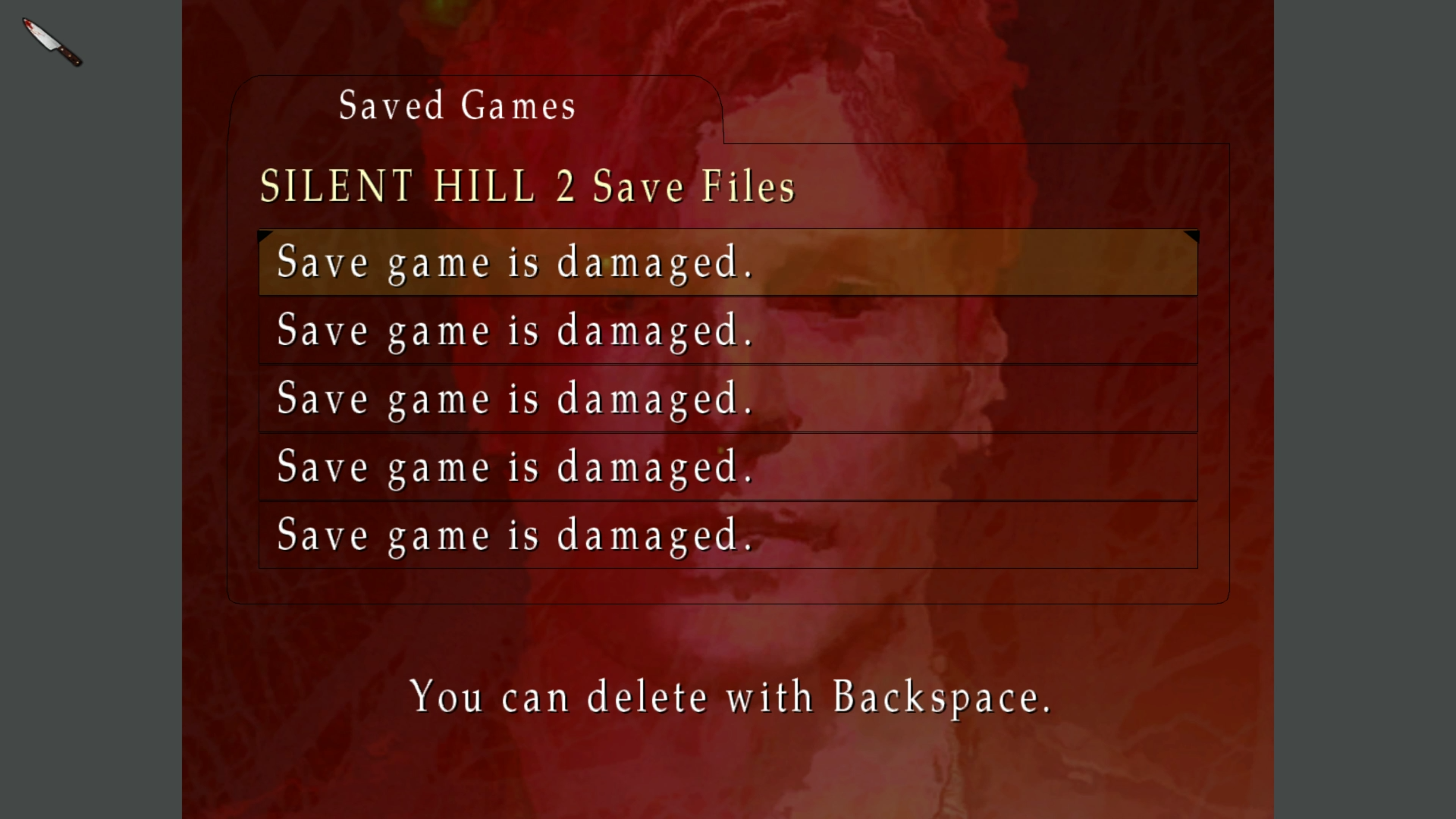
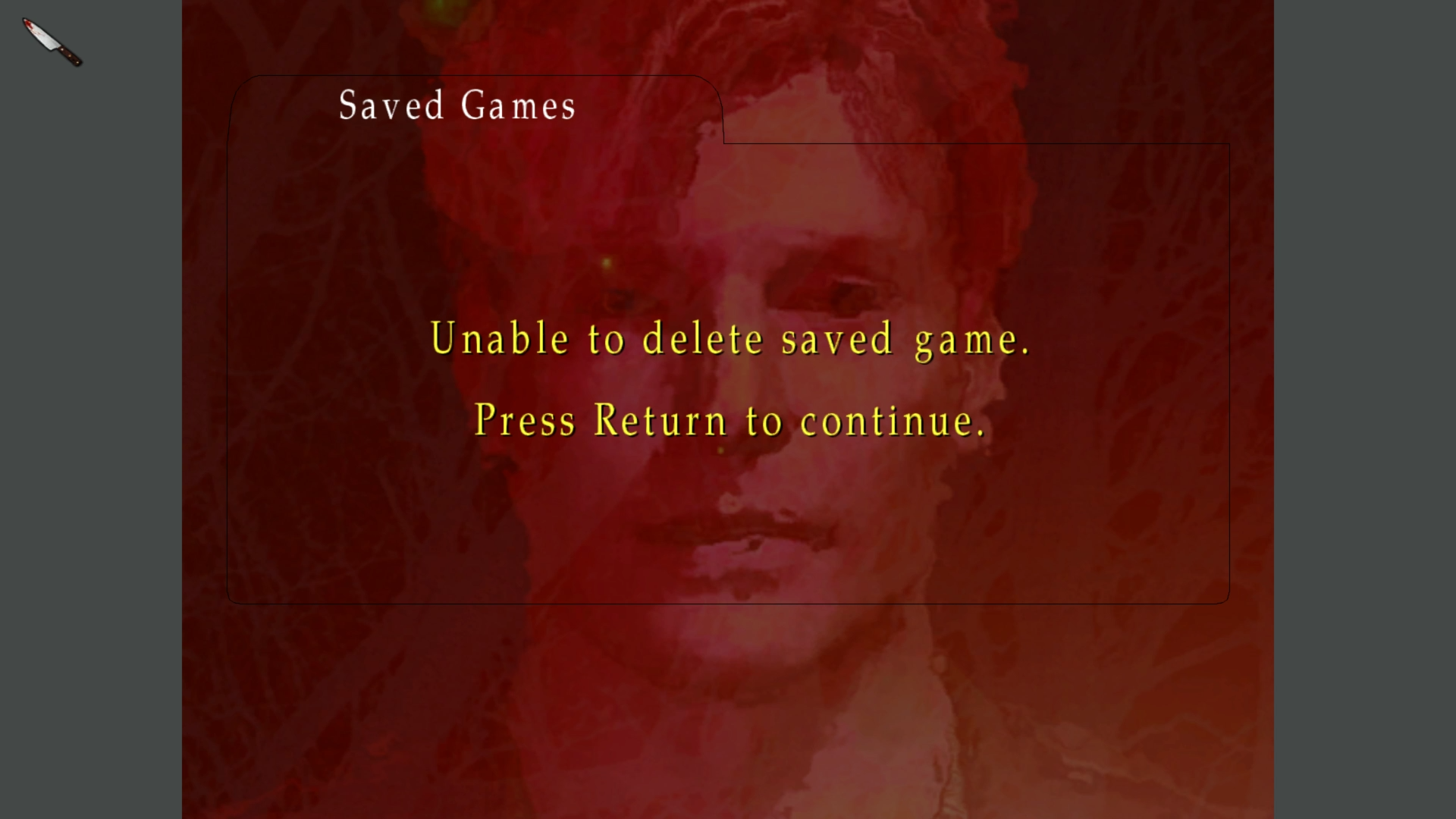
For the second run, I simply deleted the data/saves/Folder 01 folder, and this is what I got:

It didn't "freeze" per se, but the game gave me no further input options except for exiting this screen. Let me know if the logs are any help.
tycho1974
on 22 Sep 2019
@tycho1974, that does not seem to be a problem with the 2TB fix. I believe there is an issue with your saves. Try renaming Folder 01 under Silent Hill 2\data\save and replacing it with the one below.
New save folder: Folder 01.zip
elishacloud
on 22 Sep 2019
@tycho1974 try out Elisha's save folder by placing Folder 01 back to \data\save\ (\data\save\Folder 01\)
If that doesn't work, fully delete Folder 01, launch the game, start a new game, and either Quick Save anywhere or save at the first save point (at the Forest well).
If I remember correctly, you can't just delete the contents inside Folder 01 but also leave the folder present. You need to fully delete the folder and the game will create a new Folder 01 on your first save.
Basically, if Folder 01 already exists, the game also expects to see SaveImage.pcv and sh2pc.sys in there, too. If it doesn't detect those files within that folder, it won't save at all. However, if it doesn't detect Folder 01 at all, it'll create that folder + the necessary/needed files within it.
Polymega
on 22 Sep 2019
Congratulations, you're all a bunch of friggin' geniuses. I used your new build along with the folder of save files, and upon reaching the start screen I'm greeted with an all-new "continue" option:

...followed by a successful load of the list of save files:

...ending gloriously with a newly created save game on my 5TB external drive:
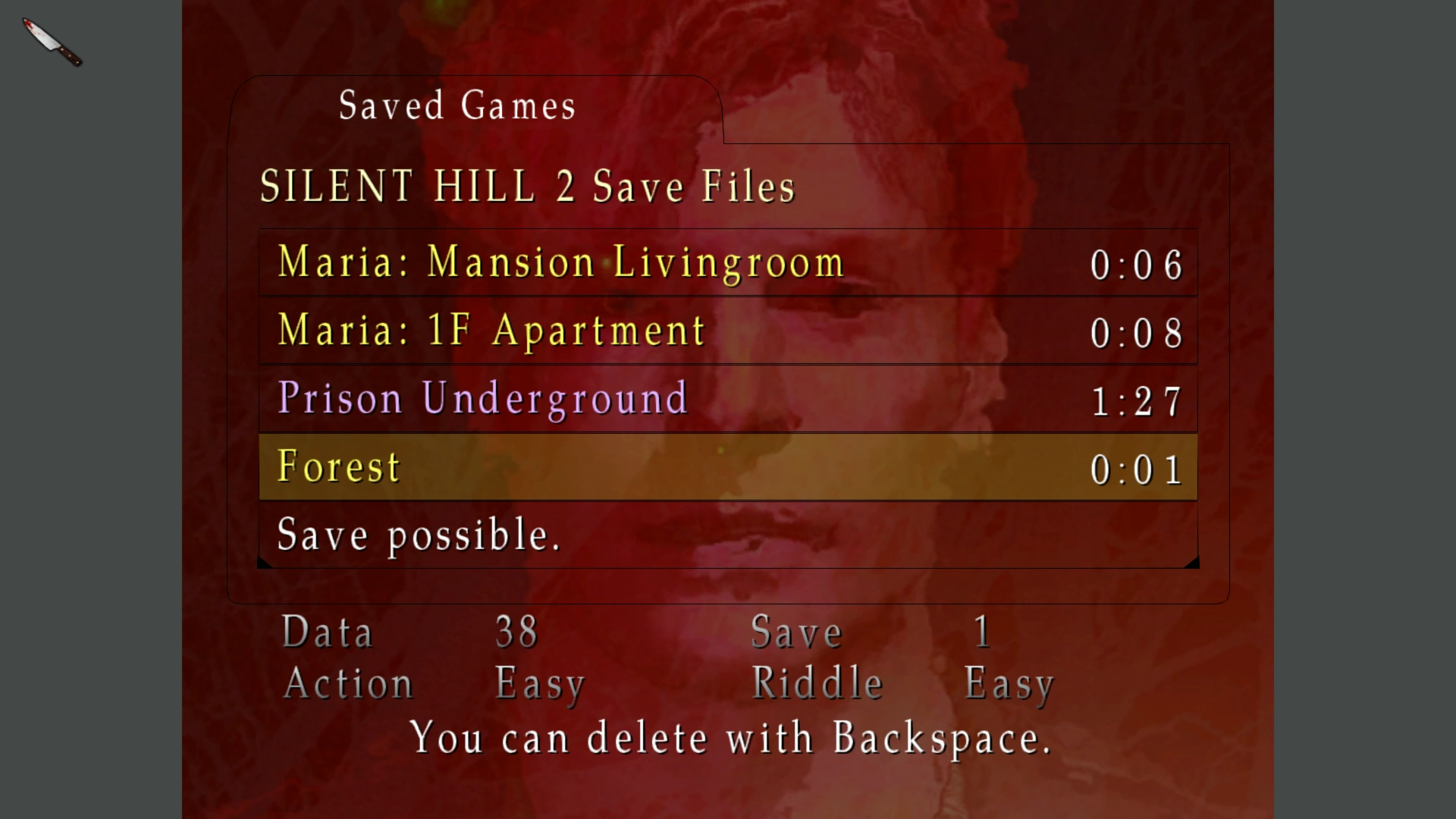
Seriously, all the credit in the world to this amazing team that has put so much polish on a twenty year-old beloved classic. I can't wait to fully play through SH2 again, so I can really appreciate all the hard work that's gone into this. One million Internet Points™ to all of you — I can't thank you enough, really.
tycho1974
on 22 Sep 2019
I'll say this until I turn blue in the face: I love this team. I love being a part of this team. I couldn't ask for better people to work alongside with. The other folks who work on this are so damn smart, talented, kind, and patient.
Enough of me gushing... I'm glad Elisha got things working for you!
I can't wait to fully play through SH2 again
Great! And I'll give you another reason to come back to it in the future: Stay tuned as our next update will feature restored post-processing effects, soft & self shadows, and many other neat fixes/improvements!
Polymega
on 22 Sep 2019
Just to be clear on this one, the issue is still present. I installed to my 5TB HDD and with nothing inside the save folder (typical result from a fresh game installation) the game still tells me not enough space to save. It's only when other save files are present by using that Folder01 that I am able to save. I just went through the process of deleting every single save in the list in-game at the first save spot, and upon deleting the last save file it changed over to not enough free space. So the issue persists, and relies on using other players save files to circumvent the issue on >4TB storage locations.
Is it not possible to just disable the game's check altogether and just force the save, ignoring storage space? I highly doubt anyone playing this game on a modern PC has less than 32KB free on any device. You'd have to really try to get a storage device that low.
 DaRkL3AD3R
on 31 Jan 2020
DaRkL3AD3R
on 31 Jan 2020
Thanks for the info, @DaRkL3AD3R
I don't have a 2+ TB disk to play test this, but...
Is it not possible to just disable the game's check altogether and just force the save, ignoring storage space? I highly doubt anyone playing this game on a modern PC has less than 32KB free on any device. You'd have to really try to get a storage device that low.
I don't think that'd be a problem to do, if all other solutions fail. Thoughts @AeroWidescreen and @elishacloud?
DaRkL3AD3R: By chance, is the hard drive you installed the game on not your C:\ drive? I'm curious if installing to another drive besides C:\ makes it to where the fix won't read the disk space of the drive the game is installed on.
Polymega
on 31 Jan 2020
It is installed to a secondary drive correct.
DaRkL3AD3R
on 31 Jan 2020
It's only when other save files are present by using that Folder01 that I am able to save.
I suggest we solve this issue. We should be able to either drop a file in the Save folder to make this work or bypass this check.
elishacloud
on 31 Jan 2020
We should be able to either drop a file in the Save folder to make this work
One potential issue with this method. I'll copy + paste it from the troubleshooting page of the site:
Your save folder might be corrupted. Go to
<path-to-game>\Silent Hill 2\data\save\and delete theFolder 01folder. Do not create a newFolder 01folder. Launch the game, and you should then be able to save your progress like normal (the game will create a newFolder 01for you with all required files within it). This method will completely remove any previous save files you had.
We'd be unable to just place an empty Folder 01 in the save folder; save files would need to be in there with it to solve it this way and, for first time players, it's advised if no prior save files are in their game.
Polymega
on 31 Jan 2020
It definitely wouldn't feel "whole" if the solution was to include pre-built save files. I really feel the only way we can work around this is by having a user configurable option in the ini that let's the user bypass any disk space checks if they have a driver greater than 4TB. Just need to have a mention about it in the configuration guide on the main webpage. I'm game for any more-elegant solutions but these are the limitations of a 32 bit application.
DaRkL3AD3R
on 31 Jan 2020
I'm game for any more-elegant solutions but these are the limitations of a 32 bit application.
Thank you for understanding this is a limitation of any 32 bit game.
I really feel the only way we can work around this is by having a user configurable option in the ini that let's the user bypass any disk space checks
I'd be on board with this, if no alternative comes to mind. The save files are 8 KB a piece, plus a single 18 KB file and one 3 KB file.
If we'd do this, perhaps we just also remove the "FREE SPACE: ###### KB" line at the bottom of the save screen with it? I know people didn't like how it showed the available space in KB, anyways.
Polymega
on 31 Jan 2020
Seems fair to me, the free space thing hasn't really made sense since the 7th generation consoles where storage space far outpaced game save file sizes. Certainly if you have 5TB+ you aren't worried about 32KB save files.
DaRkL3AD3R
on 31 Jan 2020
Certainly if you have 5TB+ you aren't worried about 32KB save files.
If we were to bypass this check, this feature would probably be enabled by default (to cover all users, regardless of their disk space). But you're right: Even if someone has 1TB or less of storage, a few kilobytes extra shouldn't be an issue for them to save their files.
Polymega
on 31 Jan 2020
Your save folder might be corrupted. Go to
<path-to-game>\Silent Hill 2\data\save\and delete theFolder 01folder. Do not create a newFolder 01folder.
This is an even easier solution. If the Folder 01 folder is empty then delete it.
BTW: the solution that we are using already skips the space check when there is more than 8KBs of disk space. The problem is that the game also checks for other things besides just disk space. The "not enough space" error is a red herring.
elishacloud
on 31 Jan 2020
The thing is, I never had a Folder01 in my save folder from the get go. I only stumbled on this issue thread from google searching and saw the downloadable Folder01 zip, which had the same results as the user above being able to save now, however I took things a step further and loaded up the game and deleted all the saves that came with that download from the first save point in-game and upon deleting the final save file that's when the error popped up again. I also noticed since deleting all save files in-game, the Folder01 completely disappeared and save folder is now back to being empty again. So not a case of a corrupt save.
DaRkL3AD3R
on 31 Jan 2020
The thing is, I never had a Folder01 in my save folder from the get go.
Yes, that seems right. Elisha: On a fresh game install, there would be nothing in the save folder as DaRkL3AD3R mentioned. The game would create a Folder 01 upon first game save.
I also noticed since deleting all save files in-game, the Folder01 completely disappeared and save folder is now back to being empty again.
That is normal behavior for the game to do.
The problem is that the game also checks for other things besides just disk space. The "not enough space" error is a red herring.
Well damn. I wish I had a 2+ TB hard drive to help test this one. :-/
Polymega
on 31 Jan 2020
upon deleting the final save file that's when the error popped up again. I also noticed since deleting all save files in-game, the Folder01 completely disappeared and save folder is now back to being empty again. So not a case of a corrupt save.
It sounds like there is an issue on larger drives when there are no saves at all.
Let me check this out later. I have the game installed on an 8TB drive. Maybe there are multiple places in the code where the game checks the disk space and we only fixed one of those places.
elishacloud
on 31 Jan 2020
Observation note: I just uninstalled and reinstalled the game on my laptop. For me, there wasn't even a save folder until I saved my game for the first time. It then made .\save\Folder 01\ with the necessary files in it.
Polymega
on 31 Jan 2020
I tried deleting the entire save folder and launching the game, it still showed the 99999999+ KB free space yet not enough space to make the 32KB save file. I exited the game and the save folder was remade but no Folder 01.
DaRkL3AD3R
on 1 Feb 2020
I can reproduce this issue. If you delete all the saves then the issue happens. It seems like the game has separate code to check if there is enough room to create the sh2pc.sys file. We will need to put a patch in for this also.
elishacloud
on 1 Feb 2020
Ok, the issue is fixed. Here is the fixed module: d3d8.zip
Code checked in here: e2d3961634d7ee31daef2c8b1573d238afe34dcb
elishacloud
on 1 Feb 2020
I can confirm the issue is completely resolved. Thank you so much for your looking into it and coming up with a solution so quickly! This truly is one of the finest group of developers the gaming community has ever known.
DaRkL3AD3R
on 1 Feb 2020
Thanks for your kind works and helping us troubleshoot this issue.
elishacloud
on 1 Feb 2020
Related issues
 Psycho-A
·
16Comments
Psycho-A
·
16Comments
 snigelpasta
·
13Comments
Polymega
·
18Comments
snigelpasta
·
13Comments
Polymega
·
18Comments
 Badore90
·
9Comments
Badore90
·
9Comments
 silentdream21
·
8Comments
silentdream21
·
8Comments
Most helpful comment
Ok, the issue is fixed. Here is the fixed module: d3d8.zip
Code checked in here: e2d3961634d7ee31daef2c8b1573d238afe34dcb