Signal-desktop: Gnome's "Do Not Disturb" is not respected for message sounds
- [X] I have searched open and closed issues for duplicates
Bug Description
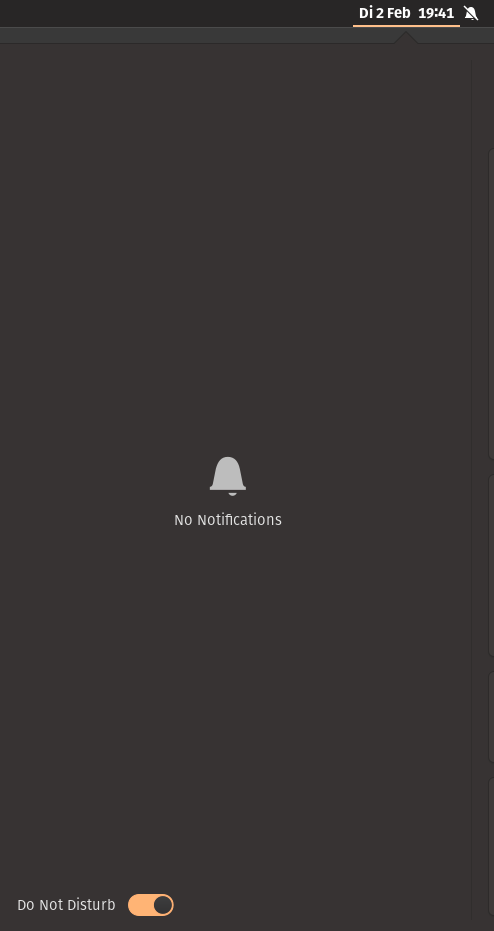
Signal still plays message sounds when in "Do Not Disturb" mode.
Steps to Reproduce
- Open Signal Desktop
- Enable message sounds under preferences.
- Set Gnome to do not disturb mode
- Receive a message
Actual Result:
The message sound plays.
Expected Result:
No message sounds is played but a notification is sent,
Screenshots

Platform Info
Gnome 3.38.1
Signal Version:
1.39.6
Operating System:
Pop OS 20.10
Linked Device Version:
Android 5.3.7
Link to Debug Log
 13hannes11
All 8 comments
Thanks for reporting.
This is happening because we always play audio notifications on Linux. Here's the relevant code:
Note that we're always playing the sound—we don't check for Do Not Disturb.
I think there are two options to fix this:
Detect whether we're in Do Not Disturb.
There are at least two edge cases to keep in mind. First, that branch should only trigger on Linux today, but it may occur on other platforms (e.g., macOS) in the future. Second, we should make sure it works on non-GNOME Linux environments. Many of them lack Do Not Disturb and we should play the notification if it's missing.
Electron recommends the electron-notification-state package for this, but that doesn't seem to have Linux support, so we'll need to do something else if we go this route.
- Ask the notification system (maybe
libnotify?) to play the sound effect instead of playing it ourselves. Ideally, that external system would quiet the sound in Do Not Disturb node.
If anyone would like to submit a pull request for this, I'm happy to review it.
 EvanHahn-Signal
on 2 Feb 2021
EvanHahn-Signal
on 2 Feb 2021
Maybe this can be a different Route:
Since the only Case, we have to look into is the Linux with GNOME
Since GNOME is a Desktop Environment we can check if the Desktop is running it by accessing XDG_CURRENT_DESKTOP
XDG_CURRENT_DESKTOP is an Environment Variable
So we can get them by:
env | grep XDG_CURRENT_DESKTOP
More Info Here: Link
Let me know your thoughts ✨
 Deep-Codes
on 9 Feb 2021
Deep-Codes
on 9 Feb 2021
Since the only Case, we have to look into is the Linux with
GNOME
That's actually not true—KDE also has a "do not disturb" function in its notifications area. I'm not sure about other DEs, but either way, I don't think you'd want to assume anything about the user's desktop environment if it's possible to avoid that.
 RussianCow
on 10 Feb 2021
RussianCow
on 10 Feb 2021
Since the only Case, we have to look into is the Linux with
GNOMEThat's actually not true—KDE also has a "do not disturb" function in its notifications area. I'm not sure about other DEs, but either way, I don't think you'd want to assume anything about the user's desktop environment if it's possible to avoid that.
Agreed! The best way to solve this can be the 2nd option: libnotify but that will only cover the GNOME one.
Thanks for Following up!
Deep-Codes
on 10 Feb 2021
Actually, libnotify is DE-independent and will work on any DE that implements the Desktop Notifications Specification, so that should cover every major Linux DE.
I see two ways to make this work:
- Find a way to get the current "do not disturb" state of the DE and check for that before playing the sound.
libnotifysupports passing a sound file with the notification, so use that to show the notification and bypasswindow.Notificationentirely.
I can do some light research to see which is more technically feasible with as little change as possible, but does anyone have a strong preference for one of the above?
RussianCow
on 10 Feb 2021
I did some quick reading about this, and it looks like option 2 may not be feasible; the sound-file option is implemented as a hint, which means that notification servers may choose to support it or not, arbitrarily. I tested it on my KDE system and it does not have support. So if we want to support DEs aside from Gnome, the only surefire way to do so is the original suggestion of checking for "do not disturb" mode before playing the sound. I have not yet figured out how to do this.
RussianCow
on 10 Feb 2021
What do you think about a user being able to chose if the notification is handled by libnotify or not?
To identify if gnome is in do not disturb mode the following works:
gsettings get org.gnome.desktop.notifications show-banners however I am not sure if this is the ideal way.
Edit:
Trying out if sounds work on gnome via hints I was not successful:
notify-send "Test" --hint=string:sound-file:path_to_file.mp3
13hannes11
on 10 Feb 2021
Both GNOME and KDE implement the XDG notification specification. I think you should look up org.freedesktop D-BUS. So any notification event sent by the means of dbus should be quieted. I am however not quite sure how one is to lookup the actual state (if it's activated or do not disturb)
for checking gnome specifically the correct approach is this:
gsettings get org.gnome.desktop.notifications show-banners
however for KDE i am not quite sure. I think it's controlling the notification part of D-Bus without truly revealing what state it is in. I don't run KDE atm.
OK, simplest way it seems to look into the KDE desktop "Do-not-disturb" is to do
wc -l ~/.config/plasmanotifyrc > 0 dont't notify..
or use
kreadconfig5 --file ~/.config/plasmanotify --group DoNotDisturb --key Until
/* This works, without sound, but I think that's alright. */
const myNotification = new Notification('Signal-desktop', {
body: 'You got a message...'
})
One can check for do not disturb and play a sound if it's not set, and use electron for the notification to system part.
 rahmi
on 13 Feb 2021
rahmi
on 13 Feb 2021
Related issues
 hanzei
·
3Comments
hanzei
·
3Comments
 demux4555
·
3Comments
demux4555
·
3Comments
 cmdrogogov
·
3Comments
cmdrogogov
·
3Comments
 github-cygwin
·
3Comments
github-cygwin
·
3Comments
 vincenzopalazzo
·
3Comments
vincenzopalazzo
·
3Comments
Most helpful comment
Thanks for reporting.
This is happening because we always play audio notifications on Linux. Here's the relevant code:
https://github.com/signalapp/Signal-Desktop/blob/1356625391eb00d2358abca33511077eebf8df9a/ts/services/notify.ts#L45-L48
Note that we're always playing the sound—we don't check for Do Not Disturb.
I think there are two options to fix this:
Detect whether we're in Do Not Disturb.
There are at least two edge cases to keep in mind. First, that branch should only trigger on Linux today, but it may occur on other platforms (e.g., macOS) in the future. Second, we should make sure it works on non-GNOME Linux environments. Many of them lack Do Not Disturb and we should play the notification if it's missing.
Electron recommends the electron-notification-state package for this, but that doesn't seem to have Linux support, so we'll need to do something else if we go this route.
libnotify?) to play the sound effect instead of playing it ourselves. Ideally, that external system would quiet the sound in Do Not Disturb node.If anyone would like to submit a pull request for this, I'm happy to review it.