Signal-desktop: Win desktop app won't sync groups and contacts with iOS, and eventually conversations sync one way only
- [X] I have searched open and closed issues for duplicates
Bug Description
I had a similar issue of missed sync between the Mac desktop app (OSX 10.13.6) and the ones on iPhone and iPad and I was suspecting my network that anyway is quite a regular one but the issue was solved leaving only the 8.8.8.8 Google DNS on the Mac, or so it seemed.
Here on Win 10 the sync between the desktop app and the iOS ones appears buggy. I tried several times to resync the app (deleting the data on desktop each time), manually removing the other DNS and leaving 8.8.8.8 only, without and with VPN, connecting both iPhone and Win PC to an iPad as hotspot, different names for the connected PC, disabling PIN, CloudFlare DNS 1.1.1.1, reinstalling, rebooting the iPhone and Win, ... no success. And couldn't find a solution on the web or here either.
Thanks in advance for your support.
Steps to Reproduce
- Install and open the desktop app
- QR pairing with iPhone
- PC name appears on iPhone
- "Syncing contacts and groups" remains on the desktop app for a couple of minutes
Actual Result:
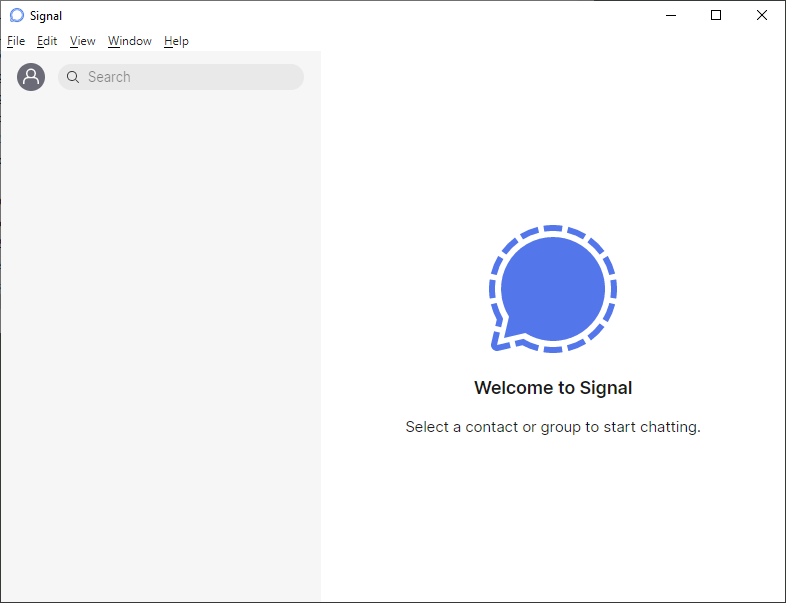
Eventually the app opens with a totally empty left frame; the user icon is standard still, clicking it, it reveals my phone number.
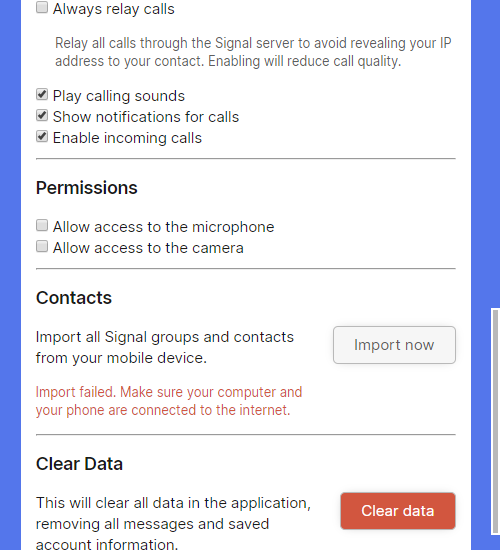
When trying File > Preferences > Import now, after a couple of minutes or so, I get "Import failed. Make sure your computer and your phone are connected to the internet."
Sometimes, after some much longer time, the left panel gets populated.
In any case, messages written on iPhone/iPad appear on Win but messages written on Win do not appear on iPhone/iPad.
Expected Result:
Groups and contacts to show in the left panel at the initial sync.
Eventually conversations should be synced both ways, when a new message is sent from the iPhone or from the desktop app, not only when sent from the iPhone or iPad.
Screenshots
Platform Info
Signal Version:
1.39.5
Operating System:
Windows 10 Pro 20H2
Linked Device Version:
iOS: 14.3
Link to Debug Log
debug log Win 10
dbl Win.txt
iPhone
https://debuglogs.org/b359f762641a8c448de6e53553c2b0ca6080499827ac5a35722093b80d343e50.zip
 geom4t
All 29 comments
This is also happening to me with Windows 10 and syncing from my iPhone.
 signalcomment
on 14 Jan 2021
signalcomment
on 14 Jan 2021
Same problem, iPhone + Mac laptop
 OldGitGuy
on 14 Jan 2021
OldGitGuy
on 14 Jan 2021
+1
 GSebastian
on 14 Jan 2021
GSebastian
on 14 Jan 2021
+1
Signal Desktop Mac v1.39.5 (macOS Big Sur 11.1)
Signal App on iPhone v5.2.0.4 (iOS 14.3)
New installed Signal Desktop Mac -> linke device -> "Syncing contacts and groups" -> not synced
Manually importing groups and contacts -> not working
 joerg-wille
on 14 Jan 2021
joerg-wille
on 14 Jan 2021
+1, iPhone + MacBook
 lisannevdl
on 14 Jan 2021
lisannevdl
on 14 Jan 2021
Same issue. After installing the Mac desktop app and linking it, nothing gets synced ... not even my profile picture.
iPhone Xs Max (latest iOS) and MacBook Pro (latest MacOS)
 Ultrasaurus01
on 14 Jan 2021
Ultrasaurus01
on 14 Jan 2021
Same here, but on Linux.
 bgeron
on 14 Jan 2021
bgeron
on 14 Jan 2021
Same issue, some groups not synced, but some other are... running on Android 9 and Windows 10
 yoda1490
on 14 Jan 2021
yoda1490
on 14 Jan 2021
This appears to be an old issue. If you look at this thread https://github.com/signalapp/Signal-Desktop/issues/1499, it was closed a year ago, but it is still an issue.
Try stopping the app on the phone and it should sync.
 paulwarwicker
on 14 Jan 2021
paulwarwicker
on 14 Jan 2021
Yes in a way since it appears to be a recurring issue in various flavours but anyway no, at least for me: I tried again also the forced closure of the iOS app as in #1499 and the error in importing in the preferences still appears. Also messages don't show on iPhone when sent from Win (messages show on iPhone sent from OSX).
Overall a forced closure cannot be considered a solution.
geom4t
on 14 Jan 2021
@geom4t Absolutely agree closing the app is not a solution.
I have the same issue and now understand your "eventually conversations sync one way only", i.e. you only get one half of the conversation.
paulwarwicker
on 14 Jan 2021
Happens to me on Iphone (5.1.0.31) and Ubuntu/KDE desktop app (V1.39.5). After restarting the app on the phone I can see the contacts but conversations are not being synced.
 drorcohen
on 15 Jan 2021
drorcohen
on 15 Jan 2021
The #1499 fix worked for me. I force-quit the iOS app then started the sync on desktop, then opened the app and it worked. Not ideal. I think this desktop app needs work!
 peteash10
on 15 Jan 2021
peteash10
on 15 Jan 2021
The stated fix does not work for me. MacOS 11.1 on computer and iOS 14.3 on iPhone. Signal versions both up to date -- 1.39.5 on computer, 5.1.0.31 on iPhone. Messing around with quitting the iPhone app as instructed doesn't seem to solve anything. They are both connected to the internet, and on the same network.
"Import all Signal groups and contacts" fails with "Import failed. Make sure your computer and your phone are connected to the internet."
Incoming messages show both in the iPhone and computer apps, but outgoing messages are not sync'd. I see only what I enter on each specific device.
These things are not talking to each other.
OldGitGuy
on 15 Jan 2021
Same problem happening for me with sync between iOS and Mac. Groups from my iPhone don't show up on the Mac until a message is sent in them, and messages I sent on my Mac never show up on my iPhone.
Debug log: https://debuglogs.org/1e46284bbee66cd73d1d9645240e239cc8f6a638900fbf9de55cbe72861a0328
 nielshoven
on 15 Jan 2021
nielshoven
on 15 Jan 2021
I called it a fix earlier. "Turn it off and on again" is not a fix. It's a hack for something that doesn't work. Happy to donate for work to be done to make it work!
peteash10
on 15 Jan 2021
The #1499 fix worked for me. I force-quit the iOS app then started the sync on desktop, then opened the app and it worked. Not ideal. I think this desktop app needs work!
This "fix" worked for me on iOS and Mac.
 ian-campbell
on 15 Jan 2021
ian-campbell
on 15 Jan 2021
The #1499 fix worked for me. I force-quit the iOS app then started the sync on desktop, then opened the app and it worked. Not ideal. I think this desktop app needs work!
This "fix" worked for me on iOS and Mac.
This work-around worked for me with Big Sur, Mac Pro 2013, iPhone SE 2020. Shouldn't be necessary though.
 Ralph-Elliott
on 15 Jan 2021
Ralph-Elliott
on 15 Jan 2021
The #1499 fix worked for me. I force-quit the iOS app then started the sync on desktop, then opened the app and it worked. Not ideal. I think this desktop app needs work!
This "fix" worked for me on iOS and Mac.
This work-around worked for me with Big Sur, Mac Pro 2013, iPhone SE 2020. Shouldn't be necessary though.
Did this "fix" work for syncing all conversation in both directions? For me, I seem to have been able to sync contacts, but not the conversations (i.e. whatever I type on my computer never shows up on my phone, and similarly in the other direction; I do see all incoming messages though)
Another possibly related issue: if I use "note to self" on the phone, it works as intended. If I use it on the computer, the note to self does not show up on the phone, and I see a warning "Partially sent, click for details", but the details don't give much information -- just some dates and times and message identifiers, no additional warning text.
OldGitGuy
on 15 Jan 2021
Ah, found another issue for the desktop messages not appearing on iPhone: https://github.com/signalapp/Signal-Desktop/issues/4852
The problems appears to be isolated to fresh install of v1.39.5
The solution from that thread (unlinking the desktop app, downgrading to 1.39.4, relinking the desktop app, and then upgrading to 1.39.5) fixed the issue for me
nielshoven
on 17 Jan 2021
Ah, found another issue for the desktop messages not appearing on iPhone: #4852
The problems appears to be isolated to fresh install of v1.39.5
The solution from that thread (unlinking the desktop app, downgrading to 1.39.4, relinking the desktop app, and then upgrading to 1.39.5) fixed the issue for me
Downgrading to 1.39.4 using the link in that thread worked for me as well. (I unlinked the Desktop first, then reinstalled, then relinked. I have not tried upgrading again to see if the fix 'sticks'.)
OldGitGuy
on 17 Jan 2021
Uninstalling, downgrading, unlinking, relinking and synching also works for me. The upgrade to v1.39.5 also worked.
This has also fixed any remaining issues that I had with messages not appearing and Note to Self.
Thanks @nielshoven
paulwarwicker
on 18 Jan 2021
Interesting.
... sorry, any pointer to an official installer for 1.39.4? can't seem to find it
Thanks
geom4t
on 18 Jan 2021
Windows: https://updates.signal.org/desktop/signal-desktop-win-1.39.4.exe
Mac: https://updates.signal.org/desktop/signal-desktop-mac-1.39.4.dmg
 chrisdebruin
on 18 Jan 2021
chrisdebruin
on 18 Jan 2021
Thanks. I should have tried that...
Ah! The road via 1.39.4 actually worked. Contacts and groups were fully imported and messages from desktop are showing on iPhone.
Thanks!
geom4t
on 18 Jan 2021
Just sent some messages from the desktop which were received by the recipient but they're not in the iOS app. This is a bit of a dealbreaker. I really want to move from WhatsApp but can't without a decent desktop app.
peteash10
on 27 Jan 2021
This build was released last week, and should fix these issues. Have you tried it? https://github.com/signalapp/Signal-Desktop/releases/tag/v1.39.6
 scottnonnenberg-signal
on 28 Jan 2021
scottnonnenberg-signal
on 28 Jan 2021
This build was released last week, and should fix these issues. Have you tried it? https://github.com/signalapp/Signal-Desktop/releases/tag/v1.39.6
Yes, this happened after it upgraded on launch. I do need to upgrade the iOS app though (got a prompt but it wasn't in the App store, so am waiting for the prompt again...)
peteash10
on 28 Jan 2021
@peteash10 I'm going to close this. Please enter a new bug, with a full debug log (View -> Debug Log) so we can figure out what's wrong.
scottnonnenberg-signal
on 28 Jan 2021
Related issues
 jeremymasters
·
3Comments
jeremymasters
·
3Comments
 muellermartin
·
3Comments
muellermartin
·
3Comments
 fredaas
·
3Comments
fredaas
·
3Comments
 TarkanY
·
3Comments
TarkanY
·
3Comments
 halb9
·
3Comments
halb9
·
3Comments
Most helpful comment
Thanks. I should have tried that...
Ah! The road via 1.39.4 actually worked. Contacts and groups were fully imported and messages from desktop are showing on iPhone.
Thanks!