Signal-desktop: Not all messages sync with Desktop
- [x] I have searched open and closed issues for duplicates
Bug Description
Some messages on the Desktop app are either missing, or show up of order.
Rarely (once) messages are not delivered to someone else despite the fact that there are two unfilled check-boxes on that message.
Steps to Reproduce
- Close the desktop app.
- Send a lot of messages using the phone app.
- Re-open the desktop app
- Messages will either be missing or appear out of order.
Actual Result:
The messages show up either missing or are out of order.
Expected Result:
The messages are not missing and they show up in order.
Screenshots
N/A due to confidentiality of all messages.
Platform Info
Signal Version:
All versions going back at least six months. Current version v1.31.0
Operating System:
Ubuntu Linux 18.04
Linked Device Version:
All versions of Android 10
Link to Debug Log
N/A however will be updated once the issue occurs again.
 stazio
All 19 comments
I have (and have been having) this issue as well. The good news is that it doesn't seem platform-dependent. It was present on Android 9, and is still an issue on 10. I've used Signal on Windows 10 (both Pro and Home), Ubuntu 19.10, and Fedora 30/31 with the same behavior.
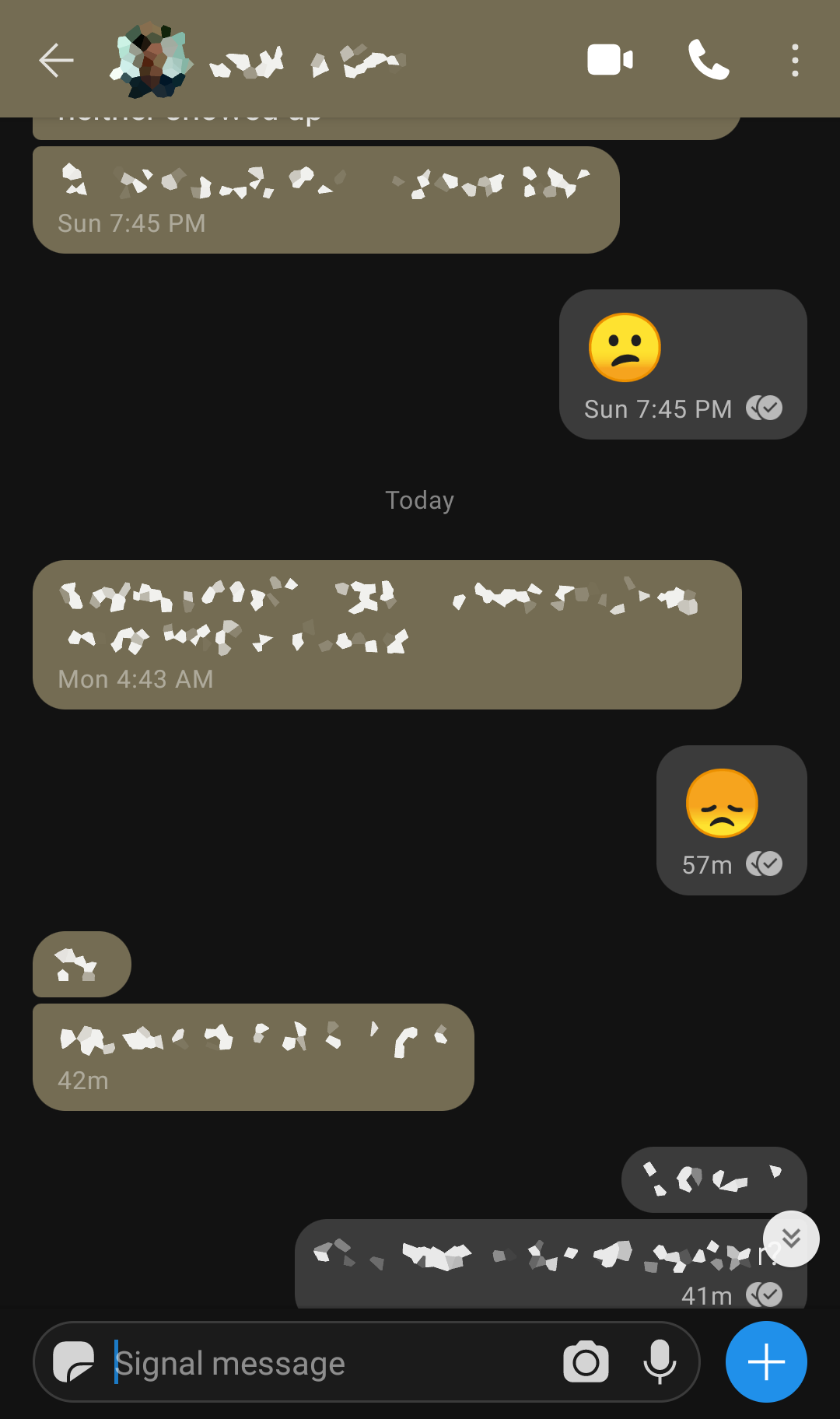
I've attached a pair of screenshots from today showing a message at 4:43AM that's missing from the desktop client even though messages before and after it appear.
Desktop side: Windows 10 pro x64, Signal 1.31.0
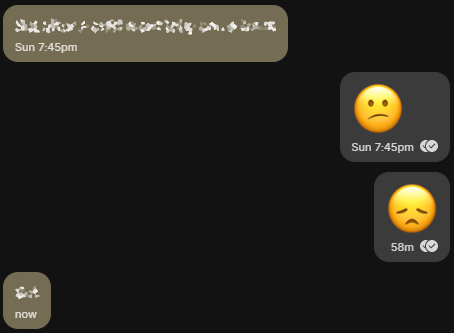
Android side: Pixel 2, Android 10 (Feb patch), Signal 4.55.8
 banduccm
on 17 Feb 2020
banduccm
on 17 Feb 2020
Missing and out of order messages are being tracked in this issue: https://github.com/signalapp/Signal-Desktop/issues/3332
@stazio / @banduccm in order to debug any specific issues we will need debug logs. Both your desktop and primary device logs would be useful.
 kenpowers-signal
on 18 Feb 2020
kenpowers-signal
on 18 Feb 2020
One message from the other side missing on desktop (Ubuntu 18.04 LTS), but not on Android. My next message, written on Android, again showed up on desktop, but the missing one does not appear.
It happened around the time Signal desktop was starting up.
Log from desktop: https://debuglogs.org/193b90f9c4d5071d0b3aea10c4ba538faa7b54985bae3caa93ec2af17a2c467b
Log from Android:
https://debuglogs.org/93703d80b0f1144180553b98b11423881b6b8d21e38fd46648e337e4478e719e
Missing message occurred towards the end of the logging period.
 sirius-c
on 20 Feb 2020
sirius-c
on 20 Feb 2020
@sirius-c can you provide us with the message ids of the missing messages? You can get the messages ids of the missing messages by going to the message detail screen on your primary mobile device (long press on the message) and then long press on the "sent" header -- that will place the sent id on your clipboard.
kenpowers-signal
on 20 Feb 2020
Message ID is 1582181193764 (I had to long press on the sender name to get this number, long pressing on 'Sent' had no effect - is this the right number?).
In the meantime, the missing message also appeared on the desktop, so it was not lost, but delivered (or shown?) with much delay compared to the surrounding messages. I did not check since this morning, so I cannot specify the delay.
Here is the current debug log from the desktop, in case that gives a clue.
sirius-c
on 20 Feb 2020
Additional info from a second desktop computer that I booted now: also here one message is missing - the last one sent by the other side (not the same as mentioned in the previous replies).
But it is missing only in the main message window, I see the message in the contact pane on the left side of the window.
sirius-c
on 20 Feb 2020
@kenpowers-signal Now a message I wrote on Android to the other side is not (yet?) shown on desktop. The next message that I wrote on the desktop is showing on Android as expected.
sirius-c
on 23 Feb 2020
I have another set today. Desktop v. 1.31.0, Android v. 4.55.8
Missing Message IDs: 1582553573738, 1582553578200
Desktop debug log: https://debuglogs.org/77c3034085819ba46caf623878384bcee29bc2b5d888b147e2c75cbeb941af89
Android debug log: https://debuglogs.org/69f4bee4b5105f7eee270ef9e0acc38bdb09e0e015c6ed96e9dd8afb3ca7adb6
I checked again after @scottnonnenberg-signal 's comment and got different numbers. I'm not sure if I did something wrong or if I misunderstood the procedure.
The missing IDs I got this time are 1582553571813, 1582553576961.
banduccm
on 24 Feb 2020
@banduccm Looking at your desktop log, I didn't see either of the missing messages at all. Nor did I find decryption errors. This is very unusual; it suggests that the sender never sent the message to desktop at all. Are you sure you got the right id?
 scottnonnenberg-signal
on 24 Feb 2020
scottnonnenberg-signal
on 24 Feb 2020
I can confirm that this happens to me as well. I get a notification on my phone, I launch my desktop app to check it - and nothing's there.
This is a big inconvenience for people switching multiple platforms quickly.
 ankushdas9
on 2 Mar 2020
ankushdas9
on 2 Mar 2020
@ankushdas9 The more information you can provide about this, the better. The most basic is your debug log (View -> Debug Log), but we'd also like the 'sent id' for missing messages. You can get this id by going to the message detail screen on your primary mobile device (long press on the message) and then long press on the "sent" header -- that will place the sent id on your clipboard.
scottnonnenberg-signal
on 13 Mar 2020
PC (Linux) log: https://debuglogs.org/c85506c1c0225f3f1bd937ff335bdd4e5ba390b4666e37993eacbe4fbf565e0e
Android log: https://debuglogs.org/b247c23c1f068796da438b957884ff6a593663cad3af64b38008128789a756ba
I've uploaded the debug info of the desktop app. And, the sent ID for one of missing messages which is on my phone but not on desktop is: 1584033183893
Let me know if you need any other details @scottnonnenberg
ankushdas9
on 13 Mar 2020
@ankushdas9 I see the message in your log. Have you searched for that message? It might not be that the message is fully missing; it might just be sorted incorrectly.
scottnonnenberg-signal
on 17 Mar 2020
@ankushdas9 I see the message in your log. Have you searched for that message? It might not be that the message is fully missing; it might just be sorted incorrectly.
@scottnonnenberg No, I didn't "search" for it explicitly, but it wasn't just there where it should have been.
I launched the app on Linux today and checked again, it was there.
Not sure of a sorting issue or missing messages (technically) - but syncing messages with no issues should be a priority, I think.
ankushdas9
on 17 Mar 2020
@scottnonnenberg-signal I investigated it again and have also included the debug logs along with some screenshots as well:
Desktop Linux debug: https://debuglogs.org/b05b2932ae6f2d77f0a7d9bae02233a71bdf1bd59c3253ead54facc9b4d98e4a
Android debug log: https://debuglogs.org/9a7030fc97783b2981e30795cbebc6a023fb1f5cb988a99eb69bca3289ea0a5b
The message ID: 1585112134986
Desktop screenshot that does not include the missing message: https://imgur.com/a/gvkLVcT
Android screenshot that includes the message that I want on desktop: https://imgur.com/a/27LwOqD
Unfortunately, I can't be of any help more than this. So, I hope that your team will look into this and sort this problem asap, whatever it is.
@kenpowers-signal You might wanna take a look at this! :)
P.S: If it's a sorting issue - it's more annoying than "missing" the messages. So, the sync should happen properly if we want a good user experience.
ankushdas9
on 25 Mar 2020
@ankushdas9 can you please search for the missing message on desktop and report back if you find it? I'm also curious if by switching conversations or restarting the app the message appears. From looking at the debug logs it seems the message is being processed.
 josh-signal
on 25 Mar 2020
josh-signal
on 25 Mar 2020
@ankushdas9 can you please search for the missing message on desktop and report back if you find it? I'm also curious if by switching conversations or restarting the app the message appears. From looking at the debug logs it seems the message is being processed.
I can confirm that restarting the app made the message appear. So, it is a sorting issue - which needs to be addressed.
@josh-signal
ankushdas9
on 26 Mar 2020
I'm regretting my heavy recent promotion of Signal now after finding that even simple attempts to create a message to someone that is already in my Android Signal, cannot even be found on my Linux { https://photos.app.goo.gl/KkZLejae8UF6cT7dA } desktop's Signal Desktop's search component? It feels like there is virtually zero true synchronization between the Android & Desktop clients/apps/packages/programs?
EVEN if I attempt to manually sync an Android Signal contact's thread by searching for any data from my Android chat threads, it finds NOTHING?!
Also finding none of my Group chat threads either? As Signal Desktop loads it shows output implying it has synced between 200-300 'something's? Log submitted.
 HacimLlih
on 15 May 2020
HacimLlih
on 15 May 2020
@HacimLlih Signal Desktop operates as its own standalone device and will only receive new messages. Old messages do not sync -- this is by design. See https://github.com/signalapp/Signal-Desktop/issues/2533 and https://github.com/signalapp/Signal-Desktop/issues/444
Also, on another note, you have to post the link to your log here. Submitting the log only makes it available for 30 days, but we won't know about it unless you put the link here for us to look at.
kenpowers-signal
on 15 May 2020
Related issues
 halb9
·
3Comments
halb9
·
3Comments
 lokesh-krishna
·
3Comments
lokesh-krishna
·
3Comments
 fredaas
·
3Comments
fredaas
·
3Comments
 McLoo
·
3Comments
McLoo
·
3Comments
 mawed
·
3Comments
mawed
·
3Comments