Signal-desktop: Signal Desktop GUI hogs CPU on macOS
- [X] I have searched open and closed issues for duplicates
Bug Description
Signal Desktop GUI hogs CPU when updating (scrolling, new message, notification, etc)
Steps to Reproduce
- Install fresh Signal on previously clean system (Signal never installed before or ~/Library/Application Support/Signal deleted beforehand
- Start signal and link phone
- Start 'top -u' in a terminal window
- Go back to Signal, scroll list of contacts, scroll debug log, or receive an incoming message
Actual Result:
Watch in top "Signal Helper" eat 100% CPU and Window Server and kernel_task go as high or even higher. The machine suddenly feels very sluggish. If you have a HD video playing from e.g. YT it will skip frames or hang.
Expected Result:
Reasonable CPU usage for basic GUI operations.
Screenshots
While scrolling debug log (contact list edited out of the screencap)

Platform Info
Signal Version: 1.26.2
Operating System: macOS 10.14.6 (18G87)
Linked Device Version: iOS 2.41.1.2
Link to Debug Log
https://debuglogs.org/13972c93626c56ed01526c541854dcdca5c55f6f383795ac795c4467eb505ea6
 f00b4r0
All 44 comments
What happens after that first couple minutes of runtime? It's reasonable to expect an application to do some work up front to make things faster going forward, or when processing a lot of data, but it would be an issue if it were a long-term trend. Speaking of processing a large amount of data, do you have a lot of contacts? The more contacts you have, the more data Desktop needs to decrypt right after you link.
 scottnonnenberg-signal
on 4 Sep 2019
scottnonnenberg-signal
on 4 Sep 2019
I'm sorry if I gave you the impression this is a "startup" kind of bug, it's absolutely not.
I guess you assume that from the screenshot: for the purposes of the screenshot I had just restarted Signal, but it happens regardless of runtime.
And it's not background activity, the correlation with GUI changes is clear: it notably happens on new received messages. Indeed, the first time I experienced that bug I was watching a HD YT video when I received a message: I heard the signal notification sound (can't remember if that was on my phone or on the Mac so don't assume the notification sound went immediately through on the latter) and then almost everything came to a complete halt on my machine, before resuming moments later after the notification and new message had been displayed. As for contacts, I have exactly 13 at this time.
f00b4r0
on 4 Sep 2019
At this point we're going to need a whole lot of information about your computer. Machine specs (hardware visual acceleration details too), its performance and CPU usage in Google Chrome, etc. We can't repro what you describe locally, so we're relying completely on data you provide.
scottnonnenberg-signal
on 4 Sep 2019
Specs of the machine: https://everymac.com/systems/apple/macbook_pro/specs/macbook-pro-core-i7-2.5-15-dual-graphics-mid-2015-retina-display-specs.html
Point of interest: it has a retina display.
As for Google Chrome, being privacy-conscious I never use it. I'm ok to perform tests but could you elaborate on what I need to test for please?
FWIW 1.27.1 still exposes the problem. I've also updated to 10.14.6 18G95
f00b4r0
on 6 Sep 2019
@f00b4r0 Hit any somewhat complicated site in Chrome, and look at the CPU usage.
You can also tell us about your usage of Signal Desktop. Do you have a lot of disappearing messages visible at any given time in the app? What about if you open a conversation with no messages in it, does that change the CPU usage? We're looking for anything that might contribute.
scottnonnenberg-signal
on 6 Sep 2019
So I checked out apple.com and theregister.co.uk frontpages in a freshly started Chrome (run from disk image) vs Safari. Chrome's CPU is very significantly higher than that of Safari, typically 3-4x higher and the websites feel a lot less responsive. CPU usage was not as bad as what I saw scrolling the debug log in Signal.
Then it dawned on me to browse and rapidly scroll my uploaded debug log from Chrome and bam, exactly the same madness: ~200% CPU load in top... By comparison, browsing/scrolling (same pace) the same webpage from Safari uses 30-35% CPU total (Safari ~10% + WindowServer ~25% )
As for my usage of Signal, it's extremely sparse. I occasionally exchange plain text with one contact at a time and no special features (disappearing message), save for the occasional smiley...
f00b4r0
on 6 Sep 2019
The only thing I can think of is that your graphics hardware acceleration is having major problems.
Try launching Signal Desktop without hardware acceleration. Open up Terminal, then run this:
/Applications/Signal.app/Contents/MacOS/Signal --disable-gpu --force-cpu-draw
scottnonnenberg-signal
on 6 Sep 2019
If I do that and rapidly scroll the debug log I see one Signal Helper thread at ~75%, another at ~15% and WindowServer at ~15%, which is clearly better than the previous case.
However I'm not experiencing this kind of problem with _any_ other piece of software I use on this machine (besides Chrome now that I just tested it), so I'm not sure how "[my] graphics hardware acceleration is having major problem" describes the issue here?
f00b4r0
on 6 Sep 2019
@f00b4r0 have you noticed any connection between the hangs and the contact typing indicator?
 lnicola
on 29 Oct 2019
lnicola
on 29 Oct 2019
@lnicola Not that I recall. I eventually stopped using Signal Desktop.
f00b4r0
on 3 Nov 2019
I am seeing this as well -- on my beefier machine it is typically two SignalHelper processes each using 20% of CPU plus WindowServer at 30%; all go away when I stop signal. I can try to get reproduction scenarios or logs if someone tells me what is needed.
For me the issue typically happens just before the UI receiving a message in the few minutes after waking from sleep -- in fact I know a message will arrive shortly when I hear my laptop fans spin up.
Here's a typical snapshot of my top three processes during the CPU load incident, via top -u:

There's nothing obviously weird in the debug log. I've uploaded it anyway in case it helps. https://debuglogs.org/84dd96ce52bcd1b47429ea6da928d3273bdcfd5140830240e204bd1642fd65dd
Hope this helps! Signal being heavier than my web browser is just strange.
 ggould256
on 25 Jan 2020
ggould256
on 25 Jan 2020
Out of curiosity I tried a recent (v1.34.1) Signal Desktop client on my Mac (same model as before: I like it ;).
As soon as a contact starts typing and the waving three dots appear in the chat window, the machine is completely stuck. Absolutely no other window will update (rainbow disc everywhere), it's totally insane. sigh
f00b4r0
on 1 Jun 2020
@f00b4r0 One thing that Mac users can do to help us out is an Activity Monitor 'sample.' Double-click the process in Activity monitor, and you should see a 'Sample' button in the bottom-left. This is especially useful if it's while that 'rainbow disc' is showing.
scottnonnenberg-signal
on 12 Jun 2020
I tried sampling during "typing indicator". Sampling while rainbow disc seems impossible as nothing is responsive during that time and the Activity Monitor sampling period is very short (3s).
As far as I can tell the GPU helper is the one hogging the CPU.
HTH
Échantillon de Signal.txt
Échantillon de Signal Helper (GPU).txt
Échantillon de Signal Helper (Renderer).txt
f00b4r0
on 27 Jun 2020
@f00b4r0 Thanks for taking those samples. However, they aren't very useful without a pretty detailed account of what was happening in the app at that time. You mention a typing indicator - were you in a 1:1 chat with someone, with the typing indicator showing?
scottnonnenberg-signal
on 29 Jun 2020
@scottnonnenberg-signal well, I merely did what you asked: you asked for samples, I provided. You didn't ask for context 😛
FWIW I didn't find a detailed "how to report a bug" entry on signal.org's FAQ (the closest thing was "how to share a debug log", which isn't helpful here), and I can't guess what you need: please be specific, and I'll do my best.
Re your question: Signal app started, 1:1 chat, typing indicator (from remote party nice enough to bear with my testing and provide long type sequences) showing, yes.
HTH
f00b4r0
on 29 Jun 2020
@f00b4r0 Thanks. What can you say about your computer? Model? Year?
scottnonnenberg-signal
on 30 Jun 2020
f00b4r0
on 30 Jun 2020
You mention a typing indicator - were you in a 1:1 chat with someone, with the typing indicator showing?
I noticed the same thing (Skylake iGPU laptop, Linux). When the typing animation is running, the text I'm typing does not (did not?) appear. That's with 1:1 chats. The renderer process is using a lot of CPU while the animation is showing.
lnicola
on 30 Jun 2020
You mention a typing indicator - were you in a 1:1 chat with someone, with the typing indicator showing?
I noticed the same thing (Skylake iGPU laptop, Linux). When the typing animation is running, the text I'm typing does not (did not?) appear. That's with 1:1 chats. The renderer process is using a lot of CPU while the animation is showing.
Same here. I see elevated CPU usage in a 1:1 chat when my peer is typing (typing indicator showing). On a MacBook Pro, OS X 10.15.6.
 gordonklaus
on 24 Sep 2020
gordonklaus
on 24 Sep 2020
I see 100% CPU on Mac OS X 10.14.6 (Mac Pro Late 2013, 64GB RAM) when Signal (upgrading to 1.36.2 and earlier) is asking for admin creds to install a new helper app. If that happens when I'm AFK, I come back to noticeably louder fans from the Mac Pro.
The rest of the time, it's generally idle -- ~0.3-0.5% CPU (always, polling?) for the renderer, 0.0-1.0% for the main process.
Clicking on a different contact or group on the left to switch conversations will spike the Signal renderer to ~50% CPU for a few seconds.
Haven't checked while having a conversation with someone.
 jlfranklin
on 25 Sep 2020
jlfranklin
on 25 Sep 2020
@jlfranklin Why would that helper app pop up while you're AFK? It should only pop up after you've chosen to restart signal.
scottnonnenberg-signal
on 25 Sep 2020
Not sure if this is the same issue, but here's a sample just before Signal Helper (GPU) forced my (otherwise totally idle) laptop into thermal throttling:
Sample of Signal Helper (GPU).txt
While this was happening -- and it stopped as soon as I killed Signal Helper -- the Window Server process was also running at a surprisingly high CPU. So I snagged a sample of it as well if it helps.
Sample of WindowServer.txt
Again, not sure if this is the same issue or not.
Given how idle-ish those samples look, I wonder if the issue is signal thrashing the GPU (reloading shaders, eg?) without necessarily doing anything suspicious in the CPU stack trace side of things.
ggould256
on 26 Sep 2020
Oh, and here's Signal Helper (Renderer) which was also spinning though not as hard.
Sample of Signal Helper (Renderer).txt
Those three processes between them have run my battery down by 50% in half an hour at this point, which is pretty remarkable.
ggould256
on 26 Sep 2020
@jlfranklin Why would that helper app pop up while you're AFK? It should only pop up after you've chosen to restart signal.
Then that's another bug. The helper pop-up is how I learn Signal wants to update itself.
Just today, I sat down, unlocked the machine, and found the admin creds dialog window waiting for me. I put in some creds, the green "Restart Signal to upgrade" box appeared at the top of the contacts list, and I clicked it to restart. As soon as Signal restarted, I opened up Signal's preferences to look for an "automatically update" setting. (Didn't find one.) While I was in Signal's preferences, _another_ pop-up appeared, asking for admin creds to upgrade Signal.
jlfranklin
on 26 Sep 2020
This is still an issue. Any idea if it's ever gonna get fixed?
 dazidrhyne
on 6 Nov 2020
dazidrhyne
on 6 Nov 2020
Every day - several times a day - Signal Helper (Renderer) gets messed up, hogs my Mac resources and has to be Force Quit. This is unacceptable.
Spec:
Signal v1.38.2 / MBP16 i9 - 64GB / OS 11.0.1 (20B29)
 lucashawro
on 4 Dec 2020
lucashawro
on 4 Dec 2020
@lucashawro Does it seem to be connected to any behaviors? Would you be willing to provide a debug log which includes one of these high-CPU periods?
scottnonnenberg-signal
on 4 Dec 2020
I've notice that the signal app will cause my system to get sluggish when it plays the "someone is typing" animation while the conversation is selected (only noticed while focus is on a different space but that is probably circumstantial). It seems like changing the signal app to focus an inactive conversation helps.
MBP 2015 with i7 & 16GB / macOS 10.15.7 / Signal v1.38.2
 gehring
on 6 Dec 2020
gehring
on 6 Dec 2020
@lucashawro Does it seem to be connected to any behaviors? Would you be willing to provide a debug log which includes one of these high-CPU periods?
https://debuglogs.org/86d2c781706fe4302f5d9b9e2e2e48bc88d4afd3f713d568c144cc1c803c2fcd
lucashawro
on 6 Dec 2020
I've notice that the signal app will cause my system to get sluggish when it plays the "someone is typing" animation while the conversation is selected (only noticed while focus is on a different space but that is probably circumstantial). It seems like changing the signal app to focus an inactive conversation helps.
MBP 2015 with i7 & 16GB / macOS 10.15.7 / Signal v1.38.2
Is that an option that we can toggle off (I can't see it...)? Or do you mean we need to click out the focus away from the convo every time someone is responding to us?
lucashawro
on 6 Dec 2020
@lucashawro I'm sorry, that was very unclear phrasing on my part. I just click on a different convo and that seems to help but it's far from an ideal workaround.
gehring
on 6 Dec 2020
It keeps jamming. This has to do with waking my Macbook from sleep. But it is the only app that does that on my Mac and it's annoying.
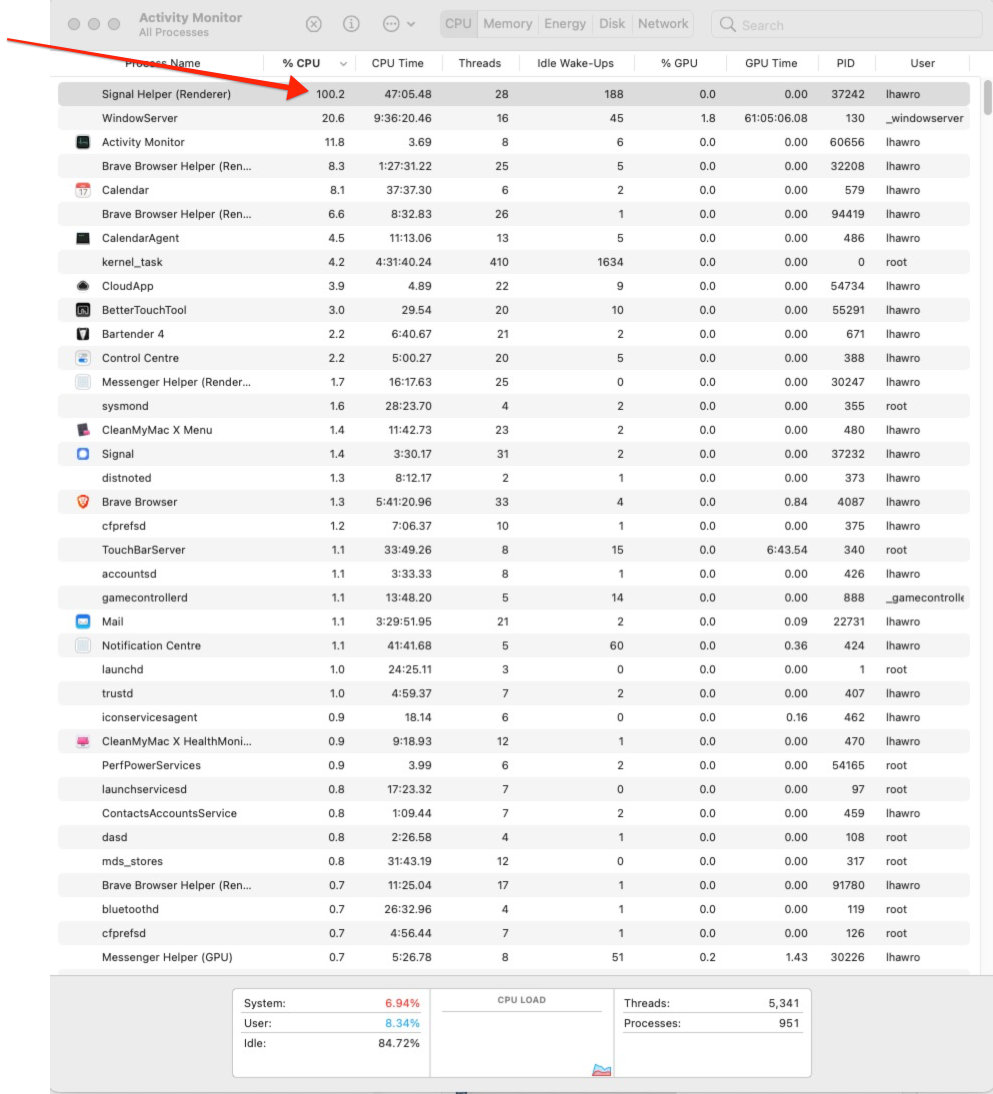
lucashawro
on 22 Jan 2021
Just gave a try to 1.39.6 on 10.15.7, on a pretty beefed up desktop machine: as soon as one of my Signal contacts starts typing, the whole machine grinds to a complete halt: rainbow spinner, nothing responds to mouse clicks (including Signal itself). That a single application like Signal can do this is relatively frightening too. Still, completely unusable.
f00b4r0
on 11 Feb 2021
I've experienced this with Signal Helper (Renderer) on MacOS 11.2.1 and Signal v1.40.0.

Sample of Signal Helper (Renderer).txt
Sounds similar to #4583
 pcullum
on 19 Feb 2021
pcullum
on 19 Feb 2021
Same here, also on macOS 11.2.1 with Signal 1.40.0 and I also noticed another electron app doing the same thing : Authy Desktop.
 adisor19
on 19 Feb 2021
adisor19
on 19 Feb 2021
Random suspicious question but do any of you experiencing this problem happen to also have SOPHOS Endpoint running on your macs ?
adisor19
on 19 Feb 2021
@pcullum @lucashawro Thanks for the screenshots, but what would really be helpful is understanding what Signal Desktop is doing when high CPU usage occurs. Is it downloading and processing new messages? If so, then high CPU is actually expected. If it's just animating something, that's not.
scottnonnenberg-signal
on 19 Feb 2021
@scottnonnenberg-signal you keep asking the same question, even though several people - myself included 5 messages above - tell you this happens simply when a contact starts typing. No message downloading happening. Open signal, wait for someone to start messaging you and hell breaks loose.
f00b4r0
on 19 Feb 2021
In my case, Signal was unresponsive. I only noticed because my fans were so loud. Signal Helper (Renderer) was at 100% CPU and had used the most overall CPU time of any single process. I had to kill the processes forcefully.
Thanks!
pcullum
on 19 Feb 2021
@f00b4r0 The reason we keep asking is because we have many different machines we've tested it on, and regularly run it on, and have never seen this. That's why we need as much information as possible. There are many, many, many software/hardware/configuration permutations in the world, and we can only cover so many.
scottnonnenberg-signal
on 19 Feb 2021
@scottnonnenberg-signal I haven't been able to run Signal Desktop on any of my Macs. They _all_ expose this problem. I notice this problem seems to be quite cross-platform, judging by #4786 which looks very similar. That wouldn't be very surprising given most (all?) of your code appears to be platform-independent. I also notice a CPU usage issue that affects the iOS version of Signal (which drains my iPhone battery unless I force quit it), maybe it's also related?
f00b4r0
on 19 Feb 2021
Hi folks, just wanted to say that since I uninstalled Sophos Endpoint EAP (10.0.3 beta) both Signal and Authy Desktop no longer freeze anymore. So both of these Electron apps seem to have been afftected by Sophos. :/
adisor19
on 20 Feb 2021
I'm seeing this behavior on my MacBookPro9,1, the CPU fan is on full power and only slows down once I close Signal. If needed I can provide any logs, just instruct me how to do so.
 pk27734
on 20 Mar 2021
pk27734
on 20 Mar 2021
Related issues
 fredaas
·
3Comments
fredaas
·
3Comments
 bcsga
·
3Comments
bcsga
·
3Comments
 PanderMusubi
·
3Comments
PanderMusubi
·
3Comments
 mawed
·
3Comments
mawed
·
3Comments
 lokesh-krishna
·
3Comments
lokesh-krishna
·
3Comments
Most helpful comment
I am seeing this as well -- on my beefier machine it is typically two SignalHelper processes each using 20% of CPU plus WindowServer at 30%; all go away when I stop signal. I can try to get reproduction scenarios or logs if someone tells me what is needed.
For me the issue typically happens just before the UI receiving a message in the few minutes after waking from sleep -- in fact I know a message will arrive shortly when I hear my laptop fans spin up.
Here's a typical snapshot of my top three processes during the CPU load incident, via

top -u:There's nothing obviously weird in the debug log. I've uploaded it anyway in case it helps. https://debuglogs.org/84dd96ce52bcd1b47429ea6da928d3273bdcfd5140830240e204bd1642fd65dd
Hope this helps! Signal being heavier than my web browser is just strange.