Signal-desktop: Signal Desktop Windows: disappearing messages not reliable
Signal for iOS, newest version
Signal Desktop for Windows (Windows 7), newest version
Test:
From a foreign smartphone I send 30 messages via Signal to myself (Content: 1,2,3,... for easy testing).
Before I set the timer of disappearing messages to 5 minutes.
I take my phone and see: 30 new messages. I open the chat, they are all there.
I close Signal on IPhone and wait. 10 minutes later, I open Signal on IPhone again - all messages are gone.
Now, I would expect NOT to see any messages on Signal desktop, because they are gone on my phone!
I open Signal desktop and see 25 of the 30 messages. For some reason, 5 are gone.
Performed similar test a few times, result was basically always the same:
The disappearing messages on Signal desktop for Windows are not reliable at all.
 KarlTeri
All 16 comments
I'm having almost the polar opposite experience. Messages always disappear from Signal-Desktop, and they almost never disappear from Signal-Android.
Is there an hourglass next to the send date, by the way? If so, is it full or empty?
 Dyras
on 12 May 2018
Dyras
on 12 May 2018
@KarlTeri Please follow the bug template. We really do need the specific versions of the apps. And we also very much need logs from each of the affected devices. A couple things beyond that would help us track down this particular issue: screenshots from both devices, and a couple specific timestamps for messages that didn't disappear when they should.
 scottnonnenberg-signal
on 12 May 2018
scottnonnenberg-signal
on 12 May 2018
Well, the versions were given. Newest iOS version, that is 2.24.1.0, and newest signal desktop version.
The problem occured on all signal versions from the day disappearing messages on the former chrome extension was integrated. I have tested it with 2 iphones and on 3 different windows computers over the last 1-2 years, and this is not the first time I report it (long ago I wrote email to Masha Kolinka).
I also talked to other people who use Signal desktop (on Windows, don't know mac version), and they also said, that disappearing messages are not reliable on their comp.
So I guess the signal team can reproduce this behavior with some testing, which only takes 10-15 minutes.
KarlTeri
on 12 May 2018
@KarlTeri Can you talk about what exactly you see when this happens? Do the message that shouldn't be there have the hourglass icon next to them? If you close and restart the application, do you see those messages still?
scottnonnenberg-signal
on 14 May 2018
I can reproduce that.
IOS Signal Version 2.24.1.0
Windows Signal Version 1.11.0
Sent 15 messages from STRANGER to ME. Timer=5 m
Check on IOS at once: Can read them all.
Look 5 m later on IOS: They are all gone.
Turn 10 m later desktop on, start Signal there.
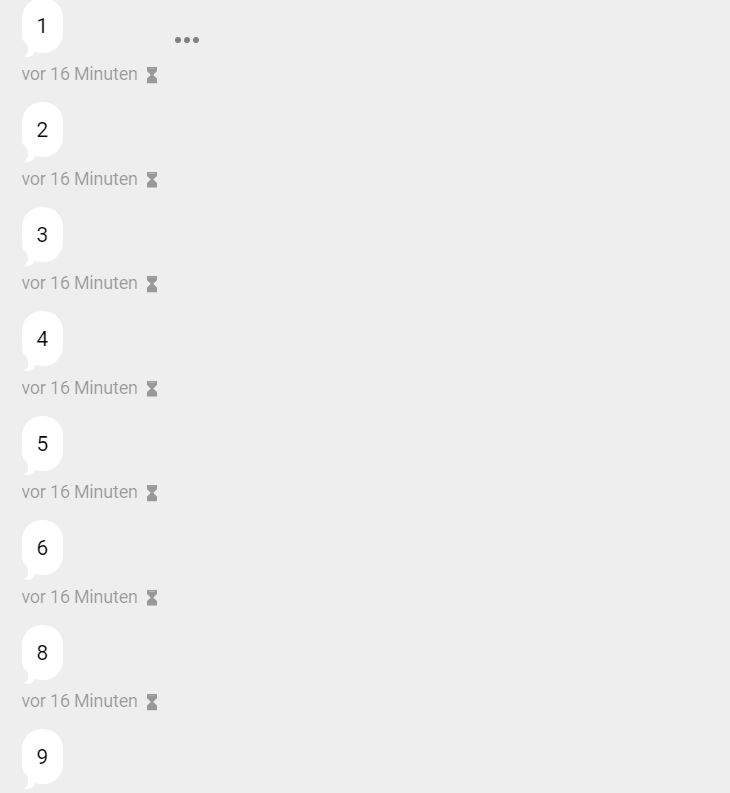
I see all messages there, which already disappeared on IOS (ACTUALLY 14 messages, no. 15 can not be seen?!). They show up hourglass and then disappear in further 15 m.
That shouldn't be the case. After disappearing on IOS, they should not show up on Desktop
Here screenshot:
 MarcMarkus
on 16 May 2018
MarcMarkus
on 16 May 2018
Registered so I could chime in and hopefully get some traction behind getting this fixed. I'm having the same issue occur on an Android Device and Windows Signal client.
Android Signal Version: 4.19.3
Windows Signal Version: 1.11.0
Happy to help with any testing I can do from my end, but as it stands I'd just be regurgitating the above.
 finitenamespace
on 17 May 2018
finitenamespace
on 17 May 2018
If it helps, the reverse isn't true.
If I read a message first on Signal Desktop, wait for it to expire and then check my Android's Signal, the message isn't available. I did notice the notification icon though, so it was received, but expired successfully as it should.
Edit: It might also be worth noting Signal Desktop only seems to keep received messages. If I send people messages, they'll expire as they should. I just come home to a screen of replies that should have expired, but none of my own messages.
finitenamespace
on 19 May 2018
I just tried it out on 2 different additional Win systems, and it seems a general problem. I guess everyone using Signal win app should have this problem. Thus it is as important as the problem with the Mac notifications (even more important: more people use Win instead of Mac, and this here is a bug, that notifications on Mac were a misplaced feature).
Hey looks at this:
Disappearing messages on mac do not disappear. #1767 reported in november 2017.
Gets a label BUG, nothing happens for months.
Then, someone twitters about it:
pic.twitter.com/CVVi7rfLoY
and one day later we have a new mac version, where the bug is fixed.
Shall we all better get Twitter acccounts and twitter about Signal bugs? Seems so.
MarcMarkus
on 19 May 2018
I've had the same issue now for at least as far back as the MacOS issue. At first I just assumed it was something with my installation....
 githubsgreg
on 22 May 2018
githubsgreg
on 22 May 2018
@scottnonnenberg-signal can we get a Bug tag for this?
finitenamespace
on 23 May 2018
I'm sensing some frustration in this thread, so I'd like to set some expectations. Given that we don't any windows-specific code around disappearing messages, this is going to be a tough investigation into a race condition that doesn't repro all the time, though it does seem to be the most common on Windows for some reason.
scottnonnenberg-signal
on 24 May 2018
Hello everyone,
I experience exactly the same issue, also with increasing frustration over the last months.
It seems to affect everyone using the Windows version of Signal desktop. I was trying the process described above, too, on three different Windows systems, and I can confirm similar observations.
I have no Mac available here, could anyone check, whether this is a problem on macOS, too?
While I know this is alot of precision work, to find the bug (I guess the Signal team has no choice than first try it out themself on a Windows system, then identify those messages, which have not been deleted, and then look, if there was any difference in the process for these messages), I have full trust, that the problems will be solved. That is, because I just checked the website of Scott, and saw he always has the goal of excellence and says, that he is pretty geeky!
Best requirements to find the problem! GO Scott!
I consider this bug to be important, because without reliability, disappearing messages are even more dangerous then useful.
 Flixoba
on 24 May 2018
Flixoba
on 24 May 2018
For those of you experiencing this, it would help if you could take a closer look at this behavior. Does it seem to happen in certain situations more often than others? Perhaps when your computer is doing a lot of things at once, or when there are a lot of Signal messages being downloaded at the same time? We'd appreciate anything you can do to help us nail down exactly when it happens.
scottnonnenberg-signal
on 24 May 2018
For me it's occurs 100% of the time.
My Windows machine at home is always online, and isn't set to sleep, so the messages just continually download throughout the day as they come through as the Signal Desktop software remains open. No strenuous CPU usage to speak of.
Also doesn't appear to be affected by whether the machine is locked or not; I can be logged on and using my Windows machine, send messages through the Android app, have them expire within 5 minutes inside of the app, and then an hour later switch window on the Desktop to Signal, and they'll be sitting there waiting for me to read them still.
Again, for me at least, it's only _received_ messages that don't seem to expire until 'read' on the Desktop. My own messages never seem to be waiting there, they expire successfully.
finitenamespace
on 25 May 2018
For me it's like this:
Disappearing mess on iOS always work.
disappearing messages on Android always work.
Disappearing messages on Windows desktop sometimes work, sometimes not. Following the process described above (like sending 20 messages from foreign Smartphone to myself), 100% of my tries some messages will remain, others disappear.
As someone else said: This is just for received messages. Messages I sent to someone always disappear, also in Signal desktop for Windows. Messages I obtain often do not disappear.
I tried with computer being online during that experiement, also tried switching computer off, sending, then switching computer on again right before opening Signal (without doing anything else on this computer, no other processes running but system)....
Always the same...
Flixoba
on 26 May 2018
Alright everyone, I've got a fix submitted. I'm locking the issue for now. If you still have problems after that change is released, please enter a new bug.
scottnonnenberg-signal
on 26 May 2018
Related issues
 PanderMusubi
·
3Comments
PanderMusubi
·
3Comments
 gesus14
·
3Comments
gesus14
·
3Comments
 cmdrogogov
·
3Comments
cmdrogogov
·
3Comments
 muellermartin
·
3Comments
muellermartin
·
3Comments
 ploum
·
3Comments
ploum
·
3Comments