Signal-desktop: Sync disappearing messages timer with contact sync
Bug description
When I sync the phone app to a chrome app, most of the disappearing messages settings get reset to none for conversations.
Steps to reproduce
- Pair phone app with chrome app when you have a bunch of conversations with disappearing messages set up (to 1 week)
Actual result: all the 1 week presets get reset to none
Expected result: none of the settings should get reset
Platform info
Operating System: Windows 10
Browser: Chrome (latest)
Signal version: Latest
 Enigma0
All 15 comments
Hi there - we'd love a little more detail to help us track this behavior down. What mobile app (iOS/Android, version) are you using, and what do you see in it after that initial sync? Are the disappearing message timers still there, or have they been cleared? What exactly do you see in the desktop app?
 scottnonnenberg
on 5 Oct 2017
scottnonnenberg
on 5 Oct 2017
It should be really easy to reproduce. Happens every time I try to pair the phone app to the chrome app (4-5 times so far).
Android app (latest version) - it loads all the chats successfully but resets the disappearing message settings (from 1 week to none)
Enigma0
on 5 Oct 2017
Again, we need just a little bit more detail. Is it just in the desktop app that you see no timer? Or do you also see that the Android app also has no timer? What about your contact in those conversations? What do they see? Do any of the apps (Desktop, Android, contact) show an explicit 'timer was removed' entry in the conversation history?
scottnonnenberg
on 5 Oct 2017
I think I've been pretty clear. The setting is reset universally for the affected chat threads.
I see within the app, 'Disappearing messages set to 'Off'' or whatever it says when it should still be on '1 week'.
The Chrome/desktop app is pretty wonky on its own and no it doesn't show that or a handful of other things reliably.
The Android app does show the reset message above.
Enigma0
on 5 Oct 2017
I just tested that scenario with the latest version of Electron and the latest version of the Android beta, and didn't see any loss of the disappearing messages state on the phone or contact side. Not until I sent a message from the desktop instance. That's why I was asking for more detail. If the first message sent after the pairing is sent from the desktop app, it doesn't know about the disappearing message setting and will therefore reset it to 'none.' If the first message is sent by your other devices or the contact, then the right disappearing message state will be preserved.
Now, to help us track this down, a log from your desktop would be helpful.
scottnonnenberg
on 5 Oct 2017
Electron? Is that the Chrome app?
I didn't have to send anything to know it was gone. The status field on the top bar stopped showing 1 week.
I also didn't have to send anything from the desktop app for it to be evident that the setting was reset.
Where is the desktop app log located?
Enigma0
on 6 Oct 2017
Click the triple-dot icon at the top of the window, then choose 'Submit debug log,' then upload that log, then include the resultant gist URL in this conversation.
scottnonnenberg
on 6 Oct 2017
Enigma0
on 6 Oct 2017
This sounds like a duplicate of #944
 mutantmonkey
on 21 Oct 2017
mutantmonkey
on 21 Oct 2017
@Enigma0 That log doesn't seem to encompass the registration process, just a bunch of idle time waiting for incoming messages. If you do have occasion to re-link and you see this behavior, please submit the log as soon as possible afterwards.
scottnonnenberg
on 23 Oct 2017
That's a shame - will do.
Enigma0
on 24 Oct 2017
Hi @scottnonnenberg
I had to switch laptops today so I have the opportunity to explore this one in detail.
Here are some screenshots from my phone:
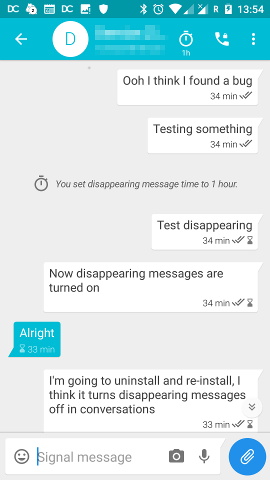
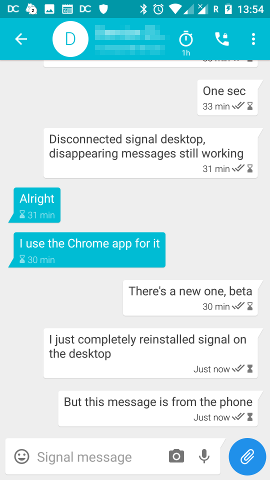
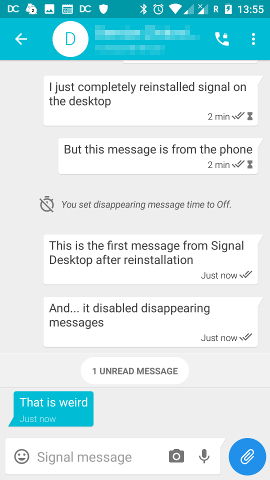
The corresponding screenshots from Signal Desktop:
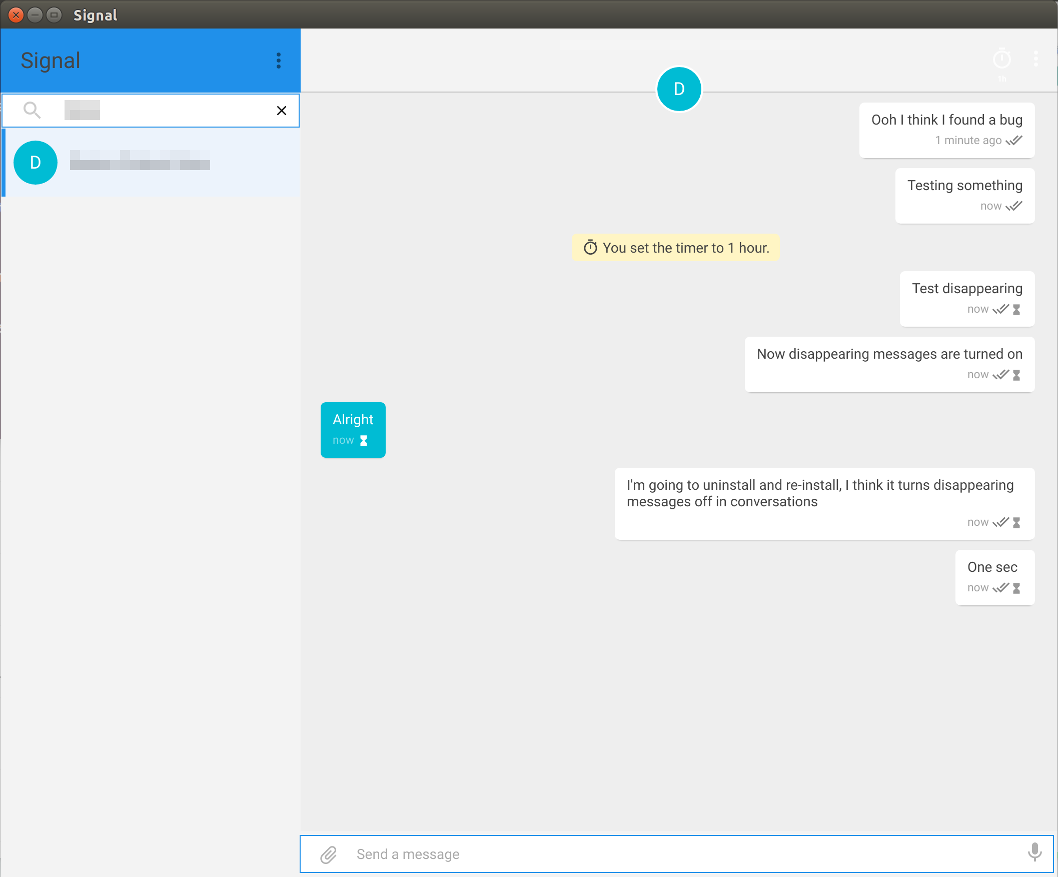
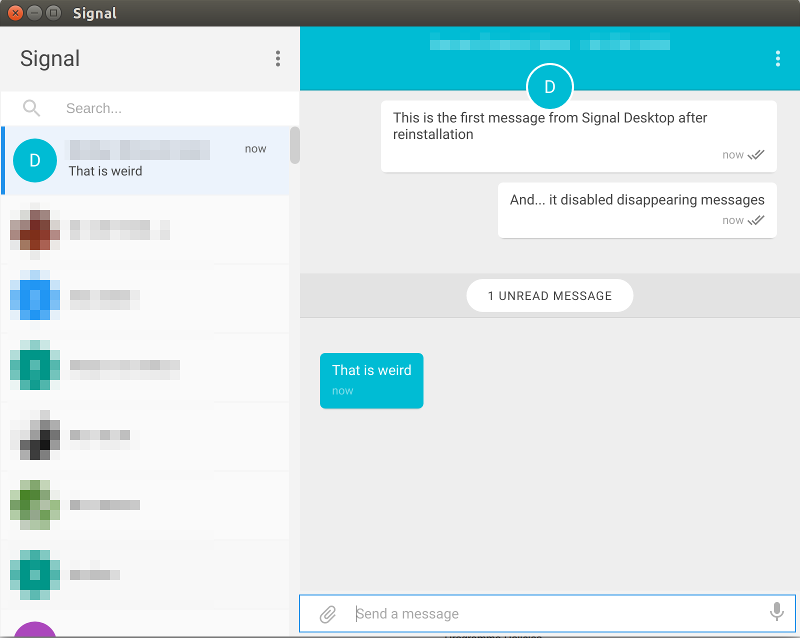
Actions to reproduce:
- Have Signal on your phone
- Start a conversation on either devices
- Turn on "Disappearing messages"
- Install or reinstall Signal Desktop (I "
purged" the package and deleted$HOME/.config/Signalmanually just to be safe) - Find the contact on Signal Desktop and start a new conversation - this part is important - you have to send the first message to your contact on the newly installed Signal Desktop
Expected results:
- Conversation would have disappearing messages set to the time on the phone
Results:
- The conversation will have disappearing messages disabled, and the phone would show the message "you set disappearing message time to Off" (which by the way is a UI issue, it should say "You turned disappearing messages off")
Phone log:
Device  : OnePlus ONE A2003 (OnePlus2)
Android : 7.1.2 (4f3634c820, OnePlus2-userdebug 7.1.2 NJH47F 4f3634c820)
Memory  : 35M (3.22% free, 768M max)
Memclass: 288
OS Host : iktinos.acc.umu.se
App : Signal 4.12.0
Desktop data:
Mozilla/5.0 (X11; Linux x86_64) AppleWebKit/537.36 (KHTML, like Gecko) Signal/1.0.35 Chrome/56.0.2924.87 Electron/1.6.15 Safari/537.36 node/7.4.0
 arikb
on 3 Nov 2017
arikb
on 3 Nov 2017
Thanks for the detailed analysis! It does look like you've discovered a small Android UI quirk.
But I don't think you've discovered anything unexpected. Because our contact/group sync doesn't included the disappearing message timer, if the first message in that conversation after setup comes from the desktop instance, it won't know about the timer. And the other clients will interpret that as turning the timer off on purpose.
Your detailed information makes that very clear. The initial bug report didn't indicate that the first message was sent by the user on the desktop app, and that would definitely be a bug: unexpected messages sent by desktop, causing automatic resets of the disappearing messages timer...
So, without further information, I'm going to change the title of this to 'Sync disappearing messages timer with contact sync,' a feature request.
scottnonnenberg
on 3 Nov 2017
Which makes it an Signal-Android issue, doesn't it?
Signal-Android also fails to send timer updates when it responds to a group info request.
 Trolldemorted
on 3 Nov 2017
Trolldemorted
on 3 Nov 2017
@Trolldemorted I'd say it's a cross-platform request, needing both iOS and Android changes!
scottnonnenberg
on 3 Nov 2017
Related issues
 lokesh-krishna
·
3Comments
lokesh-krishna
·
3Comments
 shaaati
·
3Comments
shaaati
·
3Comments
 mawed
·
3Comments
mawed
·
3Comments
 hanzei
·
3Comments
hanzei
·
3Comments
 jeremymasters
·
3Comments
jeremymasters
·
3Comments
Most helpful comment
@Trolldemorted I'd say it's a cross-platform request, needing both iOS and Android changes!