Signal-desktop: Messages come in very slowly when using computer that's been off for a while
I have a laptop that I rarely use that has Signal-Desktop on it.
Every time I turn it on, extremely slowly, every message I've sent/received since I last used the laptop pop up as notifications and in bubbles. This time it took about 15 minutes for it to finish doing it. This is extremely frustrating, and also will display disappearing messages that have already disappeared.
 Brett99
All 11 comments
I think the way the desktop client gets all the messages since the last time it was used is really annoying.
Would there be a way to have an option to disable this ? Like disable syncing ?
 Yutsa
on 28 Jun 2017
Yutsa
on 28 Jun 2017
I have been using signal on a daily basis for like three months now on android, mac and ubuntu. While I use my Android phone to keep up daily whenever I would wanna use signal on my laptop it gets really annoying when the messages get downloaded all at once.
I believe the best way to handle this issue is to download the present day's messages at that given time, preferably the last comfortable number of chat messages, from the reversal order, making provision to the user to download the required messages later when needed. This will give the user the comfort to start texting from the desktop application right where they stopped from the mobile phone!
Looking forward to seeing this in the next release!
 alfredpatric
on 13 Jul 2017
alfredpatric
on 13 Jul 2017
What we've considered lately is a loading screen shown until everything is loaded and the application is fully caught up. No notifications would be shown, but you also wouldn't be able to do anything in the app.
Today we don't have too many other options because the messages we're catching up on are presented in chronological order until we get through that saved queue.
 scottnonnenberg
on 13 Jul 2017
scottnonnenberg
on 13 Jul 2017
Signal Desktop 0.42.1, released to the Chrome Web Store today, has a loading screen which suppresses notifications until the app has processed all messages from the server queue. It may also be slightly faster than it has been in the past. Please re-open this if you run into this behavior again.
scottnonnenberg
on 9 Aug 2017
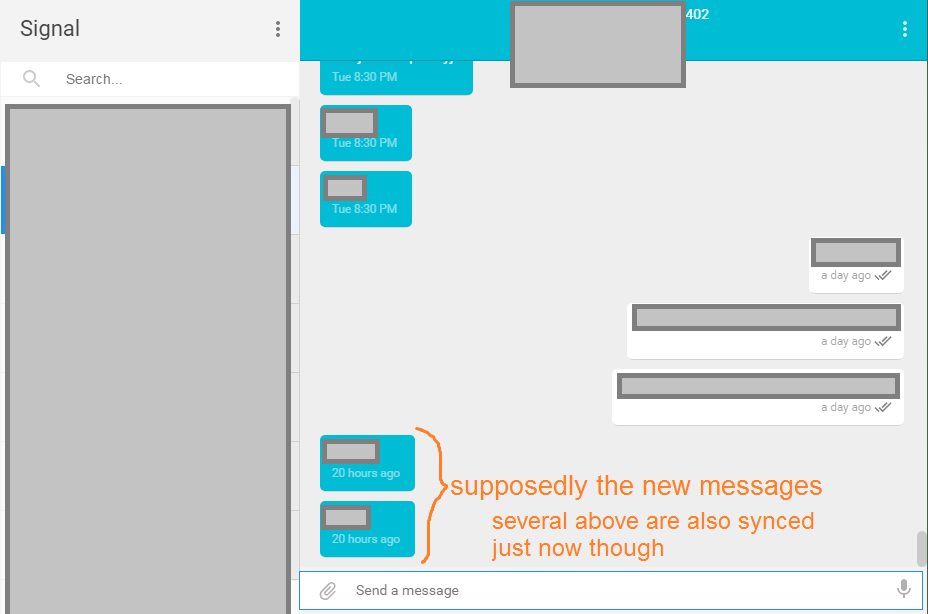
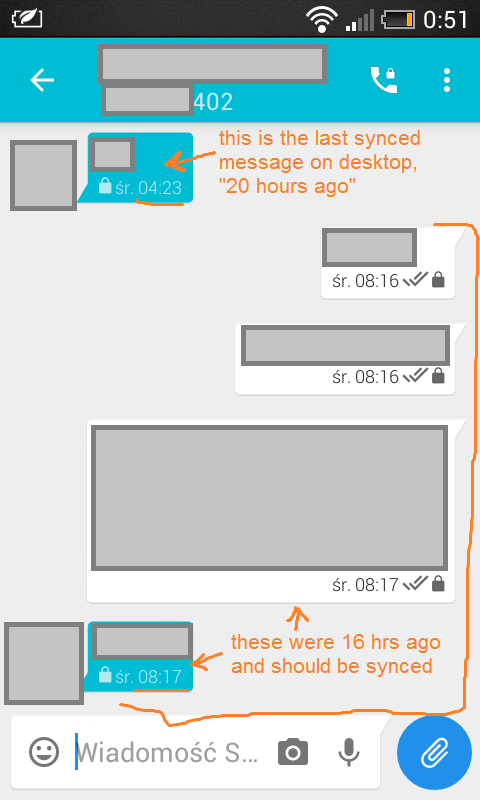
I have come across a different behaviour - it only syncs like 3 messages and that's it. This has happened before - last time I had Signal opened on desktop, right after downloading the update. I'm searching for a thread on this and consider starting one, but I can give you the logs here anyway.
https://gist.github.com/8d45b14d4cd3ccf7523836c62147f46d - desktop
https://gist.github.com/786915bbc150b161708186fa93f772d0 - android
Okay after looking into the conversations, it's not actually 3 messages, although it showed 2 and 1 new messages in two different conversations (in the sidebar). But when I looked at them, there was more synced messages that were before the "unread" ones - even though those last ones were obviously already read on the phone. And there should be more messages after those, but they failed to sync. While both the android and desktop clients are in use though, it syncs immediately with no problem (when I send a message on the phone, it appears on the desktop).
 6lancmange
on 24 Aug 2017
6lancmange
on 24 Aug 2017
@6lancmange You're experiencing something related, but most certainly a different issue. Your Desktop instance just isn't processing incoming messages! You can see at the bottom of the below snippet of your log that the app has 900 messages in its cache which it didn't get through in previous sessions (it retries everything it its cache on startup).
You can also see where the processing stopped. The first line is the end of a huge number of 'queuing envelope' items. The second line, a little over two minutes later, is the very first thing the app logs on startup. Maybe Chrome kills the app when this happens? Too much resource usage? Do you see any notifications about the app crashing?
I think our best bet would be for you to go to chrome://extensions/, find the extension, then check and uncheck the 'enabled' box. Then make sure the app is open. Then click background.html on the extensions page to open the dev tools. Watch that as the application tries to get through all those messages. Maybe watch system resource usage to see how much memory/CPU Chrome tries to use during this process. It could be that there's an error printed to the console that isn't making it into the logs...
2017-08-23T21:28:40.297Z queueing envelope +[REDACTED]613.1 1503517670113
2017-08-23T21:30:48.062Z pre-main prep time: 17 ms
2017-08-23T21:30:51.518Z background page reloaded
2017-08-23T21:30:55.554Z opening message socket https://textsecure-service-ca.whispersystems.org:80
2017-08-23T21:30:55.597Z getAllFromCache
2017-08-23T21:30:55.602Z listening for registration events
2017-08-23T21:30:55.605Z Next signed key rotation scheduled for Fri Aug 25 2017 23:22:10 GMT+0200 (Central European Daylight Time)
2017-08-23T21:30:56.547Z websocket open
2017-08-23T21:30:56.610Z got request PUT /api/v1/queue/empty
2017-08-23T21:30:57.207Z getAllFromCache loaded 900 saved envelopes
@scottnonnenberg welp, it seems that even the new version finally broke. I had the laptop hibernated for a few days while I was using Signal on my phone, and now when I roused the laptop, the most recent message was from Friday. I killed the Signal process and reopened it, disabled and enabled the app, and neither helped. I might try to do what you said, but I can provide you with logs already:
https://gist.github.com/419a67fba1861a775d76632279037c3b - desktop
https://gist.github.com/528d1b6066e4963579ec97a0199fbc55 - android
6lancmange
on 18 Oct 2017
We still need those extra steps to figure out why the app is being killed. These lines in the log show the app being unceremoniously stopped: https://gist.github.com/anonymous/419a67fba1861a775d76632279037c3b#file-debuglog-txt-L1765-L1766
The first question is: what did you see during that period? From 2017-10-17T22:22:50.037Z to 2017-10-17T22:24:47.598Z (Oct 17 2017 15:22:50 GMT-0700 (PDT) to Oct 17 2017 15:24:47 GMT-0700 (PDT))
scottnonnenberg
on 20 Oct 2017
Sometimes the app crashes, but it seems random. It doesn't happen when I get new messages, usually it's not even open, just the process running in the background. I'll try to look at the background.html right after it crashes if it does again, maybe there'll be something there.
I woke up the laptop and the internet was on, but no toasts were popping up. I disabled and enabled the app, planning to look at the background.html, and I opened it, but this time it was working correctly, with the loading page, and synced messages, so there isn't the error happening.
I can see some lines being particularly frequent, maybe you can tell me which ones to look out for. "getAllFromCache" begins with just 393 saved envelopes, and then there's a lot of "queueing envelope", and one of them is "queueing decrypted envelope" (what does that mean?), then there's just "message from", and after that "time travel detected!" haha, what? Then "Next signed key rotation", which was also mentioned at the very beginning before the envelopes. Then there's a lot of queueing again, and then there's something that sounds weird to me: "read messages from (my number)", "read receipt #", "No message for read receipt #" - no message? Then "delivery receipt from #" and "No message for delivery receipt #", there's another "message from" followed by "got request PUT /api/v1/queue/empty" and it continues with queueing envelopes again. After that, there's a lot of these sequences of "sent message to", "message from" or "delivery receipt from" and "no message for delivery receipt". There's also a duplicate message, and at some point there's "queueEnvelope error handling envelope (my number) (some long number) : Error: Got empty SyncMessage". There's some more of the previously mentioned stuff and "GET blahblahblah" that's more successful, then there's a "Marked a message as read in the database, but it was not in messageCollection." and also "Found early read receipt for message" (later in the log).
Is there a way to see the older part of the log, from the period you mentioned?
6lancmange
on 22 Oct 2017
You can see the full set of log entries we've saved by going to the triple-dot menu in the top-middle of the screen and choosing 'Submit debug log.'
scottnonnenberg
on 23 Oct 2017
Okay, but that shows just the log that you've already seen, and I think you wanted me to check the background.html, right? Actually, not the same, it seems that the oldest line in the current log is from 22nd of October, and you mentioned lines from the 17th. So I think there is no way to check? However, I have a new similar problem and this time it's just happened. I cleared the app data on my phone because it was taking too much space, so I had to reconnect the laptop. I think it downloaded some old messages, or it downloaded them previously. I can see that in one conversation, there is a message missing that was sent just like five minutes after the last synced one, and both were from the phone, so that's weird. And then no more recent ones, both before and after the data clear. I'm attaching the background.html that I saved a few minutes ago and the current debug log.
backgroundhtml.log
debuglog.log
6lancmange
on 27 Oct 2017
Related issues
 lokesh-krishna
·
3Comments
lokesh-krishna
·
3Comments
 ploum
·
3Comments
ploum
·
3Comments
 ProactiveServices
·
3Comments
ProactiveServices
·
3Comments
 McLoo
·
3Comments
McLoo
·
3Comments
 cmdrogogov
·
3Comments
cmdrogogov
·
3Comments
Most helpful comment
Signal Desktop 0.42.1, released to the Chrome Web Store today, has a loading screen which suppresses notifications until the app has processed all messages from the server queue. It may also be slightly faster than it has been in the past. Please re-open this if you run into this behavior again.