Would be great to have an MSI for a proper link in start menu and uninstaller. Or put it in the Windows store with Project Centennial?
 felixfbecker
All 27 comments
I'm currently starting to work with Project Centennial. :)
 NickeManarin
on 15 May 2017
NickeManarin
on 15 May 2017
Looks like I'll not be able to use Centennial, I would need to buy a $ 300/year digital certificate. That's a big 'no' unfortunately. :(
NickeManarin
on 18 May 2017
Since it's so few files you can pretty easy build an installer with insted.
 SuperDOS
on 22 May 2017
SuperDOS
on 22 May 2017
I would like an installer too, ideally with some facility to automatically update ScreenToGif. Your application is very useful to me, but I use it infrequently, so my workflow is something like:
- Download ScreenToGif.zip
- Run it out of the zip
- (Weeks pass)
- (Purge Downloads folder)
- Where did I download ScreenToGif to?
- Download it again
Some thoughts on installer toolkits, for your consideration:
I do not think these make automatic updates very easy, you could do it with Squirrel after-the-fact (i.e. use MSI to get the files on a user's computer, then Squirrel to keep it up-to-date). Squirrel can be used to do it all, however, installation plus updates.
ClickOnce is a bit old but it also works pretty well for simple apps. It will work with applications that aren't digitally signed (with the security consequences of unsigned applications.)
As much as I'd like to see this installer + updater, I know it's also a bit of a time commitment. I had my own application that was kept automatically up-to-date on macOS with Sparkle.framework, and the rigmarole of building/signing*/deploying was a time drain.
*Signing is free: you self-generated public/private keys, the public key is pinned in the app bundle. Squirrel is similar, I think.
 taspeotis
on 27 May 2017
taspeotis
on 27 May 2017
Don't like that Squirrel forces you to install to %LOCALAPPDATA% with no way to customize that (at least that was my experience with Squirrel-based apps like Atom). Visual Studio Code used Squirrel in the past but switched to something else (all I know is it's an MSI) because the experience for Windows users is just not the best (and this project is Windows-only...).
felixfbecker
on 28 May 2017
NSIS could be an alternative as well https://sourceforge.net/projects/nsis/
SuperDOS
on 29 May 2017
I think NSIS doesn't produce MSIs. I would always prefer MSIs because the declarative approach (in opposite to a script-based imperative approach) ensures an installation and uninstallation can be cancelled and rolled back at any stage of the (un)installation.
felixfbecker
on 29 May 2017
Correct and I'm with you on using MSI. have you looked at WIX? http://wixtoolset.org/
SuperDOS
on 29 May 2017
I'm familiar with InnoSetup, Wix (via WixSharp) and the Visual Studio Installer Projects.
It looks like the later is the easiest.
NickeManarin
on 30 May 2017
@SuperDOS So, I'm currently creating the installer with Wix#. It will produce a MSI file as requested.
NickeManarin
on 1 Jul 2017
Here's what I got, not the final version: ScreenToGif 2.8.1 Setup.zip
NickeManarin
on 1 Jul 2017
Tried it, works great (besides a a security warning)!
felixfbecker
on 1 Jul 2017
@felixfbecker Nice, but what kind of security warning? Maybe because it's not signed?
NickeManarin
on 1 Jul 2017
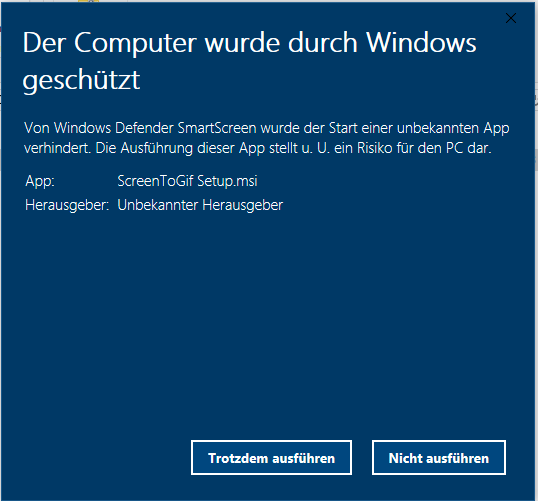
felixfbecker
on 1 Jul 2017
Oh, this dialog appears because it's a file that Windows does not trust yet. The only way to make it disappear is to have a certificate.
NickeManarin
on 1 Jul 2017
You need to right click and choose properties and then unblock it.
SuperDOS
on 2 Jul 2017
@NickeManarin Where did you read about the $300/year certificate? Here they say that Centennial could generate the certificate for you. And above it, there's an paragraph about packaging apps without an installer. But no words about $300/year certificate.
 bramborman
on 23 Jul 2017
bramborman
on 23 Jul 2017
@bramborman
From https://www.thawte.com/code-signing/
But I managed to buy one from KSoftware for way less money. I just pass the validation process to get the certificate.
NickeManarin
on 23 Jul 2017
@bramborman
About the generated certificate, it only works if you install, it's not a valid global certificate. Only works if the CA is installed on the machine. It's a fake certificate.
NickeManarin
on 23 Jul 2017
@NickeManarin Windows Store doesn't create one for you? For UWP apps it's all done automatically and for free.
bramborman
on 23 Jul 2017
@bramborman Apparently not with Project Centennial.
NickeManarin
on 9 Aug 2017
@NickeManarin just downloaded Visual Studio 15.4 that adds a new project type - Windows Application Packaging Project - which simplifies creating Centennial apps. Just tested it and it generated a temporary certificate and I was also able to get the Store certificate that's generated by Microsoft and is used to publish the app to Windows Store.
Could you please look at it? I think I'm not the only one who'd prefer downloading ScreenToGif from the Windows Store.
bramborman
on 10 Oct 2017
@bramborman I'm downloading... :)
Btw, I got a code signing certificate.
NickeManarin
on 11 Oct 2017
I think I'm not the only one who'd prefer downloading ScreenToGif from the Windows Store.
I definitely don't prefer Windows Store and can name various problems with the App Store model in general, but I acknowledge some devices are locked down to only allow Apps from the Windows Store.
Thanks for looking into that.
 vatterspun
on 11 Oct 2017
vatterspun
on 11 Oct 2017
@vatterspun I'm still going to distribute the app via the current available options (no install, installer, Chocolatey).
;)
NickeManarin
on 12 Oct 2017
@NickeManarin I know you have the certificate, but the app still isn't on Windows Store, so not sure if you're planning to add it later or what :)
bramborman
on 12 Oct 2017
I'm still going to distribute the app via the current available options (no install, installer, Chocolatey).
Thanks for that.
vatterspun
on 12 Oct 2017
Related issues
 alphestdev
·
4Comments
alphestdev
·
4Comments
 Quisquose
·
3Comments
Quisquose
·
3Comments
 tomasorti
·
4Comments
tomasorti
·
4Comments
 L0Lock
·
4Comments
L0Lock
·
4Comments
 daniloalonso
·
5Comments
daniloalonso
·
5Comments
Most helpful comment
I'm currently starting to work with Project Centennial. :)