Screentogif: Apply keystrokes only in some frames
Is there an option to apply keystrokes only to some frames? It would be nice if you could remove the keystrokes where you type too much text, and leave only frames that contains ENTER, SHIFT+KEY, TAB, and others.
This tool is great, congratulations!
 daniloalonso
👍1
All 5 comments
I started working with the keystrokes editor (to add or remove key presses), but I had to postpone it.
Thank you, btw :D
 NickeManarin
on 16 Mar 2017
NickeManarin
on 16 Mar 2017
Other proposed enhancements:
- Let the keystroke be shown X ms in advance.
- Allow customization of key strokes text. Example: Change the text for 'Ctrl' key from 'Control' to 'Ctrl' and from 'Return' to 'Enter' or even an arrow icon that is on 'Return' key.
- Allow to display icons instead of keys.
NickeManarin
on 3 Dec 2017
@NickeManarin Just a note that this is a hard problem -- I appreciate you putting so much energy into it.
 vatterspun
on 9 Dec 2017
vatterspun
on 9 Dec 2017
👍1
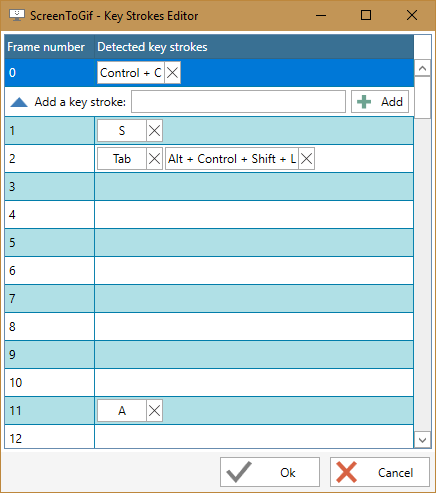
Done!
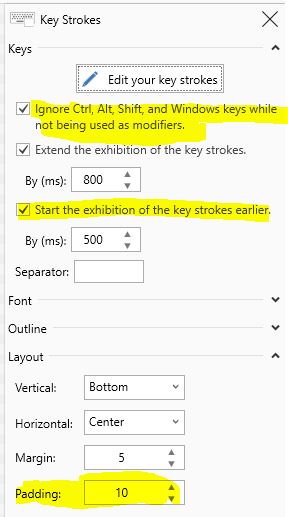
Basically, you can add/remove/edit the detected key strokes:
NickeManarin
on 24 Jan 2018
🎉1
Basically, you can add/remove/edit the detected key strokes
Oh HELL yeah.
That's not just a great program addition, that's a really smart solution.
vatterspun
on 25 Jan 2018
👍1
Was this page helpful?
0 / 5 - 0 ratings
Related issues
 laiqun
·
4Comments
laiqun
·
4Comments
 Kristinita
·
4Comments
Kristinita
·
4Comments
 L0Lock
·
4Comments
L0Lock
·
4Comments
 Quisquose
·
3Comments
Quisquose
·
3Comments
 spyoungtech
·
4Comments
spyoungtech
·
4Comments