Scratch-gui: How can I add spacers in custom extensions?
Expected Behavior
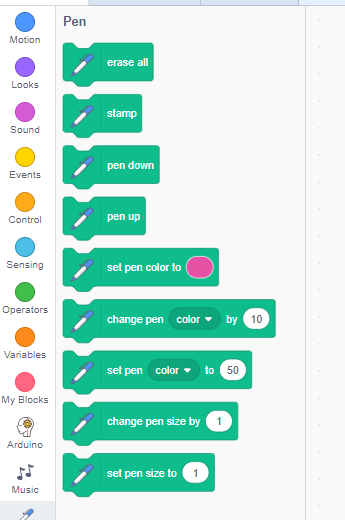
I would like to obtain the same "appereance" with spacer between similar blocks also for the custom extensions

I tried to search the wiki available but without success. Is this possible?
Actual Behavior
 cotestatnt
All 2 comments
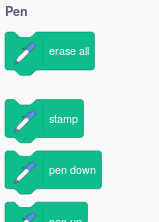
Scratch 3.0 actually already supports separators in extensions - just specify '---' in place of two blocks, for example like this:
blocks: [
    {opcode: 'clear' ...},
    '---',
    {opcode: 'stamp' ...}
]
This results in a separator:
 towerofnix
on 4 Feb 2019
towerofnix
on 4 Feb 2019
👍1
Thanks, @towerofnix!
While more thorough extension documentation should be coming later this year, I've added this to the documentation that we have now.
 cwillisf
on 6 Feb 2019
cwillisf
on 6 Feb 2019
👍1
Was this page helpful?
0 / 5 - 0 ratings
Related issues
 ericrosenbaum
·
4Comments
ericrosenbaum
·
4Comments
 TaiAurori
·
3Comments
TaiAurori
·
3Comments
 fsih
·
3Comments
fsih
·
3Comments
 chrisgarrity
·
4Comments
chrisgarrity
·
4Comments
 kyleplo
·
4Comments
kyleplo
·
4Comments