Scratch-gui: Brokenness in nav bar in にほんご language
Expected Behavior
Text in navigation bar is in navigation bar
Actual Behavior
Text is vertical
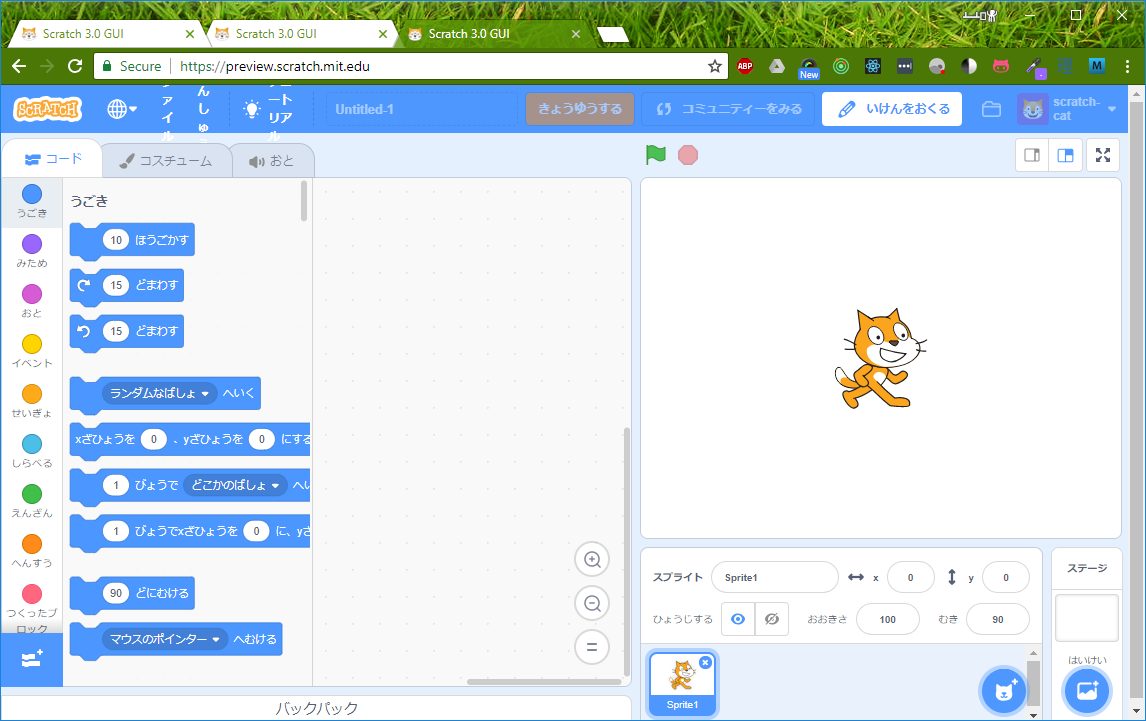
Steps to Reproduce
- Switch language to にほんご
- Text begins to escape the navigation bar when Chrome is at 1222px across
Operating System and Browser
Windows 10 Chrome
 fsih
fsih
All 12 comments
I cannot reproduce this on develop, Windows 10.0.17134.165, Chrome 67.0.3396.99

 Kenny2github
on 24 Jul 2018
Kenny2github
on 24 Jul 2018
Cannot repro on develop, Windows 7 HomePremium 64bit SP1, Firefox 61.0.1
 apple502j
on 25 Jul 2018
apple502j
on 25 Jul 2018
Cannot repro on Chromebook
 kyleplo
on 25 Jul 2018
kyleplo
on 25 Jul 2018
So does Chinese, but it is OK for showing Chinese vertically. : )
 wufeng87
on 26 Jul 2018
wufeng87
on 26 Jul 2018
@wufeng87 what operating system are you using? 您在用什么操作系统?
Kenny2github
on 26 Jul 2018
@BryceLTaylor Could you attempt a repro?
 thisandagain
on 31 Jul 2018
thisandagain
on 31 Jul 2018

This happened when narrowing down the width of the browser window.
(I checked Chrome 67.0.3396.99 on macOS High Sierra 10.13.6)
And did not happen when setting white-space : nowrap; to the span tag.
<span style="
    white-space: nowrap;
">ファイル</span>
 setoyama60jp
on 5 Aug 2018
setoyama60jp
on 5 Aug 2018
@setoyama60jp Thanks for the repro! And thanks for the suggested solution, as well. Yeah, this seems similar to a ScratchWikiSkin issue I had a while back (which was fixed by this pull, which can provide some more detail).
I also managed to repro this myself just now:

As you can see, I had inspect element open - this caused the page's width to shrink, and the Chinese characters to stack on top of each other.
The full solution would be to add white-space: nowrap; to the style of div.menu-bar_menu-bar-item_oLDa-.
Kenny2github
on 5 Aug 2018
@Kenny2github Thank you.
https://github.com/LLK/scratch-gui/blob/9e31cd2e8abae88cf3b9bd50041b436e45d9ca64/src/components/menu-bar/menu-bar.css#L60-L70
So maybe we should add white-space: nowrap; to the class above.
I'll test and send PR later (a week or later.)
setoyama60jp
on 6 Aug 2018
@chrisgarrity how do you feel about making this help-wanted?
fsih
on 6 Aug 2018
This issue was fixed #2806 .
setoyama60jp
on 28 Aug 2018
@Kenny2github win10. Sorry for not reply in time.
wufeng87
on 2 Sep 2018
Related issues
kyleplo
·
4Comments
 chrisgarrity
·
4Comments
fsih
·
3Comments
chrisgarrity
·
4Comments
fsih
·
3Comments
 TaiAurori
·
3Comments
TaiAurori
·
3Comments
 ericrosenbaum
·
4Comments
ericrosenbaum
·
4Comments