Scratch-gui: wait (timer) secs does not work
Expected Behavior
Scratch 2.0 seems to take the value of the timer at the time the wait block is first run, and wait that long
Actual Behavior
Nothing happens when you click or use a wait block that has (timer) as its argument, the block doesn't even glow.
Steps to Reproduce
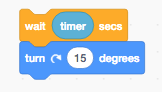
Click on a group of blocks like this
Operating System and Browser
_e.g. Mac OS 10.11.6 Safari 10.0_
 fsih
fsih
All 5 comments
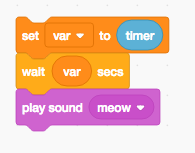
Of note, this does work:
 towerofnix
on 29 Jul 2017
towerofnix
on 29 Jul 2017
Hmm. I'm guessing this bug is hiding within the VM, but I'll leave it here for now until we can investigate.
 thisandagain
on 29 Jul 2017
thisandagain
on 29 Jul 2017
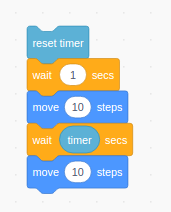
FYI. It seems like an glow issue, the logic is not affected (I mean, it is waiting in fact...)
See below test (it will move 10 step after 1 seconds, and move another 10 steps after another 1 seconds) :)
 gengshenghong
on 30 Jul 2017
gengshenghong
on 30 Jul 2017
Added some logs in VM and confirmed logic is correct. Also, more testing shown me that, when there is another block connected above "wait timer secs", the glow is correct (example: add move 10 steps above it, by the way, adding "when green flag clicked" above it, the glow is wrong still).
I've no idea how glow is implemented, so no idea how to identify the issue, hope the testing results will help you to identify the root cause faster. Thanks.
gengshenghong
on 30 Jul 2017
After digging into scratch-vm, it seems the problem is in execute.js, line: 231.
If I change following code:
    if (typeof primitiveReportedValue === 'undefined') {
        // No value reported - potentially a command block.
        // Edge-activated hats don't request a glow; all commands do.
        thread.requestScriptGlowInFrame = true;
    }
to
thread.requestScriptGlowInFrame = true;
This bug will fixed. For intuition, it seems that there is no need to request script glow by depending on the type of primitiveReportedValue.
To be honest, it's a little complicate, so I do not drop the pull request. Instead, @thisandagain , it's may be good idea to ask @paulkaplan to double check this issue.
 kamidox
on 9 Oct 2017
kamidox
on 9 Oct 2017
Related issues
 apple502j
·
4Comments
apple502j
·
4Comments
 MrBlockCat
·
4Comments
MrBlockCat
·
4Comments
 ntlrsk
·
3Comments
ntlrsk
·
3Comments
 ericrosenbaum
·
4Comments
ericrosenbaum
·
4Comments
 rschamp
·
4Comments
rschamp
·
4Comments