Renovate: NuGet: Support versions specified as msbuild properties
What would you like Renovate to be able to do?
Evaluate version from csproj when specified as msbuild property.
Example:
<PackageReference Include="Microsoft.AspNetCore" Version="$(AspNetCoreVersion)" />
Describe the solution you'd like
I'm not sure what the best solution is however, I did take a stab at this a while back and just didn't have the time to keep it going. My approach looked something like:
- Clone the repository
- Use NuGet to directly restore the solution; producing a dependency graph file
- Read the dependency graph using NuGet's .Net SDK
Describe alternatives you've considered
I originally thought that parsing the project files would be enough, however there are too many different ways dependencies can be defined. My conclusion was that you would have to actually let msbuild do a full restore. You may also be able to perform a design time build but I haven't done enough research on that approach.
Additional context
Since nuget dependency resolution was completely rolled into msbuild and csproj files, it has become common to use msbuild properties to specify versions. This allows you to mitigate some of the challenges associated with managing common dependencies across several projects in a solution. Unfortunately, this means you can't simply parse an XML file to get the version. These properties could be set using a:
- Directory.Build.props file
- *.props file plus an
<Import>element in the csproj - It is also possible to declare common dependencies using these files as well. So, a
<PackageReference>could be defined outside the csproj file. - Command line parameters
Notable examples of projects doing this:
- All the ASP.Net Core Projects (SignalR, MVC, EntityFramework, etc.)
- dotnet cli
- perfview
- Dapper
- refit
- JsonApiDotNetCore
- And many more. In fact this feature tends to make the most sense for monolithic repos and application projects which have not been included in this list.
 jaredcnance
All 19 comments
Hi @jaredcnance, thanks for the very detailed feature request.
On one hand, I agree with you that reproducing the algorithm for determining versions seems to be difficult. On the other hand, I hope we don't need to fully build a project just to check its dependencies?
I'm aware that there is some .NET support for Linux, but not of the details. Can you verify if the steps you describe above would be compatible with running on a Linux server such as Renovate normally uses?
Once we have "Read the dependency graph using NuGet's .Net SDK", what would that give us? Would that just allow us to know a list of dependencies and versions currently in use, or would it be a list of upgrades too? For determining upgrades, can we do it simply using our own nuget lookup, or is there more complexity to the lookup algorithm?
Cc: @samneirinck @tomkerkhove
 rarkins
on 16 Jul 2018
rarkins
on 16 Jul 2018
@rarkins no problem! I think this is a much needed tool for the dotnet community. You shouldn't _have_ to fully build the project, but run:
dotnet msbuild /t:GenerateRestoreGraphFile /p:RestoreGraphOutputPath=out.dg
command which will run the target that builds the dependency graph but doesn't download the packages (think npm install without actually downloading to node_modules). As a side note I believe this is possible without executing an external process by just using the nuget api directly, but I'm not familiar with the details.
This is cross-platform for projects that target .Net Core and .Net Standard but not projects that target Full-Framework (Windows only) — as far as I'm aware. It _may_ still be possible to generate the dependency graph even for Windows only projects since resolution _should_ be platform agnostic for the new SDK-style (Visual Studio 2017) projects.
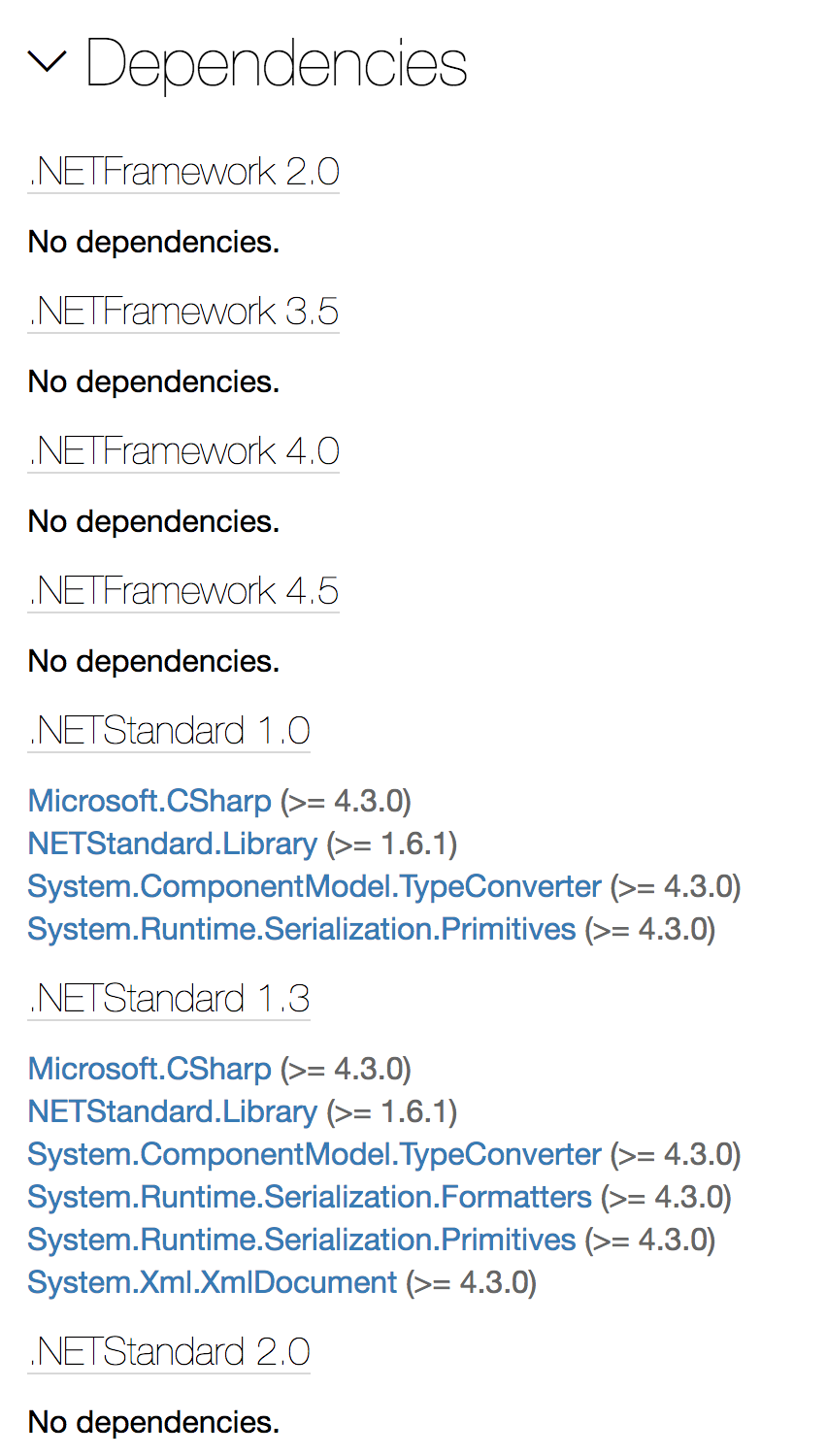
Regarding your second question it will provide you a map of dependencies that are resolved for each framework target. For example, I could have a multi-targeted project that has different dependencies for older framework targets (e.g. targeting net40 vs. netstandard). One example that comes to mind is Newtonsoft.Json (the predominant JSON parsing lib — see image below). You might be able to workaround this by saying something like: "we only consider the highest version framework target specified in your project file" (which, for the purposes of this tool, is probably fine).
It will not include a list of upgrades (although at one time there was talk of supporting this). Once you have the list of packages you can use the nuget REST api to lookup the versions.
Another thing that makes this a bit more complicated is you can target multiple feeds. I could target NuGet.org, MyGet, a local feed, or any other nuget feed. You do get references to these feeds as source URLs that you can iterate over.
FWIW many of the links I've included are from my dotnet-status project where I discovered and implemented many of the requirements already discussed. I would be more than happy to hand this project off if someone can provide the resources to finish it / integrate it. You can see how I interact with the DependencyGraph here. Unfortunately, it doesn't look like these APIs are open-source yet.
jaredcnance
on 16 Jul 2018
This is an interesting case but I think this is certainly something that needs to be turned on and not supported OOTB - What do you think @rarkins @samneirinck?
With regards to:
Another thing that makes this a bit more complicated is you can target multiple feeds. I could target NuGet.org, MyGet, a local feed, or any other nuget feed. You do get references to these feed as source URLs that you can iterate over.
I think this should be tracked as a seperate issue and has a fair point. I'm not sure if NuGet.config is still a thing but we could do that based on that.
 tomkerkhove
on 16 Jul 2018
tomkerkhove
on 16 Jul 2018
Great write-up @jaredcnance, thank you very much. The inital version was implemented to support the most easy scenarios, without support for the full msbuild syntax possibilities.
Probably now is a good time to start that discussion. I fear the only way would be to fork out to dotnet and see if we can get the desired results, perhaps via the RestoreGraphOutputPath as you mention.
I'm not 100% familiar on how Renovate actually works, but that will probably be much more expensive than the current approach of just getting csproj files (via github api) and matching a regular expression. It would involve a full clone of the repository, and run dotnet, parse the restore graph, before we can start renovating it.
Perhaps not a 100% solid solution, but could we identify the most common patterns, and try to support those, instead of the whole msbuild syntax which would force us to fork out to dotnet? You mentioned the following possibilities already:
- Variable defined anywhere
- Directory.Build.props file
- *.props file plus an
<Import>element in the csproj
It is also possible to declare common dependencies using these files as well. So, acould be defined outside the csproj file. - Command line parameters
I'm just throwing out ideas, but could we try to resolve those variable substitutions ourselves (e.g. when we find a variable, search for a <VariableName>value</VariableName> and use that), or will this lead to a path with even more edge cases? I know this wouldn't cover all cases, but perhaps it's worth the trade-off?
@tomkerkhove For custom feed support, I believe this would indeed fit best in a seperate issue.
 samneirinck
on 16 Jul 2018
samneirinck
on 16 Jul 2018
could we try to resolve those variable substitutions ourselves (e.g. when we find a variable, search for a
value and use that), or will this lead to a path with even more edge cases?
I think this will handle most cases pretty well, it just won’t support some scenarios. The other challenge is that I could have something like:
PackageAA -> $(PackageAVersion)
PackageAB -> $(PackageAVersion)
And those packages might eventually diverge.
Another thing to consider is that perhaps this pattern just doesn’t make sense if you’re using Renovate. The reason you would do this is to minimize the number of manual version substitutions and ensure that you keep versions in sync across all projects in a solution. With a tool like Renovate this becomes less of an issue. Just something to consider...
jaredcnance
on 16 Jul 2018
Quick question: is there any solution possible that would allow us to avoid doing a full clone of the repo? e.g. where we have known file names/patterns/extensions and can just selectively download the ones we need via the API?
rarkins
on 16 Jul 2018
Downloading *.props files (files that can define the variable values) is a good start and would handle all situations I’ve actually seen. I can think of several ways that would break, but I haven’t seen those in practice.
jaredcnance
on 16 Jul 2018
@jaredcnance I like the way you're thinking. i.e. if we can cover 80-90% of the use cases with a simpler solution, and meanwhile the other 10-20% can migrate their config to an approach compatible with Renovate, then that sounds like a reasonable compromise.
rarkins
on 16 Jul 2018
Thanks @jaredcnance for starting this discussion and going in to detail about how things work in the dotnet space atm.
Files we considered when doing restores in our Docker build (same as already discussed by for more confirmation):
- *.props - for vars that can be used in
s as mentioned, or, even for declaring s themselves that are then inherited. - NuGet.Config/nuget.config - for additional package sources.
- *.csproj - where
s are setup these days (rather than packages.config) - *.targets - we also copy over before a restore, and technically I think they could add MSBuild vars, but I wouldn't consider them crucial for an MVP on this.
I agree with the sentiment that it is way too hard to just parse the files now given how dynamic this can all be.
Just wondering what's the latest on this? We're investigating Renovate, but would need these scenarios supported to get the most out of the tool.
 benmccallum
on 18 Apr 2020
benmccallum
on 18 Apr 2020
I think this should be easily doable with the regex manager. You can replace any version in any text file with it. So can somebody please build a simple sample repo, so I can provide some regex samples.
We only need the relevant config files, no code.
 viceice
on 18 Apr 2020
viceice
on 18 Apr 2020
No worries. I'll create one now
benmccallum
on 18 Apr 2020
@viceice, see https://github.com/benmccallum/renovate-dotnet
benmccallum
on 18 Apr 2020
Also just added a custom package source, which probably wouldn't be relevant for a regex solution to this problem, but would be relevant if full resolution of the dependencies was considered needed.
benmccallum
on 18 Apr 2020
@benmccallum Can you give me write access and enable renovate app please?
viceice
on 20 Apr 2020
@viceice, renovate added and there should be an invite in your inbox for the repo :)
benmccallum
on 20 Apr 2020
regex sample will come later
viceice
on 20 Apr 2020
No worries. I think the challenge you're going to find is that in .props files you can identify a <PackageReference with some version easily enough, but you'll struggle to identify a random variable declaration AND resolve it to the package to look up. You may be able to find it, e.g. an XML element around a inner text of a version string, but you'd have no way to resolve
I was thinking about this over the w/e, and since we can't put . in an XML element name, we could provide this through some kind of attribute hint that's documented and supported, eg:
Directory.Build.props:
<NewtonsoftJsonVersion PackageNameHint="Newtonsoft.Json">10.0.0</NewtonsoftJsonVersion>
Some.csproj
<PackageReference Include="Newtonsoft.Json" Version="$(NewtonsoftJsonVersion)" />
Then the regex could look for <(.*) PackageNameHint="(.*)">(.*)</(.*)> (rough regex, but you get the idea) and pull out the right matched groups to get current versions and package name.
Appreciate your help on this!
benmccallum
on 20 Apr 2020
I think this can be closed, as this is more easily doable with PackageVersion which is supported by renovate since v23.67.0 and .NET Core SDK 3.1.300
see https://stu.dev/managing-package-versions-centrally/ for sample usage
So this feature request is considered obsolete and can be worked around by using a renovate regex manager.
viceice
on 2 Nov 2020
Didn't realise it was out already, we'd been thinking we'd just wait for that, thanks for the prompt. cc: @anthony-keller
benmccallum
on 3 Nov 2020
Related issues
 OmgImAlexis
·
4Comments
OmgImAlexis
·
4Comments
 zephraph
·
3Comments
zephraph
·
3Comments
 ghost
·
3Comments
ghost
·
3Comments
 jycouet
·
4Comments
rarkins
·
3Comments
jycouet
·
4Comments
rarkins
·
3Comments