React-native-svg-charts: Axis labels in reversed order
What is the problem?
The labels of my y-axis are reversed, meaning the bottom label is for the top bar (horizontal graph), and vice versa.
What platform?
- iOS
React Native version: 0.55
Code to reproduce
     let colors = [ '#7b4173', '#a55194', '#ce6dbd', '#de9ed6' ];

      data = [
        {
          label: 'One',
          apples: 1,
          oranges: 2
        },
        {
          label: 'Two',
          apples: 5,
          oranges: 6
        }
      ];
      let keys = ['apples', 'oranges'];

      return (
              <View style={{ height: 200, flexDirection: 'row' }}>
                <YAxis
                    data={ data }
                    contentInset={ { top: 30, bottom: 30 } }
                    yAccessor={({ index }) => index}
                    formatLabel={ (value, index) => {console.log(index); return data[index].label} }
                    svg={{ fontSize: 10, fill: 'grey' }}
                    numberOfTicks={ 1 }
                />
                <StackedBarChart
                    style={{ flex: 1, marginLeft: 16}}
                    keys={ keys }
                    colors={ colors }
                    data={ data }
                    horizontal={ true }
                    contentInset={ { top: 15, bottom: 15 } }
                />
        </View>
Result
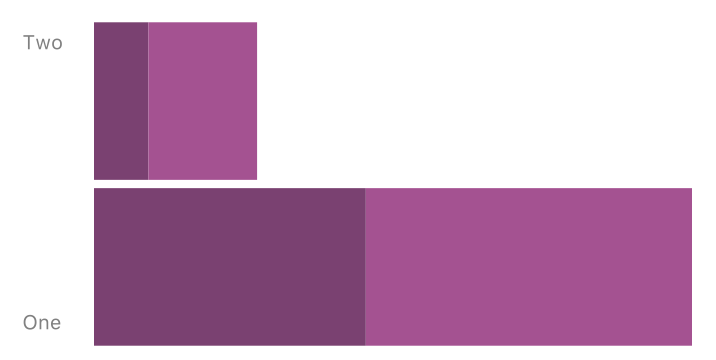
(ignoring that the label are slightly mis-spaced =)
 vjsingh
All 2 comments
use scale={scale.scaleBand} on the YAxis
 JesperLekland
on 12 Jun 2018
JesperLekland
on 12 Jun 2018
Boom! Thanks. This repo is awesome and you are awesome 👍
vjsingh
on 12 Jun 2018
👍3
Was this page helpful?
0 / 5 - 0 ratings
Related issues
 MithunKakkara
·
3Comments
MithunKakkara
·
3Comments
 harikanammi
·
5Comments
harikanammi
·
5Comments
 andrienpecson
·
5Comments
andrienpecson
·
5Comments
 ajacquierbret
·
4Comments
vjsingh
·
6Comments
ajacquierbret
·
4Comments
vjsingh
·
6Comments
Most helpful comment
Boom! Thanks. This repo is awesome and you are awesome 👍