React-native-google-places-autocomplete: Current location problem
When clicking on "Use my current location", it writes on text input "Use my current location" and nothing seems to happen.
Normal autocomplete queries works perfectly.
<GooglePlacesAutocomplete
           placeholder={LocalizedStrings.search}
           minLength={2} // minimum length of text to search
           autoFocus={false}
           textInputProps={{
             onChangeText: (text) => {
               if (!text.length) {
                this.address = '';
                this.latlng = null;
               }
             }
           }}
           returnKeyType={'search'}
           listViewDisplayed={'auto'}
           fetchDetails={true}
           renderDescription={row => row.description || row.vicinity}
           onPress={(data, details = null) => {
            console.log(data, details);
            if (details && details.formatted_address) {
              this.address = details.formatted_address;
            }
            if (details && details.geometry && details.geometry.location) {
              this.latlng = details.geometry.location;
            }
           }}
           getDefaultValue={() => ''}
           query={{
             key: 'my_key',
             language: 'es', // language of the results
             types: 'geocode' // default: 'geocode'
           }}
           styles={{
             textInputContainer: {
              width: '100%',
              backgroundColor: 'white',
              borderTopWidth: 0
             },
             textInput: {
              backgroundColor: 'white',
              fontFamily: Fonts.regular,
              color: Colors.gray_regular
             },
             description: {
               fontFamily: Fonts.bold,
               color: Colors.gray_bold
             },
             predefinedPlacesDescription: {
               color: Colors.accent_color
             }
           }}
           currentLocation={true}
           currentLocationLabel={LocalizedStrings.current_location}
           nearbyPlacesAPI={'GooglePlacesSearch'}
           GoogleReverseGeocodingQuery={{
             // available options for GoogleReverseGeocoding API : https://developers.google.com/maps/documentation/geocoding/intro
           }}
           GooglePlacesSearchQuery={{
             // available options for GooglePlacesSearch API : https://developers.google.com/places/web-service/search
             rankby: 'distance'
           }}
           filterReverseGeocodingByTypes={['locality', 'administrative_area_level_3']} // filter the reverse geocoding results by types - ['locality', 'administrative_area_level_3'] if you want to display only cities
           debounce={200}
           renderLeftButton={()  => {}}
           renderRightButton={() => {}}
         />
 fxhereng
All 9 comments
i get same issue. I logged, it has data, but it not display in screen. It just display lines like image below.
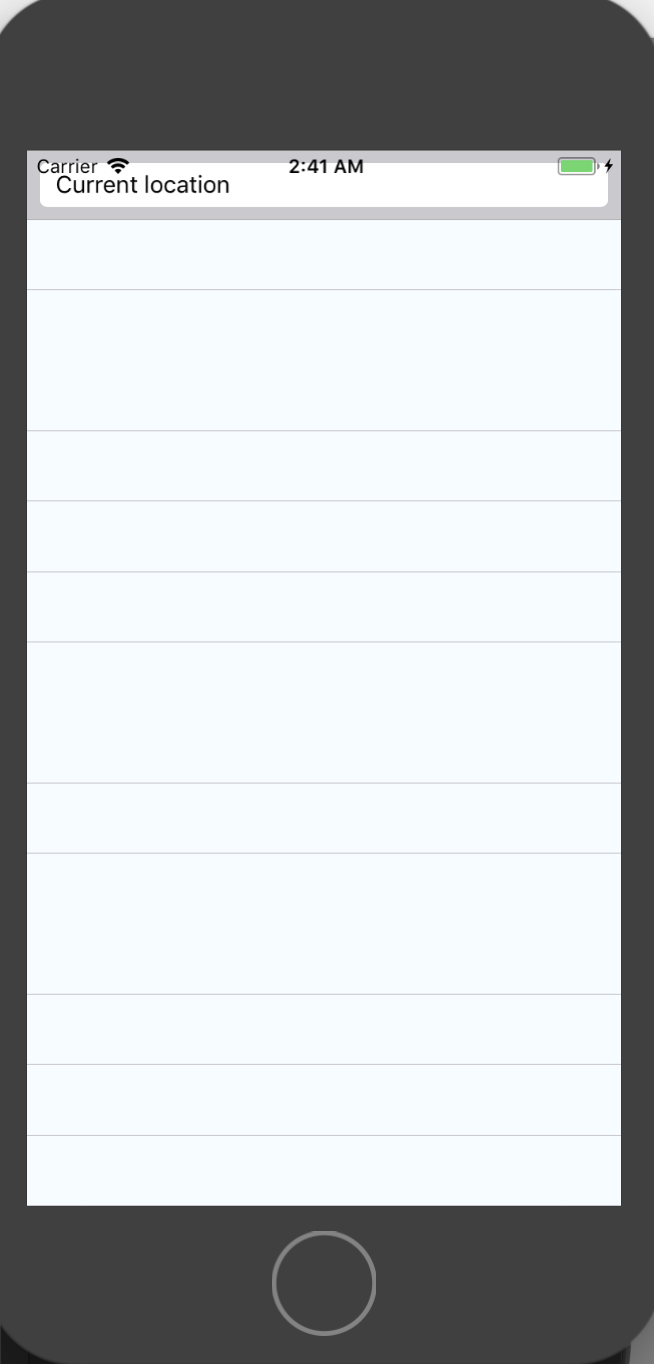
and I found the way to commending this line: renderDescription={(row) => row.description}. And its ok.
 hungdev
on 6 Jan 2018
hungdev
on 6 Jan 2018
me too.
I have to use the predefinedPlaces
 pqminh
on 8 Jan 2018
pqminh
on 8 Jan 2018
@hungdev hey, how did you log the data of the current location and how can I handle onPress for the list of current location addresses?
Thanks for your help
 singhalok641
on 11 Jan 2018
singhalok641
on 11 Jan 2018
@singhalok641 here is my code
<GooglePlacesAutocomplete
          placeholder='Search'
          minLength={2} // minimum length of text to search
          autoFocus
          returnKeyType={'search'} // Can be left out for default return key https://facebook.github.io/react-native/docs/textinput.html#returnkeytype
          listViewDisplayed='auto'    // true/false/undefined
          fetchDetails
          // renderDescription={(row) => row.description} // custom description render
          onPress={(data, details = null) => this.onSetLocation(details.formatted_address)}
          textInputProps={{
            onChangeText: (location) => this.setState({ location })
          }}
          getDefaultValue={() => {
            return '' // text input default value
          }}
          query={{
            // available options: https://developers.google.com/places/web-service/autocomplete
            key: 'YOUR KEY',
            language: 'en', // language of the results
            types: '(cities)' // default: 'geocode'
          }}
          styles={{
            description: {
              fontWeight: 'bold'
            },
            predefinedPlacesDescription: {
              color: '#1faadb'
            }
          }}

          currentLocation // Will add a 'Current location' button at the top of the predefined places list
          currentLocationLabel='Current location'
          nearbyPlacesAPI='GooglePlacesSearch' // Which API to use: GoogleReverseGeocoding or GooglePlacesSearch
          GoogleReverseGeocodingQuery={{
            // available options for GoogleReverseGeocoding API : https://developers.google.com/maps/documentation/geocoding/intro
          }}
          GooglePlacesSearchQuery={{
            // available options for GooglePlacesSearch API : https://developers.google.com/places/web-service/search
            rankby: 'distance',
            types: 'food'
          }}

          filterReverseGeocodingByTypes={['locality', 'administrative_area_level_3']} // filter the reverse geocoding results by types - ['locality', 'administrative_area_level_3'] if you want to display only cities
          enablePoweredByContainer={false}
          debounce={200} // debounce the requests in ms. Set to 0 to remove debounce. By default 0ms.
        />
In case anyone else has this issue, but still wants to display the row descriptions, changing nearbyPlacesAPI='GooglePlacesSearch' to nearbyPlacesAPI="GoogleReverseGeocoding" did it for me.
 adlondon
on 30 Mar 2018
adlondon
on 30 Mar 2018
Hello, Its not a issue, see the renderDescription props
renderDescription={row => row.description || row.formatted_address || row.name}
 dagrinchi
on 1 Apr 2018
dagrinchi
on 1 Apr 2018
Agreed, I shouldn’t have called it an issue and I think this can be closed. The problem was that OP (and myself) didn’t have nearbyPlacesApi set for GoogleReverseGeocoding, so results from row looked different on current location (or in this case, didn’t return at all because there were no || operators to fall back on).
adlondon
on 1 Apr 2018
Setting GoogleReverseGeocodingand not forgetting to activate in the google console the Geocode API, it worked fine.
Thanks for your help
fxhereng
on 6 Apr 2018
textInputProps={{ onBlur: _.noop() }}
whereas _ is from lodash
this solved this problem for me
 tinBilicCoreline
on 27 Mar 2020
tinBilicCoreline
on 27 Mar 2020
Related issues
 lukBakTsh
·
3Comments
lukBakTsh
·
3Comments
 yasirdev
·
3Comments
yasirdev
·
3Comments
 quandevelopment
·
4Comments
quandevelopment
·
4Comments
 nikohosn
·
3Comments
nikohosn
·
3Comments
 tezahzulueta
·
3Comments
tezahzulueta
·
3Comments
Most helpful comment
Hello, Its not a issue, see the renderDescription props
renderDescription={row => row.description || row.formatted_address || row.name}