React-native-google-places-autocomplete: Border is not able be styled
I have tried adjusting the border style on every possible component and I still can not get the top and bottom border to go away
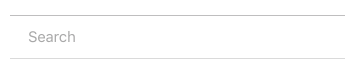
Here is my code for the component:
Has anyone experienced this issue? Any help would be greatly appreciated! Thanks
<GooglePlacesAutocomplete
             placeholder='Search'
             minLength={2} // minimum length of text to search
             autoFocus={false}
             returnKeyType={'search'} // Can be left out for default return key https://facebook.github.io/react-native/docs/textinput.html#returnkeytype
             listViewDisplayed='auto'    // true/false/undefined
             fetchDetails={true}
             renderDescription={(row) => row.description} // custom description render
             onPress={(data, details = null) => { // 'details' is provided when fetchDetails = true
               console.log('this is the data: ' + JSON.stringify(data));
               console.log('this is the Details: ' + JSON.stringify(details));
             }}
             getDefaultValue={() => {
               return ''; // text input default value
             }}
             query={{
               // available options: https://developers.google.com/places/web-service/autocomplete
               key: '',
               language: 'en', // language of the results
              //  types: '(cities)', // default: 'geocode'
             }}
             styles={{
               container: {
                 backgroundColor: 'transparent',
                 borderWidth: 0
               },
               description: {
                 fontWeight: 'bold',
                 borderWidth: 0
               },
               textInputContainer: {
                 backgroundColor: 'transparent',
                 borderColor: 'yellow',
                 borderWidth: 0
               },
               textInput: {
                 borderWidth: 0
               },
               loader: {
                 borderWidth: 0
               },
               listView: {
                 borderWidth: 0
               },
               predefinedPlacesDescription: {
                 borderWidth: 0
               },
               poweredContainer: {
                 borderWidth: 0
               },
               powered: {
                 borderWidth: 0
               },
               separator: {
                 borderWidth: 0
               }
              //  predefinedPlacesDescription: {
              //    color: '#1faadb',
              //  },
             }}

             currentLocation={false} // Will add a 'Current location' button at the top of the predefined places list
             currentLocationLabel="Current location"
             nearbyPlacesAPI='GooglePlacesSearch' // Which API to use: GoogleReverseGeocoding or GooglePlacesSearch
             GoogleReverseGeocodingQuery={{
               // available options for GoogleReverseGeocoding API : https://developers.google.com/maps/documentation/geocoding/intro
             }}
             GooglePlacesSearchQuery={{
               // available options for GooglePlacesSearch API : https://developers.google.com/places/web-service/search
               rankby: 'distance',
               types: 'food',
             }}


             filterReverseGeocodingByTypes={['locality', 'administrative_area_level_3']} // filter the reverse geocoding results by types - ['locality', 'administrative_area_level_3'] if you want to display only cities

             debounce={0} // debounce the requests in ms. Set to 0 to remove debounce. By default 0ms.
            //  renderLeftButton={() => <Text>source</Text>}
            //  renderRightButton={() => <Text>Custom text after the inputg</Text>}
          />
 nikohosn
All 3 comments
borderTopWidth/borderBottomWidth are what you want to target on the textInputContainer. adding to the readme!
nikohosn
on 4 Aug 2017
👍4
How do i change the color of the border surrounding the textInput to transparent? I've tried putting backgroundColor as well as color as transparent, but it doesn't seem to effect the styling? A little help with this too please
 shandilya1998
on 13 Aug 2019
shandilya1998
on 13 Aug 2019
textInputContainer: {
borderTopWidth: 0,
borderBottomWidth: 0,
backgroundColor: "#ffffff"
},
 hasnainbaloch
on 8 Dec 2019
hasnainbaloch
on 8 Dec 2019
Was this page helpful?
0 / 5 - 0 ratings
Related issues
 DennisMuchiri
·
4Comments
DennisMuchiri
·
4Comments
 aymkin
·
4Comments
aymkin
·
4Comments
 quandevelopment
·
4Comments
quandevelopment
·
4Comments
 macs03
·
3Comments
macs03
·
3Comments
 tgreco
·
3Comments
tgreco
·
3Comments
Most helpful comment
borderTopWidth/borderBottomWidth are what you want to target on the textInputContainer. adding to the readme!