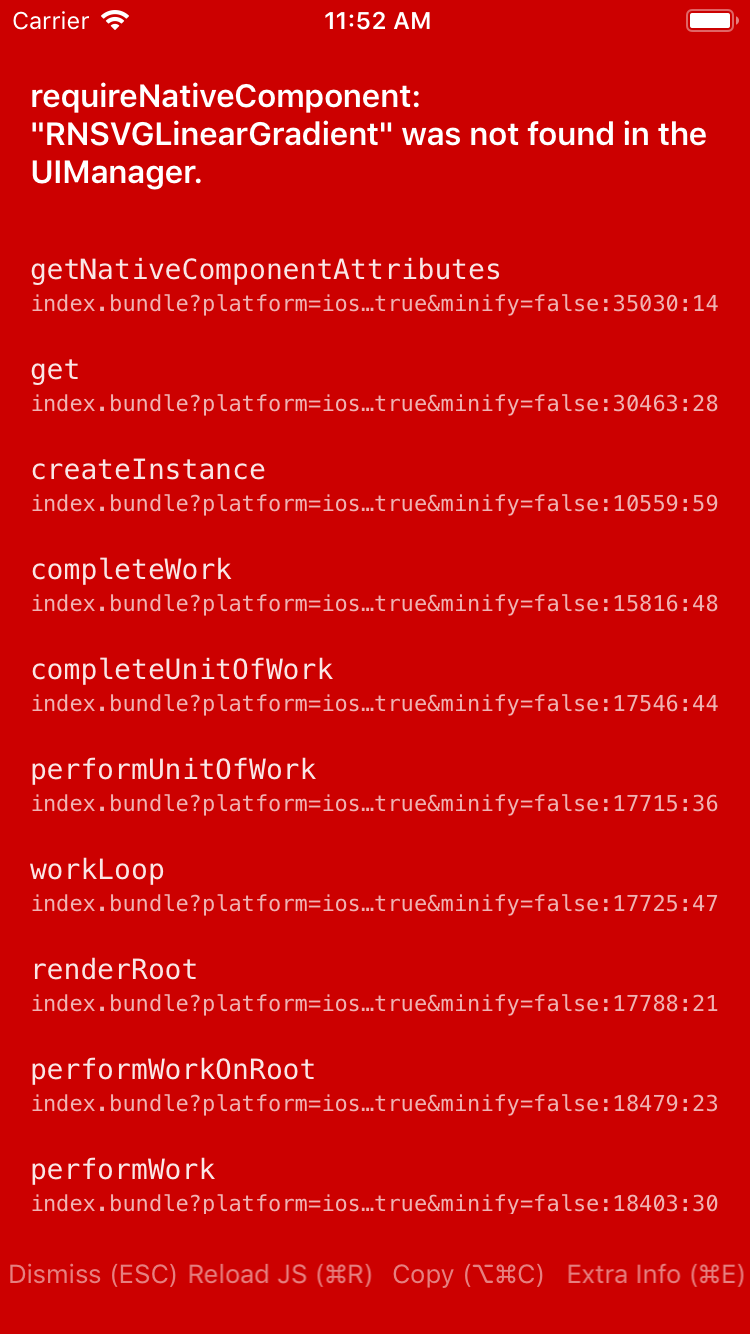
React-native-chart-kit: RNSVGLinearGradient does not exist
Trying to run quick exampe
`export default class Example extends Component {
constructor(props){
super(props);
}
render() {
  const data = {
    labels: ['January', 'February', 'March', 'April', 'May', 'June'],
    datasets: [{
      data: [ 20, 45, 28, 80, 99, 43 ]
    }]
  }


    return (
        <View>
      <LineChart
data={data}
width={200}
height={220}
chartConfig={{
backgroundColor: '#e26a00',
backgroundGradientFrom: '#fb8c00',
backgroundGradientTo: '#ffa726',
color: (opacity = 1) => rgba(255, 255, 255, 1),
style: {
borderRadius: 16
}
}}
/>
);
}
componentDidMount() {
}
}
`
Enviroment-
"react": "16.0.0",
"react-native": "0.51.0",
"react-native-chart-kit": "^1.1.5",
getting error
Invarient Violation : Native component for "RNSVGLinearGradient" does not exist

 kashifaliquazi
All 9 comments
I think you need to
yarn add react-native-svg
react-native link react-native-svg
For our testing we use expo, and it comes with react-native-svg out of the box.
 Hermanya
on 23 Jul 2018
Hermanya
on 23 Jul 2018
Adding on to @Hermanya
react-native-svg currently has a bug where automatic linking pulls in libRNSVG-tvOS.a to your Link Binary with Libraries list. Either manually add the project to Xcode, or remove libRNSVG-tvOS after running react-native link react-native-svg
See more here
 jmknoll
on 18 Aug 2018
jmknoll
on 18 Aug 2018
Do not forget rebuild your app: react-native run-android
 noluckjustskill
on 22 Nov 2018
noluckjustskill
on 22 Nov 2018
All working fine with example app, but while integrating to main project displaying this issues
Not Working for me, I have tried all
after link this was adding in podfile
pod 'RNSVG', :path => '../node_modules/react-native-svg'
I have installed previously linear-gradient package and installl pods for react-native-crop-image-picker
does this effects on this package?
please respond me
 prasad456
on 28 Jan 2019
prasad456
on 28 Jan 2019
I don't think it does, if you could make another example project, more similar to your main project, to reproduce this issue. I could take a look.
My suspicion is that your main project might have older versions of dependencies.
Hermanya
on 28 Jan 2019
@Hermanya
Thanks for the reply, these are my dependencies can you please checkout what are the older versions
"@expo/vector-icons": "^8.0.0",
"email-validator": "^2.0.4",
"moment": "^2.23.0",
"native-base": "^2.8.1",
"react": "16.5.0",
"react-native": "0.57.2",
"react-native-autocomplete-input": "^3.6.0",
"react-native-cardview": "^2.0.2",
"react-native-chart-kit": "^2.0.1",
"react-native-code-input": "^1.0.6",
"react-native-datepicker": "^1.7.2",
"react-native-elements": "^0.19.1",
"react-native-image-crop-picker": "^0.21.3",
"react-native-linear-gradient": "^2.4.3",
"react-native-masked-text": "^1.9.2",
"react-native-pure-chart": "0.0.24",
"react-native-push-notification": "^3.1.2",
"react-native-rating": "^2.0.4",
"react-native-simple-dialogs": "^1.0.0",
"react-native-simple-toast": "0.0.8",
"react-native-splash-screen": "^3.1.1",
"react-native-svg": "^9.0.5",
"react-native-vector-icons": "^6.0.2",
"react-navigation": "^2.17.0"
 prasad456
on 29 Jan 2019
prasad456
on 29 Jan 2019
I had fixed this issue by removing pods and run react-native link react-native-svg and then reinstalling the pods for iOS
for Android it works fine from before
prasad456
on 30 Jan 2019
I think you need to
yarn add react-native-svg
react-native link react-native-svg
For our testing we use expo, and it comes with react-native-svg out of the box.
yes, maybe that is the problem.. you could mention this in the installation guide. I had to install react-native-svg and I am using xcode
 fabriziobertoglio1987
on 7 Aug 2019
fabriziobertoglio1987
on 7 Aug 2019
updated installation instructions
Hermanya
on 17 Dec 2019
Related issues
 bailih
·
4Comments
bailih
·
4Comments
 mcama
·
5Comments
mcama
·
5Comments
 azui007
·
6Comments
azui007
·
6Comments
 stebogit
·
3Comments
stebogit
·
3Comments
 uttampawar
·
3Comments
uttampawar
·
3Comments
Most helpful comment
I think you need to
For our testing we use expo, and it comes with react-native-svg out of the box.