React-native-chart-kit: <LineChart> null value are displayed as 0
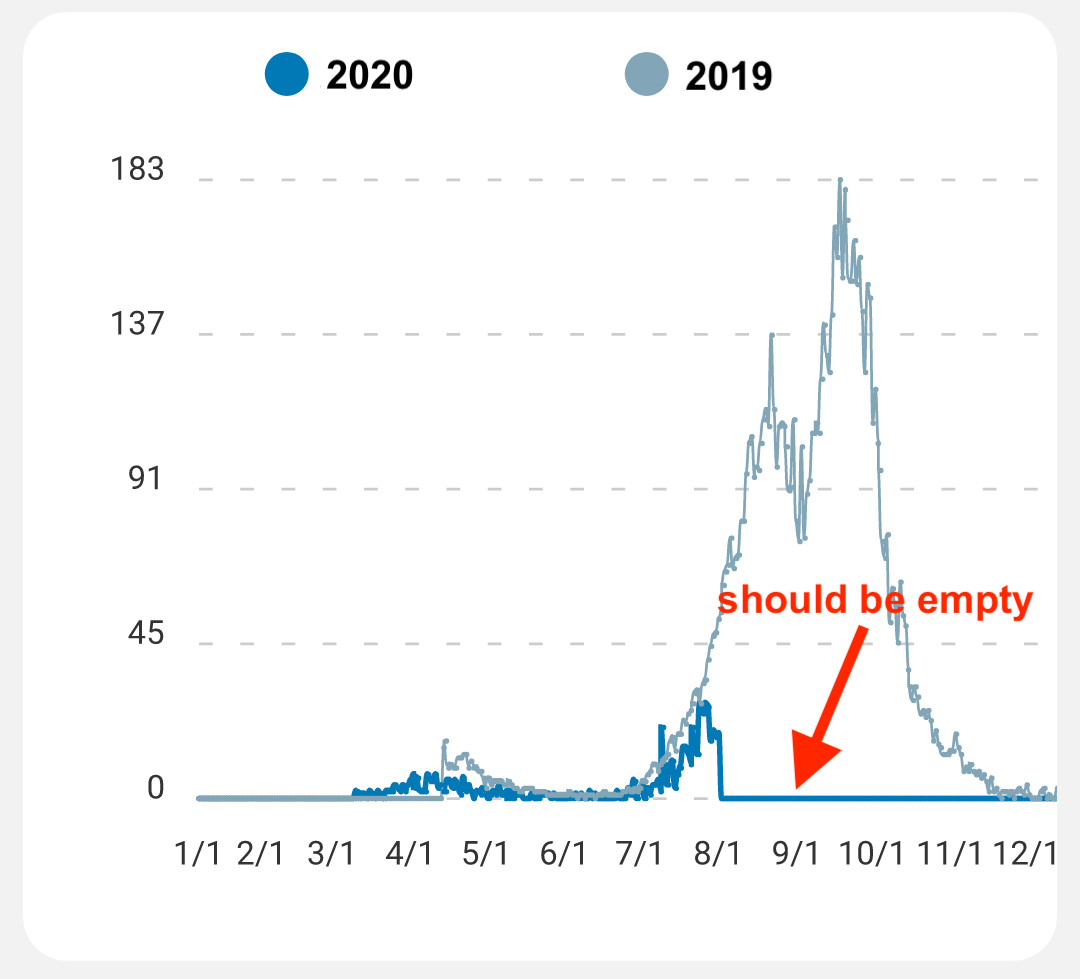
null values are still displayed as 0, but I would expect nothing to be shown instead.
In my case I have two lines to compare, the first dataset relative to the past year, the second one describing this year data; so showing 0 for values not yet occurred is just not right.
Is there a workaround?
const data = {
  datasets: [
    {data: [20, 45, 28, 80, ..., 99, 43, 65]}
    {data: [12, 54, 23, 45, ..., null, null, null]}
    legend: [2010, 2019],
  ],
};
 stebogit
👍4
All 3 comments
Hey, you found any solution for this? I have a graph and I want to skip the null values and just connect the dots from the previous to the next one.
 sinuheshinbr
on 16 Oct 2020
sinuheshinbr
on 16 Oct 2020
👍3
Unfortunately, I haven't found a clear answer either, but what I did find for my purposes I was able to do:
 getDotColor={(datapoint) => {
    if (datapoint === null) {
        return 'transparent';
    }
}}
 brandonin
on 20 Jan 2021
brandonin
on 20 Jan 2021
👍1
@brandonin This solution worked well for me, though it shows a type error since it isn't necessarily returning anything, so I just changed it to:
 getDotColor={(datapoint) => {
    if (datapoint === null) {
        return 'transparent';
    }
    return 'black';
}}
 mikeislearning
on 15 Mar 2021
mikeislearning
on 15 Mar 2021
Was this page helpful?
0 / 5 - 0 ratings
Related issues
 Danjavia
·
5Comments
Danjavia
·
5Comments
 bailih
·
4Comments
bailih
·
4Comments
 Ivanrs297
·
6Comments
Ivanrs297
·
6Comments
 carlojesuscponti
·
6Comments
carlojesuscponti
·
6Comments
 SyedShahbazHussain
·
4Comments
SyedShahbazHussain
·
4Comments
Most helpful comment
Hey, you found any solution for this? I have a graph and I want to skip the null values and just connect the dots from the previous to the next one.