DateRangePicker's DateInput components overflow the component. The from component seems to overflow the arrow in between the components and the to component overflows the main box.
Demo
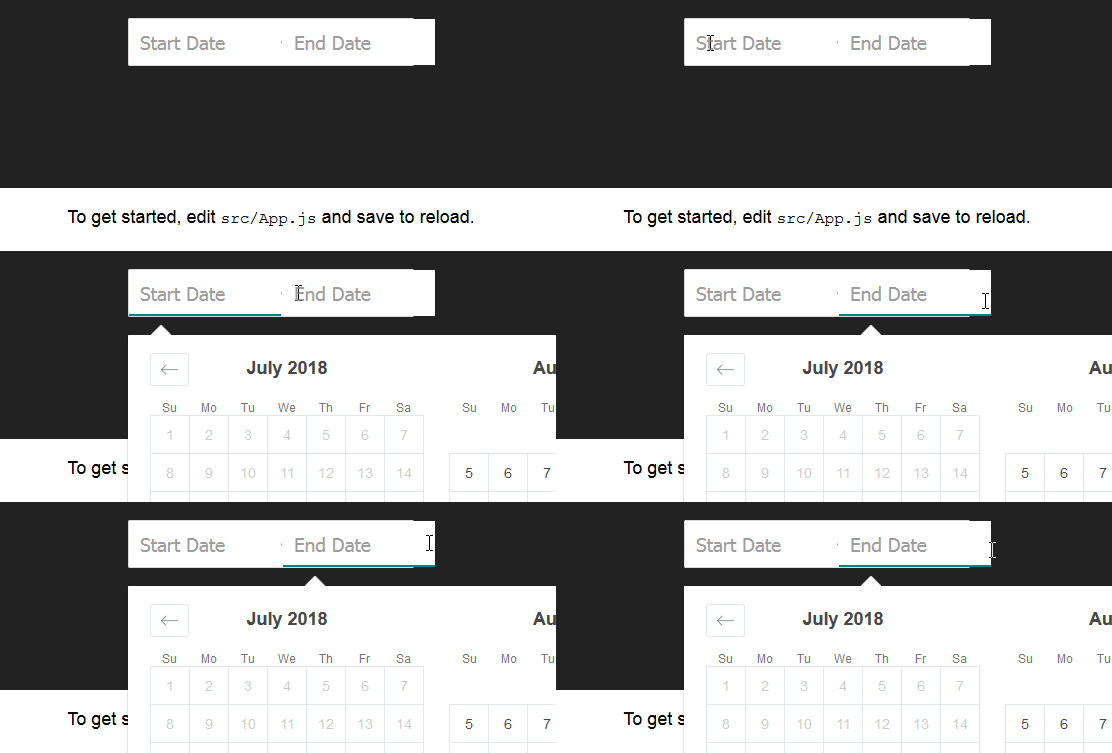
To reproduce:
Create a new project with CRA add
npm install --save react-dates moment@>=#.## react@>=#.## react-dom@>=#.##
or clone the repo from the docs
To see this in action, you can check out https://github.com/majapw/react-dates-demo which adds react-dates on top of a simple create-react-app setup.
Once the project is ready and dependencies are set change the App.js file:
import React, { Component } from "react";
import "./App.css";

import "react-dates/initialize";
import "react-dates/lib/css/_datepicker.css";
import { DateRangePicker } from "react-dates";

class App extends Component {
  constructor(props) {
    super(props);
    this.state = {
      startDate: null,
      endDate: null,
      focusedInput: null
    };
  }

  render() {
    return (
      <div className="App">
        <header className="App-header">
          <DateRangePicker
            startDateId="startDate"
            endDateId="endDate"
            startDate={this.state.startDate}
            endDate={this.state.endDate}
            onDatesChange={({ startDate, endDate }) => {
              this.setState({ startDate, endDate });
            }}
            focusedInput={this.state.focusedInput}
            onFocusChange={focusedInput => {
              this.setState({ focusedInput });
            }}
          />
        </header>
        <p className="App-intro">
          To get started, edit <code>src/App.js</code> and save to reload.
        </p>
      </div>
    );
  }
}

export default App;
 MFry
MFry
All 14 comments
I have been able to isolate the bug and I believe I found what needed to be fixed it in the code, but I can't seem to figure out how to build and run the code from the repo. I assumed build would do it, but that only seems to build the css. npm run react while impressive in size crashes after a while, so I am out of options.
MFry
on 20 Jul 2018
npm run react ensures that the proper react and enzyme adapter versions are installed; i'm surprised to hear it crashes. what version of node are you running on?
 ljharb
on 21 Jul 2018
ljharb
on 21 Jul 2018
@ljharb If you are able, could you let me know what I need to run to get /lib to populate. I know initialize and index.js are looking for files within it, but nothing looked obvious that would build the lib/initialize folder and the rest.
npm run react issue:
$ node -v
v8.11.2
The error:
npm install [email protected] enzyme@^3.0.0 react@^16.0.0-0 react-dom@^16.0.0-0 --no-save

npm ERR! code ETARGET
npm ERR! notarget No matching version found for [email protected]
It might have something to do with windows? But the error doesn't suggest it does and my goal was to build it and be able to import it so that command I can do by hand.
MFry
on 21 Jul 2018
npm run build should do it, but yes, it very much might have something to do with windows. what does npm --version print out?
ljharb
on 21 Jul 2018
$ npm --version
6.2.0
Some more info from the logs
12 info lifecycle [email protected]~react: Failed to exec react script
13 verbose stack Error: [email protected] react: `enzyme-adapter-react-install 16`
13 verbose stack Exit status 16
13 verbose stack     at EventEmitter.<anonymous> (C:\ProgramData\nvm\v8.11.2\node_modules\npm\node_modules\npm-lifecycle\index.js:304:16)
13 verbose stack     at emitTwo (events.js:126:13)
13 verbose stack     at EventEmitter.emit (events.js:214:7)
13 verbose stack     at ChildProcess.<anonymous> (C:\ProgramData\nvm\v8.11.2\node_modules\npm\node_modules\npm-lifecycle\lib\spawn.js:55:14)
13 verbose stack     at emitTwo (events.js:126:13)
13 verbose stack     at ChildProcess.emit (events.js:214:7)
13 verbose stack     at maybeClose (internal/child_process.js:925:16)
13 verbose stack     at Process.ChildProcess._handle.onexit (internal/child_process.js:209:5)
14 verbose pkgid [email protected]
that specific exit code happens when install-peerdeps -S enzyme-adapter-react-16 fails. Can you try running that command, by itself? If you're on windows, npx install-peerdeps -S enzyme-adapter-react-16 may not work, in which case, you'd do npm install --no-save install-peerdeps; ./node_modules/.bin/install-peerdeps -S enzyme-adapter-react-16, i believe
ljharb
on 21 Jul 2018
@ljharb I think I isolated the issue. npx install-peerdeps -S enzyme-adapter-react-16 works fine on windows, but the issue can be found in two parts of the evaluated command:
$ npm install react@^16.0.0-0

npm ERR! code ETARGET
npm ERR! notarget No matching version found for [email protected]
npm ERR! notarget In most cases you or one of your dependencies are requesting
npm ERR! notarget a package version that doesn't exist.
and
$ npm install react-dom@^16.0.0-0

npm ERR! code ETARGET
npm ERR! notarget No matching version found for [email protected]
npm ERR! notarget In most cases you or one of your dependencies are requesting
npm ERR! notarget a package version that doesn't exist.
The npx install-peerdeps -S enzyme-adapter-react-16 command evaluates to npm install [email protected] enzyme@^3.0.0 react@^16.0.0-0 react-dom@^16.0.0-0 --no-save
and the problem seems to arise with the -0 added to the react libraries. So, if instead we run:
$ npm install [email protected] enzyme@^3.0.0 react@^16.0.0 react-dom@^16.0.0 --no-save
npm runs and installs the dependencies fine.
The react library only uses the - for alpha, beta, and rc versions. There is no 16.0.0-0 in npm or on github.
MFry
on 23 Jul 2018
What happens if the full package+version string is quoted?
The -0 is necessary to allow for prerelease versions, and is a valid part of the semver range.
ljharb
on 23 Jul 2018
If its quoted, it successfully runs.
The -0 is necessary to allow for prerelease versions...
That's interesting! I did not know that it would work like that.
MFry
on 23 Jul 2018
In that case, can you file an issue on https://github.com/nathanhleung/install-peerdeps about this? Once patched, this issue will be resolved (I'm going to close it now, but please link the issue once filed).
ljharb
on 23 Jul 2018
Oops, this issue is about something else :-) i'm going to reopen and hide all the somewhat offtopic discussion.
ljharb
on 23 Jul 2018
I have the same issue with SingleDatePicker

 dimalakh
on 18 Aug 2018
dimalakh
on 18 Aug 2018
So what was the problem? I have the exact same problem.
 Cr0cky
on 26 Jun 2019
Cr0cky
on 26 Jun 2019
@dimalakh @Cr0cky @MFry
You should manually add to you css:
html {
  box-sizing: border-box;
}

*, *:before, *:after {
  box-sizing: inherit;
}
Note: This component assumes box-sizing: border-box is set globally in your page's CSS.
 mmarkelov
on 27 Jun 2019
mmarkelov
on 27 Jun 2019
Related issues
 ekohanyi
·
3Comments
ekohanyi
·
3Comments
 yokomizor
·
3Comments
yokomizor
·
3Comments
 maciej-w
·
3Comments
maciej-w
·
3Comments
 Daniel15
·
3Comments
Daniel15
·
3Comments
 prztrz
·
3Comments
prztrz
·
3Comments
Most helpful comment
I have the same issue with SingleDatePicker
