React-dates: Failed styles prop type check while trying to render DateRangePicker
Overview
I tried applying the DateRangePickerWrapper example along with the application of react-styles for theming but i m getting the following error:
Failed prop type: The prop
stylesis marked as required inDateInput, but its value isundefined.
My wrapper component
import React from 'react';
import 'react-dates/initialize';
import 'react-dates/lib/css/_datepicker.css';
import { DateRangePicker } from 'react-dates';
import ThemedStyleSheet from 'react-with-styles/lib/ThemedStyleSheet';
import aphroditeInterface from 'react-with-styles-interface-aphrodite';
import DefaultTheme from 'react-dates/lib/theme/DefaultTheme';
import PropTypes from 'prop-types';
import momentPropTypes from 'react-moment-proptypes';
import omit from 'lodash/omit';


ThemedStyleSheet.registerInterface(aphroditeInterface);

const propTypes = {
    autoFocus: PropTypes.bool,
    autoFocusEndDate: PropTypes.bool,
    initialStartDate: momentPropTypes.momentObj,
    initialEndDate: momentPropTypes.momentObj,
    selectedBgColor: PropTypes.string,
    selectedTextColor: PropTypes.string,
};
const defaultProps = {
    autoFocus: false,
    autoFocusEndDate: false,
    initialStartDate: null,
    initialEndDate: null,
    selectedBgColor: '#02C8A4',
    selectedTextColor: '#fff',
};
export class DateRange extends React.Component {
    constructor(props) {
        super(props);
        let focusedInput = null;
        if (props.autoFocus) {
            focusedInput = 'startDate';
        } else if (props.autoFocusEndDate) {
            focusedInput = 'endDate';
        }
        this.state = {
            focusedInput,
            startDate: props.initialStartDate,
            endDate: props.initialEndDate,
        };
        ThemedStyleSheet.registerTheme({
            reactDates: {
                ...DefaultTheme.reactDates,
                color: {
                    ...DefaultTheme.reactDates.color,
                    selected: {
                        backgroundColor: props.selectedBgColor,
                        color: props.selectedTextColor,
                    },
                },
            },
        });
    }

    onDatesChange = ({ startDate, endDate }) => {
        this.setState({ startDate, endDate });
    }

    onFocusChange = (focusedInput) => {
        this.setState({ focusedInput });
    }

    render() {
        const { focusedInput, startDate, endDate } = this.state;
        // These props are needed on the wrapper level but are not part of the airbnb single date picker
        // If we dont do this, an error is thrown by the component :/
        const props = omit(this.props, [
            'autoFocus',
            'autoFocusEndDate',
            'initialStartDate',
            'initialEndDate',
            'selectedBgColor',
            'selectedTextColor',
        ]);
        return (
            <DateRangePicker
                {...props}
                startDateId="start_date_input"
                endDateId="end_date_input"
                onDatesChange={this.onDatesChange}
                onFocusChange={this.onFocusChange}
                focusedInput={focusedInput}
                startDate={startDate}
                endDate={endDate}
            />
        );
    }
}
DateRange.propTypes = propTypes;
DateRange.defaultProps = defaultProps;
Is there a step i am missing? Previous threads tend to suggest trying to set an interface which i am already doing. Note: Identical setup works for the SingleDatePicker with the exception of the startDate endDate props which differ here ofcourse.
 asulaiman
All 28 comments
You shouldn't need import 'react-dates/initialize'; if you're registering your own aphrodite interface, as long as you add https://github.com/airbnb/react-dates/blob/master/src/utils/registerInterfaceWithDefaultTheme.js#L6 - can you try that?
 ljharb
on 1 Jan 2018
ljharb
on 1 Jan 2018
No change, same error.
asulaiman
on 1 Jan 2018
What exact version of react-dates are you using?
ljharb
on 2 Jan 2018
16.0.1
asulaiman
on 2 Jan 2018
I seem to be having a similar issue... I cannot shake away that warning:


I have followed every detail in the documentation and changed some... but the warning just won't go away. Mind you, it is not impacting much the app's performance, it is a mere annoyance, at least for now...
 rodolph66
on 2 Jan 2018
rodolph66
on 2 Jan 2018
@rodolph66 those are legitimate errors, and unrelated to this issue.
ljharb
on 2 Jan 2018
@rodolph66 startDateId and endDateId are required props on the component (this is recent). We updated this behavior to have parity with the SingleDatePicker and for accessibility reasons. If you add id props on your DateRangePicker you should see the warning go away.
@asulaiman Can you try registering your theme at the top-level instead of inside the constructor and see if that changes anything?
 majapw
on 2 Jan 2018
majapw
on 2 Jan 2018
Thanks majapw, the warning did go away when supplying the id props. Initially it failed because I supplied the wrong type (my mistake). Thank a lot...
rodolph66
on 2 Jan 2018
@majapw yes now it renders. However that defeats the purpose of theming for me because i wanted to change theme attributes based on props passed into the component. This works for SingleDatePicker.
asulaiman
on 2 Jan 2018
@asulaiman Hmm, so the react-with-styles theme is meant to be done only once on an app-wide basis. My guess is that you're doing it multiple times (rendering DateRange more than once) which is blowing up the theme and causing some strange issues.
It looks like you're rendering multiple DateRangePickers and you want each one to have a different selected color, yeah? There is a way of doing that, but it is a bit more complicated. It is on my TODO list to add a section to the README to give more detail on that. I will try to do a write-up today.
majapw
on 2 Jan 2018
Also as @ljharb mentioned, you should not need
import 'react-dates/initialize';
import 'react-dates/lib/css/_datepicker.css';
in your code if you're doing your own customization.
majapw
on 2 Jan 2018
@majapw hi how would add id props to the component. sorry I am a total newbie and resolve the issue. any help will be much appreciated. Thank you..!
 ghost
on 8 Jan 2018
ghost
on 8 Jan 2018
@rodolph66 hi how did you mange to add the id props to the component to resolve the issue? I tried varied different steps without any success to get rid of the "startDateId is marked as required in withStyles(DateRangePicker)," issue. Thank you so much for any help you can provide. Thank you again.
ghost
on 8 Jan 2018
You can use uuid which generates ids, but even simpler just make up your own. It has to be string format. Any combination of characters should work. I tried both and they did work. But using uuid for this is abit too much I guess...!!!
rodolph66
on 9 Jan 2018
Hi,
I am having the same issue, @ljharb you mentioned up about https://github.com/airbnb/react-dates/blob/master/src/utils/registerInterfaceWithDefaultTheme.js#L6
where should we add this ?
 AhmedAbdulrahman
on 31 Jan 2018
AhmedAbdulrahman
on 31 Jan 2018
@AhmedAbdulrahman you should call that method before your first react-dates component import. :) You will also need to register an interface before your first import.
The initialize helper does both of these things for you.
majapw
on 31 Jan 2018
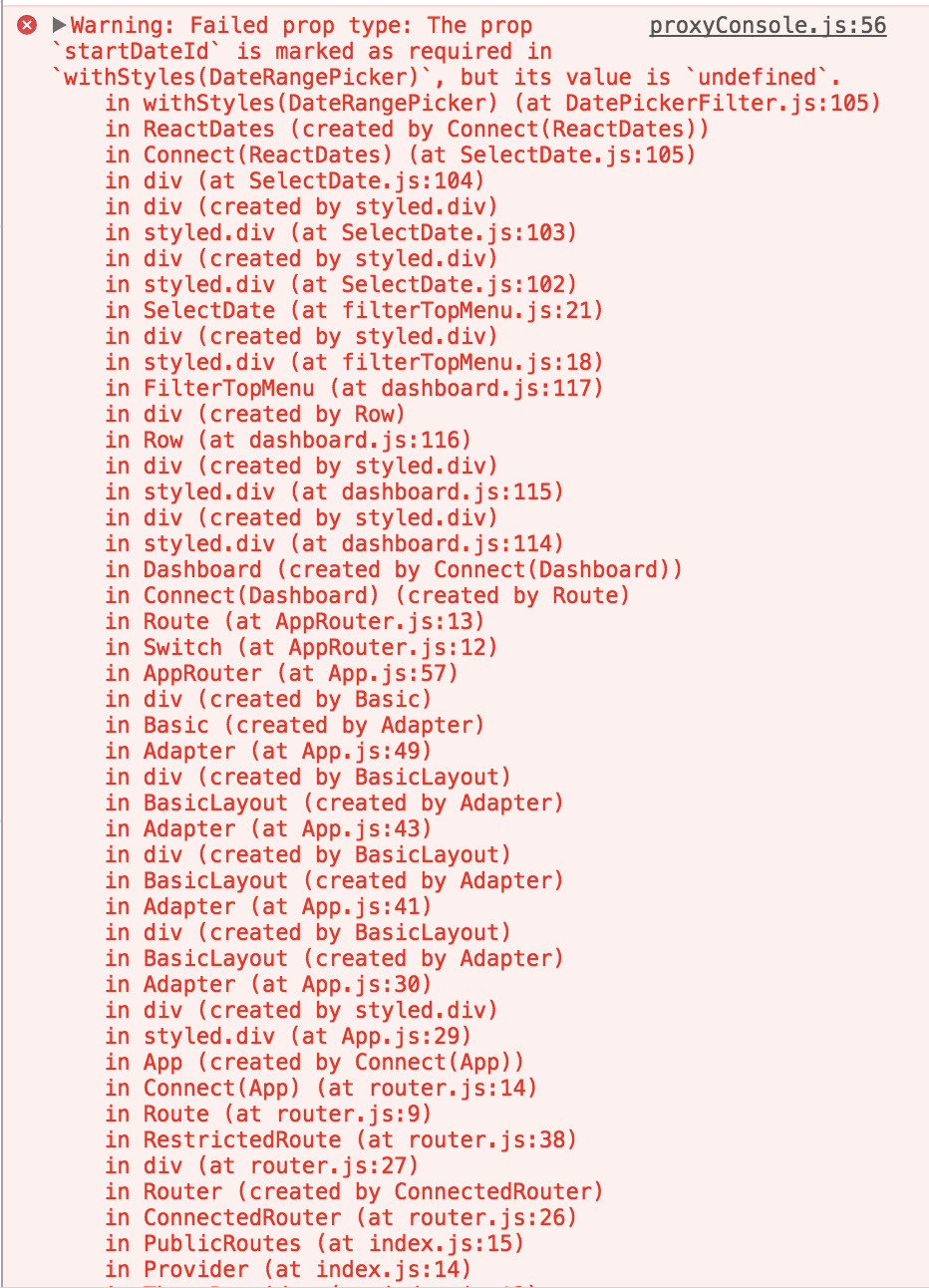
Hi, I've added "startDateId" and "endDateId" props and still get an error says I should supply those required props. Attached my code and the warnings
<DateRangePicker {...options}
                           hideKeyboardShortcutsPanel
                           minimumNights={0}
                           startDate="null"
                           startDateId="startDateId"
                           endDate="null"
                           endDateId="endDateId"
          />
 ebl22
on 8 Feb 2018
ebl22
on 8 Feb 2018
That is... very surprising. Is this the only DRP you're rendering @ebl22? What version of react-dates are you on?
majapw
on 8 Feb 2018
@majapw I'm using "react-dates": "^16.2.1". The warnings disappear when I remove the props: startDate, endDate. I pass those props in the options, so maybe I got those warnings cause I passed it twice..
ebl22
on 10 Feb 2018
You’re passing the string “null” - try passing the actual value: {null}
ljharb
on 10 Feb 2018
Setting two additional props on the DatePicker worked for me:
startDateId="start"
endDateId="end"
 HollyJHuber
on 3 Aug 2018
HollyJHuber
on 3 Aug 2018
@asulaiman Hmm, so the
react-with-stylestheme is meant to be done only once on an app-wide basis. My guess is that you're doing it multiple times (renderingDateRangemore than once) which is blowing up the theme and causing some strange issues.It looks like you're rendering multiple
DateRangePickersand you want each one to have a different selected color, yeah? There is a way of doing that, but it is a bit more complicated. It is on my TODO list to add a section to the README to give more detail on that. I will try to do a write-up today.
@majapw did you every get around to documenting the preferred way to do this?
 ianduvall
on 28 Nov 2018
ianduvall
on 28 Nov 2018
is this fixed, as of 18.1.1 version?
 PavanGangireddy
on 20 Dec 2018
PavanGangireddy
on 20 Dec 2018
If use default example I have the same error.
Just set my state :
this.state = {
      startDate: moment(),
      endDate: moment(),
      focusedInput: null  <-----------
};
 AndreyPatseiko
on 3 Jan 2019
AndreyPatseiko
on 3 Jan 2019
Setting two additional props on the DatePicker worked for me:
startDateId="start"
endDateId="end"
            <DateRangePicker
                startDate={this.props.filters.startDate}
                endDate={this.props.filters.endDate}
                onDatesChange={this.onDatesChange}
                focusedInput={this.state.calendarFocused}
                onFocusChange={this.onFocusChange}
                startDateId="start"
                endDateId="end"
            />
Fixed my isssues Thanks @HollyJHuber
 gaurav-js-dev
on 27 Dec 2019
gaurav-js-dev
on 27 Dec 2019
Thanks @HollyJHuber!
I can confirm that this works, just add them as static values and the console error disappears
startDateId="start"
endDateId="end"
 picozzimichele
on 5 Jun 2020
picozzimichele
on 5 Jun 2020
This seems to be working for me too but dont know why i needed to add it.
startDateId="start"
endDateId="end"
 Mohamudsharif010
on 8 Jul 2020
Mohamudsharif010
on 8 Jul 2020
If use default example I have the same error.
Just set my state :this.state = { startDate: moment(), endDate: moment(), focusedInput: null <----------- };
Already set the focusedInput, not working...
 flinhong
on 13 Jan 2021
flinhong
on 13 Jan 2021
Related issues
 augnustin
·
3Comments
augnustin
·
3Comments
 yokomizor
·
3Comments
yokomizor
·
3Comments
 prztrz
·
3Comments
prztrz
·
3Comments
 Jesus-Gonzalez
·
3Comments
Jesus-Gonzalez
·
3Comments
 HartiganHM
·
3Comments
HartiganHM
·
3Comments
Most helpful comment
Setting two additional props on the DatePicker worked for me:
startDateId="start"endDateId="end"