React-dates: Last in range day has incorrect border
react-dates version
[email protected]
Describe the bug
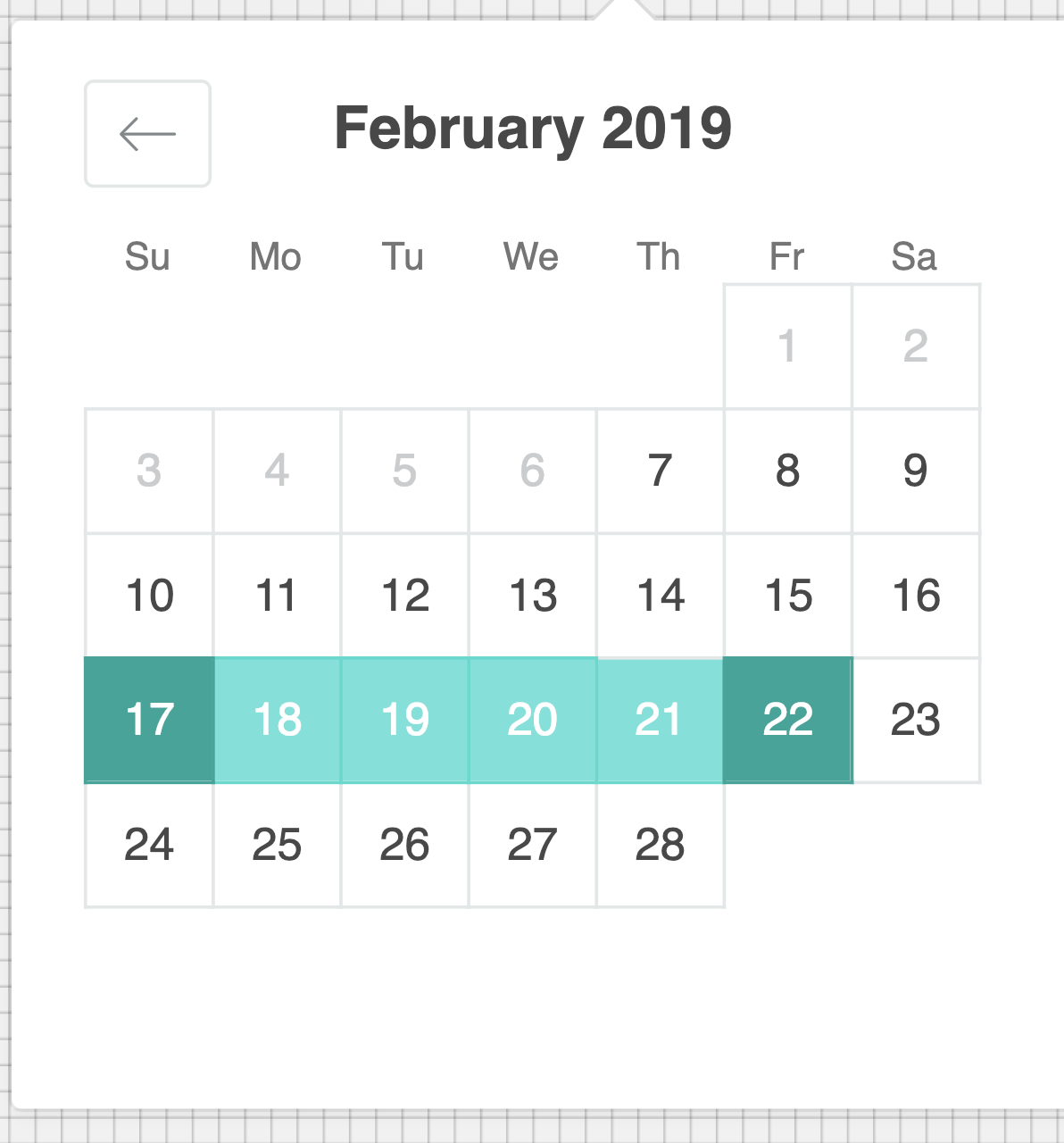
Last in selected date range has wrong border top. In the screenshot below day 21 has a gray border (looks like it's the default border). Would expect it to be green like the days in the range before it.
Source code (including props configuration)
Steps to reproduce the behavior:
<DateRangePicker
  startDate={this.state.startDate}
  startDateId="your_unique_start_date_id"
  endDate={this.state.endDate}
  endDateId="your_unique_end_date_id"
  onDatesChange={({ startDate, endDate }) => this.setState({ startDate, endDate })}
  focusedInput={this.state.focusedInput}
  onFocusChange={focusedInput => this.setState({ focusedInput })}
/>
Screenshots/Gifs
Desktop (please complete the following information):
- OS: Mac OS 10.14
- Browser: Chrome
- Version 71.0.3578.98
Is the issue reproducible in Storybook?
http://airbnb.io/react-dates/?selectedKind=DateRangePicker%20%28DRP%29&selectedStory=default&full=0&addons=1&stories=1&panelRight=0&addonPanel=storybook%2Factions%2Factions-panel
Additional context
Inspecting the styles it looks like this rule
.CalendarDay__last_in_range,
.CalendarDay__last_in_range:hover {
  border-style: solid;
}
conflicts with the default border-style: double.
 krissalvador27
All 3 comments
@ljharb would love to fix and test it, but I don't think the CSS file is exposed in the repo (only in the published version on npm). Any suggestions?
krissalvador27
on 8 Feb 2019
The css file is built from the in-JS styles. You should be able to make a fix there.
 ljharb
on 8 Feb 2019
ljharb
on 8 Feb 2019
fixed in v20.0.0
krissalvador27
on 10 Mar 2019
Related issues
 cemremengu
·
3Comments
cemremengu
·
3Comments
 thomasdtucker
·
3Comments
thomasdtucker
·
3Comments
 arthurvi
·
3Comments
arthurvi
·
3Comments
 Jesus-Gonzalez
·
3Comments
Jesus-Gonzalez
·
3Comments
 Daniel15
·
3Comments
Daniel15
·
3Comments
Most helpful comment
The css file is built from the in-JS styles. You should be able to make a fix there.