React-dates: SingleDatePicker focus problems on touch devices
Hello,
Related to #560 -- Even after the recent change that allows readonly to be set and respected rather than default to isTouchDevice, things don't behave right on touch devices that also have keyboards, like a laptop or desktop with a touch screen.
Then problem seems to be that in SingleDatePicker there is focus logic that steals away the inputs focus and places focus on the DayPicker if isTouchDevice is true.
https://github.com/airbnb/react-dates/blob/v13.0.0/src/components/SingleDatePicker.jsx#L182
There is no way to short-circut this logic and even if you manage to set readonly correctly, you still are forced to use the DayPicker rather than the input on any touch device, even if you have a keyboard available.
Any ideas on how to proceed?
 comron
All 22 comments
Hmm, does hitting esc to go back to the input work? In general we want to encourage use of the calendar over typing in the inputs, so I'm not sure that this is the worse behavior. What would your preferred behavior be?
It's possible that we could remove this check when move focus to the daypicker and leave that for the portal case.
 majapw
on 21 Oct 2017
majapw
on 21 Oct 2017
It doesn't look like there is anyway to get focus back to the input. The code seems to steal focus from the input whenever it gains focus if isTouchDevice is true.
I think the problem here is that "touch device" is too broad of a check, and specifically not allowing a user to type into the field if their browser responds to 'ontouchstart' seems overly strict. In this case the user doesn't even know they have a touch device, it just happens to be a PC with a keyboard and mouse and a touch monitor. The user expects this form to work like any other web input, especially when typing specific far-future dates typing is the most intuitive interaction.
I think you're idea about only forcing the focus when presenting the DatePicker in a portal because of screen size is the better idea. At a minimum it would be nice to be in control of this behavior, even if the default doesn't change.
comron
on 21 Oct 2017
Was there any resolution for this? I would be happy to implement the change if one was proposed.
comron
on 2 Jan 2018
Maybe we need to work on making isTouchDevice more specific to mobile devices then?
 erin-doyle
on 2 Jan 2018
erin-doyle
on 2 Jan 2018
We should be detecting features, not sniffing user agents - "mobile" isn't a feature, while "touch" is.
 ljharb
on 2 Jan 2018
ljharb
on 2 Jan 2018
@erin-doyle I think the problem is if we're not using touch, we usually end up using user-agent, which is unreliable.
@comron @ljharb Perhaps we should have a prop to allow the consumer to specify the behavior they want or maybe we should be relying on screen-size instead (that's generally how we select mobile devices at airbnb, although devices like the iPad prop make it a bit difficult).
btw the code for isTouchDevice is here --- https://github.com/airbnb/is-touch-device/blob/master/src/index.js
majapw
on 2 Jan 2018
There is no way to short-circut this logic
Perhaps we should have a prop
I think indeed that providing a way for the user to override this default logic is the simplest way forward.
ljharb
on 2 Jan 2018
Okay, I would add a prop named something like keepFocusOnInput(s) and then have that short-circuit the focus movement when true. @comron would that work for you?
majapw
on 2 Jan 2018
@majapw Probably, I'll put together a PR later today.
comron
on 2 Jan 2018
So I started to make the change, branched off master. Seems like the behavior on master is slightly different than what I was seeing with the version in October.
In the storybook for SingleDatePicker, with the default settings, when I force isTouchDevice to true, it does indeed steal focus from the input, but a second click on the input gives the input focus rather than re-stealing it to the calendar.
Any ideas on when/where the behavior changed? And does this change your opinion on how it should be "fixed"?
comron
on 3 Jan 2018
I think this may have changed with the change I made to the DayPicker's componentDidUpdate focusing behavior in Pull Request #825 .
erin-doyle
on 3 Jan 2018
@erin-doyle Thanks for the hint, I'll take a look.
However, I'm having trouble reproducing this issue inside the storybook. I rolled back my fork to v12.6.0 which is the version I have in production that exhibits this focus problem.
I hard-coded isTouchDevice to return true to fake the environment I see the bug in, and in the SingleDatePicker default story book, I cant get the focus behavior to be as expected. Not only am I able to type in the field, but it doesn't actually focus the DatePicker component. (I see no highlight around the current date, and keyboard shortcuts do not change the date.)

Is there something special about the storybook environment (Iframe?) that would cause different behavior?
In production I see the focus in the DayPicker

Here is a screenshot of both components props and state, which look identical to me.
Production:
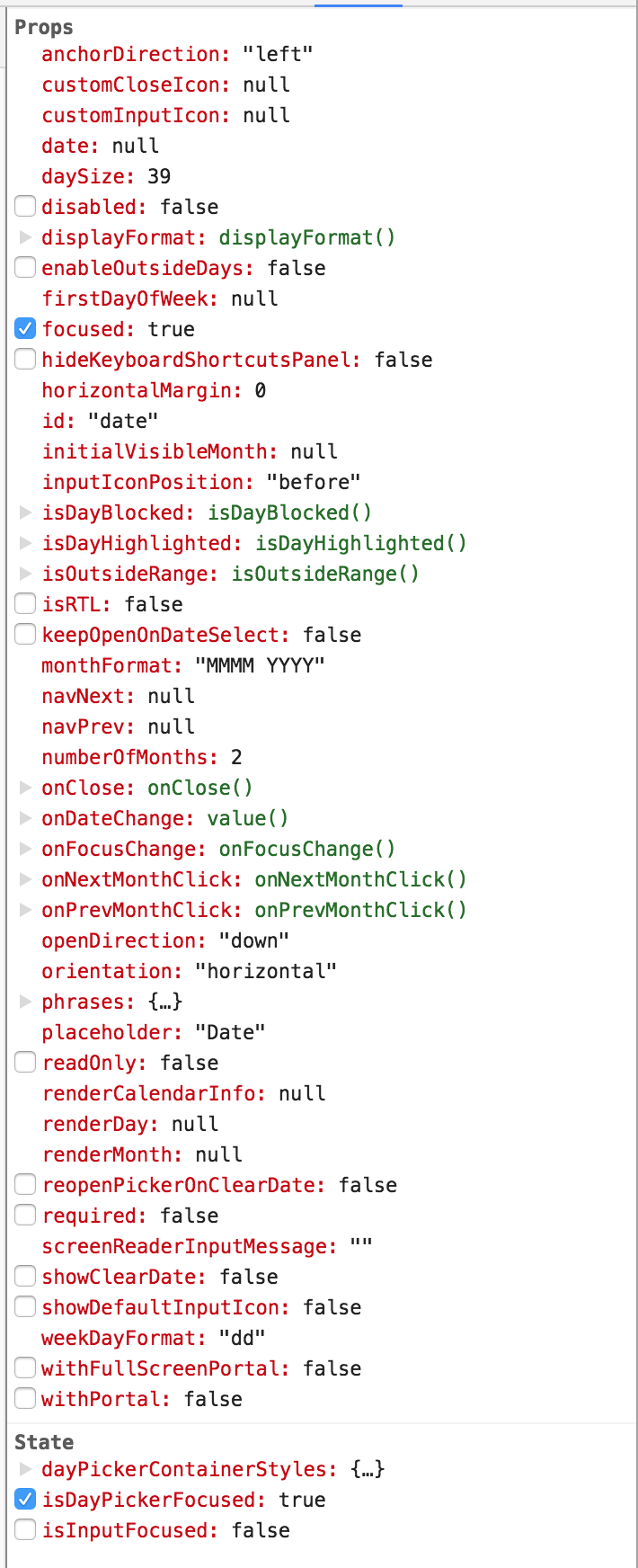
Storybook:
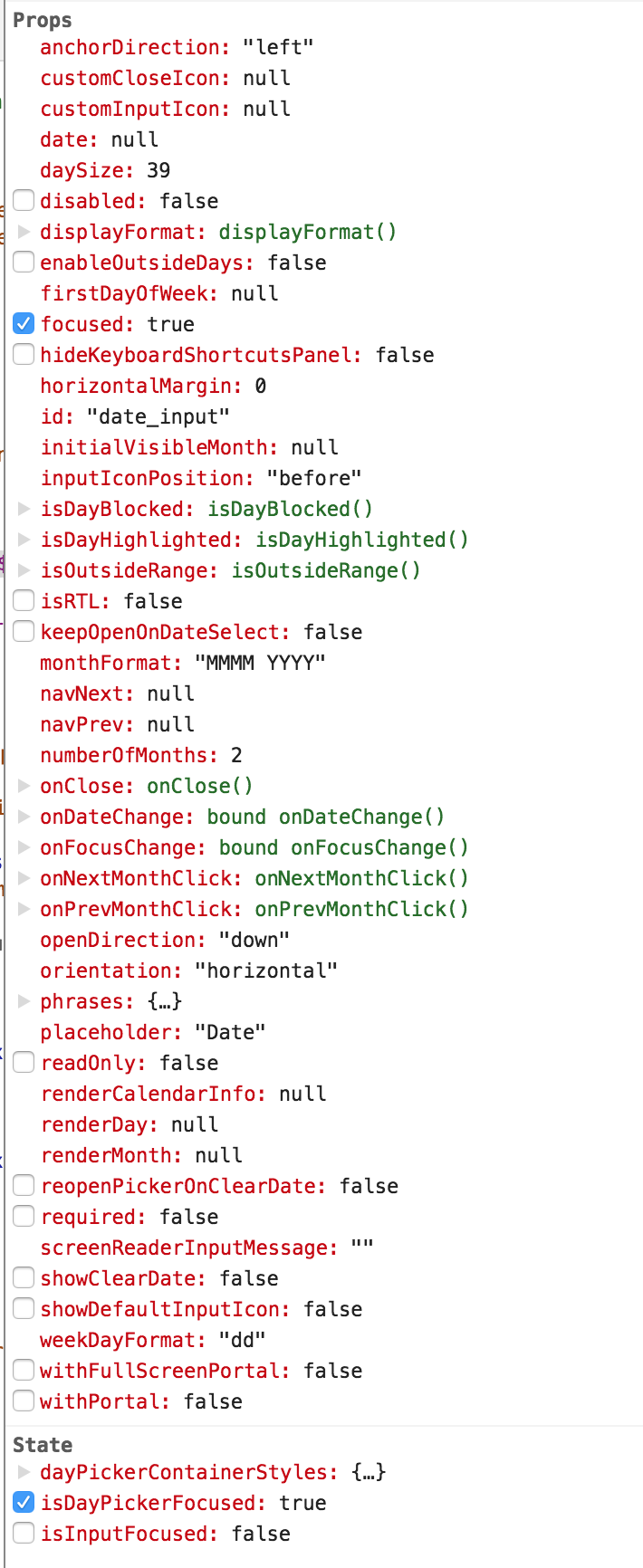
comron
on 3 Jan 2018
I have found some of the work I've done around focus to be a little tricky to test in the storybook. I think that in some browsers the elements outside of the iFrame can take focus priority and I'm sorry I can't quote exactly which ones and which versions and so forth but it has caused me problems. There have been some changes I've worked on where I've had to do a lot of my testing in my own application that consumes react-dates, with package.json pointing to the local checkout I have of react-dates that I'm making changes to, rather than depending on the storybook alone.
I'm not sure rolling back to such an old version is going to be a helpful exercise or trying to track down exactly what changed when. I've made a number of changes between then and now to focus and keydown behavior. I think it would be easier to just work on what the behavior is on the latest version.
erin-doyle
on 3 Jan 2018
Thanks for the insight. Yeah I just kept rolling back to older versions just because I kept failing to reproduce in the story book.
comron
on 3 Jan 2018
@comron I guess the question remains... is this still a bug in the latest version of react-dates? and if not, can we close this issue?
majapw
on 3 Jan 2018
@majapw I'll investigate and let you know, thanks for all your help.
comron
on 3 Jan 2018
Feature detection is a tricky issue! And we def want this to work as expected in all scenarios. :) Let us know what you find!
majapw
on 3 Jan 2018
I'm experiencing an issue in the same area (I am using version 15.3.0). Specifically, I want to be able to close the datepicker on any subsequent interaction with a readonly input on any device.
Right now I don't have sufficient hook to get it working.
I can get it to work on touch screens by checking focus state before onFocusChange and the focused value passed in. Here are the scenarios:
Using a device that is not touch enabled (I can't find a way to close the datepicker in this scenario)
Given I have a SingleDatePicker
And I've set it to readonly
And I am not using a touch enabled device
When I click input
Then the datepicker opens
And the focus remains on input
And clicking the input again does not trigger onFocusChange event (since input is already focused)
Using a touch enabled device (I can work with this scenario by reacting in the onFocusChange event)
Given I have a SingleDatePicker
And I've set it to readonly
And I am using a touch enabled device
When I click input
Then the datepicker opens
And the focus moves to the calendar
And clicking the input again triggers the onFocusChange event
Please let me know if I should create a separate issue. It seems related to the same logic in this thread.
 aporlando
on 4 Jan 2018
aporlando
on 4 Jan 2018
I realize that my issue is actually separate since this issue is requesting that input not lose focus on touch devices that have the keyboard enabled. Instead, what I am looking for is the focus to move to the datepicker when the readOnly prop is set to true. I opened #946 for this issue and have a proposed solution.
aporlando
on 8 Jan 2018
Should we close this then?
erin-doyle
on 9 Jan 2018
The “keepFocusOnInputs” is something I’m still working on. It’s still
needed, I just have been caught up with other items and haven’t been able
to push anything up.
On Tue, Jan 9, 2018 at 6:08 AM Erin Doyle notifications@github.com wrote:
Should we close this then?
—
You are receiving this because you were mentioned.
Reply to this email directly, view it on GitHub
https://github.com/airbnb/react-dates/issues/747#issuecomment-356293566,
or mute the thread
https://github.com/notifications/unsubscribe-auth/AAHuQSWMcZ7fBYicVlbtwT7Upozx03KOks5tI3LNgaJpZM4Pv2wU
.
comron
on 9 Jan 2018
@majapw would still consider this an issue. The current feature detection for touch devices (readOnly & isTouchDevice) is not sufficient, and isTouchDevice returns a false positive in Chrome on Mac + PC, causing the date picker's input field to not be editable with the keyboard on Desktop.
Probably don't want to import an entire library like Modernizr for this, but maybe we can copy what they're doing for the default behavior: https://github.com/Modernizr/Modernizr/blob/master/feature-detects/touchevents.js
Otherwise, there should be a way for the user to control this logic, as device detection tends to be a controversial topic and everyone has their own way of doing things. It would be nice if we could set the isTouchDevice prop as a function that contained our own logic.
I would be willing to draft a PR to test either the Modernizr-style touch detection or the getting isTouchDevice working as a prop that accepts a function, but would like to hear some suggestions.
 vastolf
on 11 Nov 2019
vastolf
on 11 Nov 2019
Related issues
 arthurvi
·
3Comments
arthurvi
·
3Comments
 Jesus-Gonzalez
·
3Comments
Jesus-Gonzalez
·
3Comments
 sag1v
·
3Comments
sag1v
·
3Comments
 cemremengu
·
3Comments
cemremengu
·
3Comments
 krissalvador27
·
3Comments
krissalvador27
·
3Comments
Most helpful comment
@majapw would still consider this an issue. The current feature detection for touch devices (
readOnly&isTouchDevice) is not sufficient, and isTouchDevice returns a false positive in Chrome on Mac + PC, causing the date picker's input field to not be editable with the keyboard on Desktop.Probably don't want to import an entire library like Modernizr for this, but maybe we can copy what they're doing for the default behavior: https://github.com/Modernizr/Modernizr/blob/master/feature-detects/touchevents.js
Otherwise, there should be a way for the user to control this logic, as device detection tends to be a controversial topic and everyone has their own way of doing things. It would be nice if we could set the
isTouchDeviceprop as a function that contained our own logic.I would be willing to draft a PR to test either the Modernizr-style touch detection or the getting isTouchDevice working as a prop that accepts a function, but would like to hear some suggestions.