React-dates: customize calendar height
react-dates version
[email protected]
Describe the bug
After customize some UI style, last week is _covered_ by calendar container like below.
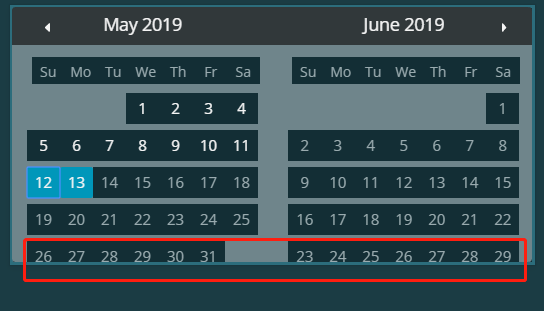
I tried to override the css class "DayPicker_transitionContainer" to fix the height but it won't adjust dynamically according to weeks account(like below two different month, height is different)

I checked the source code and find below logic:

I could change the "MONTH_PADDING" to adjust the height to fix my issue but "MONTH_PADDING" is a const in this file which can't be controlled from outside.
What I want is let "MONTH_PADDING" as a prop to us.
 AsasinCree
All 3 comments
same problem, @AsasinCree any luck with this?
 iamolegga
on 15 Jul 2019
iamolegga
on 15 Jul 2019
my solution:
useEffect(() => {
changeMonthHandler(from || moment());
});
<DayPickerRangeController
startDate={from}
endDate={to}
onNextMonthClick={changeMonthHandler}
onPrevMonthClick={changeMonthHandler}
/>
let transitionContainerStylesheet = document.createElement('style');
document.head.appendChild(transitionContainerStylesheet);
function changeMonthHandler(date: moment.Moment) {
transitionContainerStylesheet.innerHTML = `
.DayPicker_transitionContainer {
height: ${cellHeight * calcWeeksInMonth(date) + restCalendarContentHeight }px !important;
}
`;
}
function calcWeeksInMonth(date: moment.Moment) {
const dateFirst = moment(date).date(1);
const dateLast = moment(date).date(date.daysInMonth());
const startWeek = dateFirst.week();
const endWeek = dateLast.week();
if (endWeek < startWeek) {
return dateFirst.weeksInYear() - startWeek + 1 + endWeek;
} else {
return endWeek - startWeek + 1;
}
}
tldr, create stylesheet with !important height for container, that will not be redefined by inline height, calculated by library
I've tried to use inline style on .DayPicker_transitionContainer but there was some chattering of height, because first it set height from library and then custom height, so Stylesheet solves this problem
iamolegga
on 15 Jul 2019
I played with styles during the project and I know I probably did something wrong, but I came to the same problem.
I realized somehow on some step of my project height started calculating wrong everytime with the same difference from the right way ("one cell height", for me it's 37px)
So i added it as a padding and overrode box-sizing
.DayPicker_transitionContainer {
    padding-bottom: 37px;
    box-sizing: content-box;
}
Since I have complex customized layout it is seems to be bad but still the easiest workaround for my situation
 yournatalita
on 18 May 2020
yournatalita
on 18 May 2020
Related issues
 arthurvi
·
3Comments
arthurvi
·
3Comments
 thomasdtucker
·
3Comments
thomasdtucker
·
3Comments
 mgm793
·
3Comments
mgm793
·
3Comments
 cemremengu
·
3Comments
cemremengu
·
3Comments
 mrseanbaines
·
3Comments
mrseanbaines
·
3Comments
Most helpful comment
I played with styles during the project and I know I probably did something wrong, but I came to the same problem.
I realized somehow on some step of my project height started calculating wrong everytime with the same difference from the right way ("one cell height", for me it's 37px)
So i added it as a padding and overrode box-sizing
Since I have complex customized layout it is seems to be bad but still the easiest workaround for my situation