react-dates breaking after upgrading to version 13.0.0 or 13.0.1
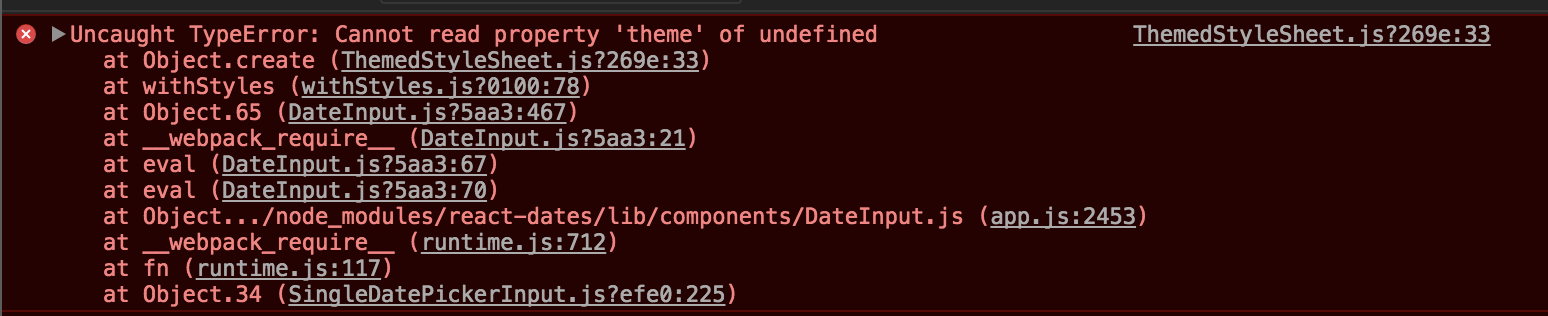
Uncaught TypeError: Cannot read property 'theme' of undefined
    at Object.create (ThemedStyleSheet.js?269e:33)
    at withStyles (withStyles.js?0100:78)
    at Object.65 (DateInput.js?5aa3:467)
    at __webpack_require__ (DateInput.js?5aa3:21)
    at eval (DateInput.js?5aa3:67)
    at eval (DateInput.js?5aa3:70)
    at Object.../node_modules/react-dates/lib/components/DateInput.js (app.js:2453)
    at __webpack_require__ (runtime.js:712)
    at fn (runtime.js:117)
    at Object.34 (SingleDatePickerInput.js?efe0:225)
 kakadiadarpan
All 22 comments
Hello, same error:
[1] C:\Node...\node_modules\react-with-styles\lib\ThemedStyleSheet.js:33
[1] theme = _styleTheme.theme,
 damien916
on 6 Oct 2017
damien916
on 6 Oct 2017
I'm getting the same error after migrating from 12.7.0 to 13.0.0
 aschonfeld
on 6 Oct 2017
aschonfeld
on 6 Oct 2017
Hi all!
v13.0.0 included a breaking change that introduced a more CSS in JS solution to the project. There is now an extra setup step which you can see in the README, namely the initialize step (https://github.com/airbnb/react-dates#initialize)
If you run
import 'react-dates/initialize';
at the top of your app, it should (hopefully) work. Let me know if you have any troubles and I will be doing some more debugging of the new protocol today.
 majapw
on 6 Oct 2017
majapw
on 6 Oct 2017
With import 'react-dates/initialize' I catch another exception:
Uncaught TypeError: registerCSSInterfaceWithDefaultTheme is not a function
 MaxGraey
on 6 Oct 2017
MaxGraey
on 6 Oct 2017
@MaxGraey v13.0.2 should fix this (I literally published it seconds ago). Can you try again?
majapw
on 6 Oct 2017
I'm having the same issue on 13.0.2 with this in my index.jsx file (using webpack)
import 'react-dates/initialize';
import 'react-dates/lib/css/_datepicker.css';
but still getting the error :(
ThemedStyleSheet.js:33 Uncaught TypeError: Cannot read property 'theme' of undefined
at Object.create (ThemedStyleSheet.js:33)
at withStyles (withStyles.js:78)
at Object.65 (DateInput.js:467)
at __webpack_require__ (DateInput.js:21)
at eval (DateInput.js:67)
at eval (DateInput.js:70)
at Object../node_modules/react-dates/lib/components/DateInput.js (koan-common-f869d982aa66dd23f2b2.js:6835)
at __webpack_require__ (koan-common-f869d982aa66dd23f2b2.js:712)
at fn (koan-common-f869d982aa66dd23f2b2.js:117)
at Object.34 (DateRangePickerInput.js:333)
Downgrading to 12.6.0 fixes the issue (the version I was on before I tried upgrading to 13)
 icd2k3
on 7 Oct 2017
icd2k3
on 7 Oct 2017
Hmm, I will dig into this.
majapw
on 7 Oct 2017
Hello! Did you find a solution for this problem? Thank you
 titanve
on 8 Oct 2017
titanve
on 8 Oct 2017
I would recommend pinning to 12.6.0 for now. I will work on this tomorrow
or Monday and hope to have a solution for you then!
On Sat, Oct 7, 2017, 8:22 PM Rafael Mora notifications@github.com wrote:
Hello! Did you find a solution for this problem? Thank you
—
You are receiving this because you commented.Reply to this email directly, view it on GitHub
https://github.com/airbnb/react-dates/issues/750#issuecomment-334980201,
or mute the thread
https://github.com/notifications/unsubscribe-auth/ABUdtTkFwGF_PjlUD2yOTSXzbGw0T5L6ks5sqD_ZgaJpZM4PwjLB
.
majapw
on 8 Oct 2017
I used:
import "react-dates/initialize";  // <---- put this at the very top of your js file
import React, { Component } from "react";
import { SingleDatePicker } from "react-dates";
import "react-dates/lib/css/_datepicker.css";
import moment from "moment";
.
.
.
class PedidoForm extends Component {
  ...
  render() {
    return (
      .
      .
      .
      <SingleDatePicker
        date={this.state.date} // momentPropTypes.momentObj or null
        onDateChange={date => this.cambiarFecha(date)} // PropTypes.func.isRequired
        focused={this.state.focused} // PropTypes.bool
        onFocusChange={({ focused }) => this.setState({ focused })} // PropTypes.func.isRequired
        displayFormat="DD-MM-YYYY"
        firstDayOfWeek={1}
      />
     );
   }
}
as suggested and it's working great! Thank you! 😄 (I'm using webpack 3 and React v16)
titanve
on 8 Oct 2017
@titanve I tried your approach, sadly it didn't work for me. (Even I'm using webpack 3 and React v16)
For now, I'll stick with version 12.7.0.
kakadiadarpan
on 9 Oct 2017
Just upgraded to React 16, I am getting this error:
500
Internal Server Error.
Cannot read property 'theme' of undefined
TypeError: Cannot read property 'theme' of undefined
at Object.create (/home/kuno/code/hotelana/node_modules/react-with-styles/lib/ThemedStyleSheet.js:33:26)
at withStyles (/home/kuno/code/hotelana/node_modules/react-with-styles/lib/withStyles.js:78:58)
at Object.65 (/home/kuno/code/hotelana/node_modules/react-dates/lib/components/DateInput.js:467:54)
at __webpack_require__ (/home/kuno/code/hotelana/node_modules/react-dates/lib/components/DateInput.js:21:30)
at /home/kuno/code/hotelana/node_modules/react-dates/lib/components/DateInput.js:67:18
at Object.(/home/kuno/code/hotelana/node_modules/react-dates/lib/components/DateInput.js:70:10)
at Module._compile (module.js:570:32)
at Module._compile (/home/kuno/code/hotelana/node_modules/next/node_modules/source-map-support/source-map-support.js:492:25)
at Object.Module._extensions..js (module.js:579:10)
at Module.load (module.js:487:32)
downgrading to 12.7.0 as @kakadiadarpan mentioned solved this.
 kunokdev
on 9 Oct 2017
kunokdev
on 9 Oct 2017
Hi all, I have a working demo of v13.0.2 of react-dates here.
The theme missing is because a react-with-styles theme or interface has not been registered which is what happens in the initialize script. Can you try following the same code in the demo and see if you get a different error?
majapw
on 9 Oct 2017
Hi all,
I did yarn upgrade --latest and I think that upgraded some other libraries, maybe react-with-styles
Just pointing that out. Try it maybe it'll work for you as well! 😄
titanve
on 9 Oct 2017
I had the same error at first and solved it with import 'react-dates/initialize' at the top of the application. Not a big news I know but :
Make sure it's a the top of the application and not at the top of your component's file !
So thank you @majapw and @titanve , you provided the right solution but unexperienced programmer may misinterpret it, just like me.
Hope this helps.
 feldvale
on 12 Oct 2017
feldvale
on 12 Oct 2017
This seems resolved; be sure to include the "initialize" entry point at the beginning of your application and it should work fine in v13.0.2+.
If you still have trouble, please file a new issue.
 ljharb
on 12 Oct 2017
ljharb
on 12 Oct 2017
Still an issue here:
I followed the instructions and am still getting the error...
react: 16.0.0
webpack: 3.5.6
react-dates: 13.0.4
index.jsx
import 'react-dates/initialize';
import 'react-dates/lib/css/_datepicker.css';
import React from 'react';
// ...
MyDatePickerForm.jsx
import { SingleDatePicker as DatePicker } from 'react-dates';
// ...
<DatePicker
  date={dueDate}
  focused={this.state.focused}
  numberOfMonths={1}
  onDateChange={this.handleDateChange}
  onFocusChange={({ focused }) => this.setState({ focused })}
  placeholder="Due Date (optional)"
/>
Uncaught TypeError: Cannot read property 'theme' of undefined
    at Object.create (webpack:///./node_modules/react-with-styles/lib/ThemedStyleSheet.js?:33)
    at withStyles (webpack:///./node_modules/react-with-styles/lib/withStyles.js?:78)
    at Object.65 (webpack:///./node_modules/react-dates/lib/components/DateInput.js?:467)
    at __webpack_require__ (webpack:///./node_modules/react-dates/lib/components/DateInput.js?:21)
    at eval (webpack:///./node_modules/react-dates/lib/components/DateInput.js?:67)
    at eval (webpack:///./node_modules/react-dates/lib/components/DateInput.js?:70)
    at Object../node_modules/react-dates/lib/components/DateInput.js (koan-common-c4c2dc63e3cd20358949.js:6854)
    at __webpack_require__ (koan-common-c4c2dc63e3cd20358949.js:713)
    at fn (koan-common-c4c2dc63e3cd20358949.js:118)
    at Object.34 (webpack:///./node_modules/react-dates/lib/components/DateRangePickerInput.js?:333)
webpack:///./src/index.jsx?:12 Uncaught Error: Cannot find module "react-dates/lib/css/_datepicker.css"
    at eval (webpack:///./src/index.jsx?:12:7)
    at Object../src/index.jsx (http://dojo.local.koan.co:3000/koan-app-c4c2dc63e3cd20358949.js:6300:1)
    at __webpack_require__ (http://dojo.local.koan.co:3000/koan-common-c4c2dc63e3cd20358949.js:713:30)
    at fn (http://dojo.local.koan.co:3000/koan-common-c4c2dc63e3cd20358949.js:118:20)
    at eval (webpack:///multi_(webpack)-dev-server/client?:4:18)
    at Object.0 (http://dojo.local.koan.co:3000/koan-app-c4c2dc63e3cd20358949.js:7687:1)
    at __webpack_require__ (http://dojo.local.koan.co:3000/koan-common-c4c2dc63e3cd20358949.js:713:30)
    at webpackJsonpCallback (http://dojo.local.koan.co:3000/koan-common-c4c2dc63e3cd20358949.js:26:23)
    at http://dojo.local.koan.co:3000/koan-app-c4c2dc63e3cd20358949.js:1:1
@icd2k3 please file a new issue - we will try to fix it asap.
ljharb
on 13 Oct 2017
16.2.1 still not working in production
Warning: Failed prop type: The prop 'styles' is marked as required in 'DateRangePicker', but its value is 'undefined'.
    in DateRangePicker (created by withStyles(DateRangePicker))
    in withStyles(DateRangePicker) (created by Datepicker)
    in div (created by Datepicker)
    in Datepicker (created by Toolbar)
 welljs
on 26 Jan 2018
welljs
on 26 Jan 2018
Maybe I a going back to an old issue with different packages versions but those posted answers helped me to solve the issue. Maybe my comment can help to others.
The issue: The calendar was not been shown on the page and there was an error in Chrome console like this
Cannot read property 'createLTR' of undefined
TypeError: Cannot read property 'createLTR' of undefined
at Object.createLTR (/usr/src/app/node_modules/react-with-styles/lib/ThemedStyleSheet
The packages that I am using are in those versions
react: 16.5.2
react-dates: 18.1.1
moment: 2.22.2
The solution:
I added at the top of the file
import 'react-dates/initialize';
Replaced this
state = {
calendarFocused: false
};
by this
state = {
focused: false
};
Replaced this line
focused={this.state.calendarFocused}
by this line that solved my issue.
focused={this.state.focused}
 cesarediaz
on 26 Oct 2018
cesarediaz
on 26 Oct 2018
This - import 'react-dates/initialize'; - at the top of the app worked for me.
 Moyo75
on 24 May 2019
Moyo75
on 24 May 2019
Nothing need just import thiese 2 lines where you date import above this import these
or Another way
in main.js or index js paste these line
import "react-dates/initialize";
import "react-dates/lib/css/_datepicker.css";
import { SingleDatePicker } from "react-dates";
 jagtarsinghwork
on 17 May 2021
jagtarsinghwork
on 17 May 2021
Related issues
 Daniel15
·
3Comments
Daniel15
·
3Comments
 augnustin
·
3Comments
augnustin
·
3Comments
 Jesus-Gonzalez
·
3Comments
Jesus-Gonzalez
·
3Comments
 Adam-Pendleton
·
3Comments
Adam-Pendleton
·
3Comments
 maciej-w
·
3Comments
maciej-w
·
3Comments
Most helpful comment
I used:
as suggested and it's working great! Thank you! 😄 (I'm using webpack 3 and React v16)