React-dates: How do I highlight "today" on the calendar? v12.6.0 upgrading to v15.1.0
Using an old version (v12.6.0), this CSS worked:
.CalendarDay--today {
    box-shadow: inset 0 0 2px 1px rgba(0,0,255,1);
    font-weight: bold;
}
To give this effect:
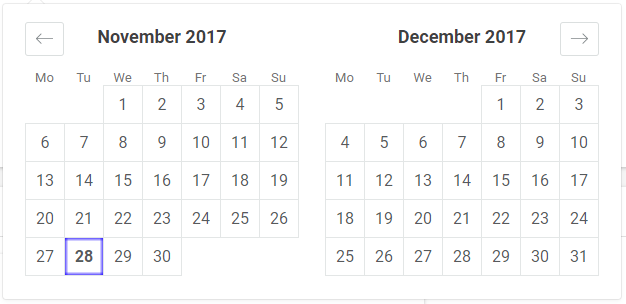
How can I do the same thing using a recent version?
I have searched and looked at the v13+ changes, but the answer does not seem obvious. Thanks!
 uvtzxpm
All 6 comments
Hmmm, it looks like this feature got removed by accident. Will add back!
 majapw
on 28 Nov 2017
majapw
on 28 Nov 2017
This may have happened during the conversion to using withStyles. Previously there was this:
const className = cx('CalendarDay', {
    'CalendarDay--outside': isOutsideDay,
}, Array.from(modifiers, mod => `CalendarDay--${mod}`));
And within modifiers is "today", so it would have set the class CalendarDay--today.
 erin-doyle
on 28 Nov 2017
erin-doyle
on 28 Nov 2017
Put up a PR for a quick fix! :)
majapw
on 28 Nov 2017
@majapw Thanks for the fast fix. It works for me (class changed to .CalendarDay__today).
Do you think there will be a release containing this sometime this week?
uvtzxpm
on 28 Nov 2017
Yup! Working on a release right now :)
majapw
on 28 Nov 2017
👍1
v15.2.0 is out! :D
majapw
on 28 Nov 2017
🎉2
👍1
Was this page helpful?
0 / 5 - 0 ratings
Related issues
 Jesus-Gonzalez
·
3Comments
Jesus-Gonzalez
·
3Comments
 thomasdtucker
·
3Comments
thomasdtucker
·
3Comments
 aishwarya-bote
·
3Comments
aishwarya-bote
·
3Comments
 HartiganHM
·
3Comments
HartiganHM
·
3Comments
 cemremengu
·
3Comments
cemremengu
·
3Comments
Most helpful comment
v15.2.0 is out! :D