React-dates: Allow Year/month navigation
This allows for a quick way to jump to another year or month without having to use the nav keys and go one month at a time.
Here is an example. Clicking on the year or month displays another dialog showing the years/months.
 rodryquintero
All 70 comments
While I love the idea of direct yearly navigation, having one modally thing pop up over another seems horrifying to me.
 ljharb
on 19 Aug 2016
ljharb
on 19 Aug 2016
How about a dropdown.
rodryquintero
on 19 Aug 2016
+1 for year navigation. Birthday input is a case.
 supnate
on 23 Aug 2016
supnate
on 23 Aug 2016
year/month navigation seems to me very important. I wouldn't have additional popup, I would replace the existing popup content with years/months.
 themre
on 24 Aug 2016
themre
on 24 Aug 2016
I think that this is a very important feature also but the UX of this should not be a new pop up but rather open inside the same widget.
Something like this:
http://eonasdan.github.io/bootstrap-datetimepicker/
This makes it easy to use and navigate between months / years.
 madisvain
on 25 Aug 2016
madisvain
on 25 Aug 2016
I had one doubt if we go by @madisvain suggestion which seems doable, we would need to create another component monthPicker which would render the month and year view right? @ljharb
 agupta93
on 13 Sep 2016
agupta93
on 13 Sep 2016
Seems like it. Btw, sorry for not working on my PR. Have not found the time to do it.
rodryquintero
on 13 Sep 2016
@rodryquintero but we still need to finalize what kind of behaviour is desired right?
agupta93
on 13 Sep 2016
I vote for the menu option. Easier to implement and more practical.
rodryquintero
on 14 Sep 2016
@rodryquintero the example suggested by @madisvain seems doable and practical to me lets see what @ljharb and @majapw have to say about this
agupta93
on 14 Sep 2016
hi... is there already in implementation?
 infacq
on 12 Jan 2017
infacq
on 12 Jan 2017
+1 here. As @supnate says- it's a blocking issue for DoB use case.
 englishtom
on 8 Feb 2017
englishtom
on 8 Feb 2017
Please do not post "+1" comments - everywhere on Github, these add noise and do not add value. Please indicate your support with emojis on the original post.
I will delete all such comments now, and any further in the future. Thanks!
ljharb
on 11 Mar 2017
I think sometimes it's better to stick with html5 date component... just for this purpose
infacq
on 12 Mar 2017
Sadly the HTML5 date component does not style consistently across browsers and the experience is subpar.
ljharb
on 12 Mar 2017
I could maybe make a PR for this. What would be the desired UI/UX for it? maybe some example from other datepickers?
 jtomaszewski
on 23 Apr 2017
jtomaszewski
on 23 Apr 2017
@jtomaszewski I think that before a PR, that's the exact question we'd need to figure out.
ljharb
on 23 Apr 2017
@jtomaszewski @ljharb As a starting point, here's the Pikaday datepicker:

and after clicking on April:

Very simple year/month navigation. I think this approach would work well with react-dates. This way, we wouldn't need to alter the existing UI much. We'd just add a little space between month and year and insert the down arrows. Any thoughts or alternative UI/UX suggestions?
 nmchaves
on 25 Apr 2017
nmchaves
on 25 Apr 2017
My only concern there is having to style <select> - a dropdown should look like a dropdown at all times, not just be a "down arrow" tacked on.
ljharb
on 25 Apr 2017
Something like this would be nice.
I would assume the left/right arrows would move through each section.

 secretyouth
on 8 Jun 2017
secretyouth
on 8 Jun 2017
I needed to add this feature to use this on a project I'm working on, but for now have only had time to implement it with a basic <select> box. Would you accept a pull req with that functionality? It currently looks like this:

 jvanderz22
on 9 Jun 2017
jvanderz22
on 9 Jun 2017
I wasn't happy with how this was progressing. So I made my own react date picker with month & year functionality. No range selection yet though.
secretyouth
on 17 Jun 2017
Is there any progress on the change per year functionality? I desperately want to add it to my superset fork!
 fufjvnvnf
on 27 Jun 2017
fufjvnvnf
on 27 Jun 2017
Hi @ljharb @majapw , is there any in-progress PR regarding Year Navigation?
 sag1v
on 22 Jul 2017
sag1v
on 22 Jul 2017
Hi @sag1v, we don't really want to support something that we haven't explored from a design/UX side. So I've been partnering with a designer at Airbnb to get some insight and hope to have something built in the near future.
 majapw
on 23 Jul 2017
majapw
on 23 Jul 2017
@majapw Thanks for the feedback.
I just want to point out that from a user perspective, the best experience I had for year/month selection was with https://uxsolutions.github.io/bootstrap-datepicker/, which does not implement it as drop-downs. One more option to consider :smile:
 jbblanchet
on 28 Jul 2017
jbblanchet
on 28 Jul 2017
+1 for @jbblanchet 's recommendation, that is the best experience for being able to pick years and months.
For picking a date of birth this is incredibly useful and was surprised that react-dates did not offer something similar
 dominiquejb
on 15 Aug 2017
dominiquejb
on 15 Aug 2017
I have created an implementation of year picker as followed:

Anyone interested? I can create a PR for this
 BenSwennen
on 16 Aug 2017
BenSwennen
on 16 Aug 2017
@BenSwennen This is awesome! A small suggestion might be that users might be more comfortable if you put buttons with the same step direction on the same side.
fufjvnvnf
on 16 Aug 2017
Hi,
Is there any way to hide arrow buttons on DateRangePicker?
I'm enabling only last 30 days on Calendar so I dont need the navigation buttons.
Thanks
 mrmuhammadali
on 14 Sep 2017
mrmuhammadali
on 14 Sep 2017
Hi @mrmuhammadali, your question isn't really related to this issue. I think it would be more helpful if you opened a new issue for this or scoured the current issues to find one that is related to your question.
majapw
on 18 Sep 2017
Hello @majapw, anything new on this ?
If you have some insight from your UX/Design team, we can propose a Pull Request with the functionality, this is a blocker for us for a birth-date input case.
My 2 cent: the best is a select or a simple field, as arrows like @BenSwennen proposed are pretty, but on a usability point of view, for someone born in 1960, it will require 57 clicks.
 onigoetz
on 29 Sep 2017
onigoetz
on 29 Sep 2017
@BenSwennen I really like your solution. I am also looking for an alternative to change years fast.
Please make a pull request for this.
 hanselsen
on 12 Oct 2017
hanselsen
on 12 Oct 2017
@hanselsen I created one, but unfortunately it didn't seem to get a lot of traction, so I removed it and kept it specific to our needs. I also struggled to find the time to get the tests to succeed and to get it to work properly. You can always help me if you want! https://github.com/airbnb/react-dates/pull/672
BenSwennen
on 16 Oct 2017
@BenSwennen I switched to react-datepicker and styled it, because it has more options and styling is not limited.
hanselsen
on 18 Oct 2017
@BenSwennen I'm also very interested in what you implemented. Any chance we could get you to re-send your PR? :)
 sontek
on 4 Nov 2017
sontek
on 4 Nov 2017
@secretyouth Your suggestion looks really nice, but I'd be happy with a PR from @jvanderz22 since he has already implemented it.
@majapw You have any luck with the designer you were partnering with?
sontek
on 4 Nov 2017
@majapw @ljharb The use case for this is birthdays, anniversaries, etc. It is extremely painful to use react-dates for historical dates. I just need a quick way for people to switch years, I don't mind having them tab through 12 months. Just no 45 years and then 12 months :P
sontek
on 4 Nov 2017
I have some designs, but realistically, since this is not a priority for us, I wouldn't be able to work on this until winter break (late December). If someone wants to tackle an initial prototype with the new react-with-styles framework that handles transition/animations between year navigation and works with keyboard navigation, I'd be happy to work on top of that.
Here are some of the ideas my designer was floating around:

majapw
on 9 Nov 2017
We could call it a MonthYearPicker or something and it could build on top of the DayPicker, but separate the logic out of year navigation.
majapw
on 9 Nov 2017
Without this feature this library isn't usable for me. :/
 trickreich
on 21 Nov 2017
trickreich
on 21 Nov 2017
Such a pity that a highly requested feature like this takes more than a year to be discussed.
 tkharuk
on 29 Nov 2017
tkharuk
on 29 Nov 2017
Weird, it’s almost as if the thing that determines maintainer’s personal availability isn’t “people want a feature”
ljharb
on 29 Nov 2017
@ljharb Maybe you have been burned by open source in the past and that is how you justified such a rude response, but hopefully I can clarify the frustration people are having and move this conversation back to something much more productive than sarcasm.
Everyone is very thankful for the work airbnb has done on this project so far and a lot of us have built our applications to depend on it. The feature we are requesting is the ability to use this picker in a historical context (birth dates, past events, etc) which is currently impossible to do.
No one has asked the maintainer's to spend your own personal availability to implement this feature. There have been multiple PRs and examples of how this could be implemented. What we were told by @majapw is nothing would be accepted until the Airbnb graphic designers took a look at it. To us (as outsiders) this meant that we should wait for airbnb to do work since the PRs submitted so far haven't received acceptance and we were told that this would continue to be the case.
All we need from the maintainer's of the this project is direction on what you are willing to accept so that one of us can send the PR. We've offered many options and just need you to OK one or implement it the way you want if that is how you want to do it.
Ignoring the feature because its not relevant to airbnb isn't really a great way to run an open source project who has MANY people willing to contribute.
sontek
on 29 Nov 2017
@sontek Thanks for this words! And in my opinion you are totally right 👍
trickreich
on 29 Nov 2017
@sontek i was responding to https://github.com/airbnb/react-dates/issues/25#issuecomment-347831965, which was an exceedingly rude comment, and i think the sarcasm (towards that person only) was quite deserved.
The reasons for delaying on this feature have been made clear; it’s not that Airbnb has to do the work, it’s that the design has to be approved by our designers first - we have an obligation to provide the best UX, not just a working one. We’re not “ignoring the feature”, but neither is anyone entitled to get a feature added on a freely given project.
If you want to send a PR, https://github.com/airbnb/react-dates/issues/25#issuecomment-343056092 asks for exactly that:
If someone wants to tackle an initial prototype with the new react-with-styles framework that handles transition/animations between year navigation and works with keyboard navigation, I'd be happy to work on top of that.
Thanks for contributing!
ljharb
on 29 Nov 2017
Maybe there is a stop gap approach that could be documented as well. There is the renderCalendarInfo, could there be a way to use that to add our own dropdowns that change the current visible year/month until this can be implemented appropriately??
sontek
on 29 Nov 2017
@ljharb I believe You are overthinking my comment. I said it is a pity that it takes years for a discussion, and that's it. I apologize if someone finds it rude or sarcastic, didn't mean to.
tkharuk
on 1 Dec 2017
what's the status of this issue?
 timgivois
on 4 Dec 2017
timgivois
on 4 Dec 2017
@timgivois Are you asking us to summarize all the conversation above? Or do you have a specific question?
sontek
on 4 Dec 2017
@sontek #25 comment asks for help to start an initial prototype. I want to know if someone is working on that, or we need to add a Pull Request needed label.
timgivois
on 4 Dec 2017
This feature is definitely needed. This date picker component will be perfect when we're getting this feature! 👍
 jonathanhotono
on 16 Jan 2018
jonathanhotono
on 16 Jan 2018
Anyone find a good alternative that has this feature?
sontek
on 1 Feb 2018
I actually just built it out using react-dates with one major caveat being it flashes (closes then opens) every time you change the Month / Year as you cannot change the calendar date by more than 1 month at a time.
Changing initialVisibleMonth or a way to change multiple months / years at a time is the only blocking bit that needs built out, in my opinion; see #376. Hacking lifecycles to get around the change 1 month at a time limitation is about 50% of my code on my datepicker component.
What I do:
- Render two selects for Month and Year via the
renderMonthfunction. - Have a
getValidCalendar[Months|Years]which look at myminDate/maxDateand some other things to see if February 2020 is a valid month to be shown in the dropdowns. - onChange select => local
state.calendarDateas well as a bunch of other stuff to unfocus then re-focus on the next render (super ugly hack, via component lifecycles). - Some additional logic to make it so when you change to the
endDateit changes the selects as well as the calendar view.
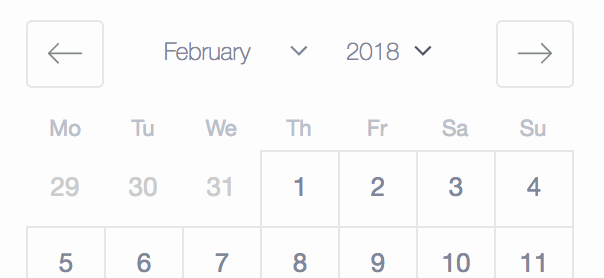
Happy to help, but gave resolving #376 a shot and couldn't / didn't have the bandwidth.
 kylorhall
on 1 Feb 2018
kylorhall
on 1 Feb 2018
Is there a new implementation for the DayPicker to use it for Birth Dates?
 xloeza
on 27 Mar 2018
xloeza
on 27 Mar 2018
@xloeza while waiting on official implementation I recommend blueprintjs datetime http://blueprintjs.com/docs/v1/#datetime/daterangeinput
http://blueprintjs.com/docs/v2/#datetime/daterangeinput
 deanbot
on 27 Mar 2018
deanbot
on 27 Mar 2018
I just PR'd a solution based on what @jvanderz22 did last year, minus the UI: https://github.com/airbnb/react-dates/pull/1106
My hope is that this can be something we can use sooner than later while some "official" design get mulled over.
My proposal is to simply add a renderCaption prop that allows callers to build their own UI in the heading. It provides the current month and callbacks to set the month and year. The caller has to do the rest.
From there, any of the UIs above could potentially be built. Here's an a simple implementation of one based on standard HTML select drop-downs (code example of this in my PR):

or, something more custom:

I believe this would unblock a bunch of folks, so hopefully this is considered for a future release.
Thanks to the maintainers for all the hard work and the community for the dialog!
 GoGoCarl
on 7 Apr 2018
GoGoCarl
on 7 Apr 2018
Is there a timeline for a solution for those blocked by this issue?
 AlexJeffcott
on 19 Apr 2018
AlexJeffcott
on 19 Apr 2018
While the nice folks at Airbnb take a look at this, I created an npm/yarn package that may help you if you're stuck waiting for this functionality. This is a temporary solution and it's not fully optimized, so please keep that in mind: https://www.npmjs.com/package/react-dates-custom-month-year-navigation.
 kevinnio
on 23 May 2018
kevinnio
on 23 May 2018
Closed by #1106.
ljharb
on 20 Jun 2018
hi guys, i just want to select the year, or select months past a selectbox only five. or month. thanks to everyone
 FPTSonPM3
on 23 Nov 2018
FPTSonPM3
on 23 Nov 2018
Hi guys, i think I managed to do it somehow, this is how i solved it:
I used the renderMonthElement property as its a function and which allows to return everything, I returned a list of years and months.
Datepicker Code:
<SingleDatePicker
                        date={this.props.date}
                        onDateChange={this.props.onSelect}
                    renderMonthElement={this.renderMonthElement}
                    />
Functions:
returnYears = () => {
        let years = []
        for(let i = moment().year() - 100; i <= moment().year(); i++) {
            years.push(<option value={i}>{i}</option>);
        }
        return years;
    }
renderMonthElement = ({ month, onMonthSelect, onYearSelect }) =>
    <div style={{ display: 'flex', justifyContent: 'center' }}>
        <div>
            <select
                value={month.month()}
                onChange={(e) => onMonthSelect(month, e.target.value)}
            >
                {moment.months().map((label, value) => (
                    <option value={value}>{label}</option>
                ))}
            </select>
        </div>
        <div>
            <select value={month.year()} onChange={(e) => onYearSelect(month, e.target.value)}>
                {this.returnYears()}
            </select>
        </div>
    </div>
Image:

:
 yjviB
on 6 Dec 2018
yjviB
on 6 Dec 2018
yjvesabalaj thanks for the great solution. I had problems when selecting a new month as it wasn't updating the calendar month. To correct this is simple had to parseInt the e.target.value getting passed into onMonthSelect.
<select
                    value={month.month()}
                    onChange={(e) => {
                        onMonthSelect(month, parseInt(e.target.value))} }
                >
                    {moment.months().map((label, i) => (
                        <option value={i} key={i}>{label}</option>
                    ))}
                </select>
 Cuse89
on 31 Dec 2018
Cuse89
on 31 Dec 2018
returnYears = () => { let years = [] for(let i = moment().year() - 100; i <= moment().year(); i++) { years.push(
Rockstar solution :) 🥇 @yjvesabalaj
 gauravbrills
on 24 Jan 2019
gauravbrills
on 24 Jan 2019
Hi ,
Is there any function to navigate month pragmatically?
 kunalkagalkar
on 23 May 2019
kunalkagalkar
on 23 May 2019
Link is down
 Kyngo
on 15 Jul 2019
Kyngo
on 15 Jul 2019
@secretyouth Seriously, thank you!
 karthigb
on 22 Aug 2019
karthigb
on 22 Aug 2019
In case someone is struggling w/ disabling navigations to months that are outside range
I worked on top of @yjvesabalaj solution -
const months = moment.months();

const years = range(2000, 2050);

const returnYears = (yearOptions) => {
  return yearOptions.map((y, index) => <option key={`${y}_${index}`} value={y}>{y}</option>);
};

const renderMonthElement = ({ month, onMonthSelect, onYearSelect }, monthOptions, yearOptions) =>  {
  return (
    <div className={cx("month-picker")}>
      <div>
        <select
          className={cx("styled")}
          value={monthOptions.indexOf(months[month.month()])}
          onChange={(e) => {
            const selected = monthOptions[e.target.value];
            onMonthSelect(month, months.indexOf(selected));
          }}>
          {monthOptions.map((label, index) => (
              <option key={`${label}_${index}`} value={index}>{label}</option>
          ))}
        </select>
      </div>
      <div>
        <select
          className={cx("styled")}
          value={month.year()}
          onChange={(e) => onYearSelect(month, e.target.value)}>
          {returnYears(yearOptions)}
        </select>
      </div>
    </div>
  );
};

/* eslint-disable no-bitwise */
const withInRange = memoize((minDate, maxDate, isOutsideRange, date) => {
  let isInRange = true;
  if (minDate && moment.isMoment(minDate)) {
    isInRange &= (date.diff(minDate, "days", true) > 0);
  }

  if (maxDate && moment.isMoment(maxDate)) {
    isInRange &= (date.diff(maxDate, "days", true) < 0);
  }

  if (isOutsideRange && typeof isOutsideRange === "function") {
    isInRange &= (!isOutsideRange(date));
  }

  return isInRange;
});

const monthElementWrapper = (
  {minDate, maxDate, isOutsideRange},
  {month, onMonthSelect, onYearSelect, isVisible}) => {

  if (moment.isMoment(month) && isVisible) {
    const monthSelected = month.month();
    const yearOptions = years.filter((y) =>  {
      const iterator =  moment(`${y} ${monthSelected + 1}`, `YYYY MM`);
      const startOfIterator = iterator.clone().startOf("month");
      const endOfIterator = iterator.clone().endOf("month");
      return (withInRange(minDate, maxDate, isOutsideRange, startOfIterator) ||
              withInRange(minDate, maxDate, isOutsideRange, endOfIterator));
    });
    const selectedYear = month.year();

    const monthOptions = months.filter((m) => {
      const iterator = moment(`${selectedYear}  ${m}`, `YYYY MMMM`);
      const startOfIterator = iterator.clone().startOf("month");
      const endOfIterator = iterator.clone().endOf("month");
      return (withInRange(minDate, maxDate, isOutsideRange, startOfIterator)
              || withInRange(minDate, maxDate, isOutsideRange, endOfIterator));
    });
    const indexOfMonth = monthOptions.indexOf(months[month.month()]);
    const indexOfYear = yearOptions.indexOf(month.year());
    const hasNextMonth = indexOfMonth >= 0 && indexOfMonth < monthOptions.length - 1;
    const hasPrevMonth = indexOfMonth > 0 && indexOfMonth < monthOptions.length;
    const hasNextYear = indexOfYear >= 0 && indexOfYear < yearOptions.length - 1;
    const hasPrevYear = indexOfYear > 0 && indexOfYear < yearOptions.length;
    const passProps = { month, onMonthSelect, onYearSelect };
    return {
      renderEl: renderMonthElement(passProps, monthOptions, yearOptions),
      hasPrev: hasPrevMonth || hasPrevYear,
      hasNext: hasNextMonth || hasNextYear
    };
  }

  return null;
};
And then in my wrapper component over react-dates, based on value received in hasNext, I am passing navNext as () => null or null. Similarly for hasPrev.
PS - This solution is just a very rough idea and can be optimised in terms of calculations that are happening.
 dulhaniAshish
on 22 Mar 2020
dulhaniAshish
on 22 Mar 2020
@yjviB Thanks !!
 maxgfr
on 5 Oct 2020
maxgfr
on 5 Oct 2020
In case someone is struggling w/ disabling navigations to months that are outside range
I worked on top of @yjvesabalaj solution -const months = moment.months(); const years = range(2000, 2050); const returnYears = (yearOptions) => { return yearOptions.map((y, index) => <option key={`${y}_${index}`} value={y}>{y}</option>); }; const renderMonthElement = ({ month, onMonthSelect, onYearSelect }, monthOptions, yearOptions) => { return ( <div className={cx("month-picker")}> <div> <select className={cx("styled")} value={monthOptions.indexOf(months[month.month()])} onChange={(e) => { const selected = monthOptions[e.target.value]; onMonthSelect(month, months.indexOf(selected)); }}> {monthOptions.map((label, index) => ( <option key={`${label}_${index}`} value={index}>{label}</option> ))} </select> </div> <div> <select className={cx("styled")} value={month.year()} onChange={(e) => onYearSelect(month, e.target.value)}> {returnYears(yearOptions)} </select> </div> </div> ); }; /* eslint-disable no-bitwise */ const withInRange = memoize((minDate, maxDate, isOutsideRange, date) => { let isInRange = true; if (minDate && moment.isMoment(minDate)) { isInRange &= (date.diff(minDate, "days", true) > 0); } if (maxDate && moment.isMoment(maxDate)) { isInRange &= (date.diff(maxDate, "days", true) < 0); } if (isOutsideRange && typeof isOutsideRange === "function") { isInRange &= (!isOutsideRange(date)); } return isInRange; }); const monthElementWrapper = ( {minDate, maxDate, isOutsideRange}, {month, onMonthSelect, onYearSelect, isVisible}) => { if (moment.isMoment(month) && isVisible) { const monthSelected = month.month(); const yearOptions = years.filter((y) => { const iterator = moment(`${y} ${monthSelected + 1}`, `YYYY MM`); const startOfIterator = iterator.clone().startOf("month"); const endOfIterator = iterator.clone().endOf("month"); return (withInRange(minDate, maxDate, isOutsideRange, startOfIterator) || withInRange(minDate, maxDate, isOutsideRange, endOfIterator)); }); const selectedYear = month.year(); const monthOptions = months.filter((m) => { const iterator = moment(`${selectedYear} ${m}`, `YYYY MMMM`); const startOfIterator = iterator.clone().startOf("month"); const endOfIterator = iterator.clone().endOf("month"); return (withInRange(minDate, maxDate, isOutsideRange, startOfIterator) || withInRange(minDate, maxDate, isOutsideRange, endOfIterator)); }); const indexOfMonth = monthOptions.indexOf(months[month.month()]); const indexOfYear = yearOptions.indexOf(month.year()); const hasNextMonth = indexOfMonth >= 0 && indexOfMonth < monthOptions.length - 1; const hasPrevMonth = indexOfMonth > 0 && indexOfMonth < monthOptions.length; const hasNextYear = indexOfYear >= 0 && indexOfYear < yearOptions.length - 1; const hasPrevYear = indexOfYear > 0 && indexOfYear < yearOptions.length; const passProps = { month, onMonthSelect, onYearSelect }; return { renderEl: renderMonthElement(passProps, monthOptions, yearOptions), hasPrev: hasPrevMonth || hasPrevYear, hasNext: hasNextMonth || hasNextYear }; } return null; };And then in my wrapper component over
react-dates, based on value received inhasNext, I am passingnavNextas() => nullornull. Similarly forhasPrev.PS - This solution is just a very rough idea and can be optimised in terms of calculations that are happening.
Could you create a js-fiddle to see how it works?
 jafaryfarzaneh
on 23 Apr 2021
jafaryfarzaneh
on 23 Apr 2021
Related issues
 yokomizor
·
3Comments
yokomizor
·
3Comments
 AsasinCree
·
3Comments
AsasinCree
·
3Comments
 cemremengu
·
3Comments
cemremengu
·
3Comments
 augnustin
·
3Comments
augnustin
·
3Comments
 prztrz
·
3Comments
prztrz
·
3Comments
Most helpful comment
+1 for year navigation. Birthday input is a case.